
Cellularline KEYPAD CASE
Cellularline KEYPAD CASE User Manual
Integrated Wireless Keyboard Case for iPad up to 11 inches
1. Introduction
The Cellularline KEYPAD CASE is a versatile and protective solution for your iPad, designed for devices up to 11 inches. It features an integrated wireless keyboard with an Italian QWERTY layout, a secure magnetic attachment system, and a foldable structure that transforms into a stand. Its intelligent Sleep Mode optimizes energy consumption, and the integrated battery offers up to one year of autonomy.
2. Package Contents
Ensure all items are present in the package:
- 1x Cellularline KEYPAD CASE (iPad Keyboard Cover)
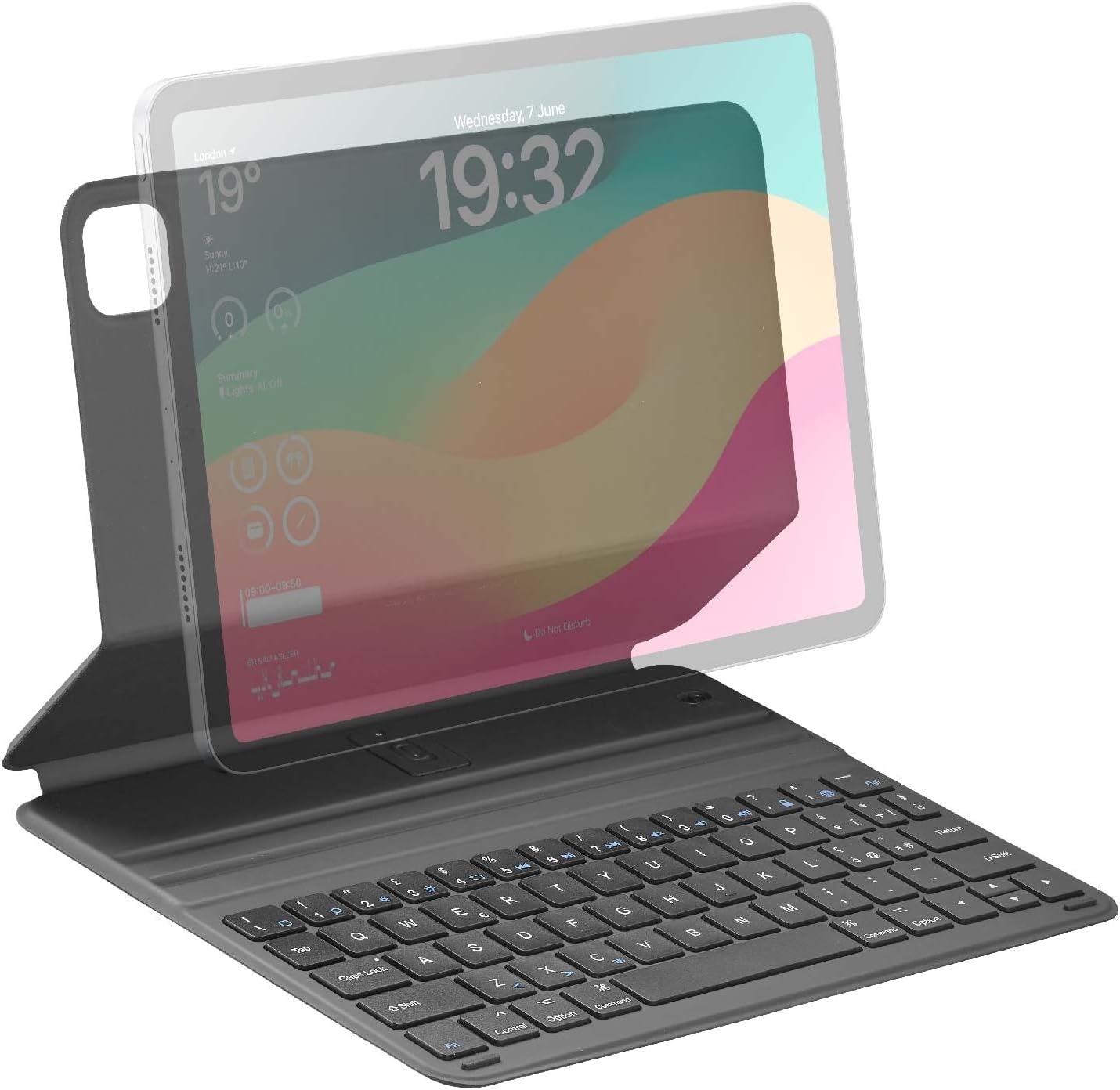
Image: The Cellularline KEYPAD CASE shown with an iPad, illustrating its design and how the iPad fits into the case with the keyboard.
3. Setup and Connection
3.1 Attaching Your iPad
The KEYPAD CASE features a magnetic attachment system for secure and stable placement of your iPad. Simply align your iPad with the magnetic area of the case until it snaps into place.

Image: Close-up view demonstrating the ultra-stable magnetic attachment mechanism of the case to the iPad.
3.2 Pairing the Wireless Keyboard
- Ensure your iPad's Bluetooth is turned on.
- Locate the power switch on the keyboard and turn it ON.
- Press the Bluetooth pairing button on the keyboard (refer to keyboard diagram for exact location, usually a small button or key combination).
- On your iPad, go to Settings > Bluetooth and select "KEYPAD CASE" or similar from the list of available devices.
- Follow any on-screen prompts to complete the pairing process.
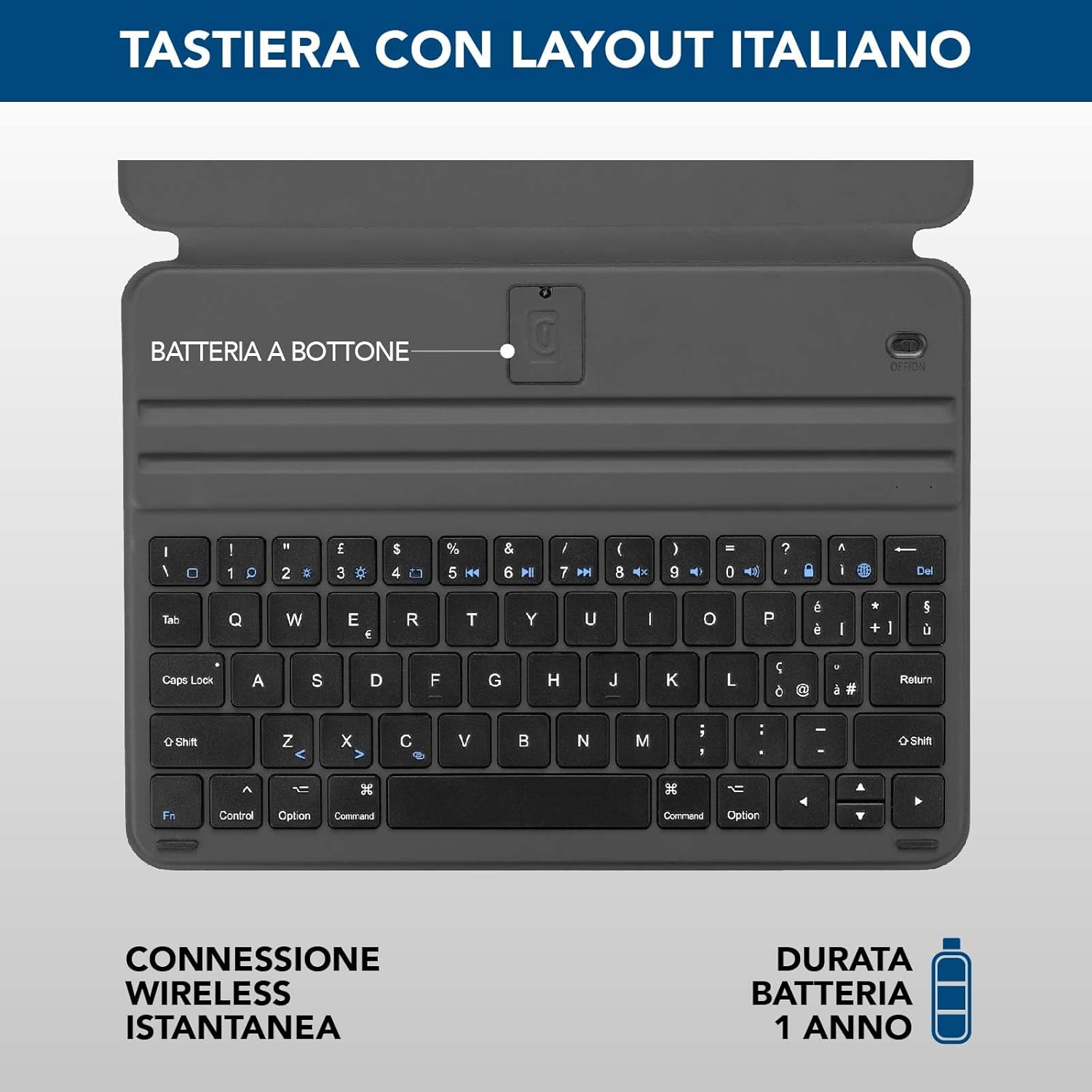
Image: Detailed view of the Italian QWERTY keyboard layout, highlighting the button battery compartment and indicating instant wireless connection and 1-year battery life.
4. Operating Instructions
4.1 Using the Keyboard
Once paired, the keyboard functions like a standard external keyboard. You can use it for typing, navigating, and utilizing keyboard shortcuts on your iPad.
4.2 Stand Functionality
The foldable structure of the Keyboard Case allows it to transform into a stand, offering two adjustable viewing angles. This is ideal for typing, watching videos, or browsing the web.

Image: A collage showing the Keyboard Case being used in various scenarios: drawing, carrying in a bag, and typing at a desk, demonstrating its versatility.
4.3 Sleep Mode
The intelligent Sleep Mode automatically deactivates the keyboard during periods of inactivity to conserve energy. It reactivates instantly upon detecting input, ensuring a seamless user experience.

Image: The Keyboard Case with an iPad displaying the lock screen, illustrating the Sleep Mode feature for energy saving with a battery icon and circular arrows.
5. Features
- Compatibility: Compatible with iPad models up to 11 inches, including iPad Air 4th/5th gen, iPad Pro 11" (1st-4th gen), and iPad Air 11" M2 2024.
- Integrated Wireless Keyboard: Provides a fluid and intuitive typing experience with an Italian QWERTY layout.
- Versatile Foldable Structure: Transforms the case into a stand for writing, video viewing, and navigation, with two adjustable angles.
- Smart Sleep Mode: Automatically deactivates the keyboard during inactivity to save power and reactivates instantly.
- Long-lasting Battery: Integrated battery offers up to one year of autonomy. Battery level can be monitored via the device widget.
- Magnetic Attachment: Ensures a stable and secure fit for your iPad without compromising its design.
- Slim and Lightweight Design: Maintains the sleek profile of your iPad.

Image: A compatibility chart showing various iPad models supported by the Keyboard Case, including iPad Air 11" M2 2024, iPad Air (5th gen), iPad Air (4th gen), and iPad Pro 11" (1st, 2nd, 3rd, 4th gen).

Image: A side profile view of the Keyboard Case, emphasizing its thin and lightweight design with corresponding icons.
6. Maintenance
- Keep the keyboard clean by wiping it with a soft, dry cloth.
- Avoid exposing the device to extreme temperatures or direct sunlight.
- Do not use harsh chemicals or abrasive cleaners.
- If the keyboard battery runs low, replace the button battery as indicated in the keyboard diagram.
7. Troubleshooting
| Problem | Possible Cause | Solution |
|---|---|---|
| Keyboard not typing | Keyboard is off; Not paired; Low battery. | Turn on keyboard; Re-pair Bluetooth; Replace battery. |
| Bluetooth connection unstable | Interference; Distance from iPad; Low battery. | Move closer to iPad; Avoid other wireless devices; Replace battery. |
| Sleep Mode not activating/deactivating | Incorrect iPad placement; Software glitch. | Ensure iPad is correctly seated; Restart iPad and keyboard. |
8. Specifications
- Brand: Cellularline
- Model: KEYPAD CASE
- Color: Black
- Dimensions: 26 x 9 x 1.5 cm
- Weight: 500 grams
- Power Source: Battery powered
- Keyboard Description: Virtual
- Compatible Devices: Apple iPad Air 4th gen, Apple iPad Pro 11", Apple iPad Air 5th gen, Apple iPad Air 11"
9. Warranty and Support
For warranty information and technical support, please refer to the official Cellularline website or contact their customer service directly. Details can typically be found on the product packaging or on the manufacturer's official support pages.
You can visit the Cellularline store on Amazon for more products and information: Cellularline Amazon Store
Related documentsKEYPAD CASE


Ask a question about this manual
Ask about setup, troubleshooting, compatibility, parts, safety, or missing instructions. Manuals+ will review the question and use this page’s manual context to help answer it.