
1. Introduction
This manual provides essential information for the safe and efficient operation of your Haier P7GT Series 4K Ultra HD Smart LED Google TV. Please read these instructions thoroughly before using your television and retain them for future reference.

Image 1.1: Front view of the Haier P7GT Series 4K Ultra HD Smart LED Google TV.
2. What's in the Box
Carefully unpack your television and check that all items are present and in good condition. The package should contain the following components:
- 1 LED TV
- 2 Table Stand Bases
- 1 Remote Control
- 1 AV IN Adapter
- 1 AC Cord
- 2 AAA Batteries

Image 2.1: Diagram showing the components included in the TV package.
3. Setup
3.1 Attaching the Stand or Wall Mounting
Before connecting any cables, decide whether you will use the included table stand bases or a wall mount (sold separately). Ensure the TV is placed on a stable, level surface if using the stand. For wall mounting, follow the instructions provided with your wall mount kit.
3.2 Connecting External Devices
Your Haier TV offers various connectivity options for external devices. Refer to the back panel diagram for port locations.

Image 3.1: Rear view of the television with labeled input/output ports.
- HDMI Ports: Connect set-top boxes, gaming consoles, laptops, or other HDMI-enabled devices. This model features 4 HDMI ports (HDMI 2.1 compliant for ALLM, VRR, 4K@60Hz).
- USB Ports: Connect hard drives or other USB devices for media playback. This model includes 2 USB ports.
- Ethernet (LAN): Connect to your wired network for internet access.
- Optical Audio Out: For connecting to external audio systems.
- AV IN: Use the provided AV IN adapter for older devices with composite video and stereo audio outputs.
3.3 Power Connection
Connect the AC power cord to the TV's power input and then to a suitable wall outlet. The TV will enter standby mode.
4. Operating Instructions
4.1 Initial Setup
Upon first power-on, the TV will guide you through the initial setup process, including language selection, network connection, and Google account sign-in. Follow the on-screen prompts.
4.2 Using the Remote Control
The remote control allows you to navigate menus, adjust settings, and access smart features. Insert the two AAA batteries into the remote control, ensuring correct polarity.

Image 4.1: The remote control features dedicated quick launch buttons for popular streaming services and Google Assistant.
- Power Button: Turns the TV on or off.
- Navigation Pad (OK button): Used to move through menus and confirm selections.
- Back Button: Returns to the previous screen.
- Home Button: Accesses the Google TV home screen.
- Volume Up/Down: Adjusts the audio volume.
- Channel Up/Down: Changes TV channels.
- Quick Launch Buttons: Direct access to Netflix, Prime Video, YouTube, and Google Assistant.
- Google Assistant Button: Activates voice control for hands-free operation.
5. Display Features
Your Haier P7GT Series TV is equipped with advanced display technologies for an enhanced viewing experience.
- 4K Ultra HD Resolution: Experience stunning clarity and detail with 3840 x 2160 pixels, offering four times the resolution of Full HD.

Image 5.1: Visual representation of 4K resolution compared to lower resolutions.
- Dolby Vision: Optimizes visuals scene-by-scene for a cinematic experience with incredible brightness, contrast, and color.
- HDR 10: Delivers stunning sharpness and dynamic contrast, enhancing the detail in both bright and dark areas of the picture.

Image 5.2: Illustrations of Dolby Vision and HDR10 enhancing picture quality.
- Motion Estimation Motion Control (MEMC): Reduces motion blur in fast-moving scenes by inserting extra frames, ensuring smoother and clearer visuals.

Image 5.3: MEMC technology reduces motion blur for clearer fast-action scenes.
- Low Blue Light: Designed to reduce eye strain during prolonged viewing.
- 60 Hz Refresh Rate: Provides smooth motion for most content.
6. Audio Features
Enjoy immersive sound with the following audio capabilities:
- 20 Watts Output: Powerful audio delivery from the integrated speakers.
- 2.0ch Powerful Stereo Speaker with Subwoofer: Provides rich and clear sound.
- Dolby Atmos: Delivers immersive, 3D surround sound that brings every moment to life.
- dbx-tv Surround Sound: Enhances audio experiences for dynamic content.

Image 6.1: Visuals illustrating the immersive audio experience provided by Dolby Atmos and dbx-tv.
- Sound Equalizer: Customize audio settings to your preference.
- Auto Volume Leveling: Maintains consistent volume levels across different content.
7. Smart Features
Your Haier TV is powered by Google TV, offering a world of entertainment and smart functionalities.
- Google TV: Organizes movies, shows, and live TV from all your apps and subscriptions into one easy-to-browse interface.

Image 7.1: The Google TV interface displaying a wide selection of available applications.
- Watchlist: Add movies and shows you want to watch to a single list, accessible across your devices.
- Google Assistant: Use voice commands to search for content, control smart home devices, and get answers to questions.
- Hands-Free Voice Control: Control your TV and Google Assistant without needing the remote.
- Chromecast Built-in: Cast content from your smartphone, tablet, or computer directly to your TV screen.
- 2GB RAM + 32GB ROM: Provides ample memory for smooth operation and storage for apps.
- Wi-Fi 5: Ensures stable and fast wireless connectivity.
- Supported Apps: Access popular streaming services like Prime Video, Netflix, Jio Hotstar, Sony Liv, Zee5, Apple TV, and many more.
8. Gaming Features
Enhance your gaming experience with features designed for responsiveness and smooth visuals.
- ALLM (Auto Low Latency Mode): Automatically switches the TV to a low-latency mode when a gaming console is detected, reducing input lag.
- VRR (Variable Refresh Rate): Synchronizes the TV's refresh rate with the game console's frame rate, eliminating screen tearing and stuttering for smoother gameplay.

Image 8.1: The TV in Game Mode, optimized for a responsive gaming experience.
9. Specifications
Below are the detailed technical specifications for the Haier P7GT Series 4K Ultra HD Smart LED Google TV (Model: 43P7GT-P).
| Feature | Specification |
|---|---|
| Brand | Haier |
| Model | 43P7GT-P |
| Model Year | 2024 |
| Screen Size | 43 Inches (108 cm) |
| Display Technology | LED |
| Display Type | VA |
| Resolution | 4K Ultra HD (3840 x 2160) |
| Refresh Rate | 60 Hz |
| Viewing Angle | 178 Degrees |
| Image Aspect Ratio | 16:9 |
| Image Contrast Ratio | 4000:1 |
| Operating System | Android (Google TV) |
| RAM Memory Installed Size | 2 GB |
| Memory Storage Capacity | 32 GB |
| Graphics Coprocessor | G52 |
| Connectivity Technology | Ethernet, HDMI, USB, Wi-Fi, Bluetooth |
| HDMI Ports | 4 (HDMI 2.1 compliant for ALLM, VRR, 4K@60Hz) |
| USB Ports | 2 |
| Audio Output Mode | Stereo Surround |
| Speakers Maximum Output Power | 20 Watts |
| Speaker Surround Sound Channel Configuration | Dolby Atmos |
| Power Source | AC |
| Voltage | 240 Volts |
| Product Dimensions (LxWxH) | 95.8 x 21.5 x 61 cm |
| Item Weight | 6 kg |
| Mounting Type | Wall Mount & Table Mount |
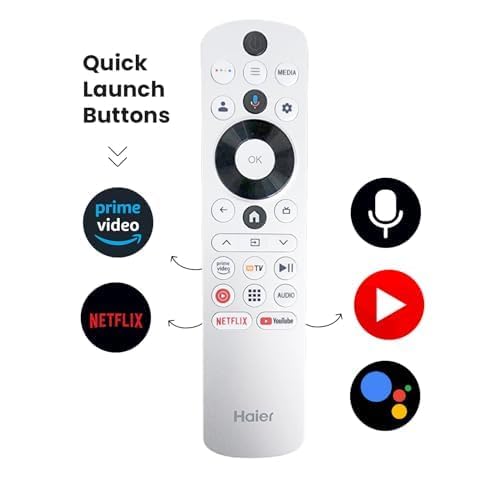
Image 9.1: Physical dimensions and weight of the 43-inch Haier P7GT Series TV.
10. Maintenance
10.1 Cleaning the Screen
To clean the screen, gently wipe it with a soft, lint-free cloth. For stubborn marks, slightly dampen the cloth with water or a specialized screen cleaner. Avoid using harsh chemicals, abrasive materials, or direct spraying of liquids onto the screen.
10.2 Cleaning the Cabinet
Wipe the TV cabinet with a soft, dry cloth. Do not use any liquid cleaners or sprays directly on the cabinet.
10.3 General Care
- Avoid exposing the TV to direct sunlight or extreme temperatures.
- Do not block ventilation openings on the back of the TV.
- Unplug the TV from the power outlet during lightning storms or when it will be unused for extended periods.
11. Troubleshooting
If you encounter issues with your TV, refer to the following common problems and solutions:
| Problem | Possible Solution |
|---|---|
| No power | Check if the power cord is securely plugged into the TV and the wall outlet. Ensure the wall outlet is functioning. |
| No picture, but sound is present | Check the input source. Ensure the connected device is powered on and its cables are properly connected. |
| No sound, but picture is present | Check the volume level and mute settings. Verify audio cable connections if using external speakers. |
| Remote control not working | Replace the batteries. Ensure there are no obstructions between the remote and the TV's IR sensor. |
| Poor picture quality | Check antenna/cable connections. Adjust picture settings (brightness, contrast, sharpness). Ensure the input source is providing a high-quality signal. |
| Cannot connect to Wi-Fi | Ensure your Wi-Fi router is on and within range. Re-enter the Wi-Fi password. Restart the TV and router. |
| Smart features not responding | Check internet connection. Restart the TV. Ensure your Google account is properly signed in. |
For more complex issues, please contact Haier customer support.
12. Warranty and Support
Your Haier P7GT Series TV comes with a 2-year manufacturer warranty from the date of purchase on the television set and a 6-month warranty on the remote control.
- Warranty Card: Brand warranty can be availed using your Amazon invoice as proof of purchase.
- User Manual: This user manual can also be accessed from the official Haier brand website.
- Installation: For installation services, Amazon will coordinate with the brand within 48 hours of delivery. Installation charges may apply in some cases.
For further assistance, visit the official Haier support website or contact their customer service.


