
YITAHOME MAYIHHETok
YITAHOME Modern TV Stand Instruction Manual
Model: MAYIHHETok
Brand: YITAHOME
1. Introduction
Thank you for choosing the YITAHOME Modern TV Stand. This entertainment center is designed to enhance your living space with its sleek black finish, ample storage, and integrated LED lighting. It features two cabinets, adjustable shelves, and open compartments to organize your media devices and accessories. The sturdy engineered wood construction ensures durability and stability for TVs up to 80 inches.

Figure 1: Overall view of the YITAHOME Modern TV Stand in a living room setting, showcasing its design and LED lighting.
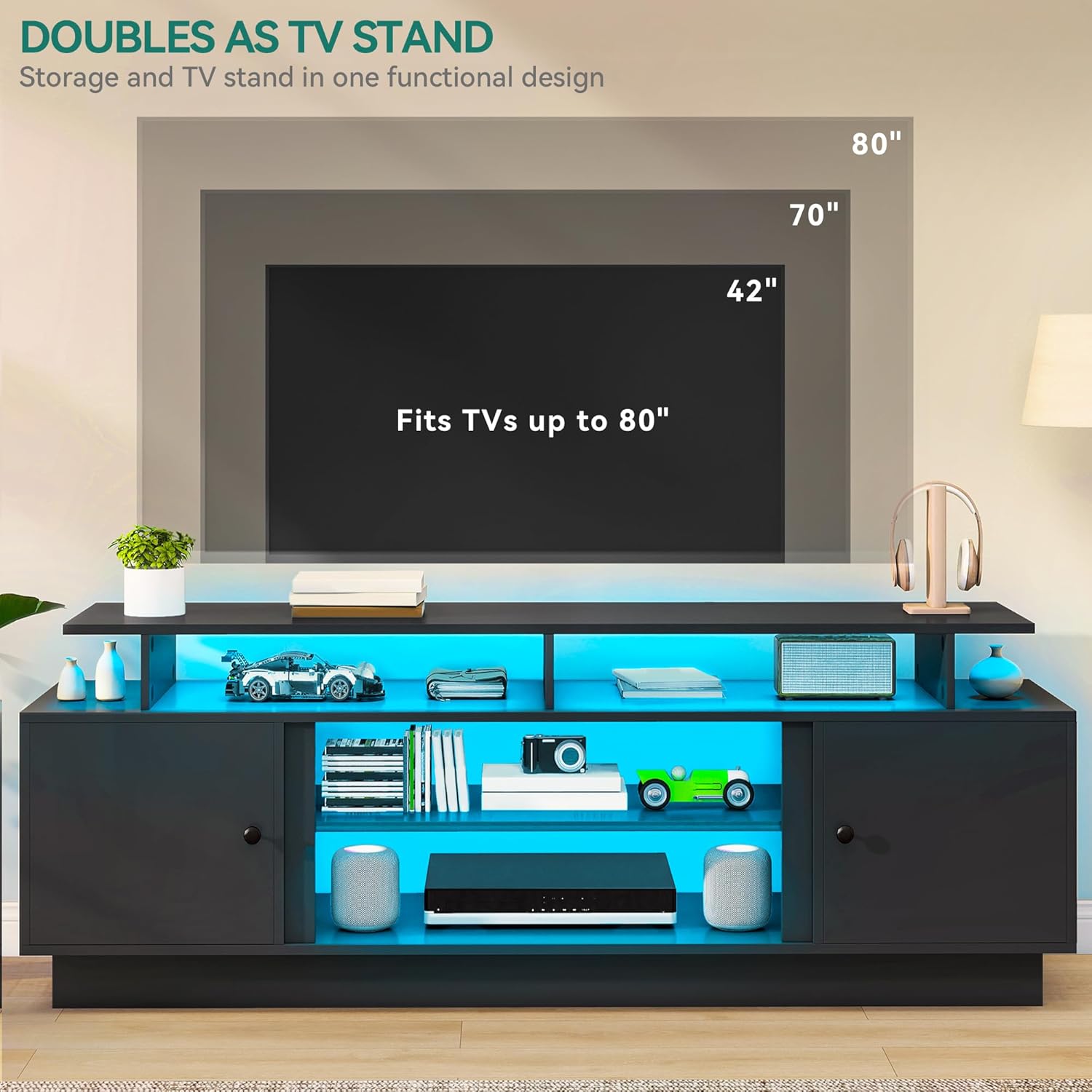
Figure 2: Illustration demonstrating the TV stand's compatibility with various TV sizes, indicating it fits TVs up to 80 inches.
2. Important Safety Information
Please read and understand all instructions before assembly and use. Failure to follow these instructions may result in injury or damage to the product.
- Always secure the TV stand to the wall using appropriate anti-tip hardware (not included) to prevent tip-over, especially in households with children or pets.
- Be cautious of sharp edges during assembly and handling.
- Do not place heavy items on the top shelf that exceed the stand's weight capacity to avoid tipping or structural damage.
- Ensure all screws and fasteners are securely tightened before use. Periodically check and re-tighten as needed.
- Do not allow children to climb on or play with the TV stand.
3. Parts List
Before beginning assembly, ensure all parts are present and undamaged. Refer to the included hardware pack and component diagrams for identification.
- Engineered Wood Panels (Numbered A, B, C, etc.)
- Hardware (Screws, dowels, cam locks, hinges, handles)
- Adjustable Shelf Pins
- LED Light Strips
- LED Remote Control
- Power Adapter for LED Lights
- Magnetic Door Catches
4. Assembly Instructions
This TV stand is designed for quick and effortless assembly. All components are numbered, and detailed instructions are provided in the separate assembly guide included in the packaging. Please follow the steps carefully.
- Unpack and Identify: Carefully unpack all components and lay them out on a clean, soft surface to prevent scratches. Identify each part using the numbered labels.
- Assemble Base Frame: Begin by assembling the main base frame of the TV stand according to the diagrams in the assembly guide. Ensure all connections are secure.
- Install Shelves and Partitions: Insert the fixed and adjustable shelves into their designated slots. The adjustable shelves allow for flexible storage configurations.
- Attach Doors: Secure the cabinet doors using the provided hinges. Ensure they open and close smoothly. The magnetic design provides secure closure.
- Install LED Lights: Adhere the LED light strips to the designated areas. Connect the light strips to the power adapter and controller.
- Final Check: Once assembled, ensure all screws are tightened and the stand is stable. Position the TV stand on a level surface.

Figure 3: Close-up views illustrating the adjustable shelves for flexible storage and the magnetic design for secure door closure.
5. Operating the LED Lights
The integrated LED light strips add a sophisticated and modern ambiance to your living space. They can be controlled via the included remote or a compatible mobile application.
- Power On/Off: Use the power button on the remote or app to turn the lights on or off.
- Color Selection: Choose from 24 different light colors to match your mood or decor.
- Music Mode: Activate music mode for lights to sync with audio.
- Timing Function: Set a timer for the lights to automatically turn off.
- Dynamic Modes: Explore various dynamic lighting effects and patterns.

Figure 4: Image highlighting the LED light features of the TV stand, including remote and app control options, 24 colors, music mode, timing, and dynamic modes.
6. Care and Maintenance
To ensure the longevity and appearance of your YITAHOME TV Stand, follow these simple care guidelines:
- Cleaning: Wipe surfaces with a soft, damp cloth. Avoid using harsh chemicals, abrasive cleaners, or polishes that may damage the finish.
- Spills: Immediately wipe up any spills to prevent staining or damage to the engineered wood.
- Sunlight: Avoid prolonged exposure to direct sunlight to prevent fading or discoloration.
- Heat: Do not place hot items directly on the surface without protective coasters.
- Stability: Periodically check all screws and connections to ensure they remain tight and secure.
7. Troubleshooting
If you encounter any issues with your TV stand, refer to the following common problems and solutions:
- LED Lights Not Working:
- Check if the power adapter is securely plugged into a working outlet and the LED strip controller.
- Ensure the remote control battery is not depleted.
- Verify that the LED strips are properly connected to the controller.
- Stand is Wobbly:
- Ensure all assembly screws are fully tightened.
- Verify that the TV stand is placed on a flat, level surface.
- Re-check the assembly steps to ensure no parts were missed or incorrectly installed.
- Doors Do Not Close Properly:
- Adjust the hinges to align the doors.
- Ensure the magnetic catches are properly installed and aligned with the door.
8. Specifications
| Feature | Detail |
|---|---|
| Brand | YITAHOME |
| Model Number | MAYIHHETok |
| Color | Black |
| Product Dimensions | 15.7"D x 70"W x 25.1"H |
| Material | Engineered Wood |
| Special Feature | Adjustable Shelf, LED Lights |
| Mounting Type | Floor Mount |
| Max TV Size Compatibility | Up to 80 inches |
| Number of Shelves | 1 (adjustable) + fixed shelves |
| Assembly Required | Yes |
| Item Weight | 94.5 pounds |
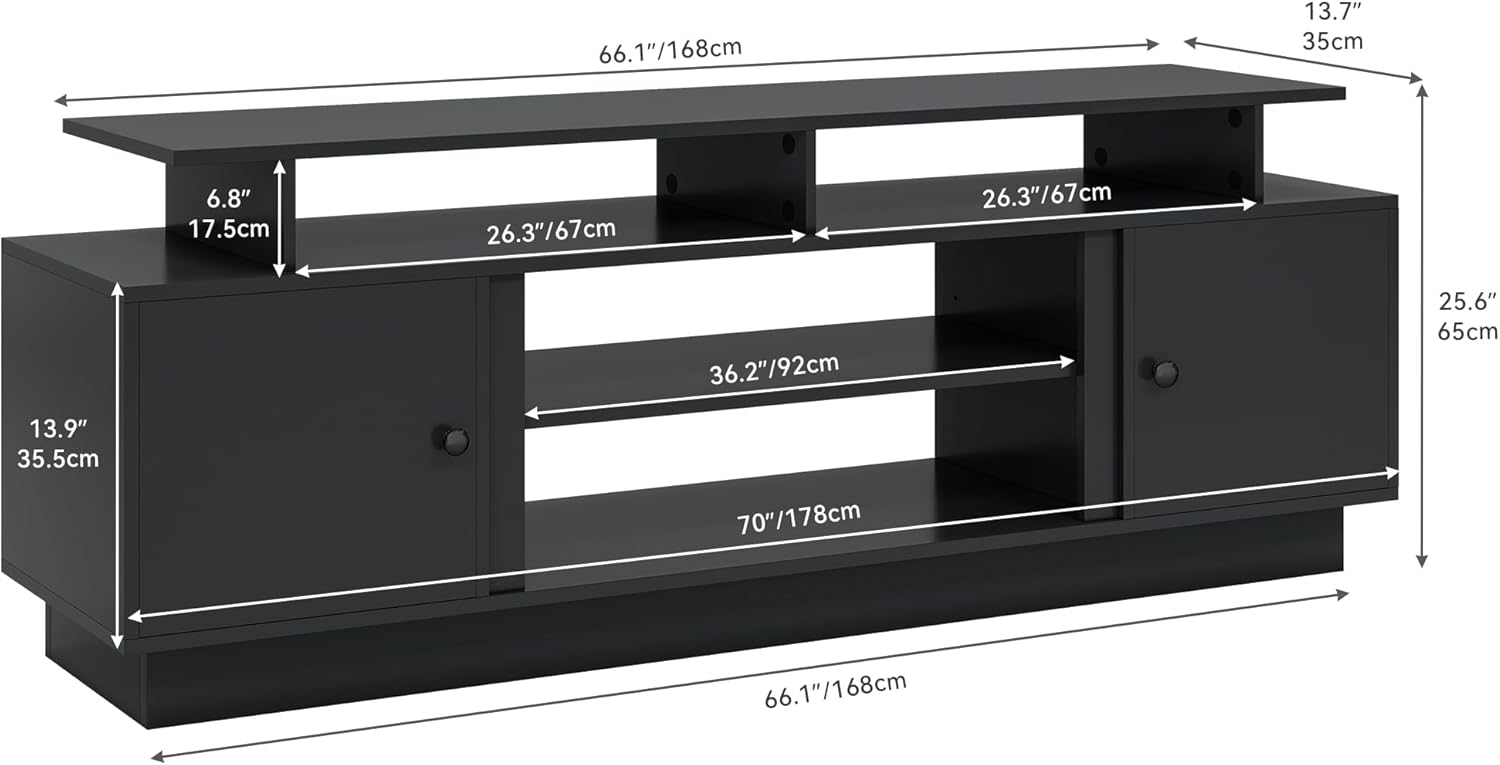
Figure 5: Detailed diagram showing the dimensions of the YITAHOME Modern TV Stand, including width, depth, and height measurements.
9. Warranty and Support
YITAHOME stands behind the quality of its products. For specific warranty information, please refer to the warranty card included with your purchase or visit the official YITAHOME website. If you have any questions, require assistance with assembly, or need to report missing/damaged parts, please contact YITAHOME customer support directly. Contact information can typically be found on the product packaging or the brand's official website.
Related documentsMAYIHHETok

Ask a question about this manual
Ask about setup, troubleshooting, compatibility, parts, safety, or missing instructions. Manuals+ will review the question and use this page’s manual context to help answer it.