
HARDELL DM124113CHD-1
HARDELL Cordless Rotary Tool Kit 8V
Model: DM124113CHD-1
Product Overview
The HARDELL 8V Cordless Rotary Tool Kit is a versatile power tool designed for a wide range of applications including drilling, engraving, sanding, polishing, and cutting. It features a powerful 8V motor, a 5-speed digital display, an auto-lock quick-change chuck, and integrated LED illumination for enhanced precision and ease of use. This kit is ideal for DIY enthusiasts and professionals seeking a compact, portable, and efficient rotary tool.

Figure 1: HARDELL 8V Cordless Rotary Tool Kit and Included Accessories.
The image displays the HARDELL 8V Cordless Rotary Tool, its gray carrying case, a USB-C charging cable, a small wrench, and a wide assortment of accessories including sanding bands, grinding stones, cutting discs, polishing wheels, and various carving/drilling bits. The tool itself is dark gray with a digital display and control buttons.
Setup
Package Contents
Before first use, please verify that all components are present in the package:
- HARDELL 8V Cordless Rotary Tool
- 61-Piece Accessory Set
- Storage Case
- Type-C Charging Cable
- User Manual (this document)
Charging the Rotary Tool
The rotary tool is powered by an internal lithium-ion battery. Fully charge the tool before its initial use for optimal performance and battery longevity. The tool features a clear three-level battery indicator to monitor power levels.
- Locate the Type-C charging port on the tool, typically covered by a protective rubber seal.
- Connect the provided Type-C charging cable to the tool.
- Connect the other end of the cable to a compatible USB power adapter (not included) or a USB port.
- The battery indicator on the tool will show charging progress. Ensure the tool is fully charged before use.

Figure 2: Charging the Rotary Tool via Type-C Port.
This image shows the HARDELL rotary tool being charged via its Type-C port, with the charging cable connected to a wall adapter. The tool's digital display is illuminated, indicating charging status.
Installing Accessories (Quick-Change System)
The HARDELL rotary tool features a 3.2mm quick-change accessory system with an automatic locking mechanism, allowing for rapid accessory changes without additional tools.
- Step 1: Unlock - Turn the center barrel of the tool clockwise until the arrow aligns with the unlock icon to release the collet.
- Step 2: Insert - Carefully insert the desired accessory bit into the collet. Ensure it is fully seated.
- Step 3: Lock - Turn the center barrel counter-clockwise until the arrow aligns with the lock icon. The automatic locking mechanism will secure the bit in place.

Figure 3: Quick-Change Accessory Installation Steps.
This image illustrates the three steps for installing accessories: turning the barrel clockwise to unlock, inserting the bit, and turning counter-clockwise to lock. It also shows examples of accessories like sanding drums and cutting discs.
Operating Instructions
Power On/Off and Speed Control
The HARDELL rotary tool features a smart digital control center with an integrated OLED display for easy speed management.
- Power Button: Press the power button to turn the tool ON or OFF.
- Speed Adjustment: Use the '+' and '-' buttons to cycle through the 5 available speed settings. The current speed (RPM) will be displayed on the OLED screen.
| Mode | RPM | Recommended Application |
|---|---|---|
| Mode 1 | 6000 RPM | Detail carving, delicate work |
| Mode 2 | 10000 RPM | Light sanding, polishing |
| Mode 3 | 14000 RPM | General drilling, grinding |
| Mode 4 | 18000 RPM | Medium sanding, cutting |
| Mode 5 | 23000 RPM | Metal grinding, heavy-duty cutting |

Figure 4: 5-Speed Setting Display and Application Guide.
This image illustrates the five speed settings (6000-23000 RPM) of the HARDELL rotary tool, with visual examples of tasks suitable for each speed, such as carving, sanding, and cutting.
Using the Integrated LED Light
The tool features an upgraded circular LED array that provides 360° shadowless illumination, improving visibility in dimly lit areas or when performing detailed work.
- The LED light automatically activates when the tool is powered on.
- It helps eliminate blind spots, making it ideal for intricate tasks like fine engraving, polishing jewelry, or working in tight spaces.
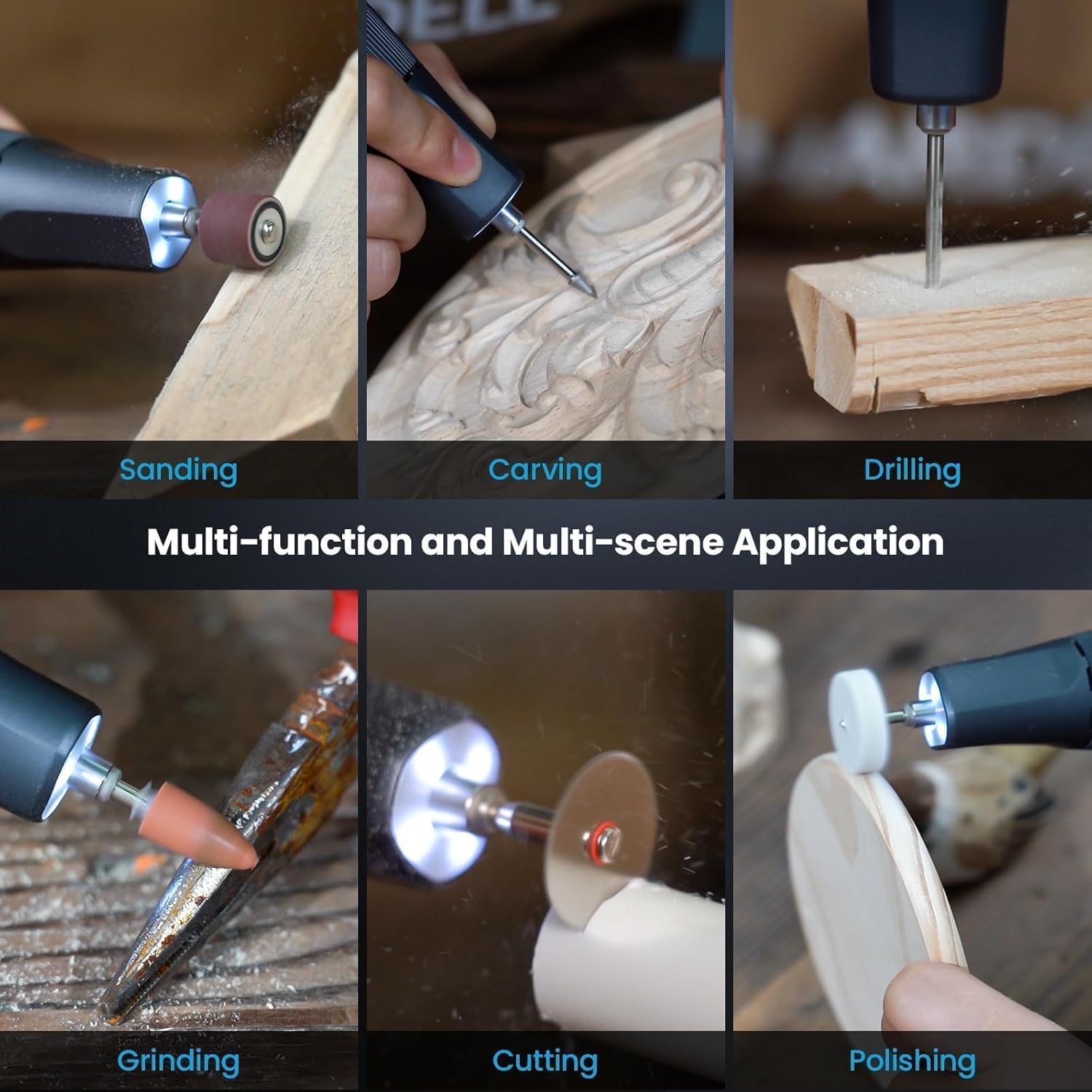
Figure 5: Ring Light in Operation.
The image shows the HARDELL rotary tool being used for carving on a wooden surface, with the integrated ring light brightly illuminating the work area, highlighting the detail of the carving.
Applications
The HARDELL Cordless Rotary Tool is designed for a variety of applications. Always select the appropriate accessory and speed setting for the material and task.
- Drilling: For creating holes in various materials.
- Engraving: For detailed designs on wood, metal, glass, or plastic.
- Sanding: For smoothing surfaces or shaping materials.
- Polishing: For bringing a shine to metals, plastics, or jewelry.
- Grinding: For shaping, sharpening, or removing material from hard surfaces.
- Cutting: For precise cuts on thin materials like plastic, wood, or soft metals.
- Pet Grooming: Specifically for pet nail filing with appropriate attachments.
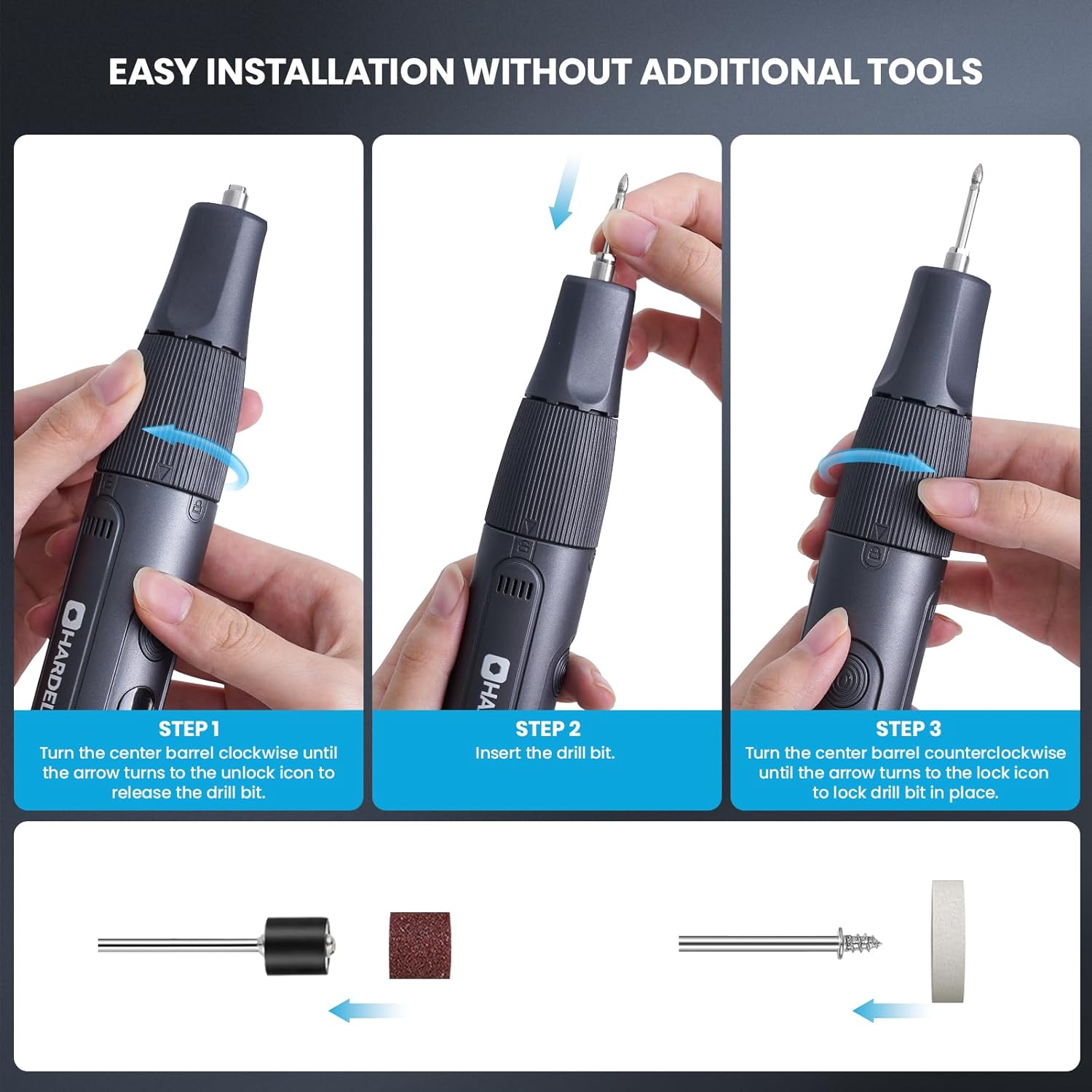
Figure 6: Multi-Function and Multi-Scene Applications.
This collage displays six different applications of the rotary tool: sanding wood, carving intricate designs, drilling into wood, grinding metal, cutting a pipe, and polishing a wooden object, demonstrating its versatility.
Maintenance
Proper maintenance ensures the longevity and optimal performance of your HARDELL rotary tool.
- Cleaning: After each use, wipe down the tool with a clean, dry cloth to remove dust and debris. Do not use harsh chemicals or abrasive cleaners. Ensure the heat dissipation vents are clear of obstructions.
- Accessory Care: Clean accessories after use. Store them in the provided storage case to prevent damage and loss.
- Storage: Store the tool and accessories in their original case in a cool, dry place, away from direct sunlight and moisture.
- Battery Care: Avoid completely draining the battery frequently. For long-term storage, charge the battery to approximately 50% to prolong its lifespan.
Troubleshooting
This section addresses common issues you might encounter with your rotary tool.
| Problem | Possible Cause | Solution |
|---|---|---|
| Tool stops unexpectedly during operation. | Overload protection activated (display shows "8"). | Reduce pressure on the tool or use a higher speed setting. Allow the tool to cool down if it feels warm. Restart the tool. |
| Tool does not turn on. | Low battery or no charge. | Charge the tool fully using the provided Type-C cable. Ensure the charging cable and power source are functioning correctly. |
| Accessory bit is loose or falls out. | Accessory not properly secured in the quick-change chuck. | Ensure the accessory is fully inserted and the center barrel is turned counter-clockwise to the lock icon until it clicks into place. |
Specifications
| Feature | Detail |
|---|---|
| Brand | HARDELL |
| Model Number | DM124113CHD-1 |
| Voltage | 8 Volts |
| Power Source | Battery Powered (Lithium Ion) |
| Minimum Rotational Speed | 6000 RPM |
| Maximum Rotational Speed | 23000 RPM |
| Special Features | Compact, Cordless, Keyless Chuck, LED Light, Variable Speed |
| Recommended Uses | Drilling, Engraving, Pet Grooming, Sanding, Polishing, Cutting |
| Included Components | Rotary Tool, 61-Piece Accessories, Storage Case, Type-C Cable, User Manual |
| Item Weight | 1.5 pounds |
| Package Dimensions | 9.21 x 4.8 x 1.93 inches |
| Color | Dark Gray |
Warranty and Support
For warranty information and customer support, please refer to the documentation included with your product or visit the official HARDELL brand store online.
Official HARDELL Store: HARDELL Store on Amazon
Related documentsDM124113CHD-1


Ask a question about this manual
Ask about setup, troubleshooting, compatibility, parts, safety, or missing instructions. Manuals+ will review the question and use this page’s manual context to help answer it.