
Introduction
Thank you for choosing the OBEST 1080P AHD Car Reversing Camera. This manual provides detailed instructions for the installation, operation, and maintenance of your new reversing camera system. Designed to enhance driving safety, this camera features high-definition video, intelligent obstacle recognition with sound alerts, and robust construction for reliable performance in various conditions.
Safety Information
- Professional Installation Recommended: If you are not familiar with car electrical systems, seek professional assistance for installation to prevent damage to the product or your vehicle.
- Power Supply: Ensure the camera is connected to a 12V DC power supply only. Incorrect voltage can damage the device.
- Wiring: Always disconnect the vehicle's battery before performing any wiring to avoid electrical shorts or injury. Ensure all connections are secure and properly insulated.
- Placement: Mount the camera securely to prevent it from becoming loose during vehicle operation. Ensure the camera's view is not obstructed.
- Operation: The reversing camera is an aid for safe reversing. Always check your surroundings directly and use your mirrors in conjunction with the camera display.
- Cleaning: Use a soft, damp cloth for cleaning the camera lens. Avoid abrasive cleaners or solvents.
Package Contents
Please check the package contents upon receipt. If any items are missing or damaged, contact your retailer.
- OBEST 1080P AHD Reversing Camera
- 6-meter RCA Video Cable
- Power Cable
- Buzzer with 2-meter Cable
- Mounting Hardware (Screws, adhesive pad)
Product Features
- Intelligent Alarm Identification: The AHD reversing camera automatically identifies people, cars, or other obstacles within the reversing line's range. It emits an alarm and displays the real-time distance to the vehicle. The closer the obstacle, the louder the alarm. This innovative design enhances driving safety.
- 1080P HD & Starlight Night Vision: This AHD rear view camera features 6 glass lenses and a large F1.5 aperture high-definition lens, combined with WDR image processing technology. This significantly improves color saturation and brightness. Its Super Starlight night vision allows for clear images day or night. (Note: Not applicable to CVBS displays).
- 145° Wide Angle: The 145° wide-angle 1080P car reversing camera effectively eliminates visual blind spots, covering a large rear area. This helps prevent collision accidents caused by insufficient rear visibility, providing reliable visual support for every reversing maneuver. (Tip: Android navigation systems require connection to the blue reverse signal cable to display the screen).
- Metal Material & IP68 Waterproof: The camera body is constructed from durable, shock-resistant metal, ensuring longevity. Its IP68 waterproof rating means there is no need to worry about water or fog ingress, effectively resisting fog, rain, and harsh sunlight for safer driving.
- Mini Size & Wide Range of Uses: With its mini design, the camera can be installed anywhere on the vehicle without affecting its overall appearance. The OBEST night vision rear camera includes a 6m extension cable, suitable for all types of 12V vehicles: cars, trucks, caravans, motorhomes, vans, and more.

Image: Comparison of AHD 1080P and Starlight Night Vision capabilities versus standard cameras.

Image: Illustration of the 145-degree wide-angle view provided by the camera, showing reduced blind spots during parking.

Image: The IP68 waterproof camera enduring various weather conditions like rain, snow, and car washes.
Setup and Installation
Follow these steps for proper installation of your OBEST reversing camera.
1. Mounting the Camera
- Choose a suitable location at the rear of your vehicle, typically above the license plate or on the bumper, ensuring a clear, unobstructed view.
- Secure the camera using the provided screws or adhesive pad. Ensure it is firmly attached and angled correctly for optimal rear visibility.
2. Wiring Diagram
Refer to the diagram below for connecting the camera, power, and video cables.
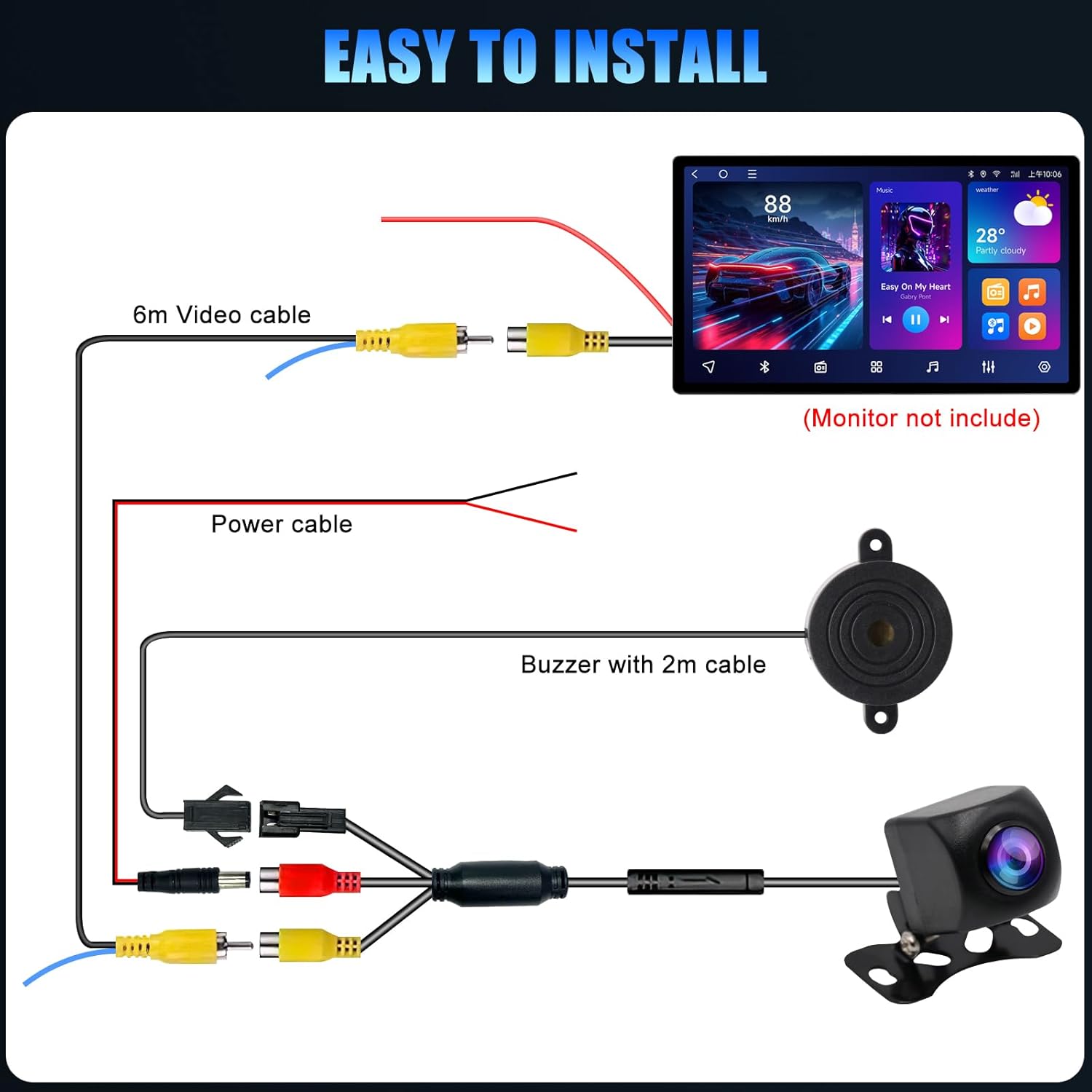
Image: Detailed wiring diagram showing connections for the camera, 6m video cable, power cable, and buzzer to a car display unit.
- Power Connection: Connect the camera's red power wire to the vehicle's reverse light positive (+) wire. Connect the black power wire to a suitable ground (-) point on the vehicle chassis.
- Video Connection: Connect the yellow RCA connector of the camera to the yellow RCA input of the 6-meter video cable. Run the 6-meter video cable from the rear of the vehicle to the front, connecting its other yellow RCA end to your car's display unit (e.g., head unit, monitor).
- Buzzer Connection: Connect the buzzer's power wires to the same reverse light positive (+) and ground (-) connections as the camera. The buzzer should be placed in a location where its sound can be clearly heard by the driver.
- Reverse Signal Wire (for Android units): If using an Android navigation system, connect the blue reverse signal wire (often found on the video cable or head unit harness) to the vehicle's reverse light positive (+) wire. This ensures the display automatically switches to the camera view when reversing.
3. Testing the Installation
After completing all connections, turn on your vehicle and engage reverse gear. The camera image should appear on your display, and the buzzer should activate if an obstacle is detected.
Operating Instructions
The OBEST reversing camera operates automatically when your vehicle is in reverse gear.
- Automatic Activation: When you shift your vehicle into reverse, the camera will automatically power on, and its video feed will be displayed on your connected monitor or head unit.
- Intelligent Obstacle Alarm: The camera's intelligent recognition system will detect obstacles (people, other vehicles, objects) within the reversing path. A 'beep' sound will be emitted from the buzzer, and the distance to the obstacle may be displayed on the screen (depending on your display unit's capabilities). The alarm frequency increases as you get closer to an obstacle.
- Night Vision: The Starlight Night Vision feature ensures clear visibility even in low-light conditions, providing a bright and detailed image at night.
- Wide Angle View: The 145-degree wide-angle lens provides a broad view of the area behind your vehicle, minimizing blind spots.

Image: A car reversing with the camera view showing a person and an obstacle, with the sound alarm icon indicating activation.
Maintenance
Regular maintenance ensures optimal performance and longevity of your camera.
- Cleaning the Lens: Periodically clean the camera lens with a soft, lint-free cloth. If necessary, use a small amount of mild glass cleaner. Avoid harsh chemicals or abrasive materials that could scratch the lens.
- Checking Connections: Occasionally inspect all wiring connections to ensure they are secure and free from corrosion. Loose connections can lead to intermittent signal loss or poor image quality.
- Housing Inspection: Check the camera's metal housing for any signs of damage or wear. Although IP68 rated, severe physical damage can compromise its waterproof integrity.
Troubleshooting
If you encounter issues with your camera, refer to the following troubleshooting guide:
| Problem | Possible Cause | Solution |
|---|---|---|
| No image on display |
|
|
| Image flickering or distorted |
|
|
| Alarm not sounding |
|
|
| Poor night vision |
|
|
Specifications
| Feature | Detail |
|---|---|
| Brand | OBEST |
| Model Number | 32079 |
| Video Resolution | 1080P AHD |
| Viewing Angle | 145 Degrees (Wide Angle) |
| Night Vision | Super Starlight Night Vision |
| Waterproof Rating | IP68 |
| Material | Metal Housing |
| Compatible Voltage | 12V DC |
| Optical Sensor Technology | CMOS |
| Connector Type | RCA |
| Product Weight | 201 g |
| Product Dimensions | 19 x 13 x 11 cm |
Warranty and Support
For warranty information or technical support, please refer to the documentation provided with your purchase or contact the seller directly. Keep your proof of purchase for any warranty claims.