
Acdctek DSA-RCK2 Series Charger
Acdctek 3-Prong 42V AC/DC Adapter User Manual
Model: DSA-RCK2 Series Charger
1. Product Overview
This manual provides essential information for the safe and effective use of your Acdctek 3-Prong 42V AC/DC Adapter. This power supply is designed to charge compatible Hover-1 Rocket H1-RCKT 2.0 and DSA-RCK2 series electric scooter batteries.

Image: The Acdctek 3-Prong 42V AC/DC Adapter, showing the main unit, the AC input power cord, and the DC output cable with its 3-prong connector.
2. Important Safety Instructions
Please read and understand all safety instructions before using this product. Failure to follow these instructions may result in electric shock, fire, or serious injury.
- Indoor Use Only: This adapter is designed for indoor use in dry locations. Do not expose to rain, moisture, or extreme temperatures.
- No User-Serviceable Parts: Do not open or attempt to repair the adapter. Refer all servicing to qualified service personnel. Opening the casing voids the warranty and poses a risk of electric shock.
- Protection Mechanisms: This adapter features built-in safety protections including Over Voltage Protection (OVP), Over Current Protection (OCP), and Short Circuit Protection (SCP) to ensure safe operation.
- Proper Ventilation: Ensure adequate ventilation around the adapter during use. Do not cover the adapter or place it in an enclosed space that could restrict airflow.
- Handle with Care: Avoid dropping or subjecting the adapter to strong impacts. Inspect the adapter and cables for damage before each use.
- Disconnect When Not In Use: Unplug the adapter from the power outlet when not in use or during electrical storms.
3. Setup Guide
Follow these steps to properly set up your AC/DC adapter:
- Unpack the Adapter: Carefully remove the adapter and all cables from the packaging.
- Inspect for Damage: Before connecting, visually inspect the adapter, AC power cord, and DC output cable for any signs of damage (e.g., frayed wires, cracked casing). Do not use if damaged.
- Connect to Device: Locate the charging port on your compatible Hover-1 Rocket H1-RCKT 2.0 or DSA-RCK2 series electric scooter. Align the 3-prong connector of the adapter's DC output cable with the port and firmly insert it.
- Connect to Power Outlet: Plug the AC power cord into the adapter's input port, then plug the other end of the AC power cord into a standard 100-240V AC wall outlet.

Image: A close-up view of the 3-prong connector, showing the pin configuration for proper connection.
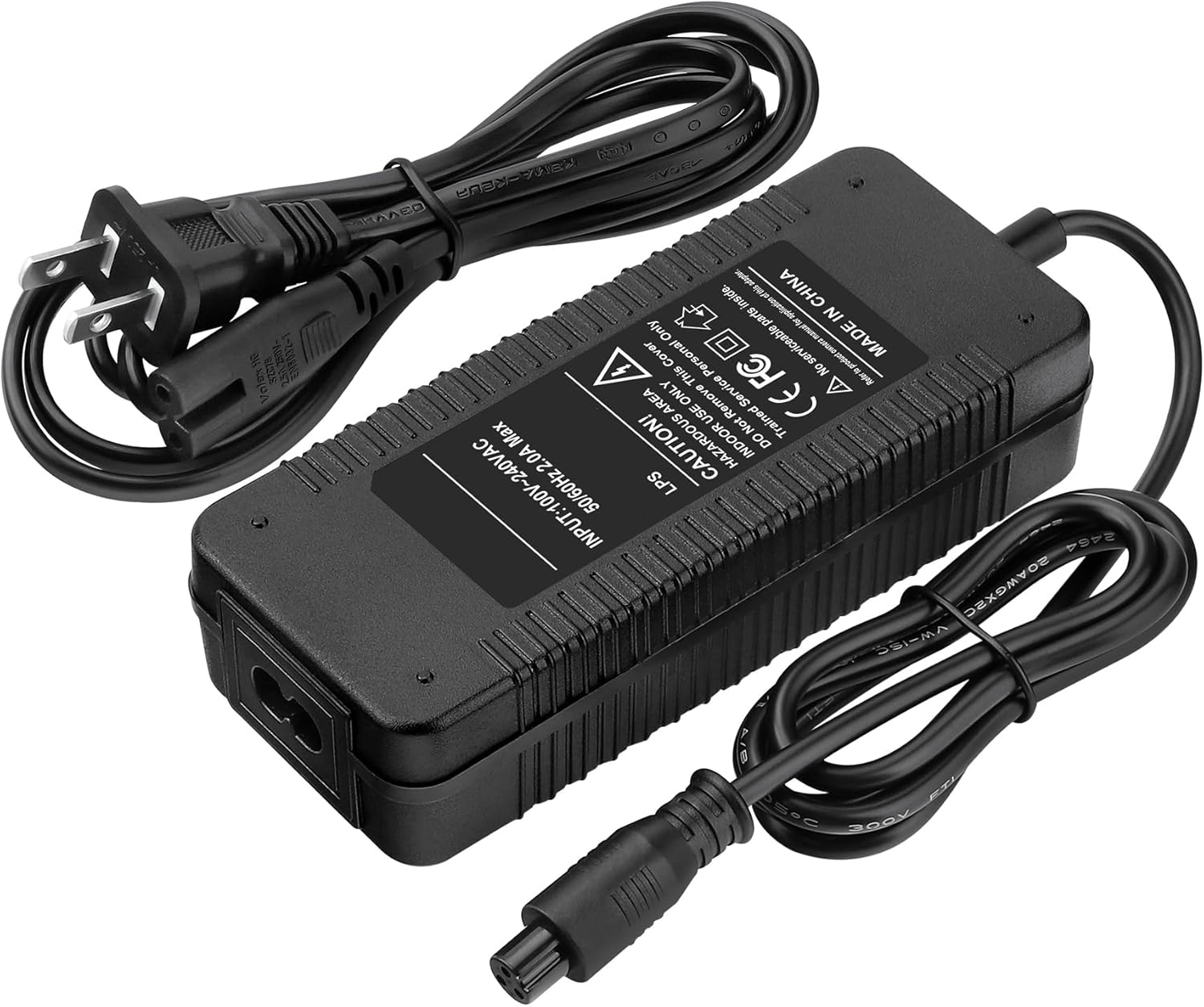
Image: The adapter with both the AC power cord and the DC output cable connected, ready for use.
4. Operating Instructions
Once the adapter is properly connected to both the device and a power outlet, the charging process will begin automatically. Most compatible devices will have an indicator light to show charging status (e.g., red for charging, green for fully charged). Refer to your device's manual for specific charging indicators.
- Ensure the adapter is placed on a hard, flat surface to allow for proper heat dissipation.
- Do not leave the device charging unattended for extended periods, especially overnight.
- Disconnect the adapter from the device and the wall outlet once charging is complete.
5. Care and Maintenance
Proper care will extend the life of your adapter:
- Cleaning: Disconnect the adapter from all power sources before cleaning. Use a soft, dry cloth to wipe the surface. Do not use liquid cleaners or aerosols.
- Storage: Store the adapter in a cool, dry place away from direct sunlight and extreme temperatures when not in use. Avoid tightly winding the cables to prevent damage.
- Cable Inspection: Regularly inspect the power cords and connectors for any signs of wear, cuts, or damage. Replace immediately if damage is found.
6. Troubleshooting
If you encounter issues with your adapter, refer to the following table:
| Problem | Possible Cause | Solution |
|---|---|---|
| Adapter not charging device | Loose connection No power from outlet Damaged adapter/cable Incompatible device | Ensure all connections are secure. Test outlet with another device. Inspect adapter and cables for damage; replace if necessary. Verify device compatibility (see Section 7). |
| Slow charging | Device battery issue Using device while charging | Consult your device's manual or manufacturer. Avoid using the device during charging for optimal speed. |
| Adapter feels hot | Normal operation Poor ventilation Overload | Some warmth is normal. If excessively hot, disconnect immediately. Ensure adapter is in a well-ventilated area. Ensure device is compatible and not drawing excessive power. |
If the problem persists after trying these solutions, please contact customer support.
7. Product Specifications
| Feature | Specification |
|---|---|
| Brand | Acdctek |
| Connectivity Technology | AC/DC Adapter |
| Connector Type | 3-Prong |
| Input Voltage | 100-240V AC, 50-60Hz |
| Output Voltage | DC 42V |
| Output Current | 2 Amps |
| Safety Protection | OVP, OCP, SCP Protection |
| Country of Origin | China |
8. Compatible Devices
This Acdctek 3-Prong 42V AC/DC Adapter is specifically designed for and compatible with the following models:
- Hover-1 Rocket H1-RCKT 35.2V 36V 2.0Ah Battery
- Hover-1 Rocket 2.0 DSA-RCK2 35.2V/2.0Ah Rechargeable Battery Electric Scooter
- Specific model variants including: DSA-RCK2-PNK, DSA-RCK2-GRN, DSA-RCK2-PRP, DSA-RCK2-BLU, DSA-RCK2-BLK, DSA-RCKT-GRN, DSA-RCKT-PRP, DSA-RCKT-BLU, DSA-RCKT-BLK
- Other Hover-1 models requiring a 42VDC 0.4A or 42VDC 2A power supply with a 3-pin connector.
Always verify the voltage and connector type of your device before connecting the adapter.
9. Warranty and Customer Support
Acdctek is committed to providing quality products. For any questions, concerns, or technical support regarding your 3-Prong 42V AC/DC Adapter, please contact Acdctek customer service. Refer to your purchase documentation for specific warranty details and contact information.
We focus on producing reliable and compatible charger adapters and power cords.
Ask a question about this manual
Ask about setup, troubleshooting, compatibility, parts, safety, or missing instructions. Manuals+ will review the question and use this page’s manual context to help answer it.