
ODK B010115SPD95USDF-3
ODK 40 Inches Small Computer Desk User Manual
Model: B010115SPD95USDF-3 | Brand: ODK
Product Overview
The ODK 40 Inches Small Computer Desk is designed for versatility and efficiency in various spaces, from small apartments to home offices. It features a durable construction and thoughtful design elements to enhance productivity and organization, making it an ideal choice for students and professionals alike.

Key Features
- Versatile Sizes: Available in 32, 40, 48, and 55-inch sizes, with sleek black, white, and vintage finishes to complement any decor.
- Durable & Stable Construction: Built with a reinforced metal frame and a scratch-resistant, waterproof desktop, ensuring long-lasting stability and support. The powder-coated finish resists daily wear and tear.
- Efficient Storage Design: Includes a built-in hook for headphones, bags, or charging cables, keeping your essentials within easy reach and maintaining a clutter-free workspace.
- Ample Workspace: Provides sufficient room for laptops, notebooks, and other essentials, supporting focus and productivity for all your work or study tasks.


Setup and Assembly
The ODK Computer Desk is designed for quick and easy assembly, typically taking around 30 minutes. All necessary tools and clear step-by-step instructions are included to ensure a stress-free experience.
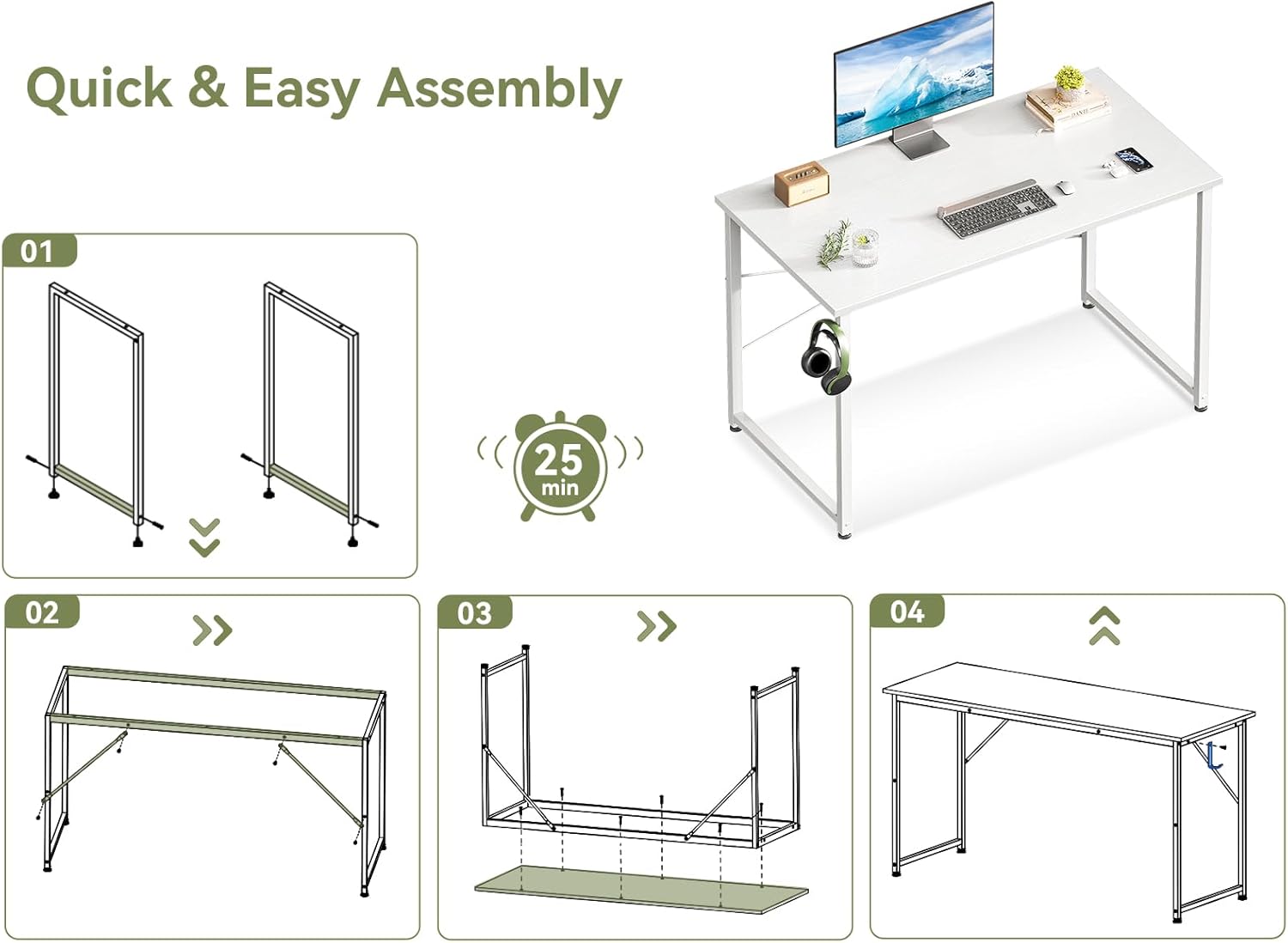
Assembly Steps:
- Unpack all components and verify against the parts list provided in the packaging.
- Assemble the two side frames by attaching the horizontal support bars to the vertical legs.
- Connect the assembled side frames using the main crossbars, ensuring all screws are finger-tight at this stage.
- Carefully place the desktop onto the assembled frame and secure it with the provided screws.
- Tighten all screws securely using the included tools, but avoid overtightening to prevent damage.
- Adjust the leveling foot mats at the bottom of the legs to ensure the desk is stable and level on your floor surface.
Operating Instructions
The ODK Computer Desk is a static furniture piece designed for holding computer equipment, study materials, and office supplies. Ensure the desk is placed on a flat, stable surface. Utilize the integrated headphone hook for convenient storage of headphones or bags, helping to keep your workspace tidy and organized.
Maintenance
- Cleaning: Wipe the desktop and metal frame with a soft, damp cloth. Avoid using abrasive cleaners, harsh chemicals, or solvents that may damage the finish.
- Spills: Promptly clean any spills to prevent staining or damage to the waterproof desktop surface.
- Stability Check: Periodically check all screws and connections to ensure they remain tight. Retighten if necessary to maintain the desk's stability and structural integrity.
- Weight Distribution: Distribute weight evenly across the desktop. Avoid placing excessively heavy items on one side to prevent undue stress on the frame.
Troubleshooting
- Desk is wobbly:
- Ensure all screws are tightened securely. Adjust the leveling foot mats at the bottom of each leg to compensate for uneven floor surfaces. Rotate the foot mats clockwise or counter-clockwise until the desk is stable.
- Missing parts:
- Carefully check all packaging materials and the parts list. If components are still missing, contact ODK customer support with your model number and a detailed description of the missing items.
- Difficulty with assembly:
- Review the assembly instructions carefully, paying close attention to the diagrams. Ensure components are oriented correctly. Do not force parts together. If issues persist, contact customer support for guidance.
Specifications
| Feature | Detail |
|---|---|
| Brand | ODK |
| Model Name | Computer Desk |
| Model Number | B010115SPD95USDF-3 |
| Color | White |
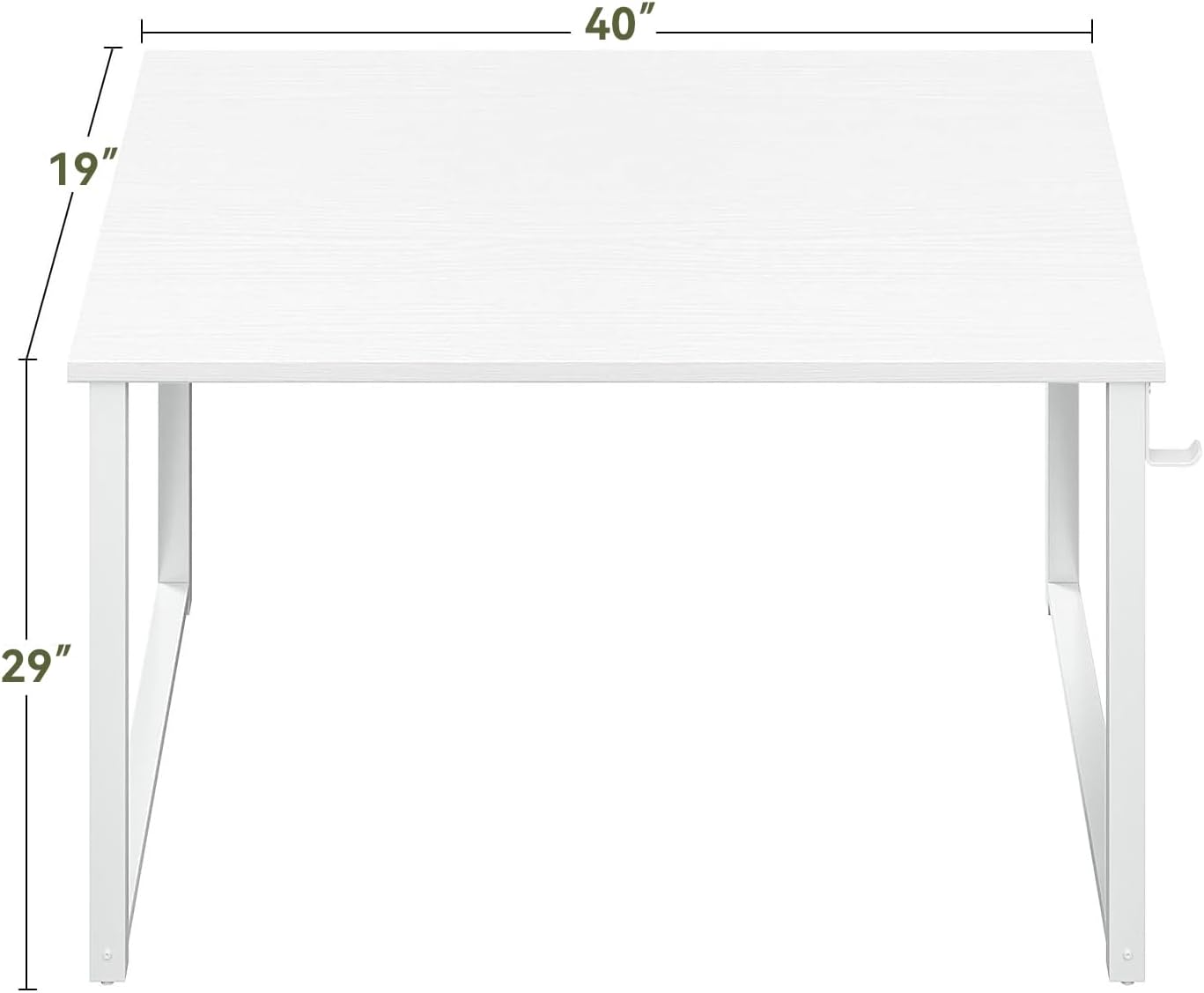
| Size | 40 inch |
| Product Dimensions (D x W x H) | 40"D x 18.9"W x 29.13"H |
| Item Weight | 15.4 Pounds |
| Top Material Type | Engineered Wood |
| Base Material | Metal |
| Style | Modern |
| Included Components | Built-in Outlet (Note: Product features prominently include a headphone hook) |
| Required Assembly | Yes |
| UPC | 850073489208 |
Warranty and Support
For specific warranty information or technical support regarding your ODK Computer Desk, please refer to the official ODK website or contact their customer service directly. It is recommended to keep your purchase receipt and the model number (B010115SPD95USDF-3) handy for faster service.
For additional product information and support, you may also visit the ODK Store on Amazon.
Related documentsB010115SPD95USDF-3


Ask a question about this manual
Ask about setup, troubleshooting, compatibility, parts, safety, or missing instructions. Manuals+ will review the question and use this page’s manual context to help answer it.