
1. Introduction
This manual provides detailed instructions for the safe and effective operation of your AUTOOL CT450 Fuel Injector Cleaner and Tester Machine. Please read this manual thoroughly before use and retain it for future reference. The CT450 is designed for cleaning and testing fuel injectors, including GDI, EFI, and FSI types, offering various voltage options and testing modes.
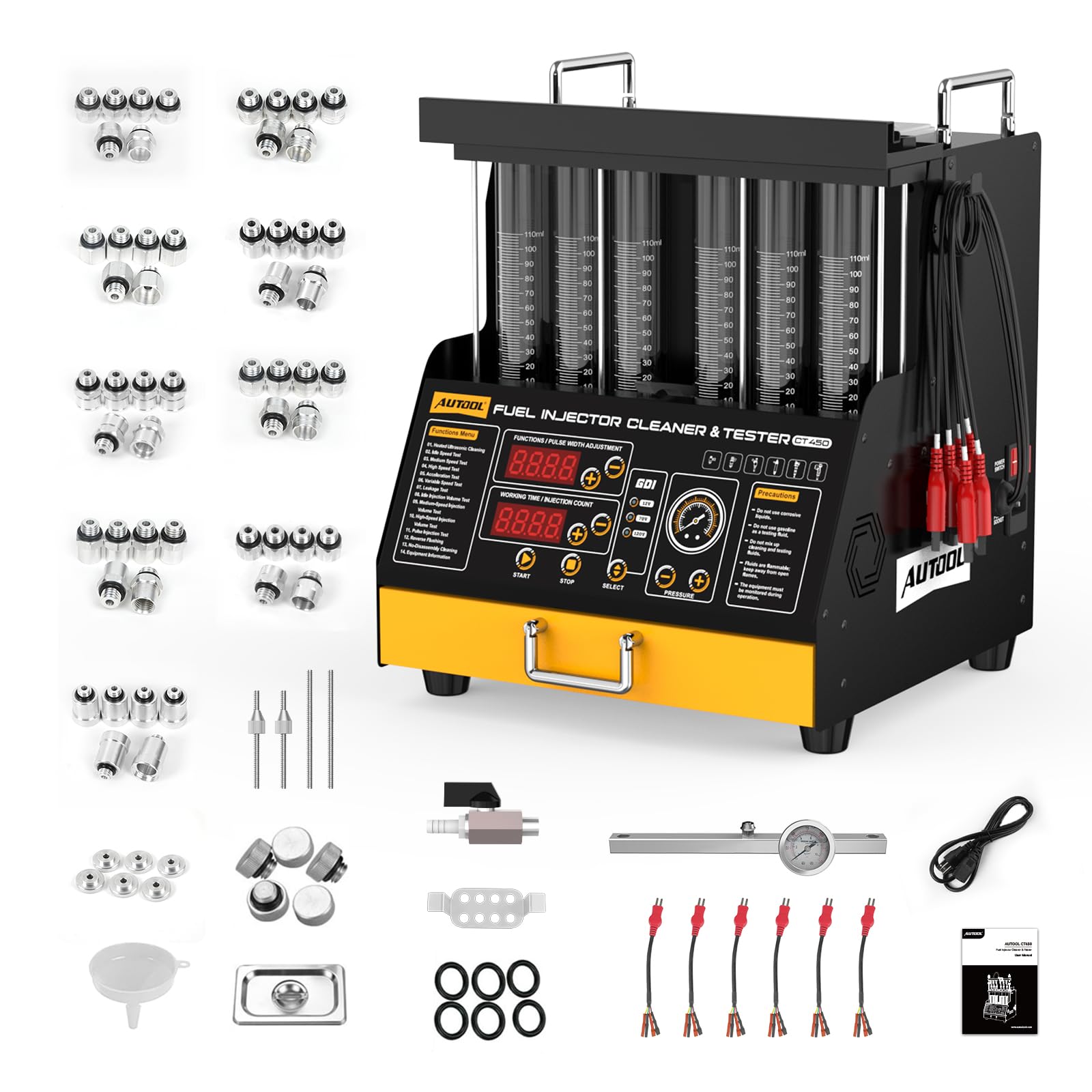
Image: The AUTOOL CT450 Fuel Injector Cleaner and Tester Machine, showcasing its compact design and multiple test tubes.
2. Safety Information
Always observe the following safety precautions to prevent injury or damage to the equipment:
- Ensure the machine is placed on a stable, level surface.
- Use only approved cleaning and testing fluids.
- Do not mix different types of cleaning or testing fluids.
- Wear appropriate personal protective equipment (PPE), including safety glasses and gloves.
- Keep the work area well-ventilated to avoid inhaling fumes from cleaning fluids.
- Disconnect power before performing any maintenance or cleaning.
- Keep flammable materials away from the machine, especially during heating operations.
- Only 12V injectors are supported for ultrasonic cleaning. 70V and 120V injectors are not supported for this specific function.
3. Product Overview
The AUTOOL CT450 is an advanced fuel injector cleaning and testing system. It features ultrasonic heating cleaning, multiple testing modes, and compatibility with various injector types.
Key Features:
- Ultrasonic Heating Cleaning: Cleans up to six injectors simultaneously with heating up to 50°C.
- 10 Testing Modes: Comprehensive testing including idle speed, medium speed, high speed, accelerating, shifting speed, leakage, and spray value tests.
- GDI, EFI, FSI Compatibility: Supports various injector types with 12V, 70V, and 120V voltage options.
- Digital Display: Intelligent digital display for function selection, pressure adjustment, pulse width, and working time.
- Six 110ml Glass Tubes: Allows simultaneous cleaning and testing of up to six injectors.
- Portable Storage Drawer: Convenient storage for connectors and accessories.
Control Panel:

Image: The control panel of the AUTOOL CT450, showing the backlit digital display for functions, pulse width adjustment, working time/injection count, GDI/voltage selection, and pressure controls.
The control panel features a backlit digital display for real-time work data. It includes buttons for function selection, voltage selection (12V, 70V, 120V), and working pressure control.
4. Setup
4.1 Unpacking and Inspection
Carefully unpack all components. Verify that all parts listed in the 'What's in the Box' section are present and undamaged. If any items are missing or damaged, contact customer support.
4.2 Component Identification

Image: A selection of various injector connectors and adapters included with the CT450 machine, designed to fit different vehicle types.
The machine comes with a variety of connectors and adapters to accommodate different injector types. Utilize the portable storage drawer to keep these organized.

Image: A close-up view of the portable storage drawer located at the bottom of the CT450, designed for organizing various parts and accessories.
4.3 Injector Installation
Follow these steps to properly install injectors for cleaning or testing:
- Install the appropriate injector connector and plugs into the straight oil separator.
- Apply a small amount of grease to the injector "O" ring for a positive seal.
- Install the straight oil separator and injector onto the upper plate holder.
- Tighten with fixing screws and nuts. The injectors are now ready for testing or cleaning.

Image: A three-panel image illustrating the steps for installing an injector: installing the connector, applying grease to the O-ring, and securing the injector to the machine.
5. Operating Instructions
5.1 Ultrasonic Cleaning
The CT450 features ultrasonic cleaning with a heating function to effectively remove carbon deposits from injectors.
- Place the injectors in the ultrasonic bath.
- Select the ultrasonic cleaning function on the control panel.
- The machine will heat the cleaning fluid up to 50°C for enhanced cleaning.
- For reverse flushing, install injectors in the opposite direction.
- Note: Only 12V injectors are supported for ultrasonic cleaning. 70V and 120V injectors are not compatible with this specific cleaning method.

Image: A visual representation of the ultrasonic cleaning process, showing injectors submerged in cleaning fluid and the temperature increasing from 3°C to 40°C.
5.2 Testing Modes
The CT450 offers 10 distinct testing modes to evaluate injector performance:

Image: A graphic detailing the three cleaning functions (Heated Ultrasonic Cleaning, Reverse Flushing, No-disassembly Cleaning) and ten testing functions (Idling Test, Medium Speed Test, High Speed Test, Accelerating Test, Shifting Speed Test, Leak Checking Test, Idling Spray Value Test, Medium Speed Spray Value Test, High Speed Spray Value Test, Pulse Injection Test).
- Idle Speed Test: Simulates engine idling conditions (0-20ms pulse width).
- Medium Speed Test: Simulates medium engine speed (0-7.5ms pulse width).
- High Speed Test: Simulates high engine speed (0-4ms pulse width).
- Accelerating Test: Checks injector response during acceleration.
- Shifting Speed Test: Evaluates performance during gear shifts.
- Leak Checking Test: Detects any fuel leakage from the injectors.
- Idling Spray Value Test: Measures spray volume at idle.
- Medium Speed Spray Value Test: Measures spray volume at medium speed.
- High Speed Spray Value Test: Measures spray volume at high speed.
- Pulse Injection Test: Allows custom pulse width and count settings.
5.3 GDI, EFI, FSI & Multi-voltage Options
The CT450 is compatible with various injector types, including GDI, EFI, and FSI. It provides selectable voltage outputs to match different injector requirements.

Image: The CT450's GDI injector driver software interface, showing options for 12V, 70V, and 120V high-pressure injectors, with various injector types illustrated.
Select the appropriate voltage (12V, 70V, or 120V) using the control panel to match the injector type. An automatic beep warning will sound if a voltage mismatch is detected.
5.4 Adjusting Test Parameters
The test time and pulse width for fuel injection can be adjusted as needed for specific testing scenarios.

Image: A close-up of the digital display showing adjustable parameters for 'Functions / Pulse Width Adjustment' and 'Working Time / Injection Count', with plus and minus buttons for modification.
5.5 Observing Test Results
The machine is equipped with features to aid in observing injector performance:
- Glass Tube Lighting: Provides clear illumination for observing the spray pattern and volume.
- Test Liquid Level Indicator: Allows monitoring of test fluid levels to prevent overflow and waste.

Image: A four-panel image highlighting features: glass tube lighting for clear observation, a test liquid level indicator, a cleaning fluid drain valve, and a side handle for portability.
5.6 Flow Rate Equalization, Injection Shape, and Leak Tests
These tests are crucial for diagnosing injector issues:
- Flow Rate Equalization: Observe the uniformity of fuel injection volume across all injectors. Pause or stop the test when the liquid level reaches 2/3 of the cylinder.
- Injection Shape Observation: Visually inspect the spray pattern of each injector for proper atomization.
- Leak Test: Check for any drips or leaks from the injector nozzles under pressure.

Image: A three-panel image demonstrating the visual assessment during testing: top panel shows flow rate equalization, middle panel shows injection spray shape, and bottom panel shows a leak test.
5.7 Official Product Video
Video: An official product video from AUTOOL-DIRECT demonstrating the features and operation of the AUTOOL Ultrasonic Heating Fuel Injector Cleaner Machine.
6. Maintenance
6.1 Cleaning Fluid Management
Proper management of cleaning and testing fluids is essential for the longevity of the machine and effective results.
- After use, drain the cleaning fluid using the dedicated cleaning liquid discharge valve.
- Collect the used fluid in a suitable container for proper disposal or reuse, if applicable.
- Regularly clean the ultrasonic bath and test tubes to prevent residue buildup.
Image: A close-up of the cleaning liquid drain valve, used for safely discharging used cleaning fluid from the machine.
6.2 General Care
- Keep the machine clean and free from dust and debris.
- Store the machine in a dry, cool place when not in use.
- Ensure all connectors and accessories are stored properly in the drawer to prevent loss or damage.
7. Troubleshooting
This section addresses common issues you might encounter with the AUTOOL CT450.
| Problem | Possible Cause | Solution |
|---|---|---|
| Machine does not power on. | Power cable not connected; Power switch off; Blown fuse. | Check power connection; Ensure power switch is on; Inspect and replace fuse if necessary. |
| Injectors not spraying or leaking during test. | Incorrect injector installation; Clogged injector; Insufficient pressure; Incorrect voltage selection. | Re-install injectors, ensuring proper seal; Perform ultrasonic cleaning; Adjust pressure; Verify correct voltage for injector type. |
| Inaccurate test results. | Contaminated test fluid; Improper calibration; Air in the system. | Replace test fluid; Refer to service manual for calibration; Bleed air from the system. |
| Ultrasonic cleaning not effective. | Incorrect cleaning fluid; Insufficient heating; Injector type not supported for ultrasonic cleaning. | Use recommended ultrasonic cleaning fluid; Ensure heating function is active; Confirm injectors are 12V type for ultrasonic cleaning. |
If you encounter issues not listed here or require further assistance, please contact AUTOOL customer support.
8. Specifications

Image: A table displaying the product specifications of the AUTOOL CT450, including power supply, frequency, RPM range, fuel injection count, PWM pulse width, system pressure, time settings, cleaning tank capacity, test tube capacity, and ultrasonic cleaning frequency.
| Parameter | Value |
|---|---|
| Power Supply | 110V/220V ±10% |
| Frequency | 50Hz/60Hz |
| RPM Range | 0~7500 |
| Fuel Injection Count | 0~9900 |
| PWM Pulse Width | 0~20ms |
| System Pressure | 0~0.6Mpa |
| Time Settings | 0~10min |
| Cleaning Tank Capacity | 2000ml |
| Test Tube Capacity | 110ml |
| Ultrasonic Cleaning Frequency | 28KHZ |
| Item Weight | 35.6 pounds |
| Product Dimensions | 17 x 17 x 19 inches |
8.1 What's in the Box
The AUTOOL CT450 package includes:
- AUTOOL CT450 Fuel Injector Cleaner and Tester Machine
- Various injector connectors and adapters
- Power adapter
- User Manual
- Other necessary accessories (e.g., funnel, cleaning fluid drain valve, test fluid level indicator)
9. Warranty & Support
AUTOOL provides a Three-Year Warranty for the CT450 Fuel Injector Cleaner and Tester Machine. If any defects are found, AUTOOL will provide a new replacement or solutions to ensure customer satisfaction without delay. Lifetime technical support is also provided.
For any needs or inquiries, please contact AUTOOL customer support. We aim to respond within 24 hours.
Contact Information: Refer to the official AUTOOL website or your purchase documentation for the most up-to-date contact details.


