
1. Introduction
Thank you for choosing the ELIVED Mobile TV Stand YD1117. This manual provides detailed instructions for the safe assembly, operation, and maintenance of your new TV stand. Please read all instructions carefully before beginning assembly and retain this manual for future reference.
This mobile TV stand is designed to accommodate most 23-inch to 60-inch LCD/LED/OLED flat or curved screen televisions with VESA mounting patterns from 75x75mm to 400x400mm. It features adjustable height, tilt functionality, a media shelf, and lockable wheels for portability and stability.
2. Safety Information
- Weight Capacity: Do not exceed the maximum load capacity of 77 lbs (35 kg). Overloading can result in serious injury or damage to equipment.
- TV Size: Ensure your TV's screen size is within the recommended range of 23 to 60 inches.
- VESA Compatibility: Verify your TV's VESA mounting pattern is between 75x75mm and 400x400mm.
- Stability: Always ensure all bolts are securely tightened before use. Do not move the stand with a TV mounted if the wheels are not locked.
- Children: Keep children away from the TV stand during assembly. Do not allow children to climb on or play with the stand or mounted TV.
- Placement: Place the TV stand on a level, stable surface. Avoid placing it near heat sources or in direct sunlight.
- Moving the Stand: When moving the stand, unlock the wheels and push it slowly and carefully. Lock the wheels once the stand is in its desired position.
3. Package Contents
Please check that all components are present and undamaged before assembly. If any parts are missing or damaged, contact customer support.
- Base with Wheels
- Vertical Support Poles (multiple sections)
- TV Mounting Bracket
- Adjustable Media Shelf
- Hardware Kit (screws, washers, spacers, Allen wrench)
- Instruction Manual
4. Setup and Assembly
Follow these steps carefully to assemble your ELIVED Mobile TV Stand. No drilling is required for installation.
Step 4.1: Assemble the Base
Attach the vertical support pole(s) to the X-shaped base. Ensure all screws are tightened securely. The base features 360° lockable castors for easy movement and stability.

Figure 4.1: Stable X-Shaped Base with Lockable Castors
Step 4.2: Choose Pole Configuration
You have two options for pole installation, depending on your desired TV height:
- Using 3 Poles: For a maximum TV height of approximately 51.2 inches.
- Using 2 Poles: For a lower TV height of approximately 34.5 inches.
Connect the pole sections as desired and secure them firmly.
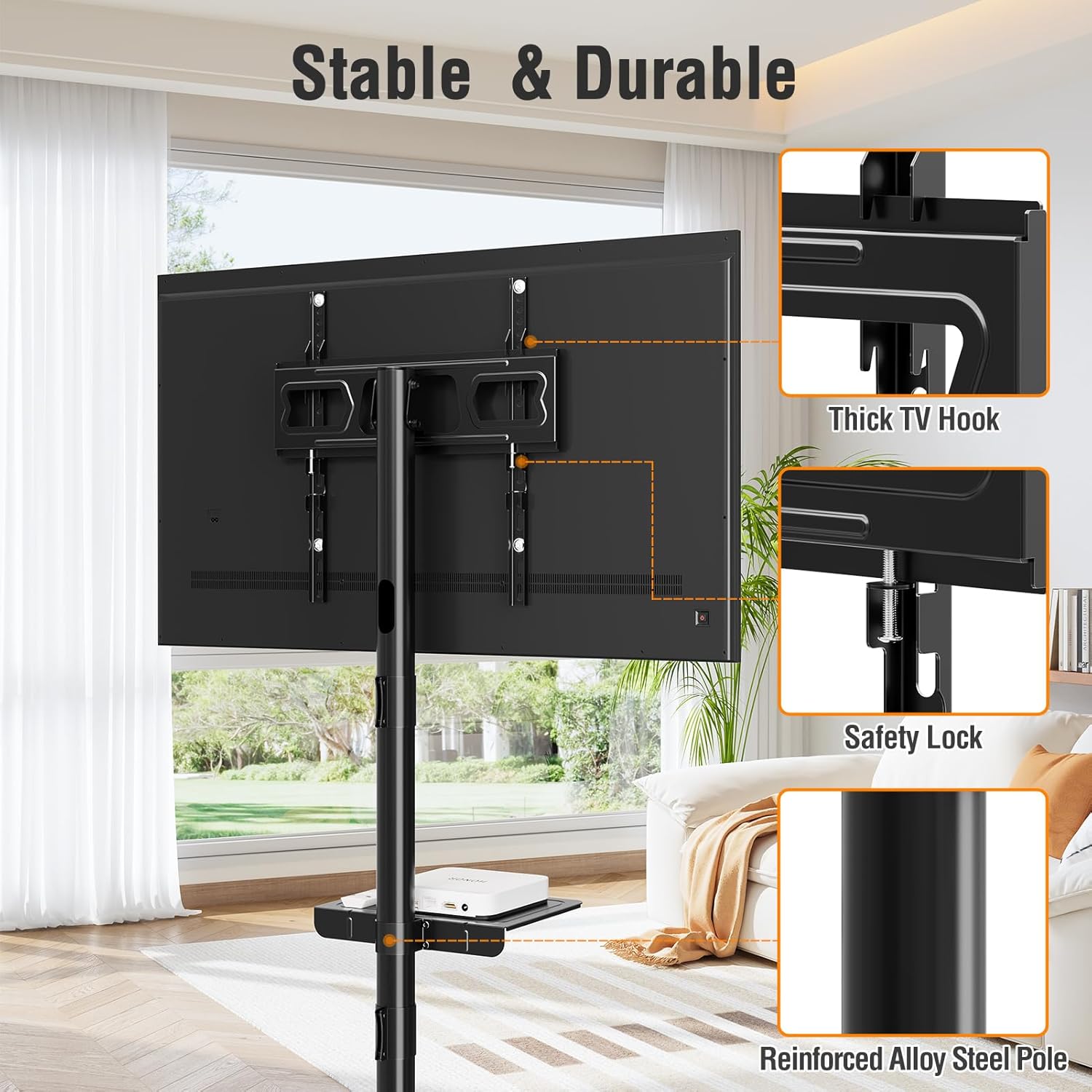
Figure 4.2: Pole Installation Options
Step 4.3: Attach TV Mounting Bracket
Secure the TV mounting bracket to the assembled vertical pole. Ensure it is at the desired height. The bracket offers two height settings for fine-tuning the TV's position.

Figure 4.3: TV Bracket Height Adjustment
Step 4.4: Install Media Shelf
Attach the adjustable media shelf to the vertical pole at your preferred height. This shelf provides convenient storage for devices like DVD players, streaming boxes, or game consoles.

Figure 4.4: Adjustable Storage Shelf and Cable Management
Step 4.5: Mount the TV
Attach the TV mounting arms to the back of your television using the appropriate screws, washers, and spacers from the hardware kit. Carefully lift your TV and hook the mounting arms onto the TV bracket on the stand. Secure the TV with the safety locks provided.
5. Operating Instructions
5.1: Moving the TV Stand
To move the TV stand, ensure the TV is securely mounted. Unlock all four wheels by flipping their locking levers. Gently push the stand to your desired location. Once in place, lock all four wheels to prevent accidental movement and ensure stability.

Figure 5.1: Rolling and Locking the TV Stand
5.2: Adjusting TV Tilt
The TV bracket allows for a tilt adjustment range of -10° (downward) to +5° (upward). This feature helps reduce glare and optimize your viewing experience. Loosen the tilt adjustment knobs on the side of the TV bracket, adjust the TV to the desired angle, and then securely tighten the knobs.

Figure 5.2: TV Tilt Adjustment
5.3: Cable Management
Utilize the integrated cable management system within the vertical poles to route and conceal your TV and device cables. This helps maintain a tidy and organized appearance.
6. Maintenance
- Cleaning: Wipe the stand with a soft, dry cloth. Avoid using abrasive cleaners or solvents that could damage the finish.
- Inspections: Periodically check all bolts and connections to ensure they remain tight and secure. Retighten if necessary.
- Wheel Care: Keep the wheels free of debris to ensure smooth movement.
7. Troubleshooting
- Stand is Wobbly: Ensure all assembly bolts are fully tightened. Check that the stand is on a level surface.
- TV Not Fitting: Verify your TV's VESA pattern and weight are within the stand's specifications (75x75mm to 400x400mm, max 77 lbs). Ensure you are using the correct screws and spacers for your TV.
- Difficulty Moving Stand: Check if the wheels are unlocked. Clear any obstructions from the wheels.
- TV Not Tilting: Loosen the tilt adjustment knobs sufficiently before attempting to adjust the angle.
8. Specifications
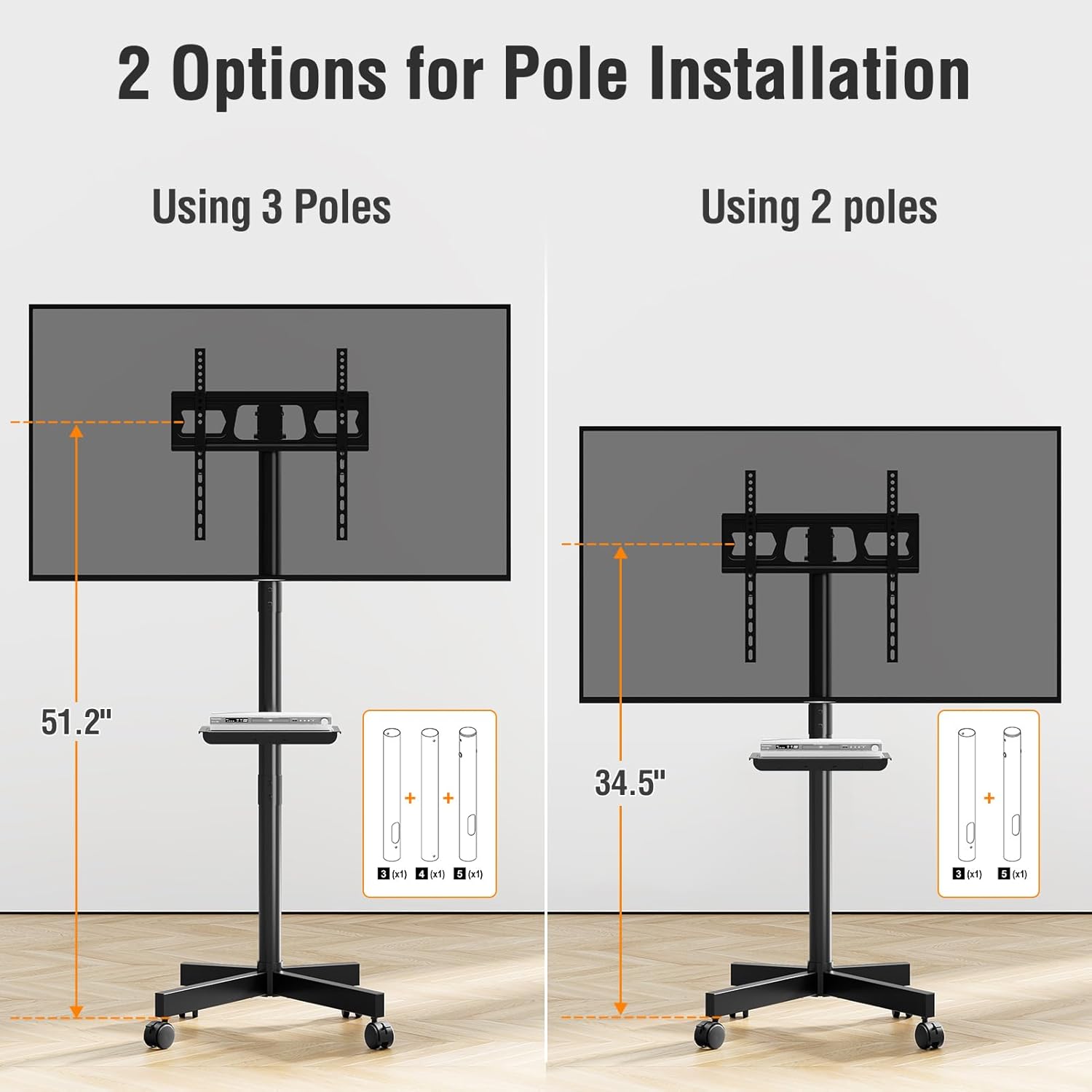
Figure 8.1: Product Dimensions and Capacities
| Feature | Specification |
|---|---|
| Model Number | YD1117 |
| Compatible TV Sizes | 23 - 60 inches |
| VESA Compatibility | 75x75mm to 400x400mm |
| Maximum Load Capacity | 77 lbs (35 kg) |
| Material | Alloy Steel, Aluminum |
| Movement Type | Articulating, Tilt (-10° to +5°) |
| Color | Black |
| Overall Height (3 poles) | Approx. 51.2 inches |
| Overall Height (2 poles) | Approx. 34.5 inches |
| Base Dimensions | Approx. 18.8" x 15.3" |
| Product Weight | Approx. 5.87 kg (12.94 lbs) |
9. Warranty and Support
ELIVED products are designed for durability and performance. For specific warranty information, please refer to the warranty card included with your purchase or visit the official ELIVED website.
If you encounter any issues or have questions regarding the assembly or operation of your ELIVED Mobile TV Stand YD1117, please contact ELIVED customer support for assistance. Contact details can typically be found on the product packaging or the ELIVED brand website.