
Vacqueen Vq-cf2024
Vacqueen Automatic Pet Food Dispenser User Manual
Model: Vq-cf2024
1. Introduction
Thank you for choosing the Vacqueen Automatic Pet Food Dispenser. This device is designed to simplify pet feeding for multi-cat households, ensuring your pets receive timely and portion-controlled meals. With its smart features and durable design, the Vacqueen feeder provides convenience and peace of mind.
This manual provides essential information for the safe and efficient operation of your new pet food dispenser. Please read it thoroughly before use and retain it for future reference.
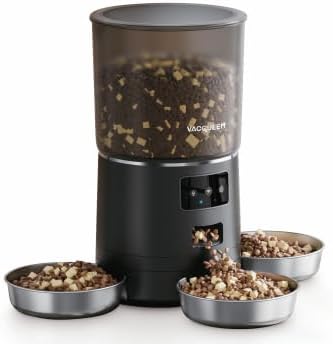
Figure 1: Vacqueen Automatic Pet Food Dispenser (Black)
2. Safety Information
- Always place the feeder on a stable, level surface to prevent tipping.
- Do not immerse the main unit in water or any other liquid.
- Ensure the power cord is not chewed by pets. Use the battery backup feature for added safety during power outages.
- Keep out of reach of small children.
- Use only dry pet food with appropriate kibble size to prevent dispenser jams.
- Regularly clean the food container and bowls to maintain hygiene and prevent bacterial growth.
- Do not attempt to disassemble or repair the unit yourself. Contact customer support for assistance.
3. Setup Guide
3.1 Unpacking and Components
Carefully remove all components from the packaging. Ensure you have the main feeder unit, three stainless steel bowls, power adapter, and desiccant filter.
3.2 Powering the Device
The Vacqueen feeder offers flexible power options:
- Wall Plug: Connect the provided power adapter to the feeder's power port and plug it into a standard electrical outlet.
- Battery Backup: For uninterrupted operation during power outages, install 3 D-cell batteries (not included) into the battery compartment located at the bottom of the unit.
3.3 Installing the Desiccant Filter
The lid features a dual-effect desiccant filter designed to keep the food fresh. Locate the filter compartment on the underside of the lid and insert the desiccant packet. Close the compartment securely.
3.4 Assembling the Bowls
Place the three stainless steel bowls into their designated slots around the base of the feeder. They are designed for easy setup and removal for cleaning.
3.5 Filling the Food Container
Open the top lid and pour dry pet food into the transparent container. The container has a large capacity, holding up to 4 pounds of dry cat food.
3.6 App Connection (Wi-Fi Enabled)
To utilize smart features, download the Vacqueen app on your smartphone. Follow the in-app instructions to connect the feeder to your home Wi-Fi network. This will allow you to customize feeding schedules and monitor activity remotely.
4. Operating Instructions
4.1 Programmable Feeding
Using the Vacqueen app, you can schedule up to 6 automated meals per day. Customize portion sizes from 1/8 cup to 1.5 cups per meal for each of the three bowls. You can set specific days and hours for each feeding event.
4.2 Manual Feeding
For immediate feeding, use the manual feeding option via the app or the physical button on the feeder. With just a tap, the feeder will dispense food into the bowls.
4.3 Multi-Pet Feeding
The feeder is designed to rotate and dispense food precisely into each of the three bowls, making it ideal for multi-pet households. This ensures each pet receives their designated portion.
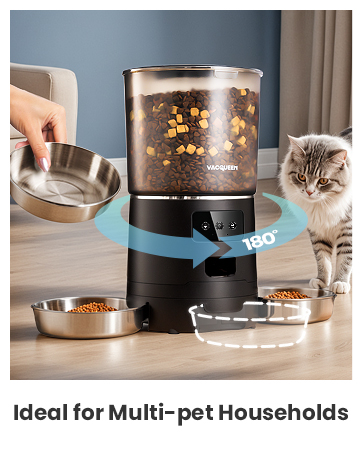
Figure 2: Feeder rotation for multi-pet households
4.4 Voice Recording and Two-Way Audio
Record a 10-second voice message to call your pets at meal times. The feeder also supports two-way audio, allowing you to interact with your pets remotely through the app.

Figure 3: Voice recording and two-way audio features
5. Maintenance
Regular cleaning is essential for the longevity and hygiene of your pet food dispenser.
- Food Container: The removable food container can be easily detached for cleaning.
- Bowls: The stainless steel bowls are dishwasher-safe for convenient and thorough cleaning.
- Main Unit: Clean the exterior of the main unit with a damp cloth. Do not use abrasive cleaners or immerse in water.
- Desiccant Filter: Replace the desiccant packet periodically (e.g., every 1-2 months) to ensure optimal food freshness.
6. Troubleshooting
If you encounter any issues with your Vacqueen Automatic Pet Food Dispenser, please refer to the following common solutions:
| Problem | Possible Cause | Solution |
|---|---|---|
| Feeder not dispensing food. | Food container empty; food jammed; power issue. | Refill food; clear any blockages; check power connection/batteries. |
| App not connecting to feeder. | Incorrect Wi-Fi password; feeder out of range; network issue. | Verify Wi-Fi credentials; move feeder closer to router; restart router and feeder. |
| Food not fresh. | Desiccant filter needs replacement; lid not sealed properly. | Replace desiccant packet; ensure lid is securely snapped shut. |
If the problem persists, please contact customer support.
7. Specifications
| Feature | Detail |
|---|---|
| Brand | Vacqueen |
| Model Name | Vacqueen Wifi Cat Feeder |
| Item Model Number | Vq-cf2024 |
| Color | Black |
| Material | ABS Plastic |
| Item Dimensions (LxWxH) | 7.7 x 7.7 x 9.8 inches |
| Item Weight | 3.97 pounds |
| Food Capacity | Up to 4 pounds of dry cat food |
| Feeding Schedule | Up to 6 automated meals per day |
| Portion Sizes | 1/8 cup to 1.5 cups per meal |
| Special Feature | Wi-Fi Enabled, Voice Recording, Two-way Audio, Battery Backup |
| Included Components | Cat Feeder, 3 Stainless Steel Bowls |
8. Warranty Information
The Vacqueen Automatic Pet Food Dispenser comes with a 2-Year Warranty from the date of purchase. This warranty covers manufacturing defects and malfunctions under normal use. Please retain your proof of purchase for warranty claims.
For detailed warranty terms and conditions, please refer to the warranty card included in your product packaging or visit the official Vacqueen website.
9. Customer Support
For any questions, technical assistance, or warranty claims, please contact Vacqueen Customer Support:
- Website: Visit the Vacqueen Store on Amazon
- Email: support@vacqueen.com
- Phone: 1-800-XXX-XXXX
Our support team is available to assist you with any product-related inquiries.
Related documentsVq-cf2024

Ask a question about this manual
Ask about setup, troubleshooting, compatibility, parts, safety, or missing instructions. Manuals+ will review the question and use this page’s manual context to help answer it.