
ODK B010111SPD66USDF
ODK 63-Inch Large Computer Desk Instruction Manual
Brand: ODK | Model: B010111SPD66USDF
Introduction
Thank you for choosing the ODK 63-Inch Large Computer Desk. This modern and spacious desk is designed to enhance your home office, study area, or gaming setup. Its durable construction and thoughtful features, such as the integrated headphone hook, provide a comfortable and efficient workspace. This manual provides detailed instructions for assembly, operation, maintenance, and troubleshooting to ensure you get the most out of your new desk.

Top-down view of the ODK 63-inch computer desk in grey oak, featuring two monitors, a laptop, keyboard, mouse, and decorative items, highlighting its spacious design.
Safety Information
- Always follow assembly instructions carefully.
- Do not exceed the maximum weight capacity of 110 lbs (50 kg) on the desktop.
- Ensure all screws and fasteners are securely tightened before use. Periodically check and re-tighten as needed.
- Keep small parts and packaging materials away from children to prevent choking hazards.
- Place the desk on a flat, stable surface to prevent wobbling or tipping.
- Avoid placing hot items directly on the desktop without protective padding.
Package Contents
Please check the package to ensure all components are present and undamaged. If any parts are missing or damaged, please contact customer support.
- Desktop Panel (1)
- Desk Legs (2)
- Support Bars (2-3, depending on size)
- Headphone Hook (1)
- Adjustable Foot Pads (4)
- Assembly Hardware (screws, bolts, Allen wrenches)
- Instruction Manual (1)
Setup (Assembly Instructions)
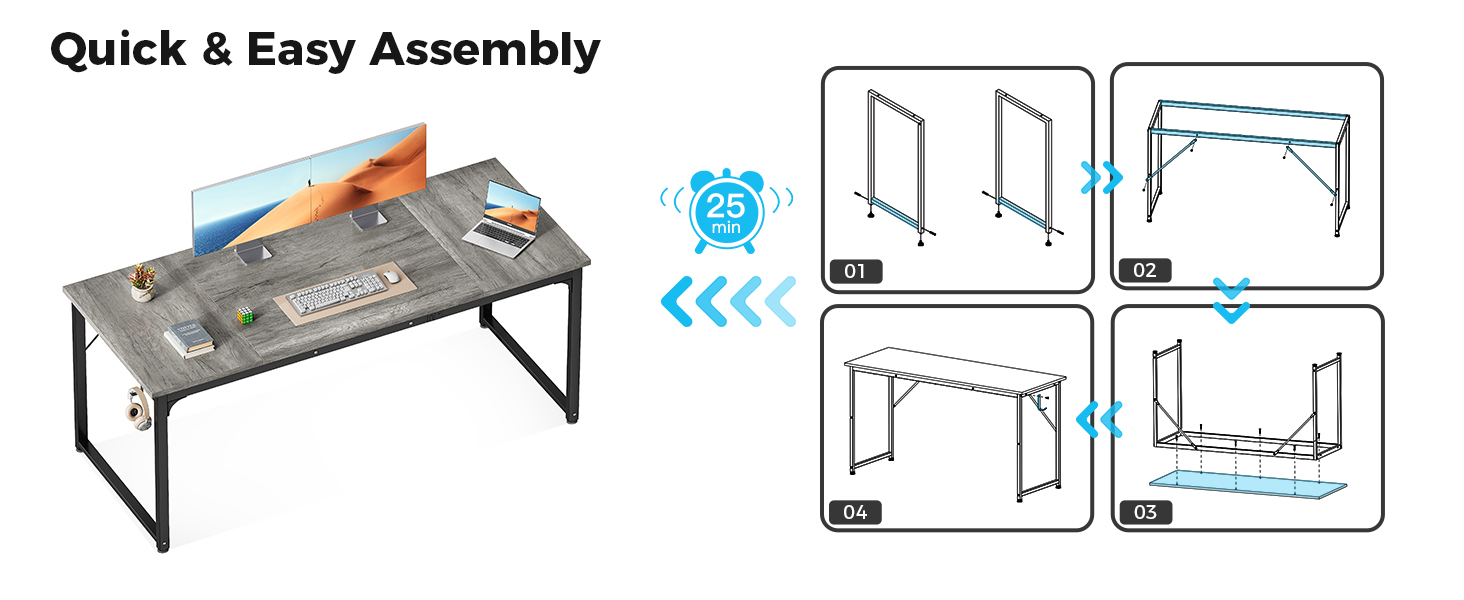
Assembly is designed to be quick and easy, typically taking around 30 minutes. All necessary tools are included.
- Prepare the Legs: Attach the adjustable foot pads to the bottom of each desk leg. Ensure they are securely tightened.
- Assemble the Frame: Connect the two desk legs using the support bars. Use the provided screws and Allen wrenches to secure them. Ensure the frame is stable and square.
- Attach the Desktop: Carefully place the desktop panel onto the assembled frame. Align the pre-drilled holes on the desktop with the holes on the frame.
- Secure the Desktop: Insert and tighten all remaining screws to firmly attach the desktop to the frame.
- Install the Headphone Hook: Choose your desired side for the headphone hook and attach it to the desk leg using the small screw provided.

Visual guide for the quick and easy assembly of the ODK computer desk, showing simplified steps.
Operating
The ODK Computer Desk is designed for straightforward use. Once assembled, it provides a stable surface for your computer, books, and other office essentials.
- Workspace Utilization: Arrange your computer, monitors, and accessories on the spacious desktop. The 63-inch length provides ample room for multiple setups.
- Headphone Hook: Utilize the integrated side hook to conveniently store your headphones, bags, or cables, keeping your workspace tidy and organized.
- Adjustable Foot Pads: If your floor is uneven, adjust the foot pads at the bottom of the legs to stabilize the desk and prevent wobbling.

Close-up view of the versatile headphone hook, ideal for storing headphones or bags.
Maintenance
Proper care will ensure the longevity and appearance of your ODK Computer Desk.
- Cleaning: Wipe the desktop and frame with a soft, damp cloth. For stubborn marks, use a mild soap solution and dry immediately. Avoid harsh chemicals or abrasive cleaners.
- Spills: The particle board tabletop is waterproof. In case of spills, wipe them up promptly to prevent any potential damage.
- Scratch Prevention: While the tabletop is scratch-resistant, using coasters for drinks and protective mats for heavy or sharp objects is recommended to maintain its pristine condition.
- Regular Checks: Periodically inspect all screws and connections to ensure they remain tight. Re-tighten if necessary to maintain stability.
The desk features a premium desktop that is easy to clean, waterproof, and scratch-resistant.
Troubleshooting
| Problem | Possible Cause | Solution |
|---|---|---|
| Desk wobbles after assembly. | Uneven floor or loose connections. | Adjust the foot pads at the bottom of the legs until the desk is stable. Check and tighten all assembly screws. |
| Parts are missing or damaged. | Shipping damage or packaging error. | Do not proceed with assembly. Contact ODK customer support immediately for replacement parts. |
| Difficulty with assembly. | Misinterpretation of instructions or incorrect part orientation. | Review the assembly diagrams carefully. Ensure parts are oriented correctly before tightening screws. If needed, disassemble and re-start. |
Specifications
| Feature | Detail |
|---|---|
| Brand | ODK |
| Model Number | B010111SPD66USDF |
| Product Dimensions | 63"D x 21.65"W x 28.95"H |
| Color | Grey Oak |
| Style | Modern |
| Top Material Type | Engineered Wood |
| Base Material | Metal (feet Pad) |
| Item Weight | 28 Pounds |
| Maximum Height | 28.95 Inches |
| Included Components | Headphone Hook |
| Required Assembly | Yes |
| Includes All Assembly Tools | Yes |
Warranty and Support
For warranty information, product support, or to order replacement parts, please refer to the contact details provided at the point of purchase or visit the official ODK website. Keep your purchase receipt as proof of purchase for any warranty claims.
For additional assistance, you may visit the ODK Store on Amazon.
Ask a question about this manual
Ask about setup, troubleshooting, compatibility, parts, safety, or missing instructions. Manuals+ will review the question and use this page’s manual context to help answer it.