
Haofy Haofyyv9bofp4tz
Haofy Automatic Fish Feeder User Manual
Model: Haofyyv9bofp4tz
Introduction
Thank you for choosing the Haofy Automatic Fish Feeder. This device is designed to provide convenient and precise feeding for your aquarium fish, ensuring they receive consistent nutrition even when you are away. It features customizable timing and portion control to maintain a healthy feeding schedule and prevent overfeeding. Please read this manual thoroughly before use to ensure proper operation and maintenance.

Image: Front view of the Haofy Automatic Fish Feeder, showing the clear food drum and mounting bracket.
Safety Information
- Do not immerse the main unit of the feeder in water. It is designed to be water-resistant, not submersible.
- Ensure the battery compartment is securely closed to prevent water ingress.
- Use only the specified battery type (2 AA batteries). Do not mix old and new batteries, or different types of batteries.
- Keep the feeder out of reach of children and pets.
- Do not attempt to disassemble or repair the feeder yourself. Contact customer support if issues arise.
- Ensure the feeder is securely mounted to prevent it from falling into the aquarium.
Package Contents
Please check the package contents to ensure all items are present:
- 1 x Automatic Fish Food Feeder Timer
- 2 x Double-faced stickers for mounting
- 1 x User manual

Image: The Haofy Automatic Fish Feeder shown alongside its user manual and double-sided mounting stickers.
Product Overview
Familiarize yourself with the components of your Haofy Automatic Fish Feeder:

Image: Diagram illustrating the main parts of the fish feeder, including the Feeding Quantity Adjustment, Fish Food Box, Battery Compartment, Plastic Screw, and Supporting Frame.
- Fish Food Box: Transparent container for storing fish food.
- Feeding Quantity Adjustment: Slider or dial to control the amount of food dispensed per feeding.
- Battery Compartment: Located on the back, holds 2 AA batteries.
- Supporting Frame: The base and clamp mechanism for mounting the feeder.
- Plastic Screw: Used to tighten the supporting frame onto the aquarium rim.
- ON/OFF Switch: Controls the power to the unit.
- 12H/24H Selector: Switch to set the feeding interval.
Setup
1. Battery Installation
- Locate the battery compartment on the back of the feeder.
- Slide open the battery cover.
- Insert 2 AA batteries (not included), ensuring correct polarity (+/-).
- Close the battery cover securely.
2. Mounting the Feeder
The feeder offers two installation options:
- Rim-Mounted: Attach the supporting frame to the rim of your aquarium using the plastic screw. Tighten the screw until the feeder is secure and stable. Ensure the food outlet is positioned over the water surface.
- Free-Standing: The feeder can also be placed on a flat surface near the aquarium, provided the food outlet can dispense directly into the water.

Image: Side view of the Haofy Automatic Fish Feeder, demonstrating its mounting clamp attached to an aquarium rim.
3. Filling the Food Box
- Slide the transparent food box off the main unit.
- Open the lid of the food box.
- Fill the food box with dry flakes or pellets. Do not overfill.
- Close the lid and slide the food box back onto the main unit until it clicks into place.
Operating Instructions
1. Setting Feeding Times
The feeder allows you to set feeding intervals:
- Locate the 12H/24H switch on the back of the unit.
- Slide the switch to your desired interval:
- 12H: The feeder will dispense food every 12 hours.
- 24H: The feeder will dispense food every 24 hours.
- The first feeding will occur approximately 12 or 24 hours after the switch is set.

Image: Rear view of the Haofy Automatic Fish Feeder, highlighting the battery compartment and the 12H/24H feeding interval selector switch.
2. Adjusting Food Volume
Control the amount of food dispensed per feeding:
- Locate the Feeding Quantity Adjustment slider/dial on the food box.
- Adjust the opening size to increase or decrease the amount of food released. Start with a small amount and observe your fish's consumption to avoid overfeeding.
3. Manual Feeding
To dispense food manually at any time:
- Press the manual feed button (if available, or briefly toggle the ON/OFF switch). Refer to the specific button on your model.
4. Power ON/OFF
Use the ON/OFF switch to activate or deactivate the feeder. When OFF, the feeder will not dispense food automatically.
Maintenance
Regular cleaning ensures optimal performance and hygiene for your fish:
1. Cleaning the Food Box
- Slide the transparent food box off the main unit.
- Empty any remaining food.
- Wash the food box with warm water and a mild, fish-safe detergent. Rinse thoroughly to remove all soap residue.
- Allow the food box to air dry completely before reattaching it to the main unit and refilling with food.
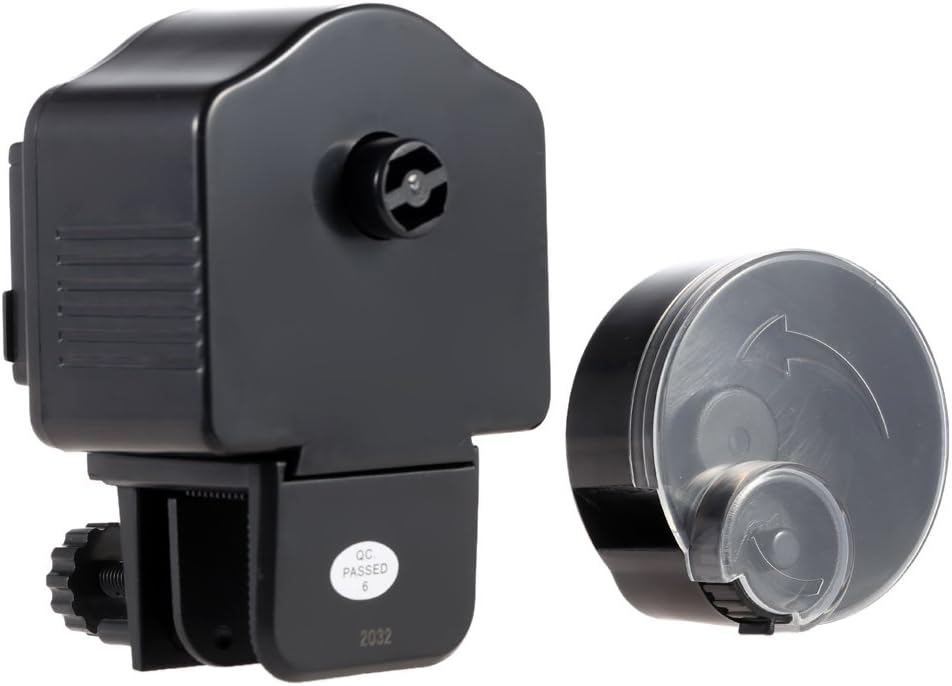
Image: The Haofy Automatic Fish Feeder with its food dispensing drum detached from the main unit, illustrating how it can be separated for cleaning or refilling.
2. General Care
- Wipe the exterior of the main unit with a damp cloth. Do not use abrasive cleaners.
- Ensure the food remains dry within the food box to prevent clogging. Store the feeder in a dry environment when not in use.
- Replace batteries annually or when the feeder's operation becomes inconsistent.
Troubleshooting
| Problem | Possible Cause | Solution |
|---|---|---|
| Feeder not dispensing food. |
|
|
| Food is clumping or wet. |
|
|
| Feeder makes unusual noises. |
|
|
Specifications
- Model: Haofyyv9bofp4tz
- Housing Material: Plastics
- Battery Type: 2 x AA batteries (not included)
- Feeding Times: 12 hours or 24 hours intervals
- Dimensions (approx): 5.91 x 4.33 x 3.15 inches (143 x 100 x 75mm)
- Net Weight: 7.1 ounces (193g)
- Color: Black
Warranty and Support
Haofy products are designed for reliability and performance. For any questions, technical support, or warranty inquiries, please contact our customer service team through the retailer's platform or visit the official Haofy store online. Please have your product model number (Haofyyv9bofp4tz) and purchase details ready when contacting support.
For more information, visit the Haofy Store on Amazon.
Ask a question about this manual
Ask about setup, troubleshooting, compatibility, parts, safety, or missing instructions. Manuals+ will review the question and use this page’s manual context to help answer it.