
1. Introduction
Thank you for choosing the AL-8787 Portable Bluetooth Speaker. This device is designed to provide a powerful and versatile audio experience, allowing you to enjoy your music anywhere. It features high-speed Bluetooth connectivity, multiple input options (USB, SD card, P2 auxiliary), and an integrated FM radio. Its compact and durable design, combined with a long-lasting rechargeable battery, makes it an ideal companion for various activities.
Please read this manual carefully before using the speaker to ensure proper operation and to maximize its lifespan. Keep this manual for future reference.
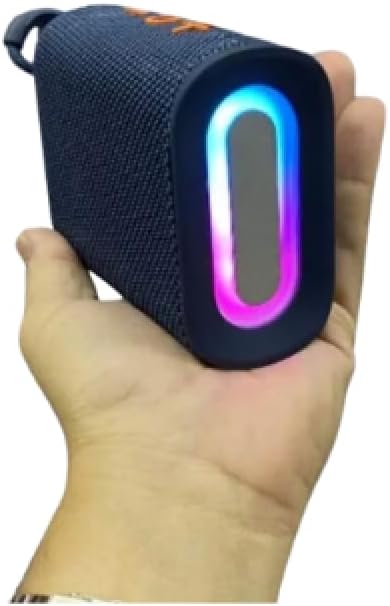
Image: The AL-8787 Portable Bluetooth Speaker, showcasing its compact size and integrated LED lighting, held in a user's hand.
2. Safety Information
- Do not expose the speaker to extreme temperatures, direct sunlight, or high humidity.
- Avoid dropping or subjecting the speaker to strong impacts.
- Do not disassemble, repair, or modify the device yourself. Refer all servicing to qualified personnel.
- Keep the speaker away from water and other liquids.
- Use only the provided charging cable or a certified equivalent.
- Clean the speaker with a soft, dry cloth. Do not use abrasive cleaners or solvents.
- Ensure proper ventilation when operating the speaker.
3. Package Contents
Please check the package for the following items:
- AL-8787 Portable Bluetooth Speaker
- USB Charging Cable
- User Manual (this document)
- Remote (as per specifications, though not explicitly listed in feature bullets)
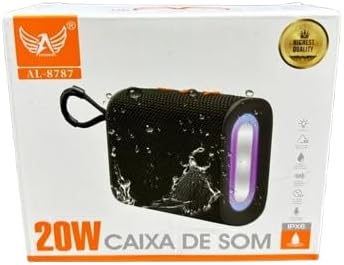
Image: The retail packaging box for the AL-8787 Portable Bluetooth Speaker, showing the product and branding.
4. Product Overview
Familiarize yourself with the speaker's controls and ports:

Image: Top view of the AL-8787 speaker, highlighting the control panel with volume and playback buttons.
Control Buttons:
- Power Button: Press and hold to turn the speaker ON/OFF.
- Mode Button (M): Press to switch between Bluetooth, FM Radio, USB, and SD card modes.
- Play/Pause Button (▶/‖): Press to play or pause audio. In FM mode, press and hold to auto-scan for stations.
- Volume Down / Previous Track (-): Short press for previous track/FM station. Long press to decrease volume.
- Volume Up / Next Track (+): Short press for next track/FM station. Long press to increase volume.
Ports:
- USB Port: For USB flash drive playback.
- SD Card Slot: For Micro SD card playback.
- AUX (P2) Input: For connecting external audio devices via a 3.5mm audio cable.
- DC 5V Charging Port: For charging the speaker using the provided USB cable.
5. Setup
5.1 Charging the Speaker
- Connect the small end of the USB charging cable to the DC 5V charging port on the speaker.
- Connect the larger end of the USB cable to a USB power adapter (not included) or a computer's USB port.
- The charging indicator light will illuminate (color may vary) to show that the speaker is charging.
- Once fully charged, the indicator light will change or turn off. Disconnect the charging cable.
Note: For optimal battery life, fully charge the speaker before first use.
5.2 Powering On/Off
- To Power On: Press and hold the Power button for a few seconds until you hear an audible prompt or see the indicator lights activate.
- To Power Off: Press and hold the Power button again for a few seconds until you hear an audible prompt or the indicator lights turn off.
6. Operating Instructions
6.1 Bluetooth Mode
- Turn on the speaker. It will automatically enter Bluetooth pairing mode, indicated by a flashing LED light and an audible prompt.
- On your smartphone, tablet, or other Bluetooth-enabled device, enable Bluetooth and search for available devices.
- Select "AL-8787" (or similar name) from the list of devices.
- Once paired, the speaker will emit an audible confirmation, and the LED light will stop flashing.
- You can now play music from your device through the speaker. Use the speaker's buttons or your device to control playback and volume.
Note: The speaker will automatically try to reconnect to the last paired device when powered on.
6.2 USB / SD Card Playback
- Insert a USB flash drive or a Micro SD card (with MP3 audio files) into the respective port on the speaker.
- The speaker will automatically switch to USB or SD card mode and begin playing music. If not, press the "M" (Mode) button to select the correct mode.
- Use the Play/Pause, Previous Track, and Next Track buttons to control playback.
6.3 FM Radio Mode
- Press the "M" (Mode) button repeatedly until you enter FM Radio mode.
- To auto-scan and save available FM stations, press and hold the Play/Pause button. The speaker will scan and store stations automatically.
- Once scanning is complete, use the Previous Track (-) and Next Track (+) buttons to navigate between saved stations.
Tip: For better FM reception, ensure the speaker is in an open area.
6.4 AUX (P2) Input
- Connect one end of a 3.5mm audio cable (not included) to the AUX port on the speaker.
- Connect the other end of the cable to the headphone jack of your external audio device (e.g., MP3 player, laptop).
- Press the "M" (Mode) button to switch to AUX mode.
- Control playback and volume directly from your connected audio device.
6.5 Volume Control
- Increase Volume: Long press the Next Track (+) button.
- Decrease Volume: Long press the Previous Track (-) button.
7. Maintenance
- Cleaning: Wipe the speaker with a soft, dry, lint-free cloth. Do not use liquid cleaners, aerosols, or solvents.
- Storage: When not in use for extended periods, store the speaker in a cool, dry place, away from direct sunlight and extreme temperatures.
- Battery Care: To preserve battery life, charge the speaker regularly, even if not in frequent use. Avoid fully discharging the battery repeatedly.
- Water Resistance: While the speaker has a durable design, avoid submerging it in water or exposing it to heavy rain.
8. Troubleshooting
| Problem | Possible Cause | Solution |
|---|---|---|
| Speaker does not turn on. | Low battery. | Charge the speaker fully. |
| Cannot pair via Bluetooth. | Bluetooth is off on your device; speaker is not in pairing mode; too far from device. | Ensure Bluetooth is enabled on your device. Put speaker in pairing mode. Move speaker closer to your device (within 10 meters). |
| No sound. | Volume too low; incorrect mode selected; device not playing. | Increase speaker and device volume. Ensure correct input mode (Bluetooth, USB, SD, AUX) is selected. Check if your device is playing audio. |
| FM radio reception is poor. | Weak signal; interference. | Move the speaker to an open area. Re-scan for stations. |
| USB/SD card not playing. | Unsupported file format; card/drive not inserted correctly; corrupted files. | Ensure files are in MP3 format. Reinsert the USB drive/SD card. Try a different USB drive/SD card. |
If the problem persists, please contact customer support.
9. Specifications
| Brand | Genérico |
| Model Name | AL8280 (Product referred to as AL-8787) |
| Speaker Type | Portable Speaker |
| Connectivity | Bluetooth, USB, SD Card, AUX (P2), FM Radio |
| Power Source | Rechargeable Battery, Wired Electric (via USB charging) |
| Included Components | Speaker, USB Charging Cable, Remote, User Manual |
| Product Dimensions (L x W x H) | 10 x 10 x 10 cm (approximate) |
| Manufacturer | LTOMEX |
| Country of Origin | Brazil |
10. Warranty Information
This product comes with a 3-month warranty from the date of purchase against manufacturing defects. The warranty does not cover damages caused by misuse, accidents, unauthorized repairs, or normal wear and tear.
Please retain your proof of purchase for warranty claims.
11. Customer Support
If you have any questions, encounter issues, or require assistance with your AL-8787 Portable Bluetooth Speaker, please contact your retailer or the manufacturer's customer service department.
For warranty claims or technical support, please refer to the contact information provided with your purchase documentation or visit the manufacturer's official website.