
1. Product Overview
The Panasonic AG-CX20 is a professional compact 4K camcorder designed for broadcast, streaming, and event videography. It features a 1/2.5-inch MOS sensor for high-resolution 4K UHD video capture, a wide 25mm lens with 24x optical zoom, and advanced image stabilization. This manual provides essential information for setting up, operating, and maintaining your camcorder.

Figure 1: Panasonic AG-CX20 4K Camcorder. This image displays the camcorder from a side-front angle, highlighting its compact design, lens, and integrated handle with audio controls.
2. What's Included
Before proceeding with setup, ensure all components are present in the packaging:
- Panasonic AG-CX20 4K Mobile Camcorder
- Power Supply
- Power Cable
- 5900mAh Battery
- Battery Charger
- Microphone Holder
- Microphone Holder Screw Set
- Input Terminal Cap
- Eye Cup
- Lens Hood
- Instruction Manuals
3. Setup
3.1 Unpacking
Carefully remove all items from the packaging. Retain the original packaging for future storage or transport of the camcorder.
3.2 Battery Installation and Charging
- Insert the provided 5900mAh battery into the battery slot on the rear of the camcorder until it clicks into place.
- Connect the battery charger to a power outlet and attach the battery. The charging indicator will illuminate.
- Allow the battery to charge completely before first use. A full charge typically takes several hours.
3.3 Memory Card Insertion
The AG-CX20 supports SD cards. Ensure the camcorder is powered off before inserting or removing memory cards.
- Locate the SD card slots, typically on the side of the camcorder.
- Insert the SD card with the label facing the correct direction (refer to the diagram near the slot) until it clicks into place.
- To remove, gently push the card in until it springs out, then pull it out.
3.4 Attaching Accessories
Attach the microphone holder and lens hood as follows:
- Microphone Holder: Secure the microphone holder to the designated mounting point on the camcorder handle using the provided screws.
- Lens Hood: Align the lens hood with the front of the lens and twist gently until it locks into position.

Figure 2: Proper handling of the Panasonic AG-CX20 camcorder. This image shows two hands holding the camcorder, demonstrating a secure grip for operation and accessory attachment.
4. Operating Instructions
4.1 Powering On/Off
To power on the camcorder, slide the POWER switch to the ON position. To power off, slide it to the OFF position.
4.2 Recording Video
- Ensure a charged battery and formatted SD card are inserted.
- Turn on the camcorder.
- Frame your shot using the LCD screen or viewfinder.
- Press the REC START/STOP button to begin recording. The recording indicator will illuminate.
- Press the REC START/STOP button again to stop recording.
4.3 Zoom Operation
The AG-CX20 features a 24x optical zoom, extendable to 48x intelligent zoom.
- Use the zoom lever on the handle to smoothly zoom in (T) or out (W).
- For precise control, use the zoom ring on the lens barrel in manual mode.
4.4 Focusing
The camcorder offers both automatic and manual focusing.
- Auto Focus (AF): Set the FOCUS switch to AF. The camcorder will automatically adjust focus.
- Manual Focus (MF): Set the FOCUS switch to MF. Rotate the focus ring on the lens barrel to adjust focus manually. Use the focus assist functions (e.g., peaking) for accuracy.
4.5 Audio Recording
The AG-CX20 includes dual XLR inputs for professional audio.
- Connect external microphones or audio sources to the XLR inputs.
- Use the audio level dials and switches on the handle unit to adjust input levels and select input types (LINE/MIC/+48V Phantom Power).
- Monitor audio levels using the on-screen meters and headphones.
4.6 Image Stabilization
The 5-Axis Hybrid Optical Image Stabilization (O.I.S.) system helps to minimize blur from camera shake. Ensure O.I.S. is enabled in the menu for smoother footage, especially when shooting handheld or at longer focal lengths.

Figure 3: Side view of the Panasonic AG-CX20 camcorder. This image highlights the various control buttons and switches on the side of the camcorder body, including focus, zoom, and menu access.
5. Maintenance
5.1 Cleaning
- Lens: Use a soft lens brush or air blower to remove dust. For smudges, use a lens cleaning solution and a microfiber cloth. Avoid touching the lens surface directly.
- Body: Wipe the camcorder body with a soft, dry cloth. For stubborn dirt, slightly dampen the cloth with water. Do not use harsh chemicals or solvents.
- LCD Screen: Use a soft, dry cloth specifically designed for LCD screens.
5.2 Storage
When not in use, store the camcorder in a cool, dry place away from direct sunlight and extreme temperatures. Remove the battery if storing for an extended period.
5.3 Firmware Updates
Periodically check the Panasonic support website for available firmware updates. Follow the instructions provided by Panasonic carefully to update the camcorder's firmware.
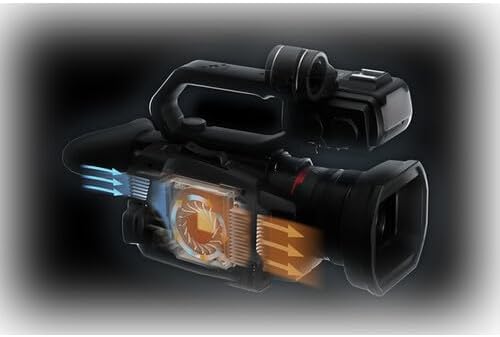
Figure 4: Diagram illustrating the internal cooling system. This image shows a cutaway view of a camcorder's internal components, highlighting the airflow and heat dissipation mechanisms crucial for maintaining optimal operating temperature.
6. Troubleshooting
| Problem | Possible Cause | Solution |
|---|---|---|
| Camcorder does not power on | Battery is not charged or incorrectly inserted. | Ensure battery is fully charged and correctly inserted. Check power cable connection if using AC adapter. |
| Cannot record video | No SD card, SD card full, or SD card not formatted. | Insert a formatted SD card. Delete unnecessary files or replace the card. Format the card if necessary (this will erase all data). |
| No audio recorded | Microphone not connected, audio levels too low, or incorrect input settings. | Check microphone connection. Adjust audio input levels. Verify XLR input settings (LINE/MIC/+48V). |
| Image is blurry | Focus issue or image stabilization off. | Check focus mode (AF/MF). Adjust focus manually if in MF. Ensure O.I.S. is enabled. |
If the problem persists after attempting these solutions, please contact Panasonic customer support.
7. Specifications
| Feature | Specification |
|---|---|
| Model Number | AG-CX20 |
| Manufacturer | Panasonic |
| Sensor Type | 1/2.5-inch MOS Sensor |
| Video Resolution | 4K UHD (60fps) |
| Optical Zoom | 24x |
| Intelligent Zoom | 48x |
| Image Stabilization | 5-Axis Hybrid Optical Image Stabilization |
| Audio Inputs | Dual XLR |
| Storage Media | SD Card (Dual Slots) |
| Product Dimensions | 7 x 6 x 6 inches |
| Item Weight | 12.86 pounds |
8. Warranty and Support
For warranty information, please refer to the warranty card included with your product or visit the official Panasonic support website. For technical assistance or further inquiries, contact Panasonic customer support through their official channels.


