
1. Introduction
The TERRAMASTER D5-310 is a 5-bay Direct Attached Storage (DAS) enclosure designed for expanding storage capacity and enhancing data protection. It features hardware RAID capabilities, supporting RAID 5, 0, 1, 10, and Single disk modes, providing flexible storage solutions. With a high-speed USB 3.1 Gen 1 interface, it offers rapid data transfers and is compatible with Windows, macOS, and Linux operating systems. This manual provides detailed instructions for setting up, operating, and maintaining your D5-310 enclosure.

Figure 1: TERRAMASTER D5-310 5-Bay HDD Enclosure.
2. What's in the Box
- D5-310 device x 1
- Power adapter x 1
- Power cord x 1
- USB Type A to C cable x 1
- A handful of screws x 1 (for 2.5-inch drives)
3. Setup
3.1. Hard Drive Installation
The D5-310 supports up to five 3.5-inch SATA HDDs, 2.5-inch SATA HDDs, and SSDs. The drive bays are designed for tool-free installation for 3.5-inch drives, while 2.5-inch drives require screws.
- Gently pull the drive tray handle to slide out an empty drive tray.
- For 3.5-inch HDDs: Place the HDD into the tray. The tray's side clips will secure the drive without screws.
- For 2.5-inch HDDs/SSDs: Secure the drive to the tray using the provided screws.
- Slide the loaded drive tray back into the enclosure until it clicks into place.
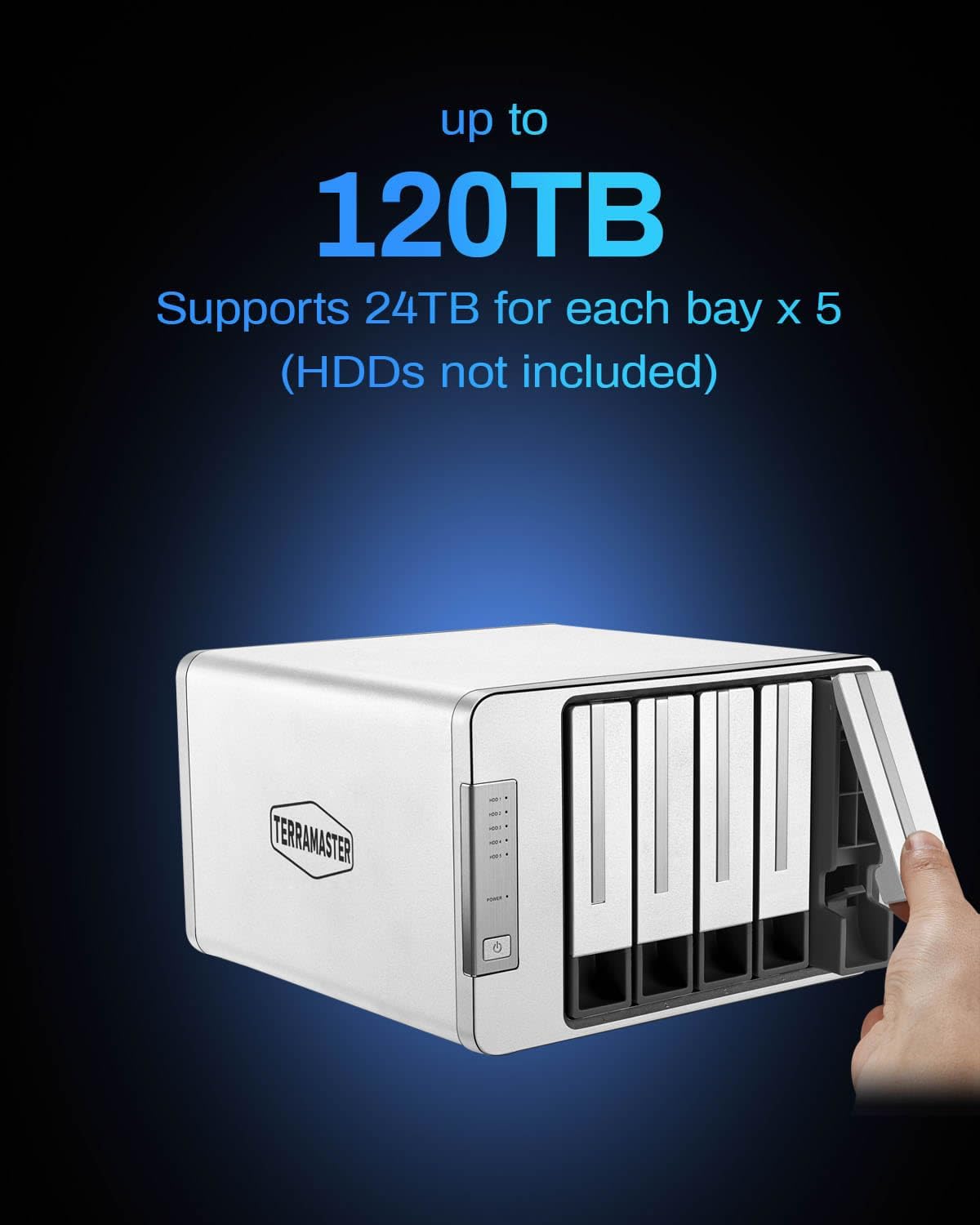
Figure 2: Inserting a hard drive into the D5-310 enclosure.
3.2. Connecting the Device
- Connect the power adapter to the D5-310 and then to a power outlet.
- Connect the USB Type-C cable from the D5-310 to your computer's USB port.
Figure 3: Rear panel connections and RAID knob.
3.3. RAID Configuration
The D5-310 features hardware RAID, configured using a dedicated knob on the rear panel. Ensure the device is powered off before changing RAID modes.
- RAID 5: Provides data redundancy and improved performance. Requires at least 3 drives.
- RAID 0: Maximizes performance and capacity, but offers no data redundancy. Requires at least 2 drives.
- RAID 1: Mirrors data across two drives for redundancy. Requires 2 drives.
- RAID 10: Combines mirroring and striping for both performance and redundancy. Requires at least 4 drives.
- Single: Each disk operates independently.
- Hot Spare: Supported for RAID 1, 5, or 10 configurations to automatically replace a failed drive.
- Using a small screwdriver (not included), rotate the RAID knob on the rear panel to select your desired RAID mode.
- Press the "RESET" button (located near the RAID knob) for 5 seconds to confirm the RAID mode change.
- Power on the device. The new RAID configuration will be applied.

Figure 4: Hardware RAID configuration knob and reset button.

Figure 5: Visual representation of supported RAID modes.
4. Operation
4.1. Power On/Off
Press the power button on the front panel to turn the D5-310 on. To turn it off, press and hold the power button until the device shuts down.
4.2. Data Transfer
The D5-310 utilizes a USB 3.1 Gen 1 interface, providing data transfer speeds of up to 5Gbps. This allows for rapid file transfers, such as moving a 1GB file in approximately 4 seconds.
4.3. Operating System Compatibility
The D5-310 is fully compatible with Windows, macOS (including the latest versions), and Linux operating systems. No additional drivers are required for basic functionality.

Figure 6: Multi-platform compatibility of the D5-310.
4.4. Backup Software
The D5-310 includes TPC Backupper, a free Windows backup tool. This software supports scheduled, incremental, and differential backups, providing robust data protection for your Windows system.
Figure 7: TPC Backupper software for Windows backup.
5. Maintenance
- Smart Sleep Mode: The device features a hard drive sleep mode to conserve energy and extend drive lifespan when idle.
- Intelligent Cooling System: Temperature-controlled fans dynamically adjust their speed based on HDD temperature to maintain optimal operating conditions. Ensure fan vents are clear of obstructions.
- Power-On Recovery: The D5-310 is designed to automatically restart after a power failure, ensuring continuous operation.
- RAID Failure Alarm: A built-in buzzer will alert you in case of a disk failure within a RAID array.
6. Troubleshooting
- Device Not Recognized: Ensure all cables (power and USB) are securely connected. Try a different USB port or cable. Verify the device is powered on.
- Drives Not Appearing: After initial setup or changing RAID modes, drives may need to be initialized and formatted through your operating system's disk management utility.
- Slow Transfer Speeds: Ensure you are using a USB 3.1 Gen 1 compatible port on your computer. Check the health of your hard drives.
- RAID Array Issues: If a drive fails in a redundant RAID configuration (RAID 1, 5, 10), the D5-310's hot spare feature (if configured) will automatically begin rebuilding. If no hot spare is present, replace the failed drive and initiate a manual rebuild according to the advanced user guide (available on the TERRAMASTER website).
- Unexpected Shutdowns: Ensure adequate ventilation around the enclosure. Check power connections.
7. Specifications
| Brand | TERRAMASTER |
| Model Number | D5-310 |
| Material | Aluminum |
| Item Weight | 4.9 Pounds |
| Product Dimensions | 8.94 x 8.86 x 5.35 inches |
| Max Number of Supported Devices | 5 |
| Hard Disk Form Factor | 3.5 Inches (also supports 2.5 Inches with screws) |
| Hardware Interface | SATA 6.0 Gb/s |
| Data Transfer Rate | 5 Gigabits Per Second (USB 3.1 Gen 1) |
| RAID Modes Supported | RAID 5, 0, 1, 10, Single |
| Maximum Capacity | 120TB (24TB per bay x 5) |
| Compatible Devices | Linux, Mac, Windows |
8. Warranty and Support
For warranty information, technical support, and additional resources, please visit the official TERRAMASTER website. You can also find updated drivers, firmware, and detailed FAQs there.