
Introduction
The JONR ED12 Pro Max Wet Dry Vacuum Cleaner is an advanced cleaning solution designed to simplify your floor care routine. This cordless, versatile appliance combines vacuuming and mopping functions, offering powerful suction and innovative features for a spotless home. Its intelligent design, including 180° lay-flat capability and self-cleaning technology, ensures efficient and convenient cleaning of various hard floor types.

Figure 1: The JONR ED12 Pro Max Wet Dry Vacuum Cleaner with its accessories.
What's Included
Your JONR ED12 Pro Max package includes all the essential components for immediate use and easy maintenance:
- Main Body (1)
- Charging Base (1)
- Maintenance Brush (1)
- Cleaning Solution (1 bottle)
- Sponge Filter (1, pre-installed)
- User Manual (1)

Figure 2: All components included in the JONR ED12 Pro Max package.
Setup
Follow these steps to set up your JONR ED12 Pro Max for first-time use:
- Assemble the Handle: Insert the handle into the main body until it clicks securely into place.
- Voice Prompt Settings: Short press the voice button to activate voice prompts. Long press to switch between available languages.
- Fill the Clean Water Tank: Press the latch to release the clean water tank from the floor brush. Open the lid and fill the tank with clean water. You may add a small amount of the provided cleaning solution. Close the lid and place the tank back into the floor brush until it clicks.
- Charge the Unit: Correctly place the main unit on the charging base. Plug the charging base into a power source. Ensure the battery is sufficiently charged before first use.
Video 1: JONR ED12 Pro Max Vacuum Cleaner Assembly and Operation Guide. This video demonstrates the initial setup steps including handle assembly, water tank filling, and charging.
Operating
Operating your JONR ED12 Pro Max is intuitive and efficient:
- Power On: Gently step on the brush cover and tilt the vacuum cleaner backward. Long press the power button on the handle to turn it on.
- Select Cleaning Mode: Short press the mode button on the handle to switch between Eco Mode (mopping and vacuuming), Turbo Mode (mopping and vacuuming with enhanced suction), and Dry Mode (only vacuuming).
- Start Cleaning: Begin cleaning your hard floors. The unit is self-propelled, making it easy to maneuver.
- 180° Lay-Flat Cleaning: For cleaning under low furniture, lay the unit flat. Ensure the dirty water tank capacity is less than 400ml and hold the handle as shown in the user guide for optimal performance.
- Voice Prompts: The device provides informative voice prompts to guide you through the cleaning process and alert you to status changes.

Figure 3: The 180° lay-flat design allows for easy cleaning under low-clearance furniture.

Figure 4: Choose from three cleaning modes: Auto, Ultra, and Suction, for various cleaning needs.
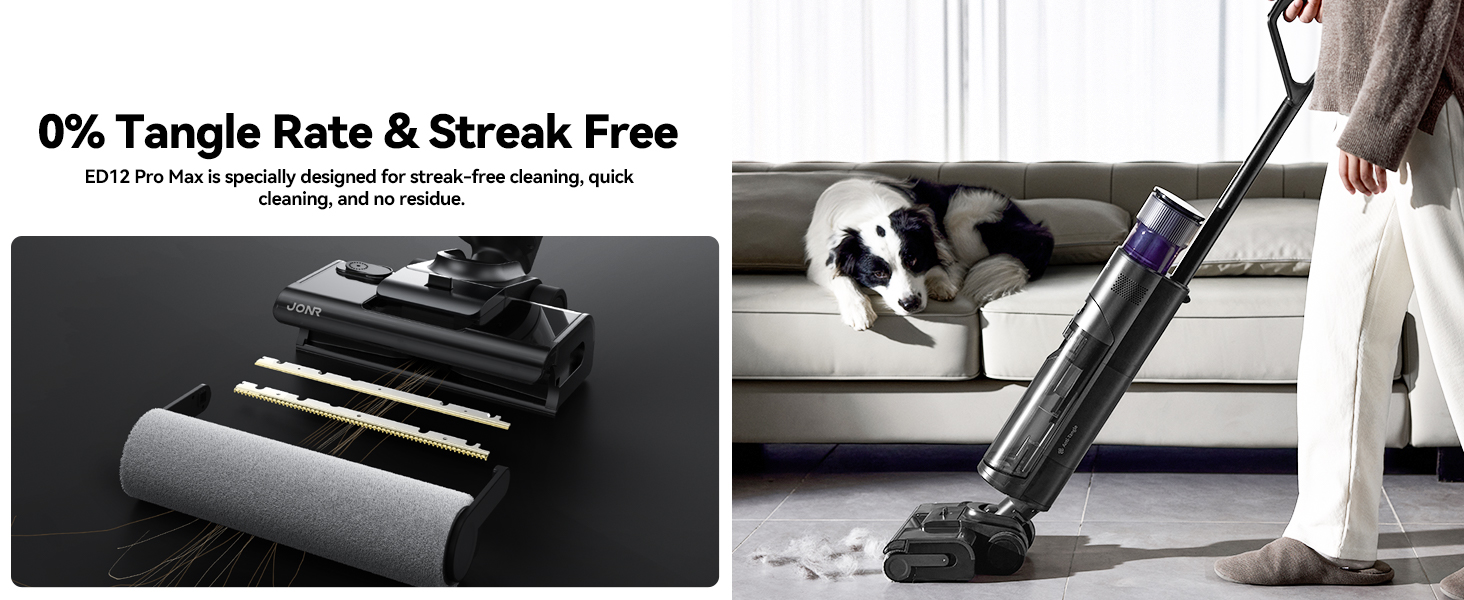
Figure 5: The triple edge cleaning design ensures thorough cleaning along baseboards and in corners.
Video 2: JONR ED12 Pro Max Wet Dry Vacuum Cleaner in action, demonstrating its cleaning capabilities on various messes.
Maintenance
Regular maintenance ensures optimal performance and longevity of your JONR ED12 Pro Max:
- Self-Cleaning & Drying: After use, dock the vacuum on the charging base. Ensure there is sufficient clean water in the clean water tank and the battery is sufficiently charged. Press the mode button briefly to start the self-cleaning process. The self-drying process will start automatically after cleaning. You can choose between a 20-minute standard drying mode or a 5-minute quick drying mode by short pressing the mode button again.
- Clean the Dirty Water Tank: After self-cleaning, press the dirty water tank release button to remove the tank. Open the lid, pour out the used water, and rinse the tank and sponge filter thoroughly with clean water.
- Clean the Roller Brush: Press the release button to remove the roller brush cover. Pull the roller brush outward. Clean the roller brush and its cover with water.
- Clean the Suction Port: Use a damp cloth to clean the suction port. Do not rinse it directly with water.
- Clean the Charging Base: Wipe the charging base with a dry cloth. Do not rinse the charging base directly with water.
- Reassembly: After all components are dry, reinstall the dirty water tank, sponge filter, roller brush, and brush cover.

Figure 6: The 167°F hot water self-cleaning feature ensures the brush roller is thoroughly cleaned.

Figure 7: Choose between a quiet 20-minute drying mode or a quick 5-minute drying mode.
Troubleshooting
If you encounter any issues with your JONR ED12 Pro Max, refer to the table below for common problems and solutions:
| Problem | Possible Cause | Solution |
|---|---|---|
| Unit does not power on | Low battery; Not properly docked; Power button not long-pressed. | Charge the unit fully; Ensure it is correctly placed on the charging base; Long press the power button for 3 seconds. |
| No suction or weak suction | Dirty water tank full; Clogged filter; Blocked suction port or roller brush. | Empty and clean the dirty water tank; Clean or replace the sponge filter; Remove any blockages from the suction port or roller brush. |
| Water leakage | Clean/dirty water tank not properly installed; Tank lid not sealed. | Ensure both tanks are securely clicked into place; Check that tank lids are properly sealed. |
| Roller brush not spinning | Hair or debris tangled in brush; Brush not properly installed. | Clean the roller brush and remove any tangles; Reinstall the roller brush correctly. |
| Voice prompt indicates "Sewage tank full" but it's empty | Sensor malfunction or blockage. | Clean the dirty water tank and ensure all internal components are free of debris. If the issue persists, contact customer support. |
Specifications
Key technical specifications for the JONR ED12 Pro Max Wet Dry Vacuum Cleaner:
| Feature | Detail |
|---|---|
| Brand | JONR |
| Model Name | ED12 Pro Max |
| Special Feature | Cordless |
| Filter Type | Foam |
| Clean Water Tank Capacity | 0.75 Liters |
| Runtime | Up to 40 minutes (advertised), 35 minutes (specified) |
| Form Factor | Upright |
| Color | Carbon Grey |
| Product Dimensions | 25"L x 12"W x 12"H |
| Battery Type | Lithium-Ion (1 AA battery included) |
| Noise Level | 78 dB |
| Suction Power | 17,000 PA |
Warranty and Support
JONR products are designed for reliability and performance. For specific warranty details and to register your product, please refer to the warranty card included in your package or visit the official JONR website. For any technical assistance, troubleshooting beyond this manual, or to purchase replacement parts, please contact JONR customer support through the official JONR Store on Amazon or their dedicated support channels.
JONR Store Link: Visit the JONR Store
Protection plans are also available for extended coverage:
- 2-Year Protection Plan
- 3-Year Protection Plan
- Complete Protect (monthly renewal option)


