
Sinbo SCM-2982
Sinbo SCM-2982 Coffee and Spice Grinder User Manual
Model: SCM-2982
1. Introduction
Thank you for choosing the Sinbo SCM-2982 Coffee and Spice Grinder. This manual provides important information regarding the safe operation, maintenance, and troubleshooting of your new appliance. Please read it thoroughly before first use and keep it for future reference.
2. Important Safety Instructions
When using electrical appliances, basic safety precautions should always be followed, including the following:
- Read all instructions before using the appliance.
- Do not immerse the motor base in water or other liquids.
- Unplug from outlet when not in use, before putting on or taking off parts, and before cleaning.
- Avoid contact with moving parts.
- Do not operate any appliance with a damaged cord or plug, or after the appliance malfunctions or has been dropped or damaged in any manner.
- The use of attachments not recommended or sold by the manufacturer may cause fire, electric shock, or injury.
- Do not use outdoors.
- Do not let cord hang over edge of table or counter, or touch hot surfaces.
- Do not place on or near a hot gas or electric burner, or in a heated oven.
- Always attach plug to appliance first, then plug cord into the wall outlet. To disconnect, turn any control to "off", then remove plug from wall outlet.
- This appliance is for household use only.
- Close supervision is necessary when any appliance is used by or near children.
- Do not use the appliance for other than intended use.
- Ensure the lid is securely locked in place before operating the grinder.
- Do not operate the grinder continuously for more than 30 seconds. Allow it to cool down between cycles.
3. Product Overview
The Sinbo SCM-2982 is a versatile grinder designed for both coffee beans and various spices. It features durable stainless steel blades and comes with two interchangeable grinding cups for different grinding needs.

Figure 3.1: The Sinbo SCM-2982 grinder, showing the main unit with one grinding cup inserted and the second grinding cup detached.
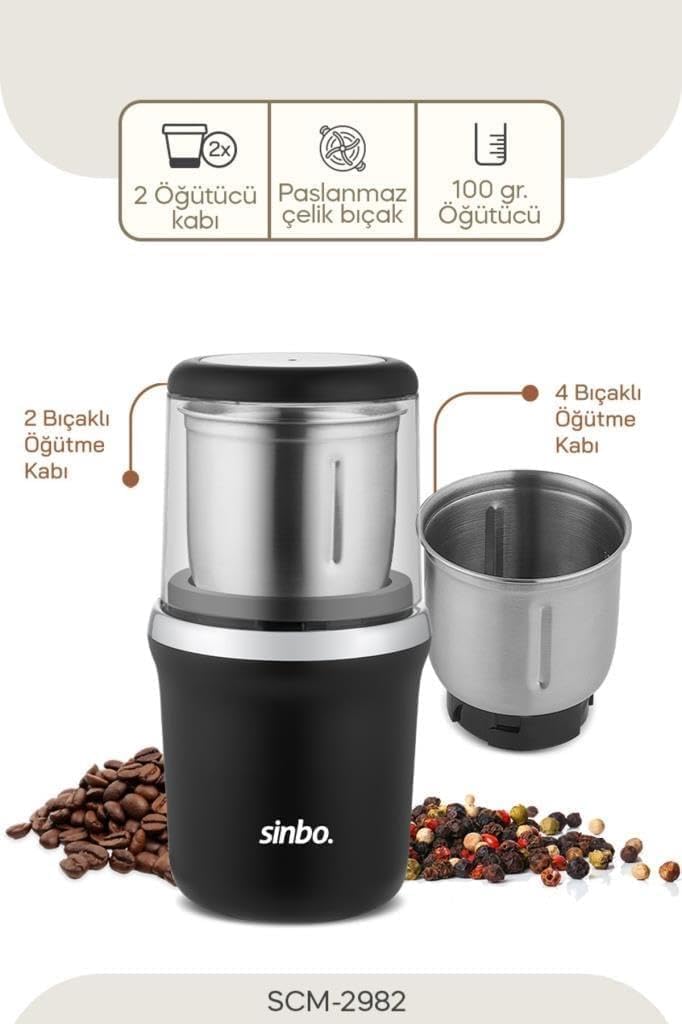
Figure 3.2: Key features of the SCM-2982, highlighting the two grinding cups (one with 2 blades, one with 4 blades), stainless steel construction, and a 100-gram grinding capacity.

Figure 3.3: The grinder's wide grinding cup allows for grinding up to 100 grams of coffee beans in a single operation, suitable for preparing multiple servings.

Figure 3.4: Demonstrating the versatile use of the grinder for both coffee beans and a variety of spices, showcasing its multi-purpose functionality.

Figure 3.5: Illustrating the consistent and even grinding capability of the appliance for both coffee and spices, ensuring optimal results.

Figure 3.6: A close-up view of the durable stainless steel blades, highlighting the two-blade and four-blade configurations available with the interchangeable grinding cups.
4. Setup
- Unpack the grinder and all its components.
- Before first use, clean the grinding cups and lids with warm soapy water, rinse thoroughly, and dry completely. Wipe the motor base with a damp cloth. Do not immerse the motor base in water.
- Select the appropriate grinding cup (2-blade for general grinding, 4-blade for finer results or specific spices).
- Place the chosen grinding cup onto the motor base, ensuring it is securely seated and locked into position.
- Ensure the appliance is unplugged before adding ingredients.
5. Operating Instructions
- Prepare Ingredients: Ensure coffee beans or spices are dry. Do not grind wet or oily ingredients.
- Fill Grinding Cup: Add the desired amount of coffee beans or spices to the grinding cup. Do not fill above the MAX line indicated inside the cup (if present) or exceed 100 grams.
- Secure Lid: Place the transparent lid onto the grinding cup and twist or press down firmly until it is securely locked. The grinder will not operate unless the lid is properly secured.
- Plug In: Plug the power cord into a standard electrical outlet.
- Grind: Press and hold the power button (or press down on the lid if it's a press-to-grind model). Grind in short bursts (5-10 seconds) to achieve the desired consistency. For finer grinds, repeat the process, allowing a few seconds between bursts to prevent overheating. Do not operate continuously for more than 30 seconds.
- Check Consistency: Release the button and unplug the grinder. Carefully remove the lid and check the consistency of the grind.
- Remove Ground Material: Once grinding is complete, unplug the appliance. Remove the grinding cup from the motor base and carefully pour out the ground coffee or spices.
Grinding Tips:
- For coarse grinds, use shorter bursts.
- For fine grinds, use longer or more frequent bursts, but always adhere to the 30-second continuous operation limit.
- Shake the grinder gently between bursts to ensure even grinding.
6. Maintenance and Cleaning
Regular cleaning will ensure the longevity and optimal performance of your grinder.
- Always unplug the grinder before cleaning.
- Grinding Cups and Lids: The removable grinding cups and their lids can be washed with warm, soapy water. Rinse thoroughly and dry completely before reassembling or storing. Do not wash in a dishwasher.
- Motor Base: Wipe the exterior of the motor base with a soft, damp cloth. Do not immerse the motor base in water or any other liquid.
- Blades: Use a small brush (like a stiff pastry brush or an old toothbrush) to remove any residual coffee grounds or spice particles from around the blades. Be careful as blades are sharp.
- Storage: Store the grinder in a dry place when not in use.
7. Troubleshooting
| Problem | Possible Cause | Solution |
|---|---|---|
| Grinder does not turn on. |
|
|
| Grinding is uneven. |
|
|
| Grinder stops during operation. |
|
|
8. Specifications
- Model: SCM-2982
- Brand: Sinbo
- Type: Coffee and Spice Grinder
- Blade Material: Stainless Steel
- Grinding Cups: Two interchangeable cups (2-blade and 4-blade)
- Capacity: Up to 100 grams (coffee beans/spices)
- Color: Chrome / Black
9. Warranty and Support
Information regarding product warranty and customer support is typically provided with the product packaging or on the manufacturer's official website. Please refer to those resources for detailed warranty terms, registration, and contact information for technical support or service inquiries.
For further assistance, please visit the official Sinbo website or contact their customer service department.
Related documentsSCM-2982

Ask a question about this manual
Ask about setup, troubleshooting, compatibility, parts, safety, or missing instructions. Manuals+ will review the question and use this page’s manual context to help answer it.