1. Introduction
This manual provides detailed instructions for the installation, operation, and maintenance of your IRONZON Fingerprint Door Lock, Model 191YN. Please read this manual thoroughly before installation and use to ensure proper function and security.
2. Product Overview
The IRONZON Fingerprint Door Lock 191YN is a smart door handle designed for enhanced security and convenience. It offers multiple unlocking methods and integrates modern design with advanced biometric technology.
2.1 Key Features
- Versatile Unlocking Methods: Fingerprint, password, physical key, and smart app (with gateway, sold separately).
- Modern Design: Sleek metal construction with a touch keypad.
- Fast Unlocking: Biometric technology allows unlocking within 1 second.
- Enhanced Security: Combines advanced security technology with convenient operation.
- Auto-Lock Feature: Automatically locks the door after a set period.
2.2 Components
The package includes the following main components:
- Exterior Handle with Fingerprint Sensor and Keypad
- Interior Handle
- Latch Mechanism
- Mounting Hardware
- Physical Keys
- Installation Template (typically included)
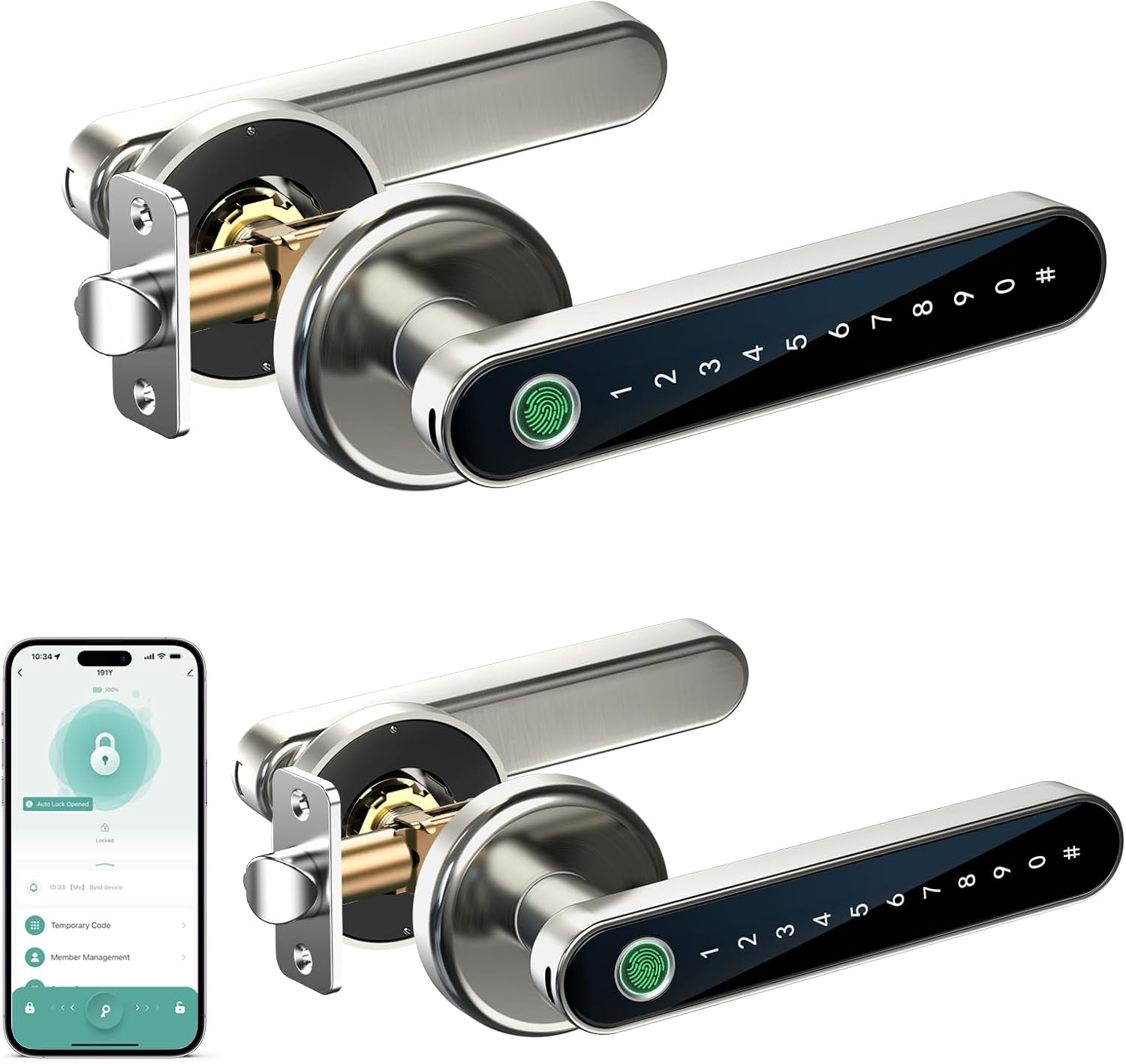
Image 1: Overview of the IRONZON Fingerprint Door Lock 191YN, showing the exterior handle with its integrated fingerprint sensor and numeric keypad, the interior handle, and the latch mechanism. The image also displays a smartphone screen illustrating the companion app interface for lock management.
3. Installation
Proper installation is crucial for the functionality and security of your lock. It is recommended to follow the detailed instructions provided in the physical installation guide that accompanies your product. Below are general steps:
- Prepare the Door: Ensure your door meets the required dimensions for the lock. If replacing an existing lock, remove the old hardware.
- Install the Latch: Insert the latch mechanism into the door edge and secure it with screws.
- Install the Exterior Assembly: Place the exterior handle assembly through the door, ensuring the spindle aligns with the latch.
- Install the Interior Assembly: Connect the interior handle assembly to the exterior assembly, securing it with mounting screws.
- Insert Batteries: Open the battery cover on the interior handle and insert 4 AAA batteries (not included), ensuring correct polarity.
- Test Functionality: After installation, test the mechanical operation with the physical key and ensure the handle turns smoothly.
For detailed, step-by-step instructions, refer to the installation template and guide included in your product packaging.
4. Operating Instructions
The IRONZON 191YN offers multiple ways to unlock and manage access.
4.1 Initial Setup and Programming
- Download the App: Search for the IRONZON smart lock app on your smartphone's app store.
- Pair the Lock: Follow the in-app instructions to pair your lock via Bluetooth. A gateway (sold separately) is required for remote control features.
- Set Administrator: Establish an administrator fingerprint and password through the app. This is crucial for managing other users and settings.
- Register Fingerprints: Add user fingerprints via the app. For optimal recognition, register each finger multiple times from different angles.
- Create Passcodes: Generate permanent or temporary passcodes for users through the app.
4.2 Unlocking Methods
- Fingerprint:
Place your registered finger firmly on the fingerprint sensor. The lock will unlock within 1 second if the fingerprint is recognized.
Image 2: Detail of the exterior handle, highlighting the fingerprint sensor and the touch keypad for code entry.
- Passcode:
Touch the keypad to activate it. Enter your registered passcode followed by the '#' key. The lock will unlock.
- Physical Key:
In case of battery depletion or electronic malfunction, use the provided physical key to manually unlock the door.
- Smart App:
Open the IRONZON app on your smartphone. If within Bluetooth range or connected via a gateway, you can remotely unlock the door.
Image 3: A smartphone displaying the IRONZON app, illustrating the user interface for managing lock settings, including auto-lock, temporary codes, and user access.
4.3 Locking the Door
- Automatic Locking: The lock is designed to automatically re-lock after a short period (default setting, configurable via app) once unlocked.
- Manual Locking: Some models may offer a manual lock button on the interior handle or a specific sequence on the keypad. Refer to the app for specific manual lock options.
5. Maintenance
Regular maintenance ensures the longevity and optimal performance of your IRONZON Fingerprint Door Lock.
- Battery Replacement:
The lock requires 4 AAA batteries. When the battery level is low, the lock will provide an alert. To replace, remove the screw on the interior handle's battery cover, replace the batteries, and re-secure the cover.
Note: If batteries completely deplete, a USB-C port on the exterior handle can be used for emergency power to unlock with a code or fingerprint, allowing access to replace batteries.
- Cleaning:
Wipe the lock's surface with a soft, dry cloth. Avoid abrasive cleaners or solvents that could damage the finish or electronic components.
- Fingerprint Sensor Care:
Keep the fingerprint sensor clean and dry. Moisture or dirt can affect recognition accuracy.
6. Troubleshooting
If you encounter issues with your IRONZON Fingerprint Door Lock, refer to the following common solutions:
- Lock Not Responding:
Check battery level. Replace batteries if low. Use the emergency USB-C power port if completely dead.
- Fingerprint Not Recognized:
Ensure your finger is clean and dry. Try different angles or re-register your fingerprint in the app. Ensure the fingerprint sensor is clean.
- Passcode Not Working:
Verify the correct passcode is being entered. Ensure the keypad is active before entering the code. Check if the passcode has expired (for temporary codes).
- App Connectivity Issues:
Ensure Bluetooth is enabled on your phone and you are within range. If using a gateway, check its connection to your network and the lock. Restart the app or your phone.
- Door Not Locking Automatically:
Check the auto-lock settings in the app. Ensure the door closes properly and the latch mechanism is not obstructed.
- Voice Prompts Unclear or Undesired:
The volume of voice prompts can typically be adjusted or muted via the smart app settings.
- Locked Inside/Outside:
Always keep a physical key accessible outside the locked room for emergencies. If locked inside, ensure the interior handle operates freely to exit. If the lock mechanism is jammed, do not force it; contact support.
7. Specifications
| Feature | Detail |
|---|---|
| Brand | IRONZON |
| Model Name | LOC191YSSUSIR (191YN) |
| Lock Type | Biometric |
| Special Feature | Auto-Lock |
| Material | Metal |
| Color | Nickel (as per current product variant) |
| Item Dimensions (L x W x H) | 1 x 1 x 1 inches |
| Item Weight | 1.9 pounds |
| Control Method | App, Push Button, Touch |
| Batteries Required | Yes (4 AAA batteries, not included) |
8. Warranty and Support
IRONZON products are designed for durability and reliability. For information regarding warranty coverage, technical support, or service inquiries, please refer to the warranty card included with your product or visit the official IRONZON website. You may also contact customer support through the retailer where the product was purchased.
For additional assistance, please visit the IRONZON Store on Amazon.


