
1. Introduction
This manual provides detailed instructions for the installation, operation, and maintenance of your HBEZON 60x32 Inch LED Medicine Cabinet. Please read this manual thoroughly before installation and use to ensure proper function and safety. Keep this manual for future reference.

Image 1.1: The HBEZON 60x32 Inch LED Medicine Cabinet featuring integrated lighting and a mirrored surface.
2. Important Safety Information
Please observe the following safety precautions to prevent injury or damage to the product:
- Always unplug the electrical outlet and USB port before installation or cleaning.
- Use appropriate safety gear when handling glass components.
- Ensure the cabinet is securely mounted to the wall to prevent tipping.
- Keep the cabinet area clear of flammable materials.
- Do not exceed the weight capacity of the cabinet to prevent structural damage or injury.
3. Product Features
- 3 Color Lighting Modes & Adjustable Brightness: High-brightness 6000 Lumens LED light strip with warm, natural, and cold white modes. Brightness is adjustable from 0% to 100%.
- Memory Function: Remembers your last light setting.
- Anti-fog Function: Keeps the mirror clear in steamy environments.
- Electrical Outlet & USB Port: Built-in for convenient device charging.
- Soft-Close DTC Hinges: Rustproof hinges with silent buffering technology for smooth and quiet door closure.
- Space-Saving Design: Adjustable shelves maximize storage.
- Recessed or Surface Wall-Mounted: Detachable glass panels allow for flexible installation.
- Durable Construction: Aluminum frame designed to withstand bathroom humidity.

Image 3.1: Overview of key features including lighting, anti-fog, and power options.
4. Specifications
| Attribute | Detail |
|---|---|
| Brand | HBEZON |
| Model Name | RAIL (Model 6032) |
| Color | Silver |
| Product Dimensions | 5"D x 60"W x 32"H |
| Mounting Type | Wall Mount, Recessed Mount |
| Weight Limit | 60 Pounds |
| Item Weight | 120 Pounds |
| Number of Shelves | 3 |
| Frame Material | Aluminum |
| Top Material Type | Glass |
| Back Material Type | Mirror |
| Assembly Required | Yes |
5. Package Contents
Verify that all components are present before beginning installation:
- Medicine cabinet with mirror
- Mounting Hardware
- Shelves (3)
6. Installation (Setup)
The HBEZON medicine cabinet can be installed as either a surface-mounted or recessed unit. Professional installation is recommended due to the weight and electrical components.
6.1 Dimensions and Cutout
Refer to the diagram below for product and recessed cutout dimensions. Accurate measurements are crucial for a successful installation.
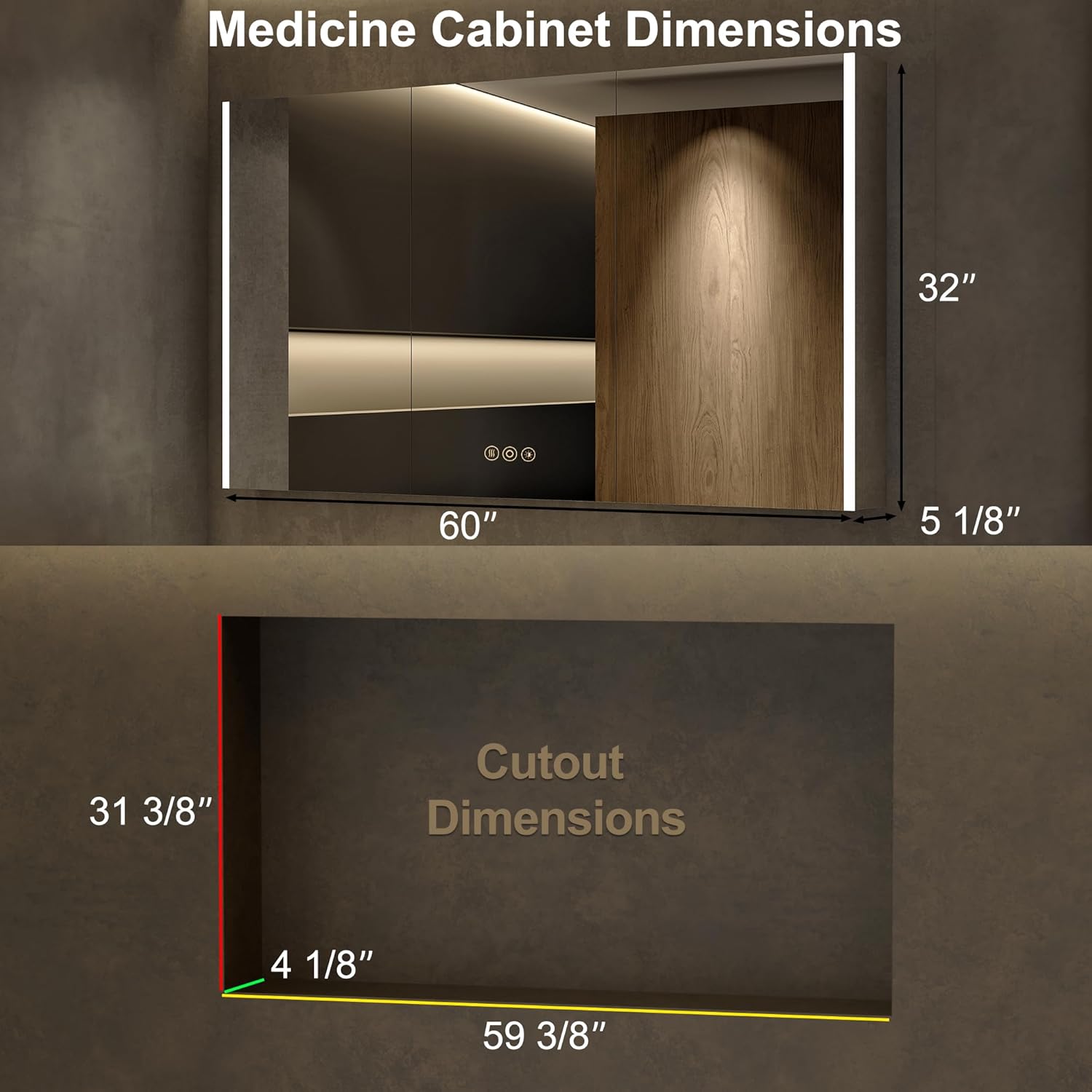
Image 6.1: Product and Recessed Cutout Dimensions.
6.2 Mounting Options
Choose between surface mount (cabinet sits on the wall) or recessed mount (cabinet fits into a wall cutout). Detachable glass panels facilitate recessed installation.

Image 6.2: Recessed vs. Surface Mount Installation.
6.3 Electrical Connection
The cabinet requires a hardwired connection. Consult a qualified electrician for installation to ensure compliance with local electrical codes. A wall switch (not included) is typically used to control the power supply to the cabinet.

Image 6.3: Internal view showing electrical outlets and USB ports.
7. Operation
The medicine cabinet features smart touch controls integrated into the mirror surface.
7.1 Lighting Control
- Power On/Off: Short press the power icon on the mirror to turn the LED lights on or off.
- Color Temperature Adjustment: Short press the color temperature icon to cycle through warm (2700K), natural (4000K), and cold white (6500K) lighting modes.
- Brightness Dimmer: Long press the brightness icon to adjust the light intensity from 0% to 100%. Release when the desired brightness is reached.
- Memory Function: The cabinet will remember your last selected light setting (color mode and brightness) when powered on again.

Image 7.1: Adjusting LED Light Color Temperature.

Image 7.2: Brightness Dimmer and Memory Function.
7.2 Anti-Fog Function
Activate the anti-fog function by pressing the dedicated anti-fog icon on the mirror. This will heat the mirror surface to prevent condensation. Turn off the anti-fog function when not needed to conserve energy.

Image 7.3: Anti-Fog Function in operation.
7.3 Electrical Outlets and USB Ports
The internal electrical outlets and USB ports provide convenient power for small appliances and charging devices. Ensure the cabinet door is open when using these ports to prevent obstruction and allow for proper ventilation.
7.4 Adjustable Shelves
The glass shelves inside the cabinet are adjustable to accommodate items of various heights. Carefully lift and reposition the shelves to suit your storage needs.

Image 7.4: Spacious interior with adjustable shelves.
7.5 Product Video
Video 7.5: An official product video demonstrating the features and functionality of the HBEZON LED Medicine Cabinet, including lighting adjustments, anti-fog, and internal storage.
8. Maintenance
- Cleaning the Mirror: Use a soft, damp cloth and a mild glass cleaner. Avoid abrasive cleaners or harsh chemicals that could damage the mirror surface or electronic components.
- Cleaning the Cabinet Interior: Wipe down interior surfaces and shelves with a soft, damp cloth. Ensure the power is disconnected before cleaning any electrical components.
- Hinge Care: The soft-close hinges are designed for durability. Avoid forcing the doors open or closed.
9. Troubleshooting
If you encounter any issues with your medicine cabinet, refer to the following common solutions:
- Lights Not Working:
- Check the main power supply to the cabinet.
- Ensure the wall switch (if installed) is in the "on" position.
- Verify that the touch control is being pressed correctly.
- Anti-Fog Not Activating:
- Confirm the anti-fog touch icon has been pressed.
- Allow a few minutes for the defogger to heat up.
- Electrical Outlets/USB Ports Not Functioning:
- Ensure the main power to the cabinet is active.
- Check if the internal power switch for the outlets/USB is engaged (if applicable).
- Doors Not Closing Smoothly:
- Inspect hinges for any obstructions or damage.
- Ensure the cabinet is level and securely mounted.
For issues not covered here, please contact HBEZON customer support.
10. Warranty and Support
For warranty information or technical assistance, please contact HBEZON customer support. Refer to your purchase documentation for specific warranty terms and contact details.
Manufacturer: HBEZON
For additional support, visit the HBEZON Store on Amazon.


