
1. Introduction
Thank you for choosing the FUSOU 11-Drawer Vanity Desk. This manual provides essential information for the safe assembly, operation, and maintenance of your new vanity desk. Please read these instructions thoroughly before beginning assembly or use, and retain this manual for future reference.

Image 1.1: The FUSOU 11-Drawer Vanity Desk, featuring a large mirror with LED bulbs, multiple drawers, and a power outlet.
2. Safety Information
WARNING: Assembly and electrical components may pose hazards. Follow instructions and safety guidelines provided with the product. Failure to do so may result in injury or damage to the product.
- Always assemble the product on a soft, clean surface to prevent scratches.
- Ensure all screws and fasteners are securely tightened before use. Periodically check for loose connections.
- Do not overload drawers. Distribute weight evenly.
- Keep electrical components (power outlet, LED lights) away from water or excessive moisture.
- Use only the provided power cord and connect to a grounded outlet.
- Do not attempt to modify the electrical system or components.
- Keep small parts and packaging materials away from children to prevent choking hazards.
3. Package Contents
Your FUSOU Vanity Desk is shipped in two separate boxes and may not arrive simultaneously. Please verify all components against the parts list included in your assembly manual before beginning assembly. If any parts are missing or damaged, contact customer support.

Image 3.1: The vanity desk is packaged in two separate boxes for shipping.
Typical components include:
- Vanity Desk Panels (top, side, back, drawer components)
- Mirror with Integrated LED Bulbs
- Vanity Stool Components
- Hardware Pack (screws, dowels, cam locks, drawer slides, handles)
- Power Outlet Unit with USB Ports
- Hair Dryer Holder
- Assembly Instructions Manual
4. Assembly Instructions
Assembly is required for this product. It is recommended to have two people for assembly. Please refer to the detailed step-by-step assembly manual included in your package for specific instructions, diagrams, and a complete parts list. The general steps are outlined below:
- Prepare Workspace: Clear a spacious area and lay out all parts on a soft surface to prevent damage.
- Assemble Base Units: Construct the left and right drawer cabinet bases according to the manual.
- Install Drawers: Assemble the 11 drawers and install the drawer slides into the cabinet bases.
- Connect Center Section: Attach the center desk panel and support structures between the two drawer cabinets.
- Install Glass Top: Carefully place the tempered glass top into its designated area.
- Mount Mirror: Secure the mirror unit to the back of the vanity desk. Ensure it is stable and level.
- Install Electrical Components: Mount the power outlet unit and hair dryer holder as indicated in the manual. Connect the power cord.
- Assemble Stool: Construct the vanity stool.

Image 4.1: The vanity desk with its 11 drawers open, illustrating the storage compartments.

Image 4.2: Detail of the vanity stool's thick sponge cushion, designed for comfort.
5. Operating Instructions
5.1 LED Lighting System
The vanity mirror features 13 Hollywood-style LED bulbs with three adjustable lighting modes:
- Cold Light: Bright, clear illumination for detailed tasks.
- Natural Light: Mimics daylight for accurate color representation.
- Warm Light: Soft, ambient lighting for a relaxed atmosphere.
To operate the lighting:
- Power On/Off: Press the touch switch on the mirror to turn the lights on or off.
- Change Color Mode: Short press the touch switch to cycle through the three lighting modes (Cold, Natural, Warm).
- Adjust Brightness: Long press the touch switch to adjust the brightness level within the selected lighting mode. Release when desired brightness is achieved.
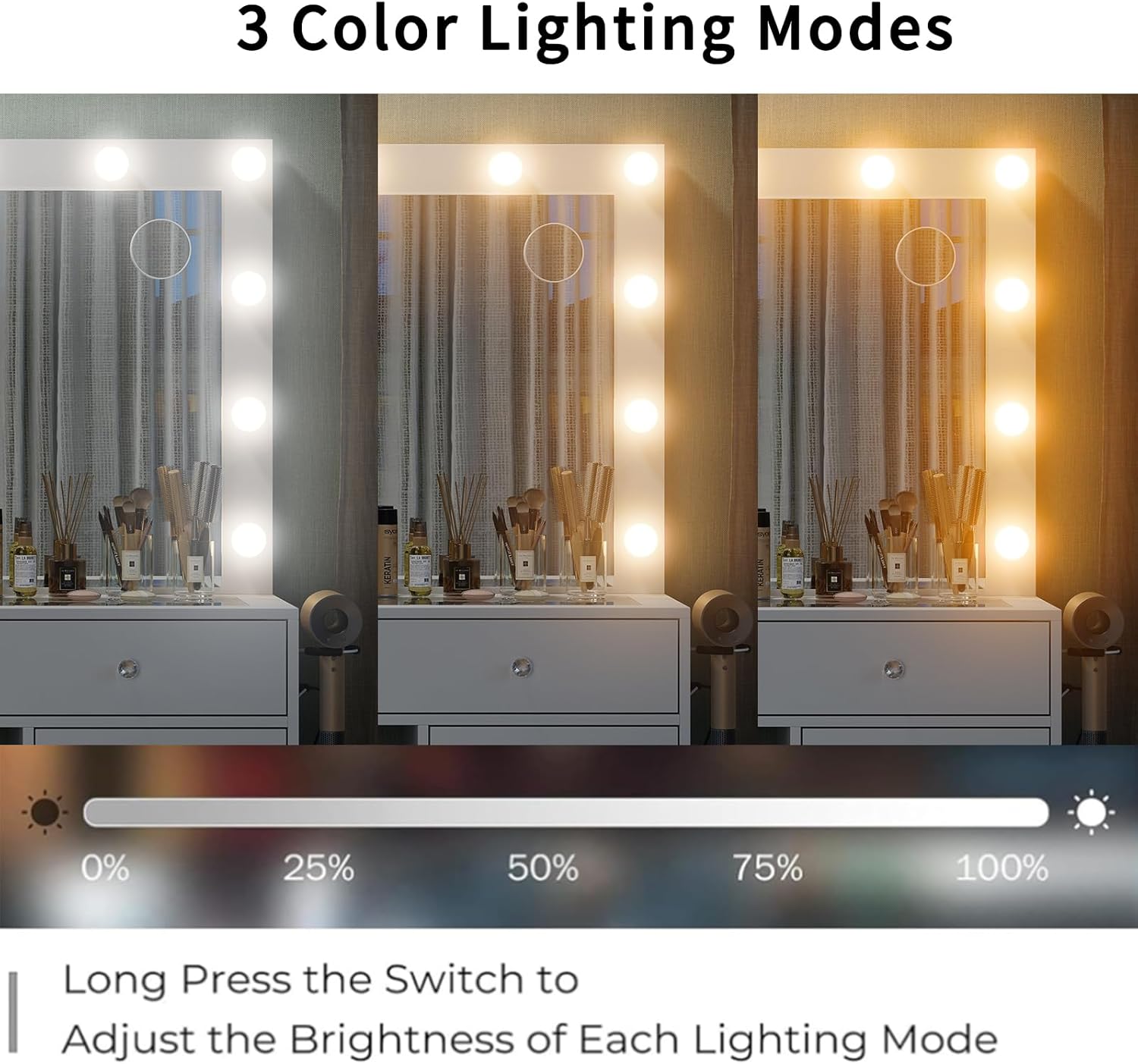
Image 5.1: Illustration of the three adjustable lighting modes available on the vanity mirror.
5.2 Integrated Power Outlet
The vanity desk includes a built-in power outlet with 2 standard AC sockets (125V/12A) and 2 USB ports (5V/2A) for convenient charging and powering of electronic devices.
- Ensure the vanity desk's main power cord is securely plugged into a wall outlet.
- Plug your hair dryer, curling iron, phone charger, or other devices into the appropriate AC or USB ports.
- Do not exceed the maximum rated power for the outlets.

Image 5.2: The integrated power strip with AC outlets and USB ports, alongside the hairdryer holder.
5.3 Glass Top Storage
The vanity features an embedded tempered glass tabletop, allowing visibility into the top drawers for easy access and organization of cosmetics and accessories.

Image 5.3: The tempered glass tabletop provides a clear view of stored items in the top drawers.
6. Care and Maintenance
- Cleaning: Wipe surfaces with a soft, damp cloth. Avoid harsh chemicals or abrasive cleaners that could damage the finish or glass.
- Glass Care: Use a glass cleaner for the mirror and glass tabletop. Do not spray cleaner directly onto the LED bulbs or electrical components.
- Dusting: Regularly dust all surfaces to prevent buildup.
- Drawer Maintenance: Periodically check drawer slides for smooth operation. If needed, a small amount of silicone lubricant can be applied.
- Electrical Safety: Unplug the vanity from the power outlet before cleaning or performing any maintenance on electrical components.
7. Troubleshooting
- Lights Not Turning On:
- Ensure the vanity's main power cord is securely plugged into a functional wall outlet.
- Check if the wall outlet is receiving power (test with another device).
- Verify the touch switch on the mirror is being pressed correctly.
- Power Outlet Not Working:
- Confirm the main power cord is plugged in.
- Test the connected device in another outlet to rule out device malfunction.
- Ensure the total power draw does not exceed the outlet's rating.
- Drawers Are Stiff or Misaligned:
- Check that drawer slides are correctly installed and free of obstructions.
- Ensure all assembly screws for the drawer and cabinet are tightened.
- Verify that the vanity desk is on a level surface.
- Vanity Feels Unstable:
- Re-check all assembly fasteners to ensure they are fully tightened.
- Ensure the vanity is placed on a flat, stable floor.
8. Specifications
| Feature | Detail |
|---|---|
| Brand | FUSOU |
| Model Number | VD015-WH |
| Dimensions (D x W x H) | 15.7" x 55" x 55" |
| Item Weight | 150 pounds |
| Frame Material | Engineered Wood |
| Color | White |
| Number of Drawers | 11 |
| Lighting Modes | 3 (Cold, Natural, Warm) with adjustable brightness |
| Power Outlet | 2 AC Outlets (125V/12A), 2 USB Ports (5V/2A) |
| Assembly Required | Yes |

Image 8.1: Product dimensions for the FUSOU 11-Drawer Vanity Desk and accompanying stool.
9. Warranty and Support
Warranty information for your FUSOU Vanity Desk is typically included with the product packaging or can be found on the manufacturer's official website. Please retain your proof of purchase for warranty claims.
For technical support, missing parts, or any questions regarding your product, please contact FUSOU customer service through the retailer where the product was purchased or refer to the contact information provided in your product documentation.