
1. Introduction
Thank you for choosing the ELIVED Mobile TV Stand, Model EV1117. This stand is designed to provide a versatile and stable solution for displaying your television. It features adjustable height, tilt functionality, and smooth-rolling wheels for easy repositioning. Please read this manual thoroughly before assembly and use to ensure safe and optimal performance.
2. Safety Information
- Weight Capacity: Do not exceed the maximum weight capacity of 25 kg (55 lbs).
- Screen Size: This stand is suitable for televisions between 26 and 60 inches. Ensure your TV's VESA pattern is compatible (100x100mm to 400x400mm).
- Stability: Always ensure all screws are securely tightened before use. Engage the wheel locks when the stand is in a desired position to prevent accidental movement.
- Outdoor Use: This TV stand is not weather-resistant. For outdoor use, a covered location is recommended.
- Children: Keep children away from the TV stand during assembly and adjustment. Do not allow children to climb on or play with the stand or attached television.
- Assembly: Follow all assembly instructions carefully. If you encounter any difficulties, contact customer support.
3. Package Contents
Verify that all components are present before beginning assembly:
- 1 x TV Stand (main components: base, vertical poles, TV bracket, media shelf)
- 1 x Set of Screws and Necessary Tools
- 1 x Installation Instructions (this manual)
4. Setup and Assembly
Follow these general steps for assembling your ELIVED Mobile TV Stand. Refer to the included hardware pack for specific screw types and quantities.
- Assemble the Base: Attach the four legs to the central base component. Secure them using the provided screws and tools. Ensure the wheels are attached to the ends of the legs, with at least two lockable wheels.
- Attach Vertical Poles: Connect the vertical support poles. The stand typically consists of multiple pole sections that fit together. Secure them firmly.
- Install Media Shelf: Position the adjustable media shelf at your desired height on the vertical pole and secure it with the provided fasteners. This shelf is suitable for media boxes, laptops, or gaming devices.
- Mount TV Bracket: Attach the TV mounting bracket to the top section of the vertical pole. Ensure it is securely fastened.
- Attach TV to Bracket: Secure the TV mounting arms to the back of your television using the appropriate VESA screws. Carefully lift your television and hook the mounting arms onto the TV bracket on the stand. Use the safety screws or locking mechanisms to secure the TV to the stand.
- Cable Management: Utilize the integrated cable management features (e.g., clips, straps) to organize and conceal cables along the vertical pole for a tidy appearance.

Figure 1: The stable X-shaped base design.

Figure 2: Adjustable media shelf and integrated cable management.

Figure 3: Enhanced stability with thick TV hooks and safety screws.
5. Operating Instructions
5.1. Adjusting Height
The TV stand offers height adjustment to achieve your preferred viewing angle. Loosen the height adjustment screws on the vertical pole, carefully raise or lower the television to the desired position, and then securely tighten the screws to lock it in place.

Figure 4: Illustration of the TV stand's height adjustment range.
5.2. Adjusting Tilt
The TV bracket allows for a tilt adjustment of +5° to -10°. Loosen the tilt adjustment knobs or screws on the TV bracket, adjust the screen to the desired angle, and then re-tighten the knobs/screws to secure the tilt.
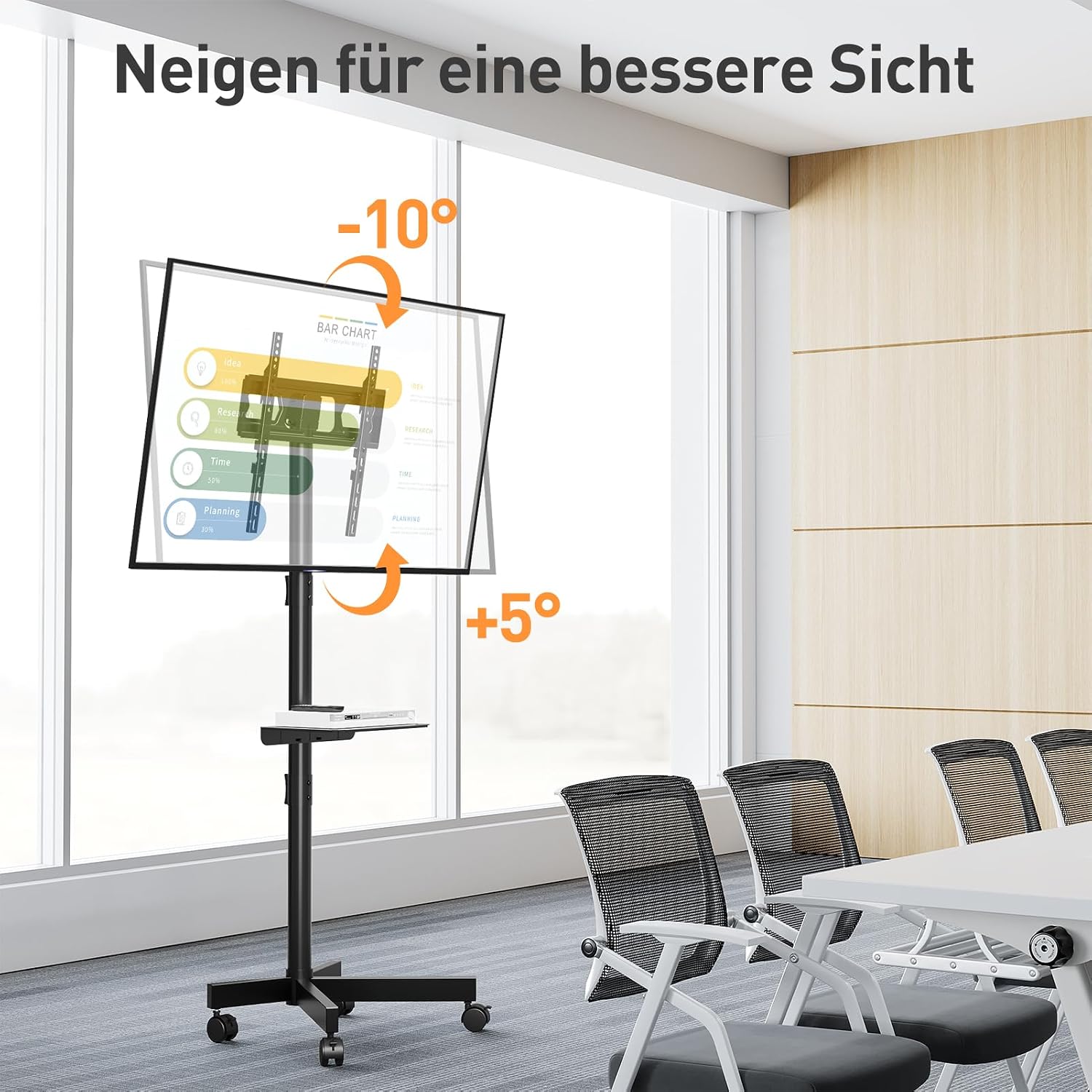
Figure 5: Demonstrating the tilt adjustment feature for optimal viewing.
5.3. Moving the Stand
To move the TV stand, unlock the two lockable wheels. Gently push or pull the stand to its new location. Once positioned, engage the wheel locks to prevent unintended movement.

Figure 6: The TV stand's mobile design with lockable wheels.
6. Maintenance
- Cleaning: Wipe the stand with a soft, damp cloth. Avoid abrasive cleaners or solvents that could damage the finish.
- Check Connections: Periodically check all screws and fasteners to ensure they remain tight and secure. Re-tighten if necessary.
- Wheel Care: Keep the wheels free of debris to ensure smooth movement.
7. Troubleshooting
7.1. Stand is Unstable
- Ensure all assembly screws are fully tightened.
- Verify that the television's weight and size are within the specified limits.
- Check that the stand is placed on a flat, level surface.
7.2. Difficulty Moving the Stand
- Ensure all wheel locks are disengaged.
- Check for any obstructions around the wheels.
- Clean any debris from the wheels.
7.3. TV Not Level
- Check the TV mounting arms for proper alignment and ensure they are securely fastened to the TV and the stand.
- Adjust the height of the TV mounting arms if individual leveling is possible.
8. Specifications
| Feature | Specification |
|---|---|
| Model | EV1117 |
| Compatible TV Sizes | 26 - 60 inches |
| Maximum Weight Capacity | 25 kg (55 lbs) |
| VESA Compatibility | 100x100mm to 400x400mm |
| Height Adjustment Range | 1456mm - 1506mm |
| Tilt Angle | +5° to -10° |
| Material | Metal (Cold-rolled steel pipes) |
| Color | Black |
| Mobility | 4 Swivel Wheels (2 with brakes) |
9. Warranty and Support
For warranty information or technical support, please refer to the product packaging or contact the manufacturer directly. Keep your purchase receipt as proof of purchase.


