
IKIER IKIER X5 Pro
IKIER X5 Pro Laser Engraver User Manual
Model: IKIER X5 Pro
1. Introduction
Thank you for choosing the IKIER X5 Pro Laser Engraver. This high-performance machine is designed for precise engraving and efficient cutting across a wide range of materials, including wood, metal, acrylic, and leather. Featuring a 5W laser output, a large working area of 410x380mm, and advanced safety features, the IKIER X5 Pro is suitable for both hobbyists and professionals.
This manual provides essential information for the safe and effective operation of your IKIER X5 Pro. Please read it thoroughly before assembly and use to ensure optimal performance and longevity of your device.

Figure 1.1: The IKIER X5 Pro Laser Engraver, showcasing its design and a sample engraving.
2. Safety Information
Operating a laser engraver involves potential hazards. Adhere to the following safety guidelines to prevent injury and damage to the equipment.
- Eye Protection: Always wear the provided safety glasses or equivalent eye protection when the laser is active. The panoramic magnetic eye protection shield on the laser module filters 97% of strong light, but additional protection is recommended.
- Ventilation: Operate the machine in a well-ventilated area to dissipate fumes and smoke produced during engraving and cutting.
- Fire Safety: Keep a fire extinguisher nearby. Do not leave the machine unattended during operation, especially when cutting materials that may ignite. The machine is equipped with a flame detector that triggers an alarm and stops operation if a flame is detected.
- Tilt Protection: The IKIER X5 Pro features a gyroscope that automatically stops operation if the machine tilts more than 15 degrees, preventing accidental laser exposure.
- Material Safety: Only engrave or cut materials specified in this manual. Avoid highly reflective, flammable, or unknown materials that may produce toxic fumes or catch fire.
- Children and Pets: Keep children and pets away from the operating area. The laser protection cover also helps prevent pets from reaching the laser point.
- Power Supply: Use only the provided power adapter. Ensure the power supply is stable and matches the machine's requirements.

Figure 2.1: Illustration of the IKIER X5 Pro's integrated safety features, including flame detection and tilt protection.
3. Package Contents
Before beginning assembly, verify that all components listed below are present in your package.
- IKIER X5 Pro Laser Engraving Machine (main frame and laser module)
- Installation Toolkit
- Power Cable
- Power Adapter
- USB Flash Drive
- Type C Cable
- X-axis Connecting Line
- Focus Shims
- Safety Glasses
- Product Manual

Figure 3.1: Overview of all items included in the IKIER X5 Pro package.
4. Setup and Assembly
The IKIER X5 Pro is designed for quick and straightforward assembly, typically completed within 10-20 minutes.
4.1. Mechanical Assembly
- Unpack all components and lay them out on a clean, flat surface.
- Follow the step-by-step instructions in the included Product Manual for assembling the frame and attaching the laser module. The integral lead screw design simplifies the process.
- Connect the X-axis connecting line and other necessary cables as indicated in the manual.
4.2. Power Connection
- Connect the power adapter to the machine's power input port.
- Plug the power cable into a standard electrical outlet (100-240V AC, 50/60Hz).
- Ensure the power switch on the machine is in the OFF position before connecting.
4.3. Software Installation
The IKIER X5 Pro is compatible with popular laser engraving software.
- Supported Software: LaserGRBL, LightBurn.
- Operating Systems: Supports Win XP / Win 7 / Win 8 / Win 10 / Win 11 / MacOS Systems, and Linux.
- Install your preferred software on your computer. Drivers may be included with the software or on the provided USB flash drive.

Figure 4.1: Visual guide for quick assembly and various connection methods for the IKIER X5 Pro.
5. Operating Instructions
This section outlines the general steps for operating your IKIER X5 Pro.
5.1. Material Preparation
- Place the material to be engraved or cut on the working surface. The large working area is 410x380mm.
- Ensure the material is flat and securely positioned to prevent movement during operation.
- The laser features fixed-focus, eliminating the need for manual focusing adjustment.

Figure 5.1: The spacious working area of the IKIER X5 Pro, providing ample space for various projects.
5.2. Connecting to the Machine
- USB Connection: Connect the machine to your computer using the provided USB cable.
- Mobile App Control: Utilize the second-generation mobile application for convenient control. The app supports offline engraving, allowing you to operate without a continuous computer connection.
- USB Flash Drive: For direct engraving, load your design files onto the USB flash drive and insert it into the machine.
5.3. Preparing Your Design
- Create or import your design using LaserGRBL, LightBurn, or the mobile app.
- Supported File Formats: NC, BMP, JPG, PNG, DXF, SVG, TIF, PDF.
- Adjust laser parameters (power, speed, passes) according to the material and desired effect.
5.4. Engraving and Cutting Process
- Initiate the engraving or cutting process from your software or app.
- The machine operates at a high speed of 400mm/s, ensuring efficient project completion.
- The laser spot area is 0.06*0.06mm, providing 0.01mm engraving precision for detailed work.
- The 5W laser output allows for single-pass cutting of materials like 5mm Paulownia wood and 3mm black acrylic.
- In case of a power outage or accidental failure, the power loss recovery function allows the machine to resume engraving from the original position.

Figure 5.2: Demonstrates the high-speed capability and quality of photo engraving.
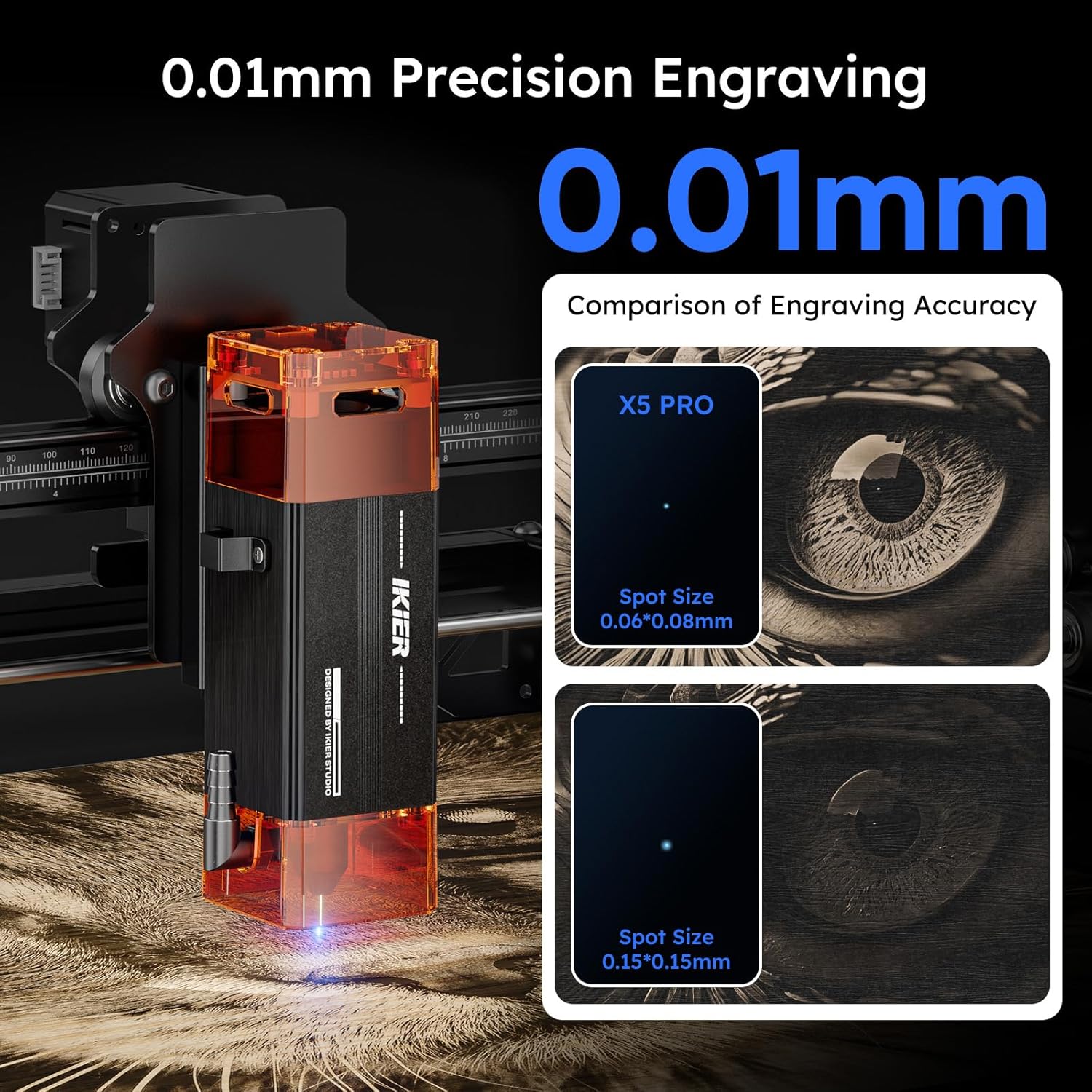
Figure 5.3: Illustrates the superior engraving precision of the IKIER X5 Pro.

Figure 5.4: Details the cutting power of the 5W laser module.
6. Maintenance
Regular maintenance ensures the longevity and optimal performance of your IKIER X5 Pro.
- Cleaning the Lens: Periodically clean the laser lens with a soft, lint-free cloth and lens cleaning solution to maintain engraving quality.
- Cleaning the Machine: Use a soft brush or compressed air to remove dust and debris from the machine's frame, rails, and moving parts.
- Lubrication: Apply a small amount of lubricant to the guide rails if you notice any friction or unusual noise during movement.
- Firmware Updates: Check the official IKIER website for any available firmware updates to ensure your machine has the latest features and improvements.
7. Troubleshooting
This section addresses common issues you might encounter.
- Machine Not Powering On:
- Ensure the power cable is securely connected to both the machine and the power outlet.
- Verify the power adapter is functioning correctly.
- Check the power switch on the machine.
- Laser Not Firing/Weak Output:
- Check if the laser module is properly seated and connected.
- Clean the laser lens for any dust or debris.
- Verify laser power settings in your software.
- Engraving Quality Issues (Blurry/Inaccurate):
- Ensure the material is flat and securely fixed.
- Check for any loose belts or components that might affect movement precision.
- Verify the engraving speed and power settings are appropriate for the material.
- Clean the laser lens.
- Software Connection Problems:
- Ensure the USB cable is properly connected.
- Restart both the machine and your computer.
- Reinstall the software and drivers if necessary.
- For app connection, ensure Bluetooth/Wi-Fi is enabled and the app is updated.
- Machine Stops Mid-Operation:
- Check for flame detection or tilt alarms. Address the cause (e.g., excessive smoke, unstable surface).
- Verify power supply stability. The power loss recovery feature should allow resuming.
For further assistance, please refer to the official IKIER support resources or contact customer service.
8. Specifications
| Feature | Specification |
|---|---|
| Product Model | IKIER X5 Pro |
| Engraving Size | 410 x 380 mm (16.14 x 14.96 inches) |
| Electric Power Output | 40W |
| Laser Output Power | 5.5 - 6W |
| Laser Wavelength | 455 ± 5 nm |
| Engraving Precision | 0.01 mm |
| Laser Spot Area | 0.06 x 0.06 mm |
| Engraving Speed | Up to 400 mm/s |
| Focusing Method | Fixed-focus Laser (No adjustment needed) |
| Limit Switches | 2 (1 on X-axis, 1 on Y-axis) |
| Safety Features | Laser Protection Cover, Flame Detector, Gyroscope (Tilt Protection) |
| Operating Software | LaserGRBL, LightBurn, Mobile App |
| Supported OS | Win XP / 7 / 8 / 10 / 11, MacOS, Linux |
| Supported File Formats | NC, BMP, JPG, PNG, DXF, SVG, TIF, PDF |
| Data Transfer Method | USB Connection, Mobile App, USB Flash Drive |
| Power Supply Input | 100-240V AC, 50/60Hz |
| Power Supply Output | 12V 3A |
| Product Dimensions (L x W x H) | 59 x 56 x 19 cm (22.8 x 10.23 x 7.08 inches) |
| Product Weight | 5.3 kg (11.68 lbs) |
| Frame Material | Full Aluminum Alloy |
8.1. Engraving Materials
- Wood, Bamboo, Cardboard, Plastic, Leather, PCB Board, Anodized Aluminum, Non-reflective Electroplated and Painted Metals, 304 Mirror Stainless Steel, Glass, Ceramic, Cotton Fabric, Slate.
8.2. Cutting Materials
- Cardboard, Non-woven Fabric, Wood, Acrylic, Certain Thin Plastics, Sponge.
9. Warranty and Support
IKIER provides a standard warranty for the X5 Pro Laser Engraver. For detailed warranty terms and conditions, please refer to the warranty card included in your package or visit the official IKIER website.
For technical support, troubleshooting assistance, or spare parts, please contact IKIER customer service through their official website or the contact information provided in your product documentation. When contacting support, please have your product model (IKIER X5 Pro) and purchase details ready.
Related documentsIKIER X5 Pro


Ask a question about this manual
Ask about setup, troubleshooting, compatibility, parts, safety, or missing instructions. Manuals+ will review the question and use this page’s manual context to help answer it.