
Amaran amran pano 120c
amaran Pano 120c Kit User Manual
Model: amran pano 120c
Introduction
The amaran Pano 120c Kit is a versatile 120W RGBWW LED panel video light designed for professional and enthusiast use in various filming and photography environments. Its compact and portable design, coupled with flexible power options and advanced control features, makes it an ideal solution for both studio and on-location shoots. This manual provides comprehensive instructions for setting up, operating, maintaining, and troubleshooting your amaran Pano 120c Kit.
What's in the Box
Carefully unpack your amaran Pano 120c Kit and ensure all items listed below are present and in good condition.
- 1 x amaran Pano 120c LED Panel
- 1 x amaran Pano 120c Softbox
- 1 x amaran Pano 120c Light Control Grid
- 1 x amaran Pano 120c Diffuser
- 1 x amaran Ace Lock to Light Stand Adapter
- 1 x amaran 150W DC Locking Power Adapter
- 1 x amaran AC Power Cable
- 1 x amaran Pano 120c Kit Carrying Case
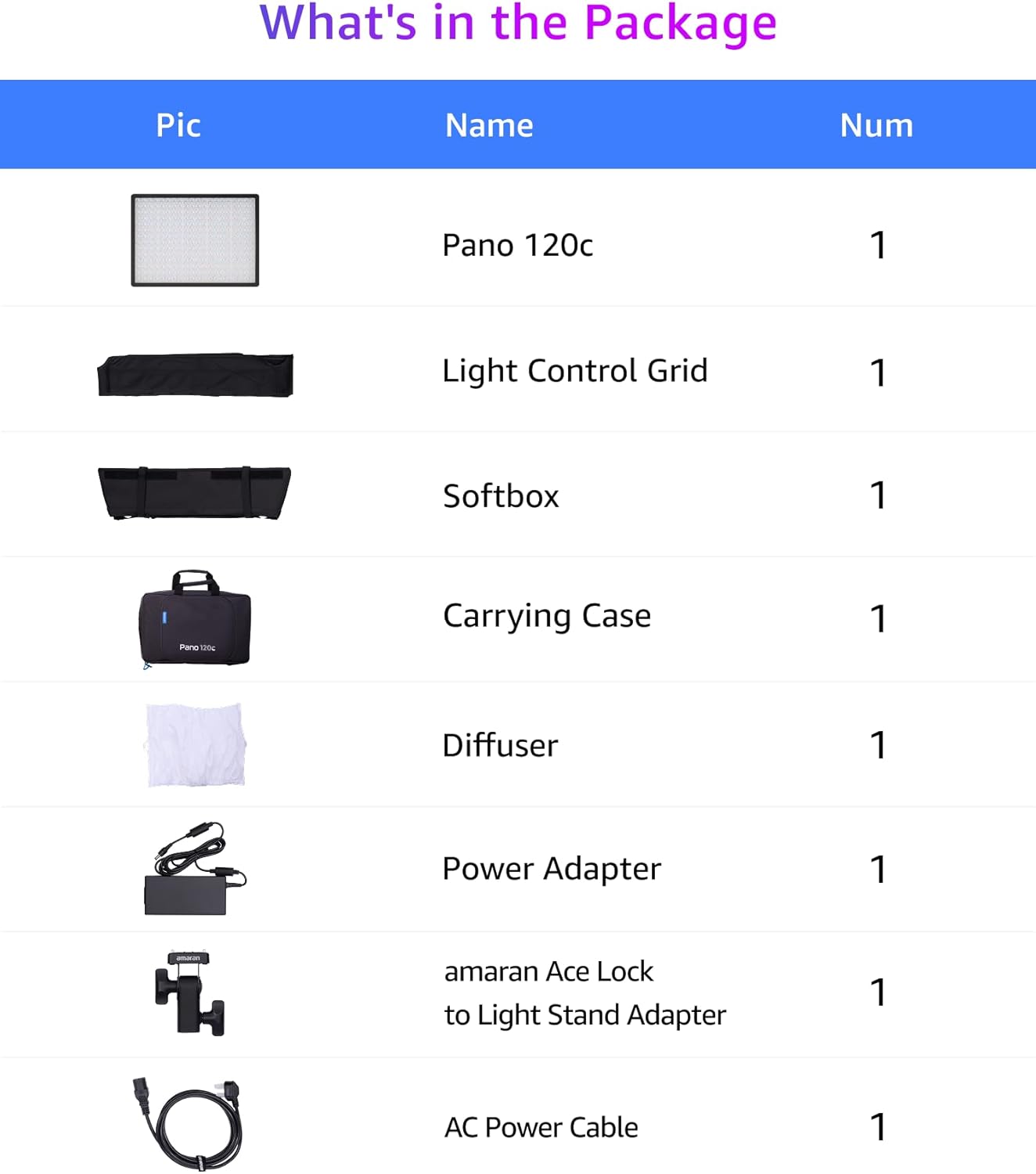
Image: All components included in the amaran Pano 120c Kit, neatly arranged. This includes the light panel, softbox, grid, diffuser, stand adapter, power adapter, AC cable, and carrying case.
Setup
- Mounting the Light:
Attach the amaran Pano 120c to a compatible light stand using the included amaran Ace Lock to Light Stand Adapter. The light features a 1/4-20in screw mount and an amaran Ace E-Lock Quick-Release Mount for secure attachment.

Image: A person's hands securing the amaran Pano 120c light panel onto a light stand using the provided adapter. The light is shown from the side, highlighting the mounting point.

Image: A close-up view of the amaran Ace E-Lock Quick-Release Mount on the light panel, demonstrating its secure locking mechanism for quick setup and breakdown.
- Powering the Light:
Connect the included 150W DC Locking Power Adapter to the light panel and then to a power outlet. Alternatively, for portable use, the amaran Pano 120c supports USB-C PD (Power Delivery) for power from compatible power banks and chargers.

Image: The amaran Pano 120c light panel displaying its various power input ports, including DC and USB-C PD, with cables connected to a power adapter and a power bank, illustrating flexible power solutions.
- Attaching Light Modifiers:
The kit includes a Softbox, Light Control Grid, and Diffuser. These can be attached to the front of the light panel to shape and soften the light output as needed for your specific shooting requirements.

Image: Three amaran Pano 120c lights, each fitted with a different light modifier: a diffuser, a softbox, and a light control grid, demonstrating the versatility of the kit's light-shaping tools.
Operating Instructions
The amaran Pano 120c offers both on-board controls and wireless control via the amaran app.
On-Board Control
The light features a user-friendly color screen and dial for direct adjustments.
- Power On/Off: Press the power button located near the control dial.
- Quick Operation Mode: Instantly adjust color temperature (CCT) and brightness without navigating complex menus.
- Mode Selection: Use the dial to cycle through different modes such as CCT, HSI (Hue, Saturation, Intensity), RGB, and FX (Special Effects).
- Parameter Adjustment: Rotate the dial to change values (e.g., intensity percentage, color temperature). Press the dial to confirm selections or enter sub-menus.

Image: A person's hands interacting with the amaran Pano 120c's on-board control screen and dial, while another hand holds a smartphone displaying the amaran app interface, illustrating both control methods.

Image: A close-up of the amaran Pano 120c's control screen showing the CCT (Color Correlated Temperature) adjustment interface, with a hand rotating the control dial to change the setting.
App Control (Bluetooth)
Wirelessly manage multiple lights and access advanced features using the dedicated amaran app.
- Pairing: Ensure Bluetooth is enabled on your mobile device. Open the amaran app and follow the on-screen instructions to discover and pair with your Pano 120c.
- Remote Adjustments: Control intensity, color temperature, hue, saturation, and access special effects directly from the app.
- Scene Modes: Utilize the 12 built-in scene modes for various lighting scenarios.

Image: The amaran Pano 60c light panel positioned next to a smartphone displaying the amaran control app, demonstrating the wireless control capabilities of the light.
Special Effects (FX)
The amaran Pano 120c includes various built-in lighting effects to enhance your creative output.
- Access the FX mode via the on-board controls or the app.
- Select from effects such as Fireworks, Lightning, TV, and more.
- Adjust parameters like intensity and frequency for each effect.

Image: A visual representation of various lighting effect icons available on the amaran Pano 120c, including symbols for lightning, fireworks, and other dynamic lighting scenarios.
Maintenance
- Cleaning: Use a soft, dry cloth to clean the light panel and accessories. Avoid using abrasive cleaners or solvents.
- Storage: When not in use, store the amaran Pano 120c Kit in its provided carrying case in a cool, dry place away from direct sunlight and extreme temperatures.
- Ventilation: Ensure the light's ventilation grilles are not obstructed during operation to prevent overheating. The fan mode can be set to Silent or Smart via the controls.
Troubleshooting
| Problem | Possible Cause | Solution |
|---|---|---|
| Light does not power on. | No power supply or loose connection. | Ensure the power adapter is securely connected to the light and a working power outlet. Check USB-C PD source if using. |
| Light output is dim or inconsistent. | Low power input or incorrect settings. | Verify power source is sufficient. Adjust intensity settings on the light or via the app. |
| Cannot connect to amaran app. | Bluetooth is off or light is not in pairing mode. | Ensure Bluetooth is enabled on your device. Restart the light and the app. Follow app instructions for pairing. |
| Light overheats. | Obstructed ventilation or fan mode setting. | Clear any obstructions from the ventilation grilles. Check fan settings (Silent/Smart) and ensure Smart mode is active for optimal cooling. |
Specifications
| Feature | Detail |
|---|---|
| Model Number | amran pano 120c |
| Brand | Amaran |
| Power Output | 120W RGBWW LED |
| Color Temperature (CCT) | 2,300K-10,000K |
| Connectivity | Bluetooth |
| Item Weight | 8.83 pounds |
| Package Dimensions | 17.8 x 11.85 x 5 inches |
| Manufacturer | Aputure |
| Self-Timer | No |

Image: Two amaran Pano 120c lights on stands, one with a softbox, demonstrating their powerful white brightness and color output. Key performance metrics are displayed below the lights.

Image: A close-up of the amaran Pano 120c light panel emitting a bright, even light, emphasizing its high brightness across the spectrum.
Warranty & Support
For warranty information and technical support, please refer to the official Amaran website or contact their customer service directly. Keep your purchase receipt as proof of purchase for warranty claims.
Manufacturer: Aputure
First Available: March 14, 2025
Ask a question about this manual
Ask about setup, troubleshooting, compatibility, parts, safety, or missing instructions. Manuals+ will review the question and use this page’s manual context to help answer it.