
Csasan V90
Csasan V90 Wireless Earbuds User Manual
Model: V90 | Brand: Csasan
Introduction
Thank you for choosing the Csasan V90 Wireless Earbuds. These Bluetooth 5.3 headphones are designed to provide a high-fidelity stereo sound experience with enhanced comfort and durability, making them ideal for sports and daily use. This manual will guide you through the setup, operation, and maintenance of your new earbuds to ensure optimal performance and longevity.
Package Contents
- Csasan V90 Wireless Earbuds (Left and Right)
- Charging Case
- USB-C Charging Cable
- Ear Tips (S/M/L sizes)
- User Manual

Image: The Csasan V90 Wireless Earbuds in pink, shown with their charging case. The case features an LED display indicating battery levels for both the case and individual earbuds.
Setup Guide
1. Charging the Earbuds and Case
Before first use, fully charge the earbuds and the charging case.
- Place the earbuds into the charging case. Ensure they are correctly seated.
- Connect the USB-C charging cable to the charging port on the case and the other end to a USB power source (e.g., wall adapter, computer USB port).
- The LED display on the charging case will show the charging status. A full charge takes approximately 1.5 hours.
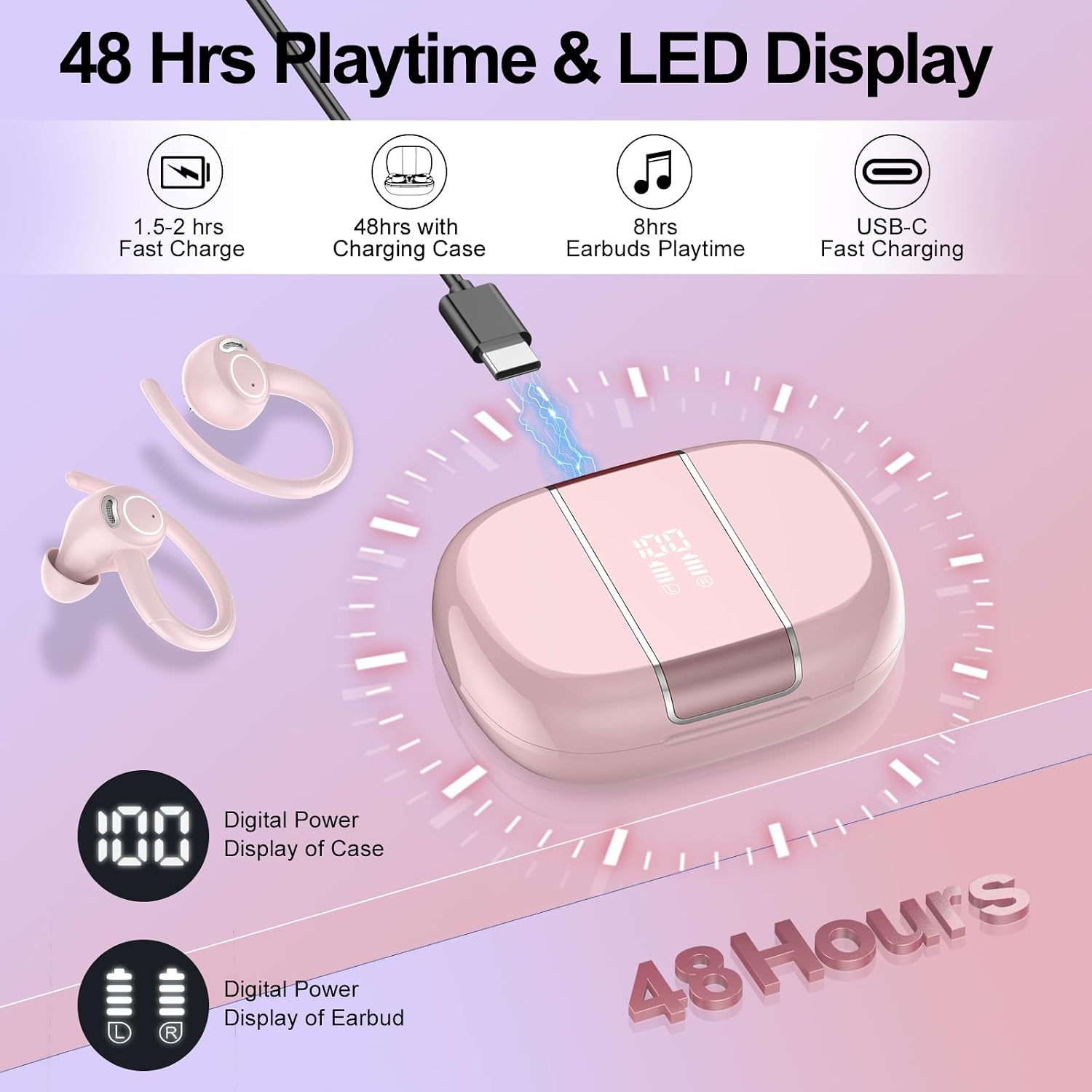
Image: A visual representation of the earbuds charging within their case. The diagram highlights the USB-C charging port and the dual LED display, which shows the battery percentage of the charging case and the charge status of each earbud.
2. Pairing with Your Device
The earbuds utilize Bluetooth 5.3 technology for a stable and fast connection.
- Ensure the earbuds are charged.
- Open the charging case. The earbuds will automatically power on and enter pairing mode.
- On your device (smartphone, tablet, laptop), go to Bluetooth settings and turn Bluetooth on.
- Search for "V90" in the list of available devices and select it to connect.
- Once connected, you will hear a confirmation tone, and the earbuds will be ready for use.
- For subsequent uses, simply open the charging case, and the earbuds will automatically reconnect to the last paired device within 2 seconds (Hall technology).

Image: This diagram demonstrates the automatic pairing feature. It shows the earbuds connecting to a smartphone simply by opening the charging case, indicating compatibility with iOS, Android, and Windows devices.
3. Wearing the Earbuds
For optimal sound quality and comfort, choose the correct ear tip size and adjust the earhooks.
- Select the ear tips (S/M/L) that provide a snug and comfortable fit in your ear canal.
- Place the earbud into your ear, then gently rotate it to ensure the earhook sits securely over your ear.
- Adjust the earbud until you achieve a comfortable and stable fit.
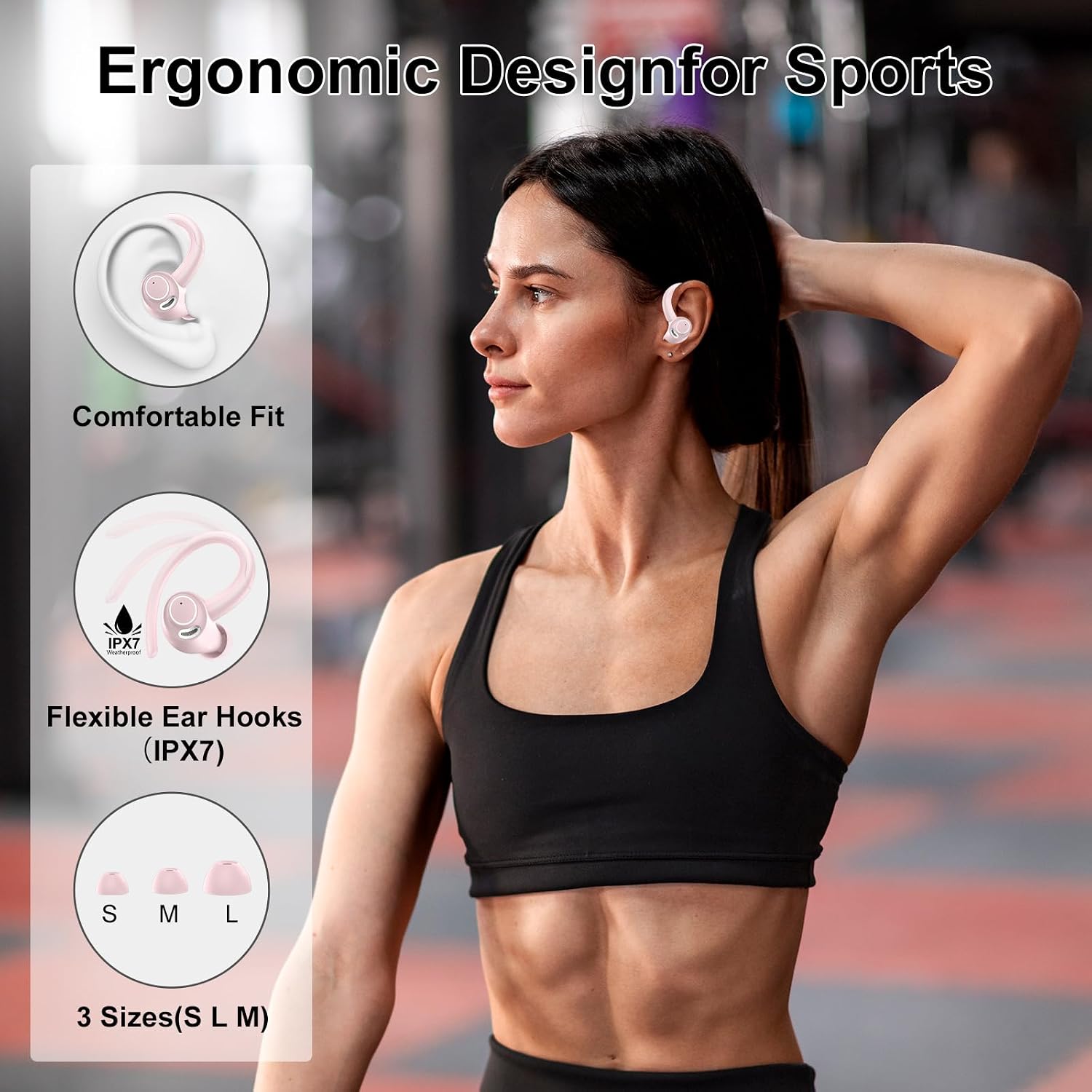
Image: An illustration detailing the ergonomic design of the earbuds, emphasizing the comfortable fit and flexible ear hooks. It also displays the three available ear tip sizes (S, M, L) to ensure a secure fit for various ear shapes.
Operating Instructions
Smart Touch Controls
The Csasan V90 earbuds feature highly sensitive touch controls on each earbud for easy management of music and calls.
| Function | Action |
|---|---|
| Play/Pause Music | Single tap on either earbud. |
| Next Track | Double tap on the Right earbud. |
| Previous Track | Double tap on the Left earbud. |
| Volume Up | Triple tap on the Right earbud. |
| Volume Down | Triple tap on the Left earbud. |
| Answer/End Call | Single tap on either earbud during an incoming call. |
| Reject Call | Press and hold on either earbud for 2 seconds during an incoming call. |
| Activate Voice Assistant | Press and hold on either earbud for 3 seconds. |

Image: A visual guide to the smart touch controls on the earbuds, showing icons for Play/Pause, Previous/Next track, Volume Control, Answer Call, Hang Up, and Voice Assistant.
Sound Quality and Noise Cancellation
The earbuds are equipped with a 14.2mm diaphragm speaker driver for a powerful and wide sound range, delivering crisp sound and deep bass. The integrated ENC (Environmental Noise Cancellation) technology with 4 microphones helps suppress ambient noise during calls, ensuring clear communication.

Image: An exploded diagram illustrating the internal components of the earbud, emphasizing the 13mm drivers, Bluetooth 5.3 chip, and bass enhancement for Hi-Fi Stereo Sound.

Image: A woman wearing the earbuds, with a graphic overlay suggesting CVC 8.0 Noise Cancellation, indicating effective noise reduction for calls and listening.
Maintenance
Proper maintenance ensures the longevity and performance of your earbuds.
- Cleaning: Regularly clean the earbuds and charging case with a soft, dry, lint-free cloth. Do not use abrasive cleaners or solvents.
- Ear Tips: Remove ear tips periodically and clean them with mild soap and water. Ensure they are completely dry before reattaching.
- Water Resistance: The earbuds have an IP7 waterproof rating, protecting them from sweat and rain. However, they are not designed for swimming or submersion in water. Always ensure the charging port is dry before charging.
- Storage: When not in use, store the earbuds in their charging case to protect them and keep them charged. Store in a cool, dry place away from extreme temperatures.
Troubleshooting
| Problem | Possible Solution |
|---|---|
| Earbuds not pairing/connecting. |
|
| Only one earbud working. |
|
| Low volume or poor sound quality. |
|
| Charging case not charging. |
|
Specifications
| Feature | Detail |
|---|---|
| Model Name | V90 |
| Brand | Csasan |
| Connectivity Technology | Wireless (Bluetooth 5.3) |
| Wireless Communication Technology | Bluetooth |
| Noise Control | Passive Noise Cancellation (ENC for Mics) |
| Ear Placement | Over Ear |
| Form Factor | In Ear |
| Water Resistance Level | IP7 Waterproof |
| Control Type | Touch Control |
| Battery Life (Earbuds) | Up to 8 Hours (single charge) |
| Total Playtime (with Charging Case) | Up to 48 Hours |
| Charging Time | Approx. 1.5 Hours (for case) |
| Battery Cell Composition | Lithium Polymer |
| Frequency Range | 20 Hz - 20,000 Hz |
| Impedance | 0.05 Ohm |
| Compatible Devices | Smartphones, Tablets, Laptops, Bluetooth-enabled Devices |
| Manufacturer | Shenzhen moldull Acoustic Technology Co.,Ltd |
Warranty and Support
Your Csasan V90 Wireless Earbuds come with a 2-year warranty from the date of purchase, covering manufacturing defects.
For any questions, technical support, or warranty claims, please contact Csasan customer service. We aim to provide a 24-hour customer service response.
Contact information can typically be found on the product packaging or the official Csasan website.
Manufacturer Contact: +86-156-9209-9166
Related documentsV90


Ask a question about this manual
Ask about setup, troubleshooting, compatibility, parts, safety, or missing instructions. Manuals+ will review the question and use this page’s manual context to help answer it.