
1. Introduction
Thank you for choosing the MaxTalker MT10 FRS Two-Way Radio. This manual provides essential information for the safe and efficient operation of your device. Please read it thoroughly before use and retain it for future reference. The MaxTalker MT10 is designed for reliable communication in various outdoor and group activities, featuring a long-lasting rechargeable battery, NOAA weather alerts, and a built-in LED flashlight.
2. Product Overview
The MaxTalker MT10 radio is a compact and user-friendly device. Familiarize yourself with its components and controls for optimal performance.
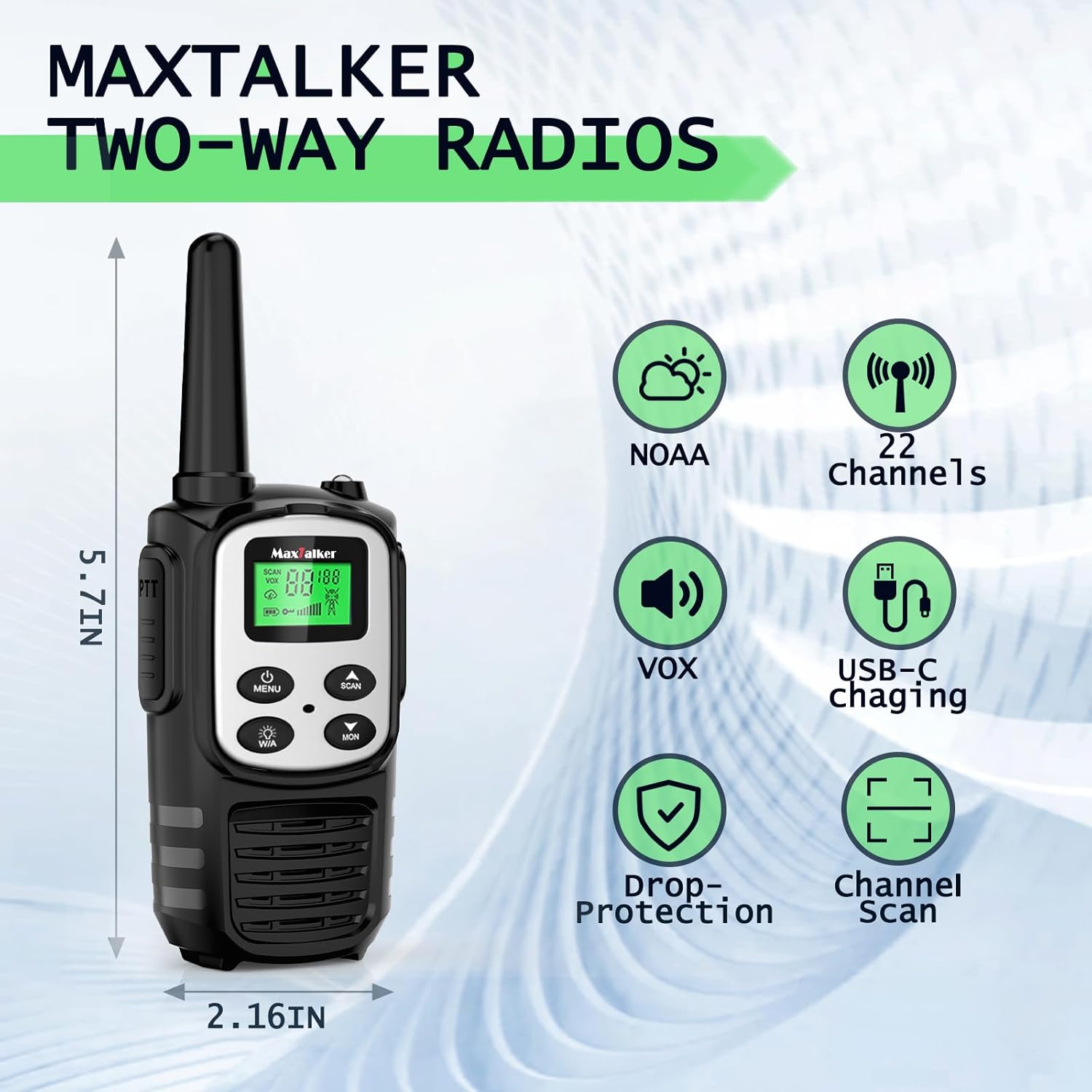
Figure 2.1: Front view of the MaxTalker MT10 radio highlighting its main features and dimensions (5.7 inches height, 2.16 inches width).
2.1 Key Components & Controls
- Antenna: For transmitting and receiving signals.
- PTT (Push-to-Talk) Button: Press and hold to transmit your voice.
- LCD Screen: Displays channel, volume, battery status, and feature indicators.
- MENU Button: Accesses menu options and powers the device on/off (long press).
- SCAN Button: Initiates channel scanning.
- MON (Monitor) Button: Checks for activity on the current channel.
- Up/Down Buttons: Adjusts volume, navigates menu, and changes channels.
- W/A (Weather/Alert) Button: Activates NOAA weather scan and LED flashlight.
- LED Flashlight: Provides illumination.
- USB-C Charging Port: For recharging the internal battery.
- Speaker/Microphone Jack: For connecting external audio accessories.
- Belt Clip: For convenient carrying.
3. Setup
3.1 Battery Installation & Charging
The MaxTalker MT10 features a built-in 1200mAh rechargeable lithium-ion battery. The device comes with the battery pre-installed.
- Initial Charge: Before first use, fully charge the radio.
- Connect Charger: Open the rubber cover on the side of the radio to expose the USB-C port. Insert the provided USB-C charging cable into the port and connect the other end to a compatible USB power adapter (not included) or a computer USB port.
- Charging Indicator: The battery icon on the LCD screen will indicate charging status. A full charge typically takes 3-4 hours.
- Battery Life: A fully charged battery provides approximately 48-72 hours of standby time.
Figure 3.1: MaxTalker MT10 radio connected to a USB-C charger, illustrating the charging process and battery specifications.
3.2 Attaching the Belt Clip
Align the belt clip with the designated slots on the back of the radio and slide it down until it clicks securely into place.
4. Operating Instructions
4.1 Power On/Off
- To Power On: Press and hold the MENU button until the LCD screen lights up.
- To Power Off: Press and hold the MENU button until the LCD screen turns off.
4.2 Adjusting Volume
Use the Up and Down arrow buttons to adjust the speaker volume. The volume level will be displayed on the LCD screen.
4.3 Channel Selection
The MaxTalker MT10 has 22 FRS channels and 121 sub-channels.
- Select Channel: Press the MENU button once. The channel number will flash. Use the Up and Down arrow buttons to select your desired channel (1-22).
- Select Sub-Channel (Privacy Code): Press the MENU button again. The sub-channel number will flash. Use the Up and Down arrow buttons to select your desired sub-channel (0-121).
- Confirm Selection: Press the MENU button a third time or wait a few seconds for the selection to be saved automatically.
For clear communication, all radios in your group must be set to the same channel and sub-channel.
4.4 Transmitting and Receiving (PTT)
- To Transmit: Press and hold the PTT button on the side of the radio. Speak clearly into the microphone. Release the PTT button when you are finished speaking.
- To Receive: Ensure the PTT button is not pressed. The radio will automatically receive transmissions on the selected channel.
4.5 VOX (Voice Activated Transmission)
The VOX feature allows for hands-free communication.
- Activate VOX: With the radio on, press the MENU button multiple times until 'VOX' appears on the screen.
- Adjust VOX Sensitivity: Use the Up and Down arrow buttons to select a sensitivity level (e.g., 1 for low sensitivity, 3 for high sensitivity).
- Confirm: Press MENU or wait to save. When VOX is active, the radio will transmit automatically when it detects your voice.
4.6 NOAA Weather Scan
Stay informed about weather conditions with the NOAA Weather Scan feature.
- Activate NOAA: Press the W/A button once. The radio will scan for NOAA weather channels in your area.
- Receive Alerts: The radio will automatically alert you to severe weather broadcasts.

Figure 4.1: The NOAA Weather Alert feature provides crucial safety information for outdoor activities.
4.7 LED Flashlight
The integrated LED flashlight provides convenient illumination.
- Turn On/Off: Press and hold the W/A button to activate or deactivate the LED flashlight.

Figure 4.2: The built-in LED flashlight is useful for low-light conditions during outdoor activities.
4.8 Keypad Lock
To prevent accidental changes to settings, you can lock the keypad.
- Activate/Deactivate Keypad Lock: Press and hold the MENU button until a key icon appears/disappears on the LCD screen.
5. Maintenance
Proper maintenance ensures the longevity and optimal performance of your MaxTalker MT10 radio.
- Cleaning: Use a soft, damp cloth to clean the exterior of the radio. Do not use harsh chemicals or abrasive cleaners.
- Storage: Store the radio in a cool, dry place away from direct sunlight and extreme temperatures. If storing for extended periods, ensure the battery is partially charged (around 50%) to prolong its lifespan.
- Water Resistance: This device is NOT water resistant. Avoid exposure to water or high humidity.
6. Troubleshooting
If you encounter issues with your MaxTalker MT10, refer to the following common problems and solutions:
| Problem | Possible Solution |
|---|---|
| No Power | Ensure the battery is charged. Press and hold the MENU button to power on. |
| Cannot Transmit/Receive | Verify that all radios are on the same channel and sub-channel. Check battery level. Ensure PTT button is fully pressed when transmitting. |
| Poor Audio Quality/Static | Move to an open area to improve signal. Check for obstructions. Adjust volume. |
| Keypad Unresponsive | Check if Keypad Lock is active (key icon on screen). Press and hold MENU to unlock. |
| Battery Drains Quickly | Reduce transmission time. Lower volume. Ensure full charge before use. |
7. Specifications
- Model Number: MT10
- Item Weight: 10.1 ounces
- Package Dimensions: 6.07 x 3.15 x 2.44 inches
- Number of Channels: 22 FRS Channels
- Sub-Channels: 121
- Frequency Range: 462-467 MHz
- Talking Range Maximum: Up to 5 miles (in open areas)
- Battery: Built-in 1200mAh Li-ion Battery
- Charging: USB-C Cable (2 included)
- Special Features: FRS, NOAA Weather Scan, Rechargeable, LED Flashlight, VOX (Voice Activated Transmission)
- Water Resistance Level: Not Water Resistant
- Included Components: 2 x Walkie Talkies with Built-in 1200mAh Battery, 2 x USB-C Cable, 2 x Belt Clips, User Manual
8. Warranty & Support
MaxTalker provides a 1-year warranty for the MT10 FRS Two-Way Radio. For warranty claims, technical support, or any inquiries, please contact MaxTalker customer service through the retailer where the product was purchased or visit the official MaxTalker website for contact information.