
1. Introduction
This manual provides essential instructions for the safe and effective operation of your OWON SDS220S Digital Oscilloscope. The SDS220S is a dual-channel digital oscilloscope featuring a 200MHz bandwidth, 1 GS/s real-time sampling rate, and an integrated 25MHz arbitrary waveform generator. It includes advanced functions such as FFT spectrum analysis, 30 automatic waveform measurements, and a 6-digit high-precision frequency counter. The device supports PC communication via USB, SCPI commands, and LabVIEW for remote control and secondary development.
2. Product Overview and Components
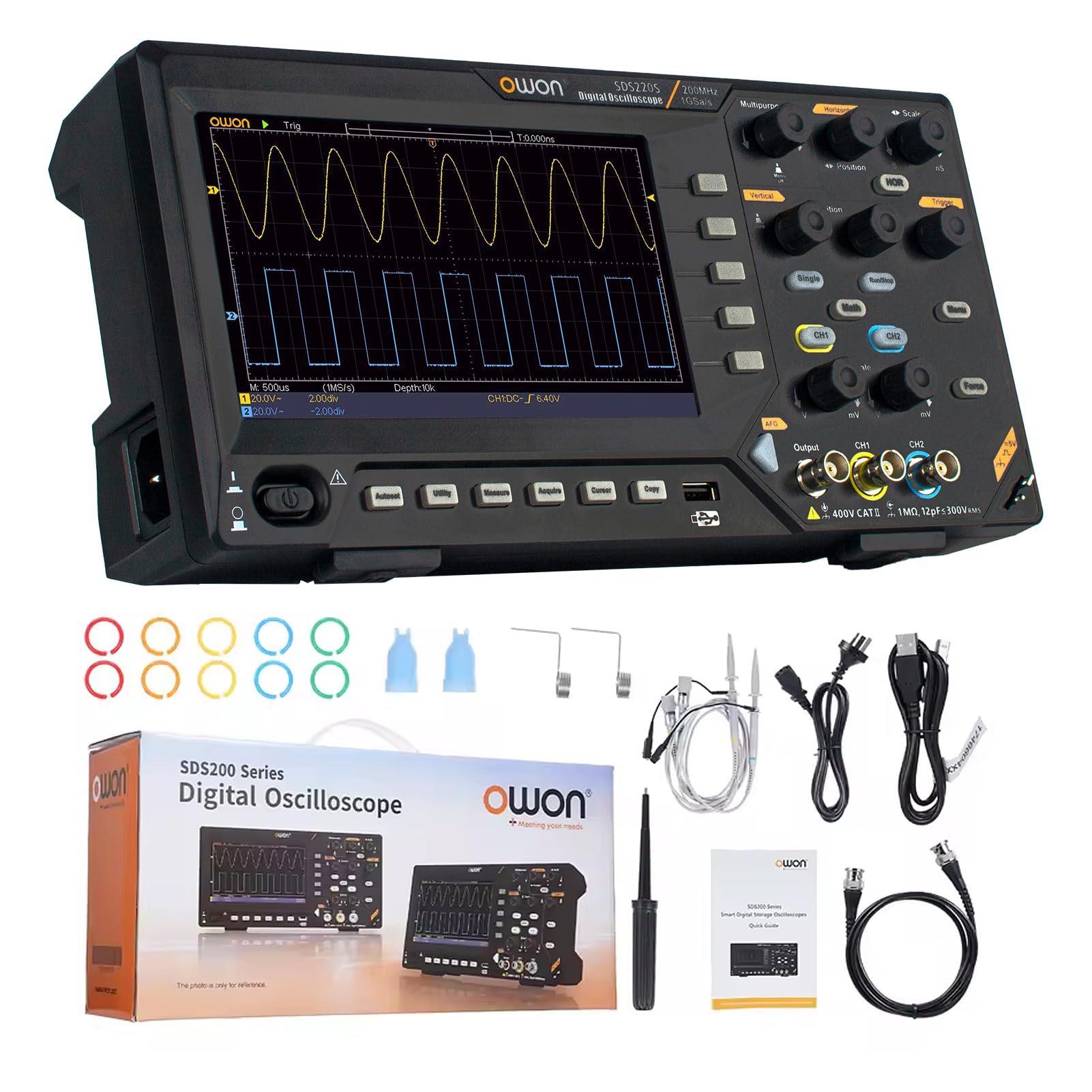
Familiarize yourself with the main components and interfaces of the SDS220S oscilloscope.

This image displays the front panel of the OWON SDS220S Digital Oscilloscope, highlighting the button and knob control area, oscilloscope signal input ports, signal generator output port, probe compensation, USB host interface, power switch, and function keys. The rear view shows the power socket, USB device interface, ventilation holes, and foldable handle.
Included Components:
The standard package for the OWON SDS220S includes the following items:
- OWON SDS220S Digital Oscilloscope Unit
- Power Cord
- Quick Guide
- USB Cable (for PC connection)
- Oscilloscope Probes (quantity may vary)
- BNC Cable
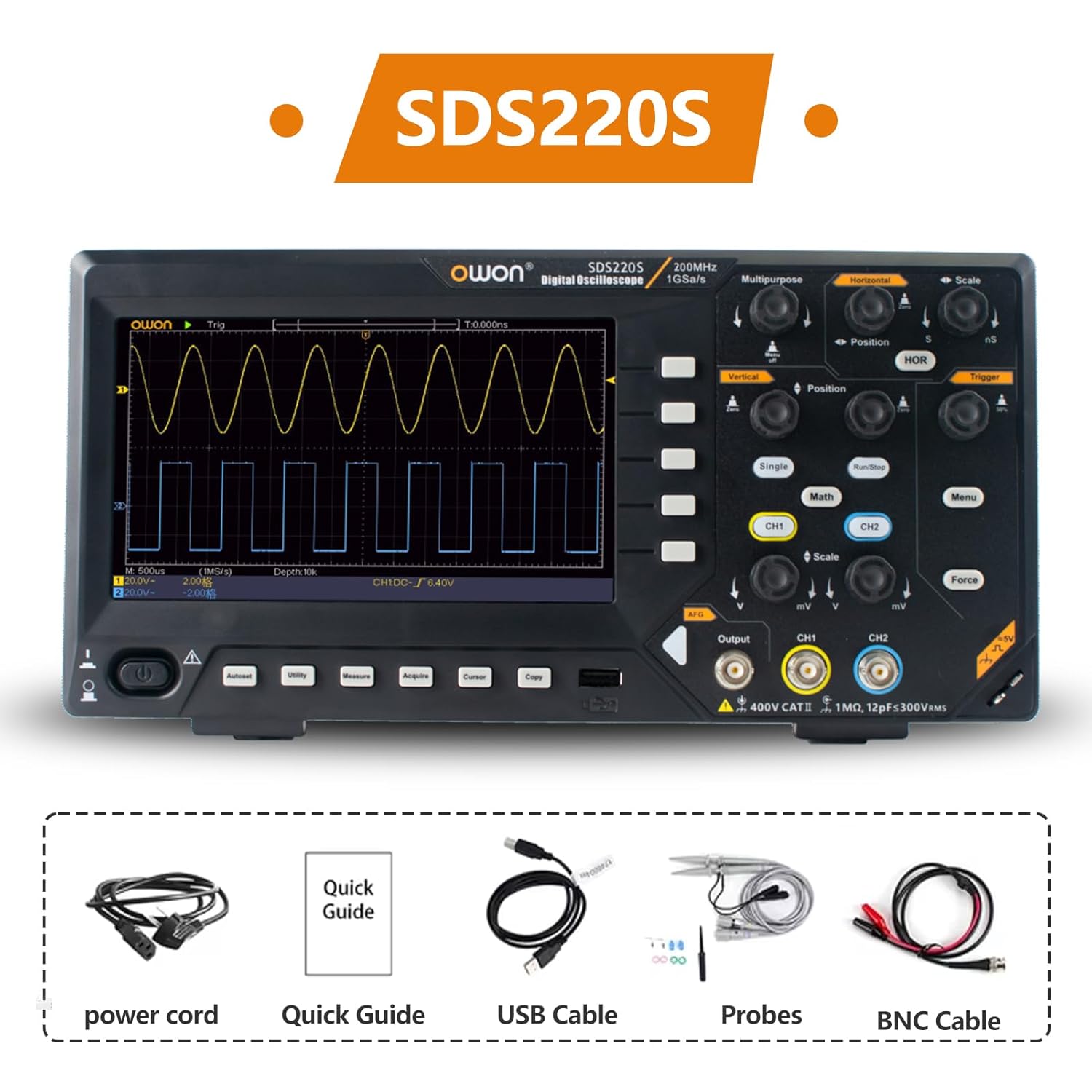
The OWON SDS220S package includes the digital oscilloscope unit, a power cord, a quick guide, a USB cable for PC connection, oscilloscope probes, and a BNC cable.
3. Setup
3.1 Power Connection
- Ensure the oscilloscope's power switch is in the OFF position.
- Connect the provided power cord to the power socket on the rear panel of the oscilloscope.
- Plug the other end of the power cord into a grounded AC power outlet.
3.2 Connecting Probes
- Connect the BNC connector of the oscilloscope probe to the desired input channel (CH1 or CH2) on the front panel.
- Ensure the probe is securely twisted into place.
- Attach the ground clip of the probe to the circuit's ground point.
- Set the attenuation switch on the probe (if applicable) to the desired setting (e.g., 1X or 10X). Remember to match this setting in the oscilloscope's channel menu.
3.3 Initial Power-On
After connecting power and probes, press the power switch on the front panel to turn on the oscilloscope. The device will perform a self-test and display the main waveform interface.
4. Operating Instructions
4.1 Display Overview
The SDS220S features a 7-inch TFT LCD display for clear visualization of waveforms and measurement data.
The 7-inch TFT LCD display of the OWON SDS220S provides a clear view of all signals and screen information. It features a same-screen display function, allowing users to zoom in and observe signal details effectively.
4.2 Basic Waveform Acquisition
- Connect the probe to the signal source.
- Adjust the vertical scale (Volts/Div) and horizontal scale (Time/Div) knobs to display the waveform appropriately.
- Use the Trigger controls (Level, Mode) to stabilize the waveform on the screen.
- Press the Auto button for automatic setup of vertical, horizontal, and trigger systems.
4.3 FFT Spectrum Analysis
The FFT function converts time-domain signals into frequency-domain components, useful for analyzing harmonics, distortion, noise, and vibration.
- Press the Math button.
- Select FFT from the menu.
- Adjust FFT settings such as source channel, window type, and display format as needed.
4.4 25MHz Arbitrary Waveform Generator (AWG)
The integrated AWG can generate various waveforms up to 25MHz.

This image highlights the 25MHz Arbitrary Waveform Generator (AWG) output port on the OWON SDS220S. The device supports USB Host and USB Device communication interfaces, along with SCPI and LabVIEW functions for advanced control and integration.
- Connect a BNC cable from the AWG output port to your desired circuit.
- Press the Output button (or corresponding menu option) to access AWG settings.
- Select the desired waveform type (e.g., Sine, Square, Ramp, Pulse, Arbitrary).
- Adjust parameters such as frequency, amplitude, and offset using the dedicated controls or menu options.
4.5 Automatic Waveform Measurements
The SDS220S supports 30 types of automatic waveform measurements, including time values, counts, deceleration and phase values, amplitude, and more.
- Press the Measure button.
- Select the desired measurement type from the on-screen menu.
- The results will be displayed on the screen.
4.6 PC Communication and Remote Control
The oscilloscope can be connected to a PC for remote control and data transfer.

The OWON SDS220S can communicate with a PC via its USB Device interface. It supports SCPI and LabVIEW functions, providing free computer software and programming development demos, enabling remote control and secondary development of the instrument.
- Connect the oscilloscope to your PC using the provided USB cable via the USB Device interface.
- Install the necessary drivers and software from the OWON website or included media.
- Utilize SCPI commands or LabVIEW functions for remote control, data logging, and custom application development.
5. Maintenance
5.1 Cleaning
To maintain the performance and appearance of your oscilloscope:
- Disconnect the power cord before cleaning.
- Use a soft, damp cloth with mild detergent to clean the exterior surfaces.
- Do not use abrasive cleaners or solvents that could damage the plastic components or screen.
- Ensure no liquid enters the device.
5.2 Storage
When not in use, store the oscilloscope in a clean, dry environment, away from direct sunlight, extreme temperatures, and high humidity.
5.3 Safety Precautions
- Always operate the device within its specified voltage and environmental limits.
- Do not attempt to open the casing or perform unauthorized repairs. Refer servicing to qualified personnel.
- Ensure proper grounding to prevent electric shock.
6. Troubleshooting
This section addresses common issues you might encounter with your SDS220S oscilloscope.
6.1 No Power
- Check if the power cord is securely connected to both the oscilloscope and the AC outlet.
- Verify that the power outlet is functional.
- Ensure the power switch on the oscilloscope is in the ON position.
6.2 No Waveform Display
- Check if the probe is correctly connected to the input channel and the signal source.
- Verify that the signal source is active and producing a signal.
- Adjust the vertical (Volts/Div) and horizontal (Time/Div) scales. The waveform might be off-screen.
- Press the Auto button to automatically adjust settings.
- Ensure the trigger level is set correctly and the trigger mode is appropriate for the signal.
6.3 Unstable or Noisy Waveform
- Ensure the probe's ground clip is securely connected to the circuit's ground.
- Check for loose probe connections or damaged cables.
- Adjust the trigger level and trigger sensitivity.
- Minimize external electromagnetic interference.
- Perform probe compensation if necessary.
7. Specifications
The following table outlines the key specifications for the OWON SDS200 series, including the SDS220S model.

This table compares the specifications of the OWON SDS200 series models, including SDS210S, SDS215S, and SDS220S. It details access channels (2CH for all), bandwidth (100MHz, 150MHz, 200MHz respectively), sampling rate (1GSa/S for all), storage depth (20M for all), vertical resolution (8 bit for all), and signal generator channels (1CH for all).
| Feature | Specification (SDS220S) |
|---|---|
| Manufacturer | OWON |
| Model Number | SDS220S |
| Bandwidth | 200 MHz |
| Channels | 2 |
| Sample Rate | 1 GS/s (Real-time) |
| Storage Depth | 20M |
| Vertical Resolution | 8 bit |
| Signal Generator | 25 MHz Arbitrary Waveform Generator (1 Channel) |
| Display | 7-inch TFT LCD |
| Measurement Accuracy | 0.005 |
| Item Weight | 1.6 Kilograms |
| Package Dimensions | 37 x 18 x 11.5 cm |
8. Warranty and Support
8.1 Warranty Information
For detailed warranty information, please refer to the warranty card included with your product or visit the official OWON website. Keep your proof of purchase for warranty claims.
8.2 Technical Support
If you encounter any issues not covered in this manual or require further assistance, please contact OWON customer support through their official website or the contact information provided in your product documentation.


