
Welcome
Thank you for choosing the Mova Z50 Ultra Robot Vacuum and Mop. This manual provides essential information for the safe operation, maintenance, and troubleshooting of your device. Please read this manual thoroughly before using the product and keep it for future reference.
Safety Information
Always adhere to the following safety precautions to prevent injury or damage to the device:
- Read all instructions before operation.
- Do not allow children or pets to operate the robot. Supervise children when the robot is in use.
- Ensure the power cord of the base station is not damaged or tripped over.
- Do not use the robot in wet environments or near water.
- Remove loose cables, small objects, and fragile items from the cleaning area before operation.
- Do not use the robot to pick up large debris, sharp objects, or liquids.
- Only use the original power adapter and charging base provided with the product.
Product Overview
Package Contents
The Mova Z50 Ultra package includes the following components:
- Robot Vacuum
- Base Station
- Side Brush (pre-installed)
- Mop Component (pre-installed)
- Main Brush (pre-installed)
- Edge Mopping Pad

Image: Overview of the Mova Z50 Ultra robot vacuum, base station, and included accessories such as side brush, mop component, main brush, and edge mopping pad.
Key Features
The Mova Z50 Ultra is equipped with advanced features for superior cleaning performance:
- Streak-free Mopping with HydroSync: The mop is continuously sprayed with clean water and cleaned as it rolls, collecting dirty water to prevent streaks.
- Triple-Intelligence AI Sensing Tech: Binocular AI, Robot AI, and Base Station AI work together for efficient, intelligent cleaning, detecting dirt, segmenting cleaning zones, and adapting strategies in real-time.
- Powerful 19,000 Pa Suction: A high-speed fan (80,000 RPM) generates strong suction to effectively remove hair and dust.
- Flexible Coverage for Thorough Cleaning: An extendable side brush reaches deep into corners, and EdgeXtend ensures tight spaces are cleaned.
- Four-stage CleanLift System: Adjusts side brush, roller brush, and mop pads for thorough cleaning. Mops lift for carpets, brushes lift for mopping.
- Quick and Easy Anti-Tangle Mechanisms: Three functions remove human and pet hair: the roller brush cuts hair, the side brush rotates eccentrically, and the mop comb aligns hair.
- Minimal Manual Effort: The multifunctional base station features a three-zone design, 75 °C hot water mop cleaning, and a 4-liter dustbin for up to 120 days of hands-free operation.

Image: The Mova Z50 Ultra robot vacuum and its accompanying base station, highlighting its sleek black design and integrated features.
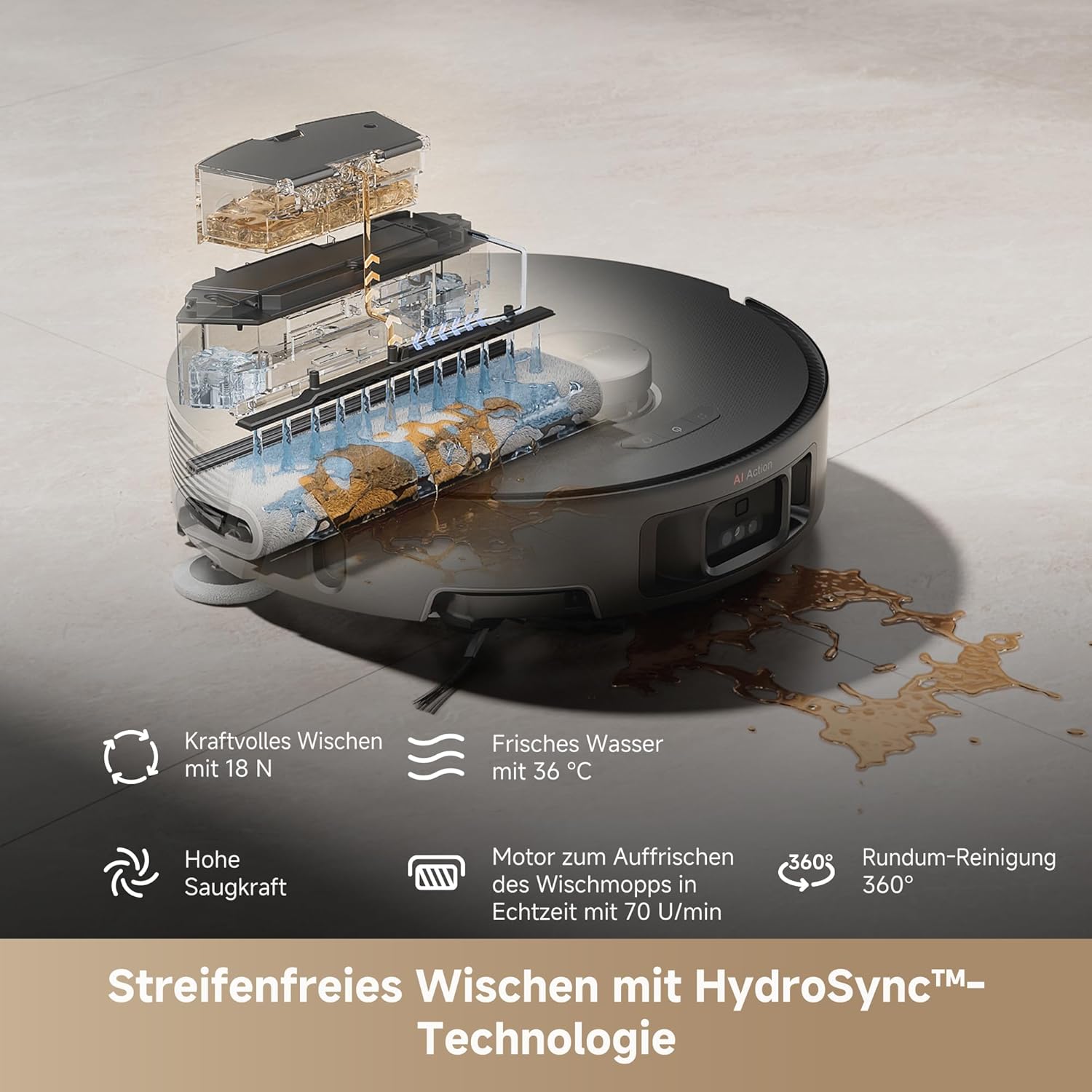
Image: An illustration demonstrating the HydroSync mopping technology, showing fresh water being applied and dirty water being collected for streak-free cleaning.

Image: The Mova Z50 Ultra detecting dirt in real-time, illustrating its AI sensing capabilities to identify and adapt to different levels of floor contamination.

Image: A visual representation of the robot's powerful 19,000 Pa suction, showing dust and debris being effectively lifted from the floor.
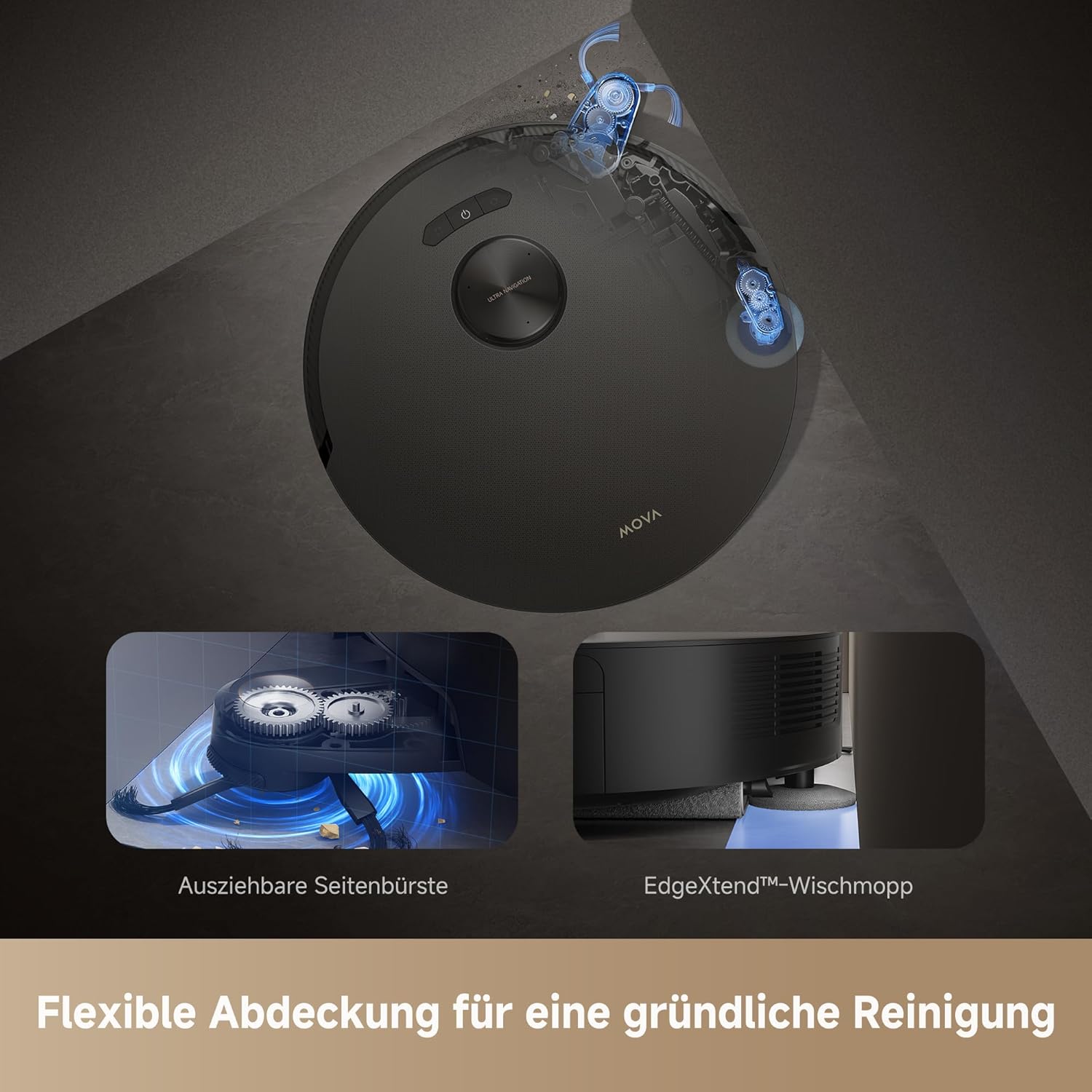
Image: The robot demonstrating its flexible cleaning coverage, with an extendable side brush reaching into corners and the EdgeXtend mop cleaning along edges.

Image: An internal view of the robot's efficient anti-tangle technology, showing how the brushes and mechanisms prevent hair from wrapping and causing blockages.
Setup
Unpacking and Placement
- Carefully remove all components from the packaging.
- Remove all protective films and packing materials from the robot and base station.
- Place the base station on a hard, flat surface against a wall, ensuring there is at least 0.5 meters of clear space on both sides and 1.5 meters in front.
- Connect the power cable to the base station and plug it into a power outlet.
Charging
Place the robot onto the charging contacts of the base station. Ensure the robot is properly aligned. The robot will automatically begin charging. For first use, fully charge the robot before operation (approximately 6 hours).
App Installation and Connection
- Download the 'CleanGenius' app from your mobile device's app store (iOS or Android).
- Open the app and follow the on-screen instructions to create an account.
- Select 'Add Device' and choose the Mova Z50 Ultra.
- Follow the app's prompts to connect the robot to your home Wi-Fi network.
Operating Instructions
Starting a Cleaning Cycle
- Manual Start: Press the power button on the robot once to start an automatic cleaning cycle.
- App Control: Open the CleanGenius app, select your robot, and tap 'Start Cleaning'. You can choose specific rooms or zones for cleaning.
Cleaning Modes
The Mova Z50 Ultra offers various cleaning modes accessible via the app:
- Auto Clean: The robot intelligently maps and cleans your entire home.
- Spot Clean: Cleans a specific area with concentrated effort.
- Zone Clean: Define custom zones on the map for targeted cleaning.
- Custom Clean: Adjust suction power, mopping intensity, and cleaning passes for specific areas.
Mopping Function
To utilize the mopping function:
- Fill the clean water tank in the base station with clean water. You may add Mova-approved cleaning solution if desired.
- Ensure the mop pads are properly attached to the robot.
- Select a mopping mode in the CleanGenius app. The robot will automatically manage water distribution and mop cleaning.
Scheduling
Set up cleaning schedules through the CleanGenius app to automate your cleaning routine. You can specify cleaning times, days, and modes for different areas of your home.
Maintenance
Regular maintenance ensures optimal performance and extends the lifespan of your Mova Z50 Ultra.
General Cleaning
- Wipe the robot's exterior with a soft, dry cloth.
- Clean the charging contacts on both the robot and the base station regularly with a dry cloth.
Dustbin and Filter Maintenance
- Open the robot's top cover and remove the dustbin.
- Empty the dustbin contents into a trash can.
- Remove the filter from the dustbin and tap it gently to remove dust. Rinse the filter with water if necessary, but ensure it is completely dry before reinserting.
- Reinstall the filter and dustbin.
Brush Maintenance
- Main Brush: Remove the main brush cover and lift out the brush. Use the cleaning tool to remove tangled hair and debris.
- Side Brush: Unscrew and remove the side brush. Clean any tangled hair or debris. Replace if worn.
Mop Pad Maintenance
The base station automatically cleans and dries the mop pads. For manual cleaning, remove the mop pads and rinse them thoroughly with water. Allow them to air dry completely before reattaching.
Base Station Maintenance
- Empty the dirty water tank regularly.
- Clean the clean water tank as needed.
- Wipe down the base station's charging contacts and the self-cleaning area to prevent buildup.
Troubleshooting
If you encounter issues with your Mova Z50 Ultra, refer to the table below for common problems and solutions:
| Problem | Possible Cause | Solution |
|---|---|---|
| Robot not charging | Charging contacts are dirty or misaligned. | Clean charging contacts on both robot and base station. Ensure robot is properly docked. |
| Poor suction performance | Dustbin full, filter clogged, or main brush tangled. | Empty dustbin, clean/replace filter, clean main brush. |
| Robot gets stuck frequently | Obstacles in cleaning path or uneven surfaces. | Clear obstacles, use no-go zones in app, ensure sufficient clearance. |
| Mopping leaves streaks | Mop pads are dirty or water tank is empty. | Clean mop pads, refill clean water tank. |
| App connection issues | Weak Wi-Fi signal or incorrect network settings. | Ensure strong 2.4GHz Wi-Fi signal. Restart robot and router. Re-pair device in app. |
Specifications
| Feature | Detail |
|---|---|
| Brand | Mova |
| Model Name | Z50 Ultra |
| Model Number | RLZ92CE |
| Color | Black |
| Product Dimensions (Robot + Base) | 46.63 x 54.5 x 39.04 cm |
| Item Weight | 21 Kilograms |
| Suction Power | 19,000 Pa |
| Battery Capacity | 6400 mAh |
| Max Run Time | Up to 140 minutes (Standard mode) |
| Special Features | Streak-free HydroSync Mopping, AI Dirt Detection, Flexible Coverage, Four-stage CleanLift System |
Warranty and Support
Warranty Information
The Mova Z50 Ultra comes with a 3-year warranty, ensuring reliable quality. For detailed warranty terms and conditions, please refer to the official Mova website or contact customer support.
Customer Support
If you have any questions, require technical assistance, or need to report an issue, please contact Mova customer support through the CleanGenius app or visit the official Mova website for contact information.


