
SINWE F993
SINWE F993 All-in-One Podcast Equipment Bundle User Manual
Model: F993 | Brand: SINWE
1. Introduction
This manual provides detailed instructions for the SINWE F993 All-in-One Podcast Equipment Bundle. This comprehensive kit is designed to deliver high-quality audio for various applications, including podcasting, live streaming, gaming, and music production. It features a BM-800 condenser microphone, a live sound card with voice changer and audio effects, and essential accessories for a complete setup.

Figure 1: Complete SINWE F993 All-in-One Podcast Equipment Bundle.
2. What's Included
The SINWE F993 Podcast Equipment Bundle includes the following components:
- BM-800 Condenser Microphone
- F993 Live Sound Card (Audio Interface)
- Adjustable Scissor Arm Stand
- Shock Mount
- Pop Filter
- Anti-wind Foam Cap
- USB Type-C Power/Data Cable
- 3.5mm Audio Cables (for phone connection)
- User Manual
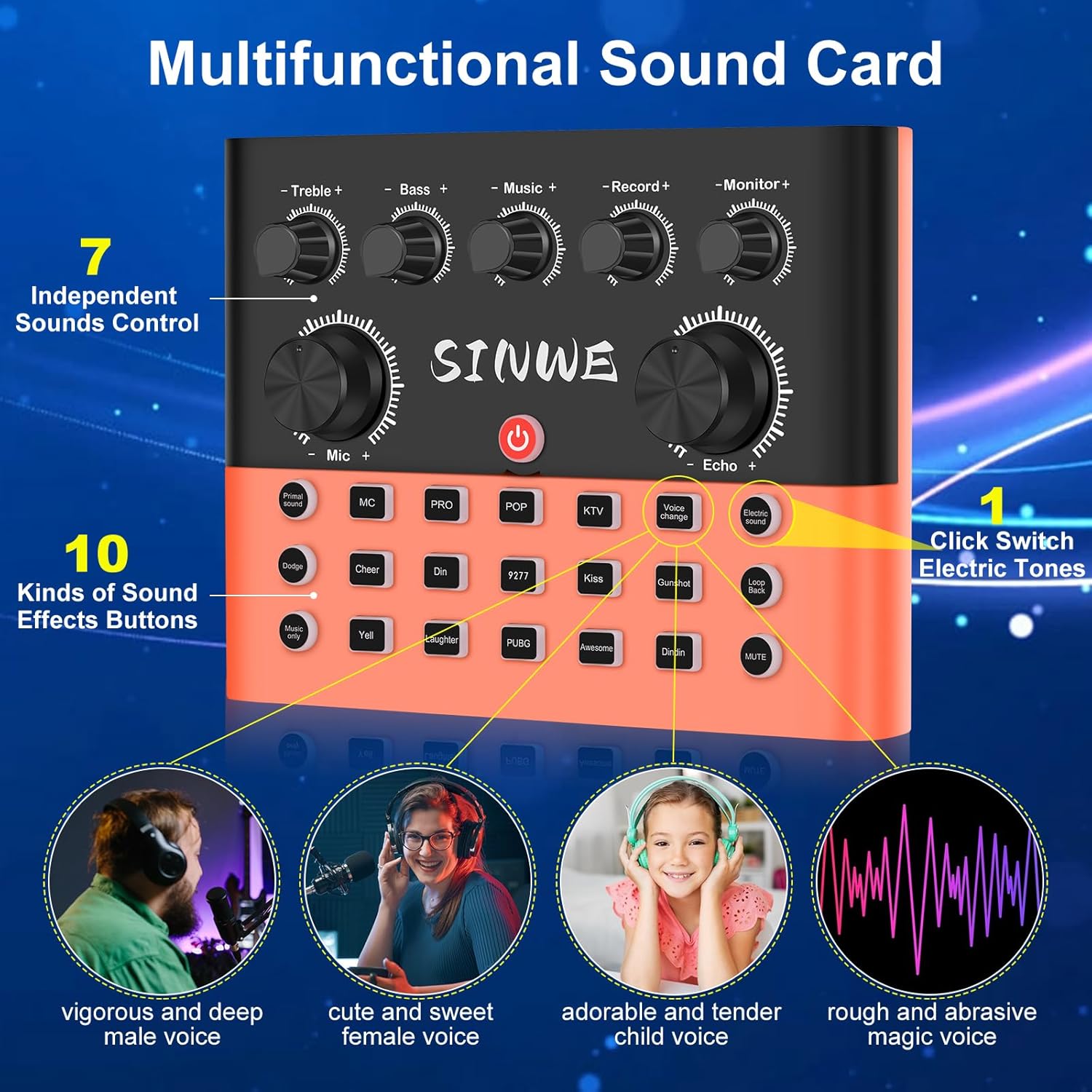
Figure 2: The F993 Live Mixer Sound Card, featuring independent sound controls and various audio effects.
3. Setup Guide
3.1 Initial Charging
Upon receiving the condenser microphone bundle, please ensure it is fully charged before first use to guarantee optimal performance.
3.2 Microphone Assembly
- Attach the adjustable scissor arm stand to your desk using the desk mount clamp. Secure it firmly.
- Mount the shock mount onto the end of the scissor arm stand.
- Carefully place the BM-800 condenser microphone into the shock mount.
- Attach the pop filter to the scissor arm, positioning it in front of the microphone to reduce plosive sounds.
- Place the anti-wind foam cap over the microphone for additional noise reduction.

Figure 3: Illustration of the durable microphone arm set, showing its adjustable features and desk clamp.

Figure 4: The microphone's cardioid pickup pattern, designed to focus on your voice and reduce background noise.
3.3 Sound Card Connections
- Connect the BM-800 microphone to the "Mic1" or "Mic2" input on the F993 Live Sound Card using the provided XLR to 3.5mm cable.
- For monitoring, connect your headphones to the "Headset" or "Earphone" jack.
- Connect the sound card to your computer (PC/Mac) via the USB Type-C port. No drivers are needed for most operating systems (Windows, macOS).
- For mobile devices (iOS/Android), connect using a 3.5mm audio cable to the "LIVE1" or "LIVE2" ports. If your phone lacks a 3.5mm jack, an OTG adapter (not included) may be required.
- Use the "AUX-IN" port to connect external audio sources for background music or accompaniment.

Figure 5: Connection diagram illustrating how to set up two microphones and two devices for live streaming or recording.
4. Operating Instructions
4.1 Sound Card Controls
The F993 Live Sound Card features independent controls for various audio parameters:
- Treble: Adjusts the high-frequency tones of your audio.
- Bass: Adjusts the low-frequency tones of your audio.
- Music: Controls the volume of background music or external audio input.
- Record: Adjusts the recording volume.
- Monitor: Controls the volume of your headphones for real-time monitoring.
- Mic: Adjusts the microphone input volume.
- Echo: Controls the echo effect level.

Figure 6: Close-up of the F993 Live Mixer, highlighting the individual channel control knobs for precise audio adjustments.
4.2 Voice and Audio Effects
The sound card includes various built-in effects to enhance your content:
- Voice Changer: Transform your voice with presets like Female, Male, Child, and Monster.
- Built-in Audio Effects: Access 10 special audio effects such as APPLAUSE, LAUGHTER, CHEERING, GUNSHOT, KISS, and more.

Figure 7: Visual representation of the four voice change options available on the sound card.
4.3 Smart Dodge Feature
The Smart Dodge feature automatically lowers background music volume when you speak and restores it when you stop, ensuring your voice remains clear and prominent during live streams or recordings.

Figure 8: Diagram explaining the Smart Dodge function, which dynamically adjusts music volume based on speech detection.
4.4 Multi-Platform Compatibility
The F993 Pro audio interface is plug-and-play, requiring no drivers. It is compatible with a wide range of devices and software:
- Devices: PC, Mac, iOS, Android, Tablets.
- Software/Platforms: TikTok, YouTube, Twitch, OBS, Audacity, Discord, Facebook.
The dual-device livestreaming feature allows simultaneous broadcasting on multiple platforms.

Figure 9: Visual guide to the F993's compatibility with popular streaming platforms and devices.
5. Maintenance
- Keep the equipment clean by wiping it with a soft, dry cloth.
- Avoid exposing the devices to extreme temperatures, humidity, or direct sunlight.
- Store all components in a safe place when not in use to prevent damage.
6. Troubleshooting
- No Sound/Distorted Audio:
- Ensure all cables are securely connected to the correct ports.
- Check volume levels on the sound card, connected devices, and software.
- Verify that the microphone is properly inserted into the shock mount and connected.
- If using a mobile phone, confirm that an appropriate OTG adapter is used if needed.
- Device Not Recognized:
- Restart your computer or mobile device.
- Try connecting the sound card to a different USB port.
- Ensure the sound card is powered on.
- Voice Breaking Up:
- Check microphone placement and ensure it's not too far or too close.
- Adjust microphone gain on the sound card.
- Ensure there are no obstructions or interference near the microphone.
7. Specifications
| Feature | Detail |
|---|---|
| Brand | SINWE |
| Model Number | F993-Orange |
| Item Weight | 5.33 pounds |
| Package Dimensions | 16.61 x 8.31 x 5.16 inches |
| Compatible Devices | Amplifier, PC, Mac, iOS, Android |
| Connector Type | USB Type-C, 3.5mm AUX |
| Supported Software | OBS Studio, Audacity, TikTok, YouTube, Twitch, Discord, Facebook |
| Operating System | Android, Windows, iOS, macOS |
| Number of Channels | 3 |
8. Warranty and Support
SINWE is dedicated to the research and development of podcast kits. If you encounter any questions or issues during the use of your F993 Podcast Equipment Bundle, please contact our customer support. We are committed to resolving any problems within 12 hours.
Ask a question about this manual
Ask about setup, troubleshooting, compatibility, parts, safety, or missing instructions. Manuals+ will review the question and use this page’s manual context to help answer it.