
1. Introduction
Thank you for choosing the EZIclean Cyclomax R22 Station Cordless Stick Vacuum Cleaner. This manual provides essential information for the safe and efficient operation, maintenance, and troubleshooting of your new appliance. Please read this manual thoroughly before first use and keep it for future reference.
2. Important Safety Instructions
When using an electrical appliance, basic precautions should always be followed, including the following:
- Read all instructions before using this vacuum cleaner.
- Do not use outdoors or on wet surfaces.
- Do not allow to be used as a toy. Close attention is necessary when used by or near children.
- Use only as described in this manual. Use only manufacturer’s recommended attachments.
- Do not use with a damaged cord or plug. If appliance is not working as it should, has been dropped, damaged, left outdoors, or dropped into water, return it to a service center.
- Do not pull or carry by cord, use cord as a handle, close a door on cord, or pull cord around sharp edges or corners. Do not run appliance over cord. Keep cord away from heated surfaces.
- Do not unplug by pulling on cord. To unplug, grasp the plug, not the cord.
- Do not handle plug or appliance with wet hands.
- Do not put any object into openings. Do not use with any opening blocked; keep free of dust, lint, hair, and anything that may reduce airflow.
- Keep hair, loose clothing, fingers, and all parts of body away from openings and moving parts.
- Do not pick up anything that is burning or smoking, such as cigarettes, matches, or hot ashes.
- Do not use to pick up flammable or combustible liquids, such as gasoline, or use in areas where they may be present.
- Do not pick up toxic material, such as chlorine bleach, ammonia, or drain cleaner.
- Do not use without dust bag and/or filters in place.
- Turn off all controls before unplugging.
- Use extra care when cleaning on stairs.
- Store the appliance indoors.
- Do not immerse the vacuum cleaner in water or other liquids.
3. Product Overview
The EZIclean Cyclomax R22 Station is a versatile cordless stick vacuum cleaner designed for efficient cleaning across various surfaces. It features a powerful digital motor, multi-level HEPA filtration, and an intelligent touch screen.
Main Components
- Main Unit: Contains the motor, dustbin, and control panel.
- Extension Tube: Connects the main unit to the brush head for floor cleaning.
- Motorized Brush Head: Equipped with a roller brush and LED lights for effective cleaning.
- Automatic Emptying Station: A docking station that charges the vacuum and automatically empties its dustbin.
- Smart Touch Screen: Displays battery status, suction power, and other real-time information.
- Various Attachments: (e.g., crevice tool, dusting brush - specific attachments may vary)

Image: The EZIclean Cyclomax R22 Station Cordless Stick Vacuum Cleaner positioned in a living room, demonstrating its adaptable design for various cleaning tasks.
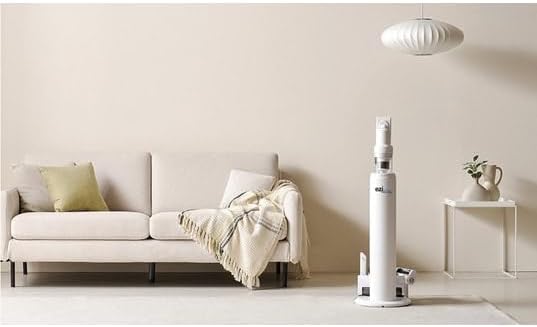
Image: The EZIclean Cyclomax R22 Station vacuum cleaner is shown upright in its automatic emptying and charging station, placed beside a sofa in a home environment.
4. Setup and Assembly
4.1 Assembling the Vacuum Cleaner
- Connect the Extension Tube: Insert the extension tube into the main unit until it clicks securely into place.
- Attach the Motorized Brush Head: Connect the motorized brush head to the other end of the extension tube, ensuring it locks firmly.
- Install Attachments: For handheld use, attach desired accessories (e.g., crevice tool) directly to the main unit.
4.2 Setting Up the Automatic Emptying Station
- Choose a Location: Place the automatic emptying station on a flat, stable surface near a power outlet. Ensure there is enough space around it for the vacuum cleaner to dock easily.
- Connect Power: Plug the power adapter into the station and then into a wall outlet.
- Install Dust Bag: Ensure a dust bag is correctly installed inside the emptying station. Refer to Section 6.1 for dust bag replacement.
4.3 Initial Charging
Before first use, fully charge the vacuum cleaner. Dock the assembled vacuum cleaner onto the automatic emptying station. The smart touch screen will indicate charging status. A full charge can take several hours.
5. Operating Instructions
5.1 Power On/Off and Suction Control
- Power On: Press the power button on the main unit. The smart touch screen will illuminate.
- Adjust Suction Power: Use the controls on the smart touch screen to cycle through different suction modes (e.g., Eco, Standard, Max). The screen displays the current mode and battery level.
- Power Off: Press the power button again to turn off the vacuum cleaner.
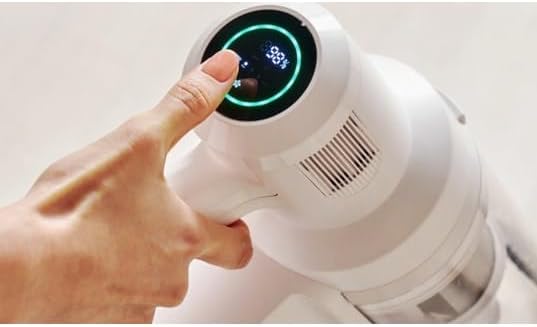
Image: A hand interacts with the smart touch screen of the EZIclean Cyclomax R22 Station, which displays a battery percentage of 98% and is encircled by a green light.
5.2 Cleaning with the Motorized Brush Head
The motorized brush head is suitable for both hard floors and carpets. Its intelligent detection technology automatically adjusts suction power based on the surface and dirt level.

Image: The EZIclean Cyclomax R22 Station vacuum cleaner is actively cleaning a pile of debris, including crumbs and small particles, from a light-colored hard floor.
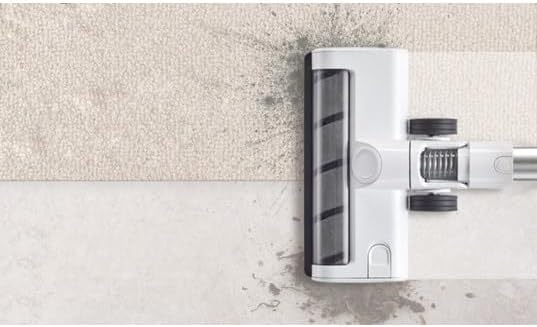
Image: A close-up view of the EZIclean Cyclomax R22 Station's brush head, showing its roller brush and wheels, positioned across a transition from a carpeted area to a hard floor.
5.3 LED Lighting
The motorized brush head features built-in LED lights that illuminate dark areas and corners, making hidden dust and debris visible for thorough cleaning.
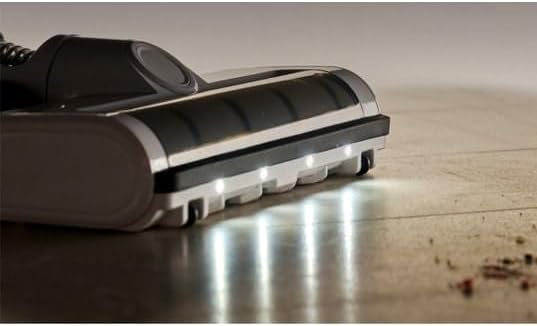
Image: A close-up of the EZIclean Cyclomax R22 Station's brush head with its front-facing LED lights illuminated, casting light on a wooden floor with some visible dust particles.
5.4 Automatic Emptying Function
When the vacuum cleaner is docked in the automatic emptying station, its dustbin will be automatically emptied into the station's larger dust bag. This process typically starts automatically after docking.
6. Maintenance
Regular maintenance ensures optimal performance and extends the lifespan of your EZIclean Cyclomax R22 Station.
6.1 Emptying the Dustbin (Manual)
While the automatic emptying station handles most dust disposal, you may occasionally need to manually empty the vacuum's dustbin:
- Disconnect the main unit from the extension tube.
- Locate the dustbin release button and press it to open the dustbin flap.
- Empty contents into a waste bin.
- Close the dustbin flap securely.
6.2 Replacing the Automatic Emptying Station Dust Bag
The dust bag in the automatic emptying station should be replaced when full. The station may indicate when replacement is needed.
- Open the cover of the automatic emptying station.
- Carefully remove the full dust bag by pulling it upwards.
- Dispose of the full bag responsibly.
- Insert a new dust bag, ensuring it is properly seated.
- Close the station cover securely.
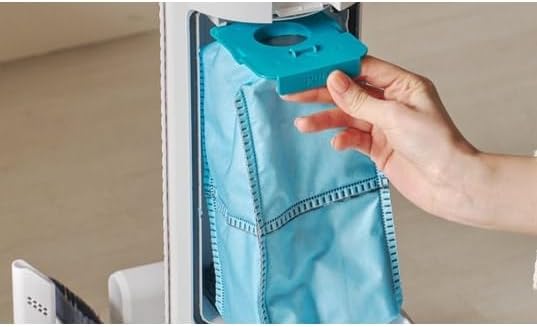
Image: A hand is shown removing a blue dust bag from the internal compartment of the EZIclean Cyclomax R22 Station's automatic emptying unit.
6.3 Cleaning Filters
The multi-level HEPA filtration system requires regular cleaning to maintain suction power and air quality.
- Remove the dustbin from the main unit.
- Carefully remove the HEPA filter and other filter components.
- Tap the filters gently to remove loose dust. If washable, rinse under cold running water until the water runs clear.
- Allow all filter components to air dry completely for at least 24 hours before reassembling. Do not use the vacuum with wet filters.
6.4 Cleaning the Brush Roll
Hair and debris can get tangled in the brush roll, affecting performance.
- Turn off the vacuum and disconnect the brush head.
- Locate the brush roll release mechanism (usually a latch or screw) and remove the brush roll.
- Use scissors or a cleaning tool to cut and remove any tangled hair or fibers.
- Reinsert the brush roll and secure it.
6.5 Battery Care
- Always charge the battery using the provided charging station.
- Avoid exposing the battery to extreme temperatures.
- If storing the vacuum for an extended period, ensure the battery is partially charged (around 50%) and recharge every few months.
7. Troubleshooting
If you encounter issues with your EZIclean Cyclomax R22 Station, refer to the following table for common problems and solutions.
| Problem | Possible Cause | Solution |
|---|---|---|
| Vacuum does not turn on | Battery is depleted Power button not pressed correctly | Charge the battery fully Press the power button firmly |
| Low suction power | Dustbin is full Filters are clogged Brush roll is tangled Hose/tube is blocked | Empty the dustbin Clean or replace filters Clean the brush roll Check for and remove blockages |
| Automatic emptying not working | Vacuum not properly docked Emptying station dust bag is full or incorrectly installed Station power not connected | Ensure vacuum is fully seated in the station Replace or correctly install the dust bag Check power connection to the station |
| Brush roll not spinning | Brush roll is tangled Brush head is blocked Brush head not properly attached | Clean the brush roll Remove any obstructions from the brush head Reattach the brush head securely |
8. Specifications
| Feature | Detail |
|---|---|
| Model Number | CYCLOMAX R22 STATION |
| Brand | EZICLEAN |
| Product Dimensions | 3.94 x 9.45 x 44.09 inches |
| Item Weight | 2.2 pounds (1 Kilogram) |
| Voltage | 28.8 Volts |
| Suction Power | Up to 35,000 Pa |
| Battery Life | Up to 52 minutes (in standard mode) |
| Filtration System | Multi-level HEPA filtration (captures 99.97% of particles down to 0.3 microns) |
| Special Features | Automatic Emptying Technology, Smart Touch Screen, Intelligent Detection Technology, LED Lighting |
9. Warranty and Support
For warranty information and customer support, please refer to the warranty card included with your product or contact EZICLEAN customer service through their official website or the retailer where the product was purchased. Please have your model number (CYCLOMAX R22 STATION) and purchase details ready when contacting support.

