
1. Overview
The TANLANIN TE-2019A-BK-TA is a versatile vinyl record player designed for both traditional vinyl playback and modern wireless audio streaming. It features built-in stereo speakers, multiple speed options, and various connectivity choices for an enhanced audio experience.
Key Features:
- Bluetooth 5.1 Connectivity: Seamlessly stream digital music from your smartphone or tablet.
- Built-in Stereo Speakers: Enjoy high-quality sound directly from the turntable.
- 3-Speed Belt-Drive Turntable: Supports 33, 45, and 78 RPM for 7", 10", and 12" vinyl records.
- Auto-Stop Function: Protects records by automatically stopping playback at the end of a side.
- Multiple Audio Outputs: Includes RCA output for connecting to external speakers and AUX-in for wired external audio sources.
- Headphone Jack: For private listening.
- Dust Cover: Protects the turntable and records from dust.
2. What's in the Box
Upon unpacking, ensure all components are present:
- TANLANIN TE-2019A-BK-TA Turntable Unit
- Power Cord
- 45 RPM Adapter
- User Manual (this document)

Image: The TANLANIN TE-2019A-BK-TA turntable with its clear dust cover open, showcasing the record player unit.
3. Setup
- Unpack the Turntable: Carefully remove the turntable from its packaging. Retain all packaging materials for future transport or storage.
- Placement: Place the turntable on a stable, level surface away from direct sunlight, heat sources, and excessive vibration.
- Remove Protective Materials: Remove any protective foam, plastic wraps, or twist ties from the turntable platter, tonearm, and stylus. Ensure the stylus guard is removed before playing records.
- Connect Power: Insert the power cord into the DC IN port on the back of the turntable and plug the other end into a wall outlet.
- Dust Cover Installation: If not already attached, carefully align and insert the dust cover hinges into the slots on the back of the turntable.
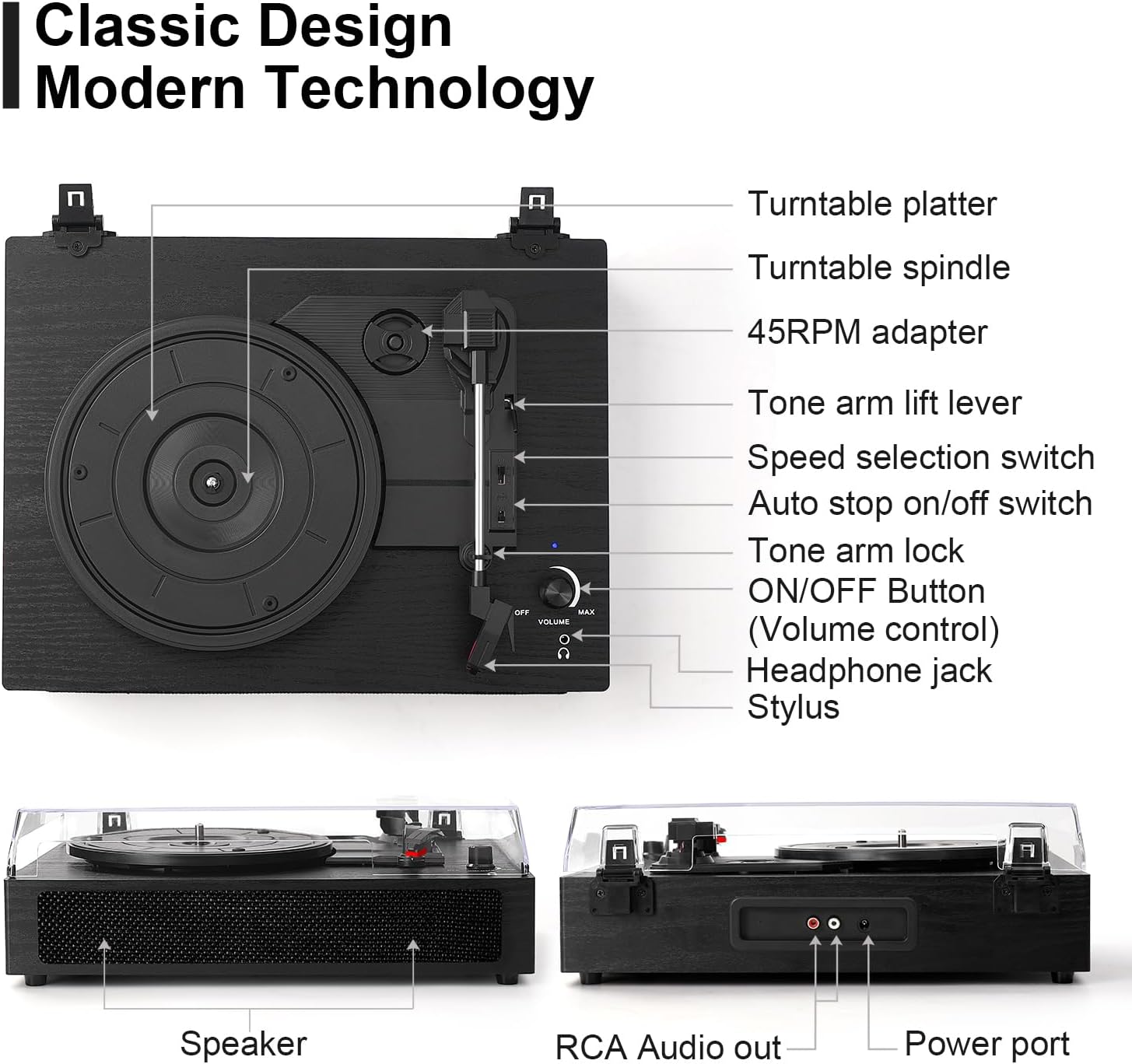
Image: A detailed diagram labeling the components of the turntable, including the platter, spindle, 45 RPM adapter, tonearm, speed switch, auto-stop switch, tone arm lock, ON/OFF/Volume knob, headphone jack, stylus, speaker, RCA audio out, and power port.
4. Operating Instructions
4.1 Playing Vinyl Records
- Power On: Turn the ON/OFF/Volume knob clockwise to power on the turntable. The power indicator light will illuminate.
- Select Speed: Set the speed selection switch to the appropriate RPM (33, 45, or 78) for your record. Use the 45 RPM adapter for 7-inch singles if needed.
- Place Record: Carefully place a vinyl record on the turntable platter.
- Release Tonearm: Unlock the tonearm clip.
- Lower Tonearm: Gently lift the tonearm using the tonearm lift lever and position the stylus over the desired track on the record. Slowly lower the tonearm onto the record using the lever.
- Adjust Volume: Adjust the volume using the ON/OFF/Volume knob.
- Auto-Stop: The auto-stop switch can be set to ON or OFF. When ON, the turntable will automatically stop spinning when the record finishes. When OFF, it will continue to spin.
- Finish Playback: When the record finishes, lift the tonearm, return it to the tonearm rest, and secure it with the clip. Turn the ON/OFF/Volume knob counter-clockwise to power off.
Video: Demonstrates playing a vinyl record on the turntable, including placing the record, lowering the tonearm, and adjusting volume.

Image: A person wearing headphones while operating the turntable, highlighting the headphone jack functionality.
4.2 Bluetooth Connection
- Power On: Turn the ON/OFF/Volume knob clockwise to power on the turntable.
- Activate Bluetooth: The turntable will automatically enter Bluetooth pairing mode. The indicator light will flash.
- Pair Device: On your smartphone or tablet, enable Bluetooth and search for "TANLANIN" or "TE-2019A-BK-TA" in the list of available devices. Select it to pair.
- Play Music: Once paired, you can stream music from your device through the turntable's built-in speakers. Adjust volume using the turntable's knob or your device.

Image: The turntable wirelessly connected to a smartphone via Bluetooth, displaying "BLTLD" on the phone screen.
Video: Demonstrates the Bluetooth connectivity of the TANLANIN turntable, showing a smartphone streaming music to the unit.
4.3 AUX-in Connection
Connect an external audio device (e.g., MP3 player, CD player) to the turntable using a 3.5mm AUX cable. The audio from the external device will play through the turntable's speakers.
4.4 RCA Output
To connect the turntable to external powered speakers or an amplifier, use an RCA cable (not included). Plug the RCA cables into the "RCA Audio Out" ports on the back of the turntable and connect them to the corresponding input ports on your external audio system.
5. Maintenance
- Cleaning the Unit: Wipe the turntable's exterior with a soft, dry cloth. Avoid using abrasive cleaners or solvents.
- Cleaning the Stylus: Gently clean the stylus regularly with a soft brush designed for stylus cleaning, brushing from back to front.
- Cleaning Records: Use a dedicated record cleaning brush or cloth to remove dust and debris from your vinyl records before each play.
- Dust Cover: Keep the dust cover closed when the turntable is not in use to prevent dust accumulation.
6. Troubleshooting
| Problem | Possible Cause | Solution |
|---|---|---|
| No power | Power cord not connected; Power outlet not active | Ensure power cord is securely plugged in; Test outlet with another device. |
| No sound from speakers | Volume too low; Incorrect input mode (if using external speakers); Stylus not properly seated | Increase volume; Check if external speakers are powered on and connected correctly; Ensure stylus is correctly installed. |
| Record skipping | Dirty or damaged record; Stylus worn out or dirty; Turntable not level; Excessive vibration | Clean record; Clean or replace stylus; Place turntable on a stable, level surface; Avoid placing near speakers or vibrating objects. |
| Bluetooth not connecting | Bluetooth not enabled on device; Turntable not in pairing mode; Device too far away | Enable Bluetooth on your device; Ensure turntable is in pairing mode (flashing indicator); Move device closer to the turntable. |
| Incorrect playback speed | Speed selection switch set incorrectly | Adjust the speed selection switch to 33, 45, or 78 RPM as required by the record. |
7. Specifications
| Feature | Detail |
|---|---|
| Brand | TANLANIN |
| Model Name | TE-2019A-BK-TA |
| Connectivity Technology | Bluetooth |
| Special Features | Bluetooth Reception and Playback, Built-in Stereo Speaker, 3-Speed Vinyl Player (33/45/78 RPM), Retro Design, Dust Cover, RCA Output, AUX Input, Auto Stop |
| Material | Engineered Wood |
| Color | Black Wood |
| Item Dimensions (L x W x H) | 14"L x 11"W x 5"H |
| Included Components | Power cord, Turntable, 45 RPM Adapter, User manual |

Image: The dimensions of the TANLANIN TE-2019A-BK-TA turntable are displayed, showing 14.17 inches length, 10.62 inches width, and 13.03 inches height with the dust cover open.
8. Warranty and Support
The TANLANIN TE-2019A-BK-TA turntable comes with a 1-year warranty from the date of purchase. This warranty covers manufacturing defects and malfunctions under normal use.
For technical support, warranty claims, or any questions regarding your product, please contact TANLANIN customer service. Refer to the contact information provided on the product packaging or the official TANLANIN website.
Please retain your proof of purchase for warranty purposes.


