
1. Introduction
This manual provides comprehensive instructions for the safe and efficient setup, operation, maintenance, and troubleshooting of your OEMGMINER Avalon Q 90TH/s Bitcoin Miner. The Avalon Q is designed for home use, offering a high hash rate with optimized power efficiency and reduced noise levels. Please read this manual thoroughly before operating the device to ensure optimal performance and longevity.
2. Product Overview
The Avalon Q is an advanced ASIC miner featuring 160 4-nanometer chips, delivering a hash rate of 90 TH/s. It is engineered for quiet operation, making it suitable for home environments.
Key Features:
- High Hash Rate: Achieves 90 TH/s for efficient Bitcoin mining.
- Energy Efficient: Features 160 advanced 4-nanometer chips for optimized power consumption.
- Ultra-Quiet Operation: Designed with a minimum noise level of 45 dB, suitable for home use.
- Flexible Power Input: Supports standard U.S. voltage of 110V and up to 240V.
- Easy Connectivity: Includes LAN and Wi-Fi modules for seamless network integration.
- App Management: Effortless control and diagnostics via the Avalon Family App.
Component Identification:

Figure 2.1: Front panel of the Avalon Q miner, showing the Power Button, Reset Button, LAN port, USB Interface, Status Light, and Screen.

Figure 2.2: Angled front view of the Avalon Q Bitcoin Miner, highlighting its compact design and ventilation grilles.

Figure 2.3: Rear view of the Avalon Q miner, indicating the power input and exhaust fan area.
3. Setup
3.1 Unpacking and Inspection
Carefully remove the Avalon Q miner from its packaging. Inspect the device for any signs of damage during transit. Ensure all components listed in the packing slip are present.

Figure 3.1: The Avalon Q miner packaging, designed to protect the device during shipping.
3.2 Placement
Place the miner on a stable, flat surface in a well-ventilated area. Ensure there is adequate space around the device for proper airflow, especially around the intake and exhaust vents. Avoid placing it near heat sources or in enclosed spaces that could restrict ventilation. While designed for quiet operation, consider its placement to minimize any potential noise impact.
3.3 Power Connection
Connect the provided power cord to the miner's power input and then to a suitable electrical outlet. The Avalon Q supports 110V-240V AC. For 110V operation, a dedicated 20A circuit and outlet are highly recommended to prevent overheating and ensure stable performance, especially when operating at higher hash rates. Ensure the power cord is securely connected.
3.4 Network Connection
The Avalon Q offers both wired and wireless network connectivity:
- LAN (Wired): Connect an Ethernet cable from the miner's LAN port to your router or network switch.
- Wi-Fi (Wireless): The miner includes a Wi-Fi module. Configuration for Wi-Fi is typically done through the Avalon Family App after initial power-up.
3.5 Initial Configuration with Avalon Family App
To set up and manage your Avalon Q, download the Avalon Family App on your smartphone or tablet. The app facilitates easy integration with mining pools like F2Pool.
- Download the Avalon Family App:
- For iOS devices: Download on the App Store
- For Android devices: Search for "Avalon Family App" on Google Play Store.
- Follow the in-app instructions to connect to your Avalon Q miner. This typically involves scanning a QR code provided with the miner or discovering it on your local network.
- Configure your mining pool settings (e.g., F2Pool) within the app. You will need to create accounts for the miner, mining pool, and set an admin password.
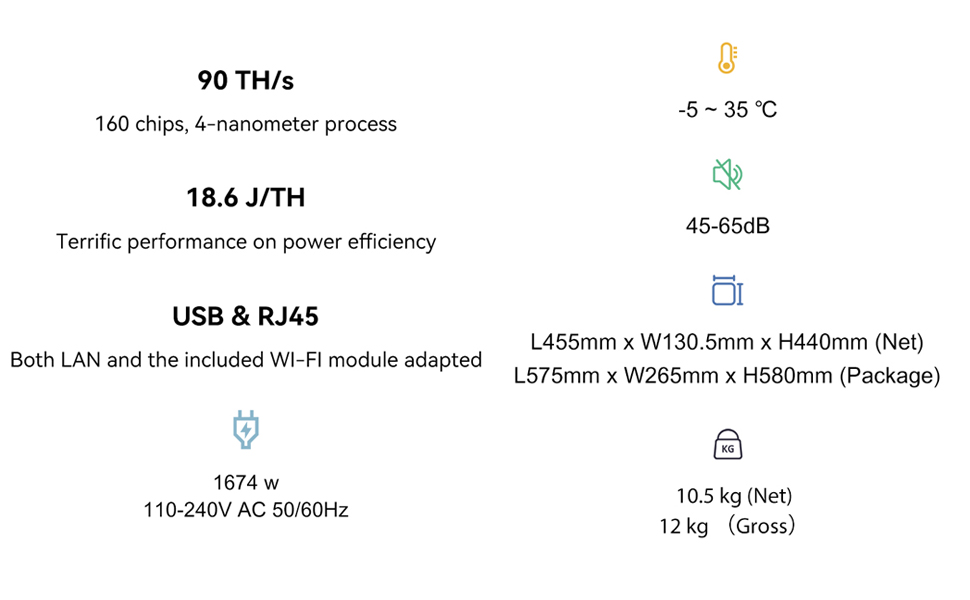
Figure 3.2: Screenshots illustrating the user interface of the Avalon Family App for managing the miner.
4. Operating Instructions
4.1 Powering On/Off
- Power On: After connecting power and network, press the Power Button on the front panel. The Status Light will indicate operation status.
- Power Off: Press and hold the Power Button until the device shuts down, or use the Avalon Family App for a controlled shutdown.
4.2 Operating Modes
The Avalon Q offers different operating modes to balance performance and power consumption:
- Eco Mode: Approximately 55 TH/s at 640W. Ideal for reduced power consumption and heat output.
- Normal Mode: Approximately 90 TH/s at 1640W. Standard operating mode for balanced performance.
- Super Mode: Up to 100 TH/s at 1760W. Provides maximum hash rate. This mode is recommended for 220V-240V circuits to avoid excessive heat on 110V outlets.
You can switch between these modes using the Avalon Family App.
4.3 Monitoring and Management
Use the Avalon Family App to monitor your miner's performance, hash rate, temperature, and power consumption. The app also allows for remote management and diagnostics.
5. Maintenance
5.1 Cleaning
Regularly clean the exterior of the miner and ensure the ventilation grilles are free from dust and debris. Use a soft, dry cloth. For internal cleaning, use compressed air to gently clear dust from fans and heatsinks. Ensure the device is powered off and unplugged before cleaning.
5.2 Ventilation and Temperature Management
Maintain good airflow around the miner. Operating the device generates significant heat, which must be dissipated effectively. Ensure the ambient temperature is within the recommended operating range (-5°C to 35°C). In warmer environments, additional cooling or improved ventilation may be necessary to prevent overheating and maintain optimal performance.
6. Troubleshooting
This section addresses common issues you might encounter with your Avalon Q miner. For more detailed diagnostics, refer to the Avalon Family App or contact support.
6.1 No Power
- Ensure the power cord is securely connected to both the miner and the electrical outlet.
- Verify that the electrical outlet is functional by plugging in another device.
- Check for tripped circuit breakers.
6.2 Network Connectivity Issues
- Wired (LAN): Ensure the Ethernet cable is properly connected and not damaged. Check your router/switch for connectivity.
- Wireless (Wi-Fi): Verify that the Wi-Fi network is active and the miner is within range. Reconfigure Wi-Fi settings via the Avalon Family App if necessary.
- Restart your router/modem and the miner.
6.3 Low Hash Rate or Instability
- Check the operating mode in the Avalon Family App; ensure it's set to your desired performance level (Eco, Normal, Super).
- Monitor the miner's temperature via the app. Overheating can lead to performance throttling. Ensure adequate ventilation.
- Verify your power supply is stable and sufficient, especially for 110V setups running in Normal or Super modes.
- Check your internet connection speed and stability.
- Confirm your mining pool settings are correct and the pool is operational.
6.4 Excessive Noise
- While the Avalon Q is designed to be quiet, fan speed increases with temperature. Ensure proper ventilation to keep temperatures down.
- Check for any obstructions to the fans.
- Consider operating in Eco Mode if noise is a primary concern.
7. Specifications
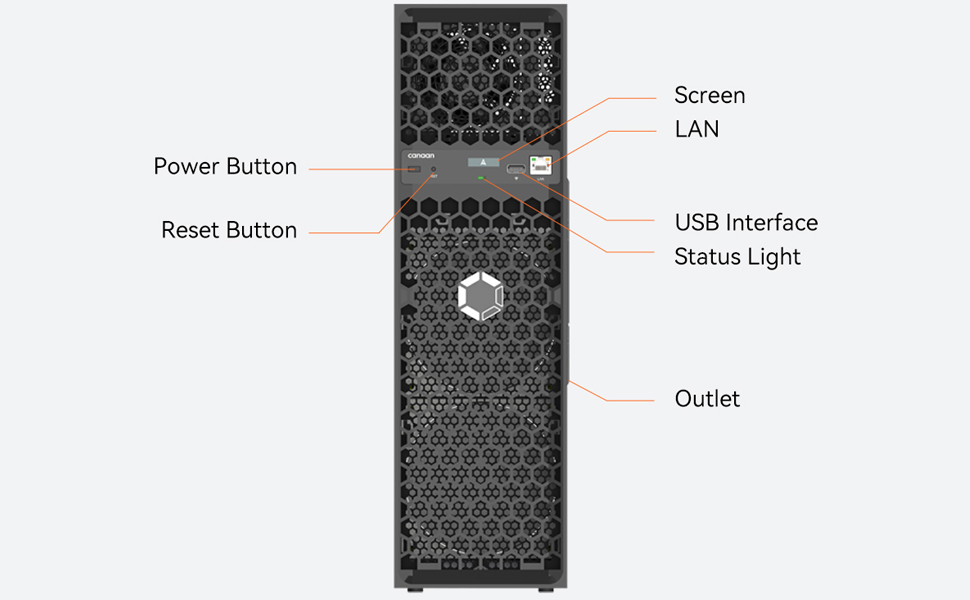
Figure 7.1: Visual representation of the Avalon Q's key technical specifications.
| Feature | Specification |
|---|---|
| Model Name | Avalon Q |
| Hash Rate | 90 TH/s (Normal Mode) |
| Power Consumption | 1674 W (Normal Mode) |
| Power Efficiency | 18.6 J/TH |
| Chip Technology | 160 x 4-nanometer chips |
| Input Voltage | 110V-240V AC, 50/60Hz |
| Noise Level | 45-65 dB |
| Operating Temperature | -5°C to 35°C |
| Cooling Method | Air Cooling |
| Connectivity | LAN (RJ45), Wi-Fi |
| Dimensions (Net) | L455mm x W130.5mm x H440mm (17.91 x 5.14 x 17.32 inches) |
| Weight (Net) | 10.5 kg |
8. Warranty and Support
8.1 Product Warranty
The OEMGMINER Avalon Q comes with a manufacturer's warranty. Please refer to the warranty card included in your product packaging or contact OEMGMINER directly for specific terms and conditions. Keep your proof of purchase for warranty claims.
8.2 Technical Support
For technical assistance, troubleshooting beyond this manual, or warranty inquiries, please contact OEMGMINER customer support. You can typically find contact information on the official OEMGMINER website or through your purchase platform.