
1. Introduction
The MEDALight F2 Mini Camera Flash is a compact and versatile lighting solution designed for various photography needs. It features 2.4GHz wireless control, adjustable power settings, and a rotatable lamp head, making it suitable for both on-camera and off-camera flash setups. This manual provides detailed instructions to help you effectively use and maintain your F2 Mini Camera Flash.
2. Product Overview
The MEDALight F2 system consists of a main flash unit and a detachable wireless transmitter. Familiarize yourself with the components and controls:

Figure 1: MEDALight F2 Mini Camera Flash with included accessories, including the main flash unit, wireless transmitter, charging cable, and protective case.
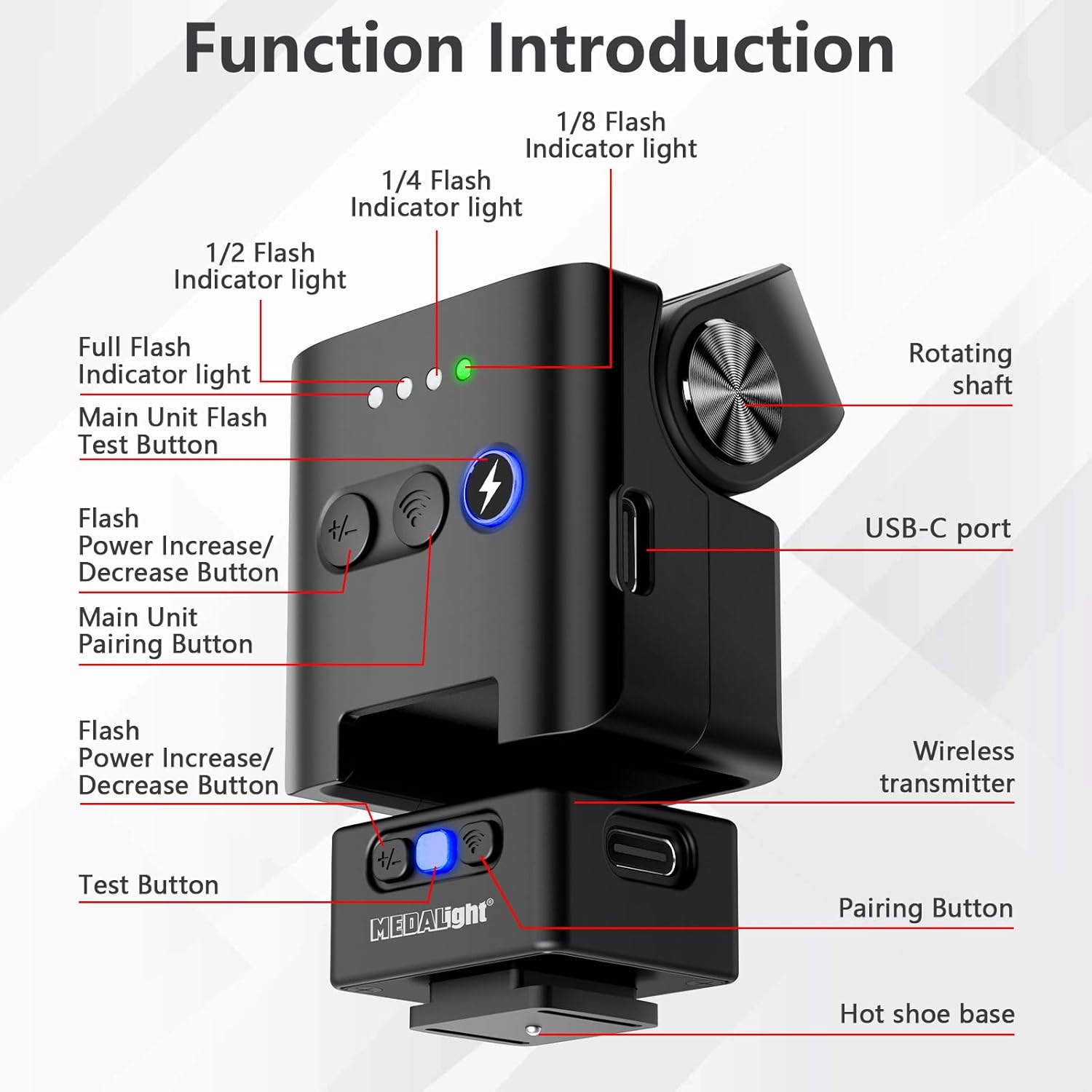
Figure 2: Detailed view of the MEDALight F2 flash unit and wireless transmitter, highlighting buttons for flash power adjustment, test, pairing, and USB-C ports.
2.1 Main Flash Unit
- Flash Head: Contains the xenon flash tube and LED fill light.
- Rotating Shaft: Allows adjustment of the lamp head angle from -10° to +80°.
- Power Indicators: Four LED lights indicating flash power levels (1/8, 1/4, 1/2, 1/1 full power).
- Flash Power Increase/Decrease Buttons: Adjusts the flash output level.
- Main Unit Pairing Button: Used for wireless pairing with the transmitter.
- USB-C Port: For charging the built-in 3.7V/400mAh rechargeable lithium battery.
2.2 Wireless Transmitter
- Hot Shoe Base: Attaches to the camera's hot shoe for triggering.
- Test Button: Triggers a test flash.
- Pairing Button: Used for wireless pairing with the main flash unit.
- Magnetic Clip: Allows the transmitter to be securely attached to the main unit or other metal surfaces.
3. Setup
3.1 Charging the Battery
The MEDALight F2 Mini Camera Flash features a built-in 3.7V/400mAh rechargeable lithium battery. Use the provided USB-C charging cable to charge both the main flash unit and the wireless transmitter. A full charge typically takes 1-1.5 hours. The test red light on the flash unit will show blue during charging and turn off when fully charged. The device includes low-battery auto-shutdown to protect the battery.
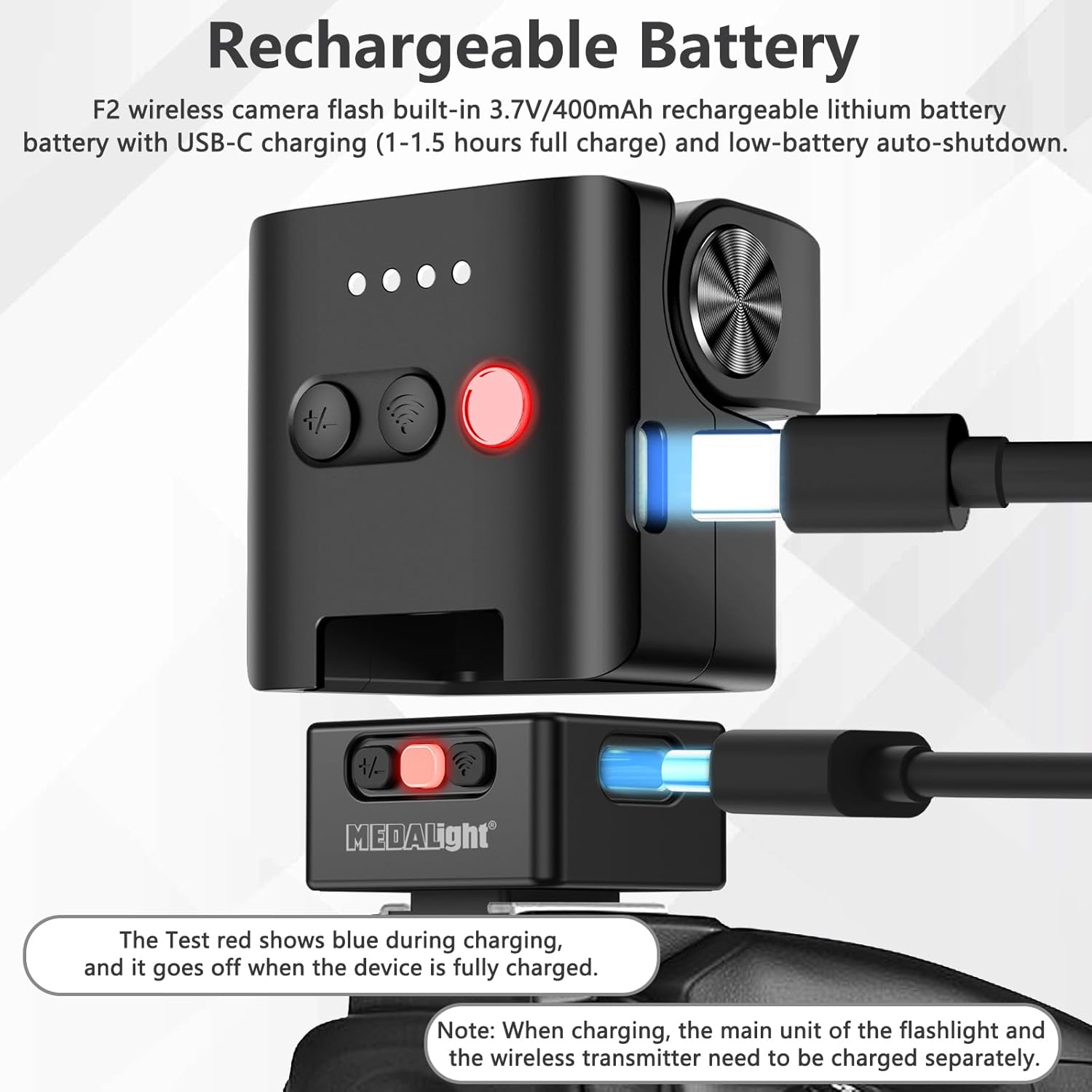
Figure 3: The main flash unit and wireless transmitter being charged via USB-C cable. The red test light indicates charging status.
3.2 Camera Compatibility
Ensure your camera has a single-contact hot shoe for compatibility. The MEDALight F2 is compatible with cameras from Fuji, Canon, Nikon, Sony ZV1, Sony ZVE10, Olympus, and Ricoh GR3. It is NOT compatible with Sony ZV-1F or other cameras without universal hot shoe contacts.

Figure 4: Visual guide for checking camera hot shoe compatibility. Ensure your camera has universal contacts for proper function.
3.3 Attaching and Pairing
Attach the wireless transmitter to your camera's hot shoe. To power on the flash unit, use the slide switch on the side. To power on the wireless transmitter, long-press the middle button. Once both units are powered on and the blue indicator lights are solid, they are paired and ready for use.
4. Operating Instructions
4.1 Adjusting Flash Power Levels
The MEDALight F2 offers four power settings: 1/8, 1/4, 1/2, and 1/1 (full power). Use the flash power increase/decrease buttons on the main unit to cycle through these settings. The indicator lights will show the current power level. Note that at full power, the flash may take approximately 6 seconds to recycle.

Figure 5: The flash unit displaying different power levels (1/1, 1/2, 1/4, 1/8) and their visual effect on a subject.
4.2 Using the LED Fill Light
The F2 flash features an integrated LED fill light. Long-press the flash test button on the main unit to activate the LED fill light. This feature is useful for focusing in low-light conditions and enhancing clarity in your shots. The color temperature of the LED fill light is 6500K with a Color Rendering Index (CRI) of 90.
4.3 Wireless Off-Camera Flash
The 2.4GHz wireless transmitter allows for seamless remote control of the flash unit up to 10 meters in an accessible environment. When the transmitter is plugged into your camera, you can simultaneously control multiple F2 flashes, expanding your creative lighting possibilities.

Figure 6: The MEDALight F2 flash unit operating wirelessly off-camera, triggered by the transmitter on the camera's hot shoe.
4.4 Rotatable Lamp Head
The adjustable lamp head allows you to modify the flash angle from -10° to +80°. This feature is crucial for bounce flash techniques and precise directional lighting control, adapting to various shooting scenarios and focal lengths.

Figure 7: Examples of the rotatable lamp head in different positions, demonstrating its flexibility for various lighting angles.
4.5 Magnetic Suction Base
The MEDALight F2 comes with a magnetic suction base, allowing it to be securely attached to metal surfaces. It also features a 1/4-inch threaded interface for versatile positioning on tripods or other mounting accessories.
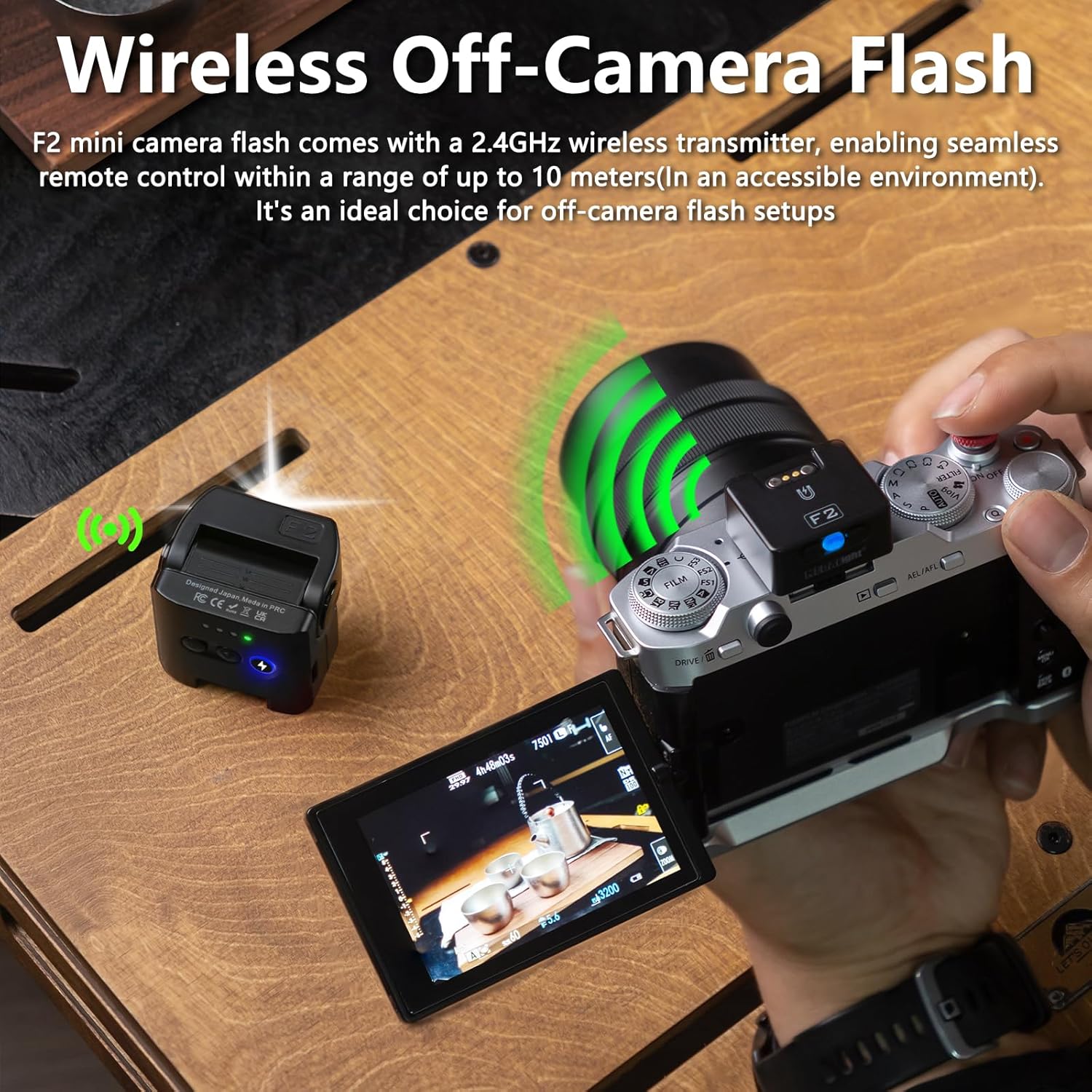
Figure 8: The magnetic base allows for effortless attachment to metal surfaces or tripods via the 1/4-inch threaded hole.
5. Maintenance
To ensure the longevity and optimal performance of your MEDALight F2 Mini Camera Flash, follow these maintenance guidelines:
- Cleaning: Use a soft, dry cloth to clean the exterior of the flash unit and transmitter. Avoid using harsh chemicals or abrasive materials.
- Battery Care: Recharge the battery regularly, even if not in frequent use, to maintain its health. Avoid completely draining the battery. The low-battery auto-shutdown feature helps prevent over-discharge.
- Storage: Store the flash unit and accessories in the provided storage box and bag when not in use to protect them from dust and physical damage.
- Handling: Handle the flash unit and transmitter with care. Avoid dropping them or exposing them to extreme temperatures or moisture.
6. Troubleshooting
If you encounter issues with your MEDALight F2 Mini Camera Flash, refer to the following common problems and solutions:
| Problem | Possible Cause | Solution |
|---|---|---|
| Flash not firing | Low battery; Not properly paired; Incorrect camera settings; Hot shoe contact issue. | Charge the battery; Re-pair the flash and transmitter; Check camera flash settings (e.g., ensure it's not set to OFF); Clean hot shoe contacts. |
| Weak flash output | Flash power set too low; Subject too far; High ambient light. | Increase flash power setting; Move closer to the subject; Adjust camera ISO or aperture. |
| Slow recycle time | Using full power frequently; Low battery. | Reduce flash power if possible; Ensure battery is fully charged. |
| LED fill light not working | Not long-pressed; Low battery. | Ensure the test button is long-pressed to activate; Charge the battery. |
| Connectivity issues | Out of range; Interference; Pairing lost. | Ensure units are within 10m range; Avoid sources of 2.4GHz interference; Re-pair the flash and transmitter. |
7. Specifications
| Feature | Detail |
|---|---|
| Product Dimensions | 2.8 x 2.8 x 4 inches |
| Item Weight | 11.3 ounces |
| Item Model Number | F2 |
| Battery Type | 3.7V/400mAh rechargeable lithium battery (1 9V battery included) |
| Battery Life | 1.25 Hours |
| Charging Time | 1-1.5 hours (full charge) |
| Color Temperature | 6200K ±400K |
| Flash Sync Speed | 1/250s (varying by camera model) |
| Wireless Frequency | 2.4GHz |
| Wireless Range | Up to 10 meters (in an accessible environment) |
| Compatible Mountings | RICOH GR 3, Sony ZV1/Sony ZVE10, Fuji, Olympus, Nikon, Canon (single-contact hot shoe) |
| Manufacturer | Zhuhai jingjia technology co.,ltd |
8. Warranty and Support
For warranty information and customer support, please refer to the detailed documentation included in your product packaging or contact Zhuhai jingjia technology co.,ltd directly. The product package includes: Camera Flash, Magnetic base, Charging Cable, Storage box & bag, Gift box, and User Manual.
