
BAOFENG UV-28 Plus
BAOFENG UV-28 Plus Ham Radio Instruction Manual
Model: UV-28 Plus
Introduction
Welcome to the instruction manual for your BAOFENG UV-28 Plus Ham Radio. This manual provides essential information for the safe and effective operation, setup, and maintenance of your device. The UV-28 Plus is a powerful 10W dual-band handheld radio featuring GPS, APP programming, FM/Aviation/NOAA reception, and a large color display, designed for reliable communication in various environments.
Safety Information
Please read and understand all safety precautions before operating the radio. Failure to do so may result in injury or damage to the device.
- FCC Compliance: This device complies with Part 15 of the FCC Rules. Operation is subject to the condition that this device does not cause harmful interference. FCC ID: 2AJGM-UV28PRO.
- Antenna Care: Do not touch the antenna when the radio is transmitting.
- Battery Safety: Use only BAOFENG approved batteries and chargers. Do not short-circuit, incinerate, or disassemble batteries.
- Explosive Environments: Do not operate the radio in environments with flammable gases or explosive dust.
- Water Resistance: This radio is not water resistant. Avoid exposure to water or high humidity.
- Hearing Protection: Do not hold the radio's speaker close to your ear when the volume is set to high.
- Licensing: In the US, an FCC license is required to transmit on amateur radio frequencies. Listening does not require a license.
Package Contents
Verify that all items are present in your package:
- UV-28 Plus Radio x 1
- 2200mAh Li-ion Battery x 2
- Desktop Charger with Adapter x 1
- High-Gain Antenna x 1
- Speaker Microphone x 1
- Headset x 1
- Belt Clip x 1
- Wrist Strap x 1

Image: Complete contents of the BAOFENG UV-28 Plus Full Kit.
Setup
1. Battery Installation and Charging
The UV-28 Plus comes with two 2200mAh Li-ion batteries. Ensure batteries are fully charged before first use.
- Align the battery with the grooves on the back of the radio and slide it upwards until it clicks into place.
- To charge, place the radio with the battery installed into the desktop charger. The charger indicator light will show charging status. Alternatively, use the USB-C port on the battery for direct charging.
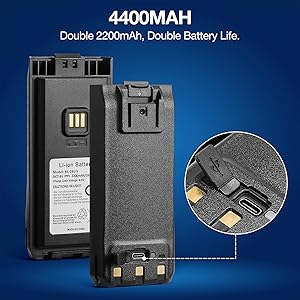
Image: Detail of the 2200mAh Li-ion battery, highlighting the USB-C charging port. The radio includes two such batteries for extended operation.
2. Antenna Attachment
Screw the high-gain antenna clockwise onto the antenna connector on top of the radio until it is finger-tight. Do not overtighten.
3. Speaker Microphone/Headset Connection
Connect the speaker microphone or headset to the dual-pin accessory jack on the side of the radio. Ensure a secure connection.
Operating Instructions
1. Power On/Off and Volume
Rotate the power/volume knob clockwise to turn on the radio and adjust the volume. Rotate counter-clockwise to turn off.
2. Display and Navigation
The 1.77-inch color screen displays frequencies, channel names, battery status, and other essential information. Use the directional keypad and function buttons for navigation.

Image: The clear 1.77-inch color screen of the UV-28 Plus, designed for easy readability of frequencies and channel details.
3. Programming Options
The UV-28 Plus offers multiple ways to program frequencies and settings:
- APP Wireless Programming: Connect via Bluetooth to the dedicated mobile application for convenient, wireless setup. This eliminates the need for a PC or programming cables.
- CPS Programming: Use compatible computer software (CPS) with a programming cable (sold separately) for advanced configuration.
- Keypad Programming: Directly program frequencies and settings using the radio's keypad.

Image: The UV-28 Plus supports APP wireless, CPS, and keypad programming for flexible configuration.
4. GPS Navigation
The integrated GPS provides real-time latitude, longitude, and altitude. This feature is useful for precise positioning and team coordination.
- Access GPS data through the radio's menu.
- Share your location or request coordinates from other compatible devices for enhanced safety and coordination during outdoor activities.

Image: GPS navigation on the UV-28 Plus facilitates team coordination by allowing users to easily check, share, and request locations.
5. Transmitting and Receiving
The UV-28 Plus offers powerful 10W transmission and multi-band reception.
- Transmit: Press and hold the Push-To-Talk (PTT) button on the side of the radio or speaker microphone to transmit. Release to receive.
- Receive Bands: The radio supports reception on UHF, VHF, Air Band (AM), NOAA weather radio, and FM broadcast bands.

Image: The UV-28 Plus supports multi-band transmit and receive, including UHF, VHF, FM, AM (Aviation), and NOAA frequencies.
6. Channel Management
The radio supports up to 1000 channels and 10 zones for organized channel management.
- Channel Clone: Easily copy channels from one UV-28 Plus radio to another.
- DTMF Manual Dial: Utilize the keypad for DTMF dialing functions.

Image: The easy channel clone feature allows for quick duplication of channel settings between two UV-28 Plus radios.
Maintenance
- Cleaning: Use a soft, damp cloth to clean the radio's exterior. Do not use harsh chemicals or solvents.
- Battery Care: Store batteries in a cool, dry place. If not used for extended periods, charge them periodically to maintain battery health.
- Antenna: Regularly check the antenna connection for tightness.
- Storage: When not in use, store the radio in a dry, dust-free environment.
Troubleshooting
| Problem | Possible Cause | Solution |
|---|---|---|
| Radio does not power on. | Battery is low or not installed correctly. | Charge the battery or re-install it securely. |
| Cannot transmit. | Incorrect frequency/channel, out of range, or PTT button issue. | Verify frequency, ensure you are within range, check PTT button functionality. Ensure you have the necessary license to transmit. |
| Poor reception. | Weak signal, antenna loose, or interference. | Move to a location with better signal, check antenna connection, identify and reduce sources of interference. |
| GPS not acquiring signal. | Indoors or obstructed view of sky. | Move to an open outdoor area with a clear view of the sky. |
| App programming not connecting. | Bluetooth off, app not updated, or radio not in pairing mode. | Ensure Bluetooth is enabled on both devices, update the app, and follow radio instructions for Bluetooth pairing. |
Specifications
| Feature | Detail |
|---|---|
| Model | UV-28 Plus |
| Power Output | 10W (High Power) |
| Frequency Range | UHF, VHF (Transmit & Receive); FM, Aviation (AM), NOAA (Receive) |
| Channels | 1000 Channels, 10 Zones |
| Battery | 2 x 2200mAh Li-ion (Total 4400mAh capacity) |
| Display | 1.77" Color Screen |
| Programming | APP (Bluetooth), CPS, Keypad |
| Special Features | GPS Navigation, USB-C Rechargeable Battery, Digital Display, Dual Band, Frequency Copy, DTMF Manual Dial |
| Water Resistance | Not Water Resistant |
| Dimensions | Approx. 15.7cm (H) x 6.7cm (W) x 4.3cm (D) / 6.2" x 2.6" x 1.7" (excluding antenna) |
| Weight | Approx. 1 pound (453g) |
| FCC ID | 2AJGM-UV28PRO |
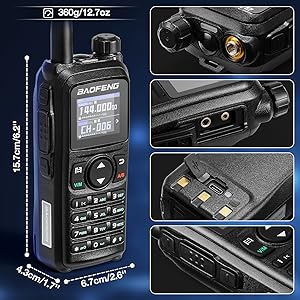
Image: Physical dimensions and weight of the BAOFENG UV-28 Plus radio.
Warranty and Support
Your BAOFENG UV-28 Plus comes with an 18 Months Warranty & Lifetime Support.
For technical assistance, warranty claims, or further inquiries, please contact BAOFENG customer support through their official channels or the retailer where you purchased the product.
For additional resources and updates, visit the official BAOFENG website or store: BAOFENG Store on Amazon
Related documentsUV-28 Plus


Ask a question about this manual
Ask about setup, troubleshooting, compatibility, parts, safety, or missing instructions. Manuals+ will review the question and use this page’s manual context to help answer it.