
1. Introduction
Thank you for purchasing the SMSL PL200T MQA-CD Transport. This high-fidelity audio device is designed to provide exceptional sound quality and versatile connectivity for your home audio system. The PL200T features MQA-CD decoding, a self-developed P.A.S.S. Servo System for precise CD reading, and multiple input/output options including USB, Optical, Coaxial, AES/EBU, and I2S. This manual provides essential information for setting up, operating, and maintaining your device.
2. Safety Information
Please read and understand all safety instructions before using the device. Keep this manual for future reference.
- Do not expose the device to rain, moisture, or extreme temperatures.
- Ensure proper ventilation around the unit to prevent overheating.
- Use only the specified power supply (AC 100-240V) or compatible USB/DC power sources.
- Do not open the casing; there are no user-serviceable parts inside. Refer all servicing to qualified personnel.
- Keep out of reach of children.
3. Package Contents
Verify that all items are present in the package:
- 1x SMSL PL200T MQA-CD Transport
- 1x Remote Control
- 1x USB Cable
- 1x AC Power Cable
- 1x User Manual
4. Product Overview
The SMSL PL200T features a sleek design with a CNC machined aluminum chassis and a tempered glass IPS display. The transparent acrylic CD lid provides dust protection while allowing visibility of the disc.

Figure 4.1: Front view of the SMSL PL200T CD Transport and its remote control. The unit features a transparent CD lid, a large display, and tactile buttons.

Figure 4.2: Rear panel of the SMSL PL200T, highlighting the various output ports including I2S, AES/EBU, Coaxial, Optical, Clock Input, USB Input, and AC power input.
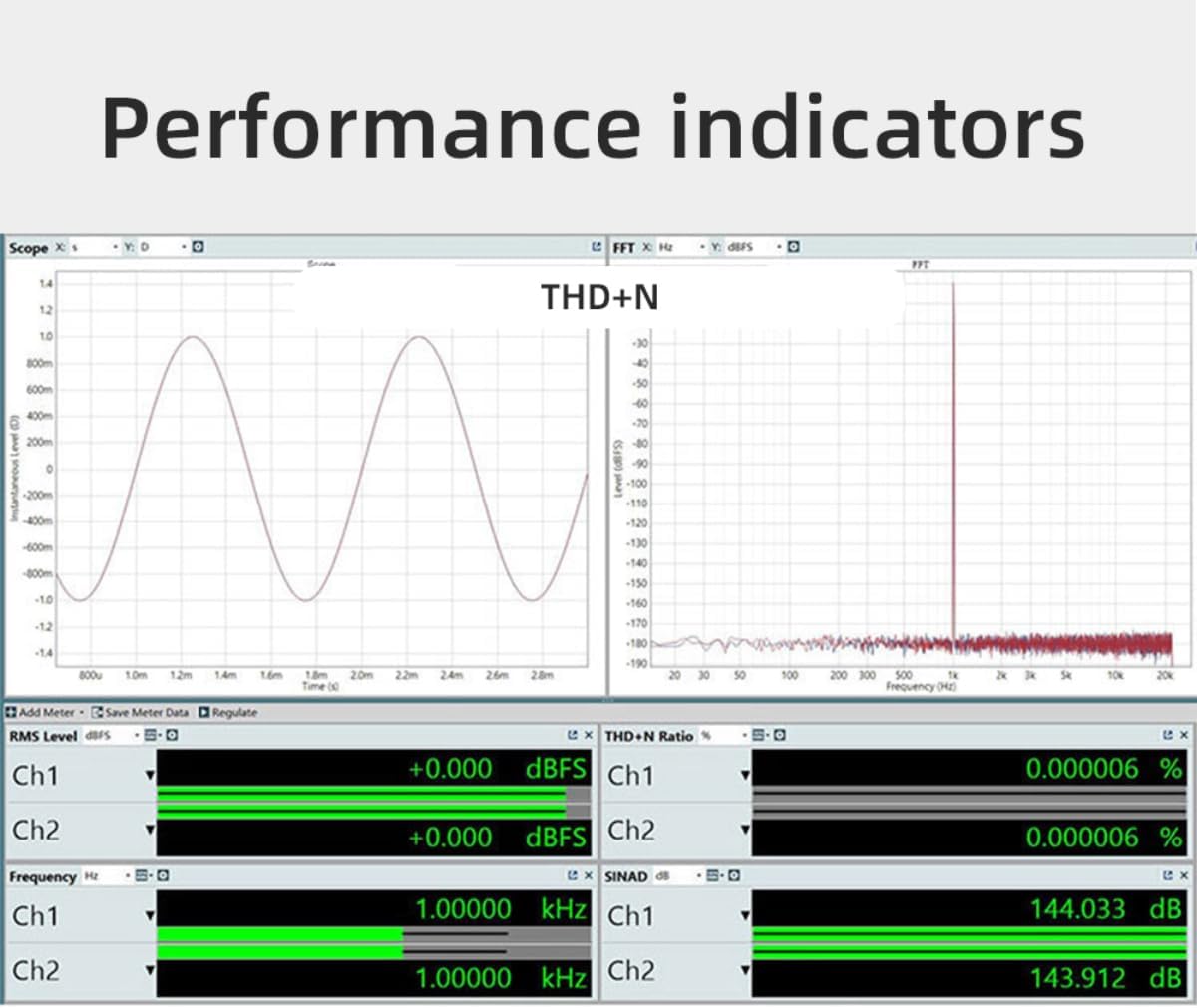
Figure 4.3: Detailed diagram illustrating the numbered components of the PL200T, including the Lid, Disc Pressure, Disc Placement Area, control buttons, display screen, and various input/output ports on the rear panel.
4.1 P.A.S.S. Servo System
The PL200T incorporates SMSL's self-developed Precision Access Servo System (P.A.S.S.) for fast response and precise CD reading. This system, combined with a self-developed vibration damper, ensures excellent mechanical anti-vibration performance.

Figure 4.4: View of the internal P.A.S.S. (Precision Access Servo System) mechanism, designed for accurate and stable CD playback.
5. Setup
5.1 Power Connection
The PL200T offers triple power flexibility, supporting AC, USB, and DC port external power supply.

Figure 5.1: Illustration of the three power input options: AC Input Interface (100-240V), DC Input Interface (5V/1A), and USB Input Port (5V/1A USB IN). Connect the appropriate power cable to the unit.
5.2 Audio Output Connections
Connect the PL200T to your amplifier or DAC using one of the available digital outputs:
- Optical Output: For standard digital audio connection.
- Coaxial Output: For standard digital audio connection.
- AES/EBU Output: Professional balanced digital audio connection.
- I2S Output: High-performance digital audio interface, typically via HDMI connector.
5.3 Clock Input Connection
The PL200T supports external clock input for enhanced synchronization. Connect a 44.1kHz word clock or a 10MHz standard/atomic clock to the BNC connector. Input impedance matching of 50 or 75Ω is possible.
5.4 USB Input Connection
Connect your computer or other USB audio source to the USB input port. The PL200T supports up to 32Bit/768kHz and DSD512 via USB. No drivers are needed for Mac, Android, or Linux operating systems.

Figure 5.2: Internal view showing the XMOS chip responsible for handling USB audio input, supporting high-resolution audio formats.
6. Operating Instructions
6.1 Basic CD Playback
- Gently lift the transparent acrylic lid.
- Place a CD onto the disc placement area, ensuring it is centered.
- Close the lid.
- Press the 'Play' button on the front panel or remote control to start playback.
- Use the 'Previous', 'Next', and 'Stop' buttons for track navigation and playback control.
6.2 MQA-CD Decoding
The PL200T fully decodes MQA-CDs with 8x unfolding, supporting resolutions up to 384kHz. When an MQA-CD is inserted, the device will automatically detect and decode the MQA stream, indicated on the display.
6.3 USB Audio Playback
When connected via USB, the PL200T functions as a high-resolution USB audio interface. Ensure your computer's audio output is set to the PL200T. Play audio files from your computer, and the PL200T will process them at resolutions up to 32Bit/768kHz PCM or DSD512.
6.4 Display and Controls
The tempered glass IPS display shows real-time track information, sampling rates, and other operational details. The piano-style tactile buttons and function knob provide intuitive control over the device.
7. Maintenance
To ensure the longevity and optimal performance of your SMSL PL200T, follow these maintenance guidelines:
- Cleaning: Use a soft, dry cloth to clean the exterior. For stubborn marks, a slightly damp cloth can be used, but ensure no liquid enters the device. Do not use abrasive cleaners or solvents.
- Dust Protection: The transparent acrylic CD lid helps protect the internal components from dust. Keep the lid closed when not in use.
- Disc Handling: Always handle CDs by their edges to avoid fingerprints and scratches, which can affect playback quality.
- Ventilation: Ensure the device is placed in a location with adequate airflow to prevent heat buildup.
8. Troubleshooting
If you encounter any issues with your SMSL PL200T, please refer to the following common troubleshooting steps:
- No Power: Ensure the power cable is securely connected to both the device and a working power outlet. Try a different power source or cable.
- No Sound Output: Verify that the correct output (Optical, Coaxial, AES/EBU, I2S) is selected on your connected amplifier/DAC. Check all audio cables for secure connections. Ensure the volume on your amplifier/DAC is not muted or set too low.
- CD Not Reading: Ensure the CD is clean and free of scratches. Make sure the CD is placed correctly on the disc placement area and the lid is fully closed.
- USB Audio Issues: Confirm the USB cable is connected properly. For Windows, ensure necessary drivers are installed if prompted (Mac, Android, Linux are driverless). Check your computer's sound settings to ensure the PL200T is selected as the output device.
- Remote Control Not Working: Check the battery in the remote control. Ensure there are no obstructions between the remote and the device's IR receiver.
If the problem persists, please contact AOSHIDA customer support for further assistance.
9. Specifications
Detailed technical specifications for the SMSL PL200T MQA-CD Transport:

Figure 9.1: Diagram showing the dimensions of the SMSL PL200T and a table summarizing its key technical specifications.
| Feature | Detail |
|---|---|
| Input | USB Audio / CD Player / Clock |
| Output | Optical / Coaxial / AES / EBU / I2S |
| USB Transmission | USB 2.0 Asynchronization |
| USB Compatibility | Windows 7 / 8 / 8.1 / 10 / 11 (Need Driver), Mac OSX 10.6 above, Android system, iOS, Linux (Driverless) |
| I2S Output Max Sampling Rate | PCM: 44.1kHz ~ 768kHz, DSD: 2.8224 ~ 22.5792MHz |
| Optical/Coaxial/AES/EBU Output Max Sampling Rate | PCM: 24bit/192kHz |
| MQA Decoding | 8-fold expansion up to 384kHz (Automatically converts to 192kHz due to SPDIF limitation) |
| Clock Input Frequency | 44.1kHz or 10MHz |
| Clock Input Impedance | 50 ohms or 75 ohms |
| Clock Input Waveform | Square wave or Sine wave |
| Clock Input Level | Square wave: TTL level, Sine wave: >1Vrms |
| Power Consumption | 15W |
| Standby Power | <0.5W |
| Size (WxHxD) | 200x42x175mm |
| Weight | 1.62kg / 3.57lbs |
9.1 Performance Indicators
The PL200T is engineered for high performance, as indicated by its low Total Harmonic Distortion plus Noise (THD+N) and excellent jitter characteristics.

Figure 9.2: Graph illustrating the THD+N (Total Harmonic Distortion plus Noise) performance of the PL200T, demonstrating its low distortion levels.

Figure 9.3: Graph illustrating typical digital audio jitter performance, indicating the device's precision in timing.
10. Warranty and Support
For warranty information and customer support, please refer to the documentation included with your product or visit the official AOSHIDA website. If you require technical assistance or have questions regarding your SMSL PL200T, please contact AOSHIDA customer service.
Contact information can typically be found on the manufacturer's website or in the product packaging.

