
XinFuture HCT-638
Smart WiFi Sprinkler Timer 3 Zone Instruction Manual
Brand: XinFuture | Model: HCT-638
1. Introduction
The XinFuture Smart WiFi Sprinkler Timer 3 Zone is designed to provide intelligent and efficient watering for your garden, lawn, and plants. With its advanced features, including long-range wireless connectivity, smart app control, voice compatibility, and rain delay functions, you can manage your irrigation system from anywhere. This manual provides detailed instructions for setting up, operating, and maintaining your sprinkler timer to ensure optimal performance.

Figure 1.1: XinFuture Smart WiFi Sprinkler Timer 3 Zone with Gateway
This image displays the main components of the Smart WiFi Sprinkler Timer system: the orange water timer unit with three outlets and control buttons, and the orange Sub-GHz Gateway. A smartphone screen showing the accompanying app interface is also visible in the background, illustrating remote control capabilities.
2. Product Overview
The XinFuture Smart WiFi Sprinkler Timer system consists of a main water timer unit and a Sub-GHz Gateway. The water timer connects directly to your outdoor faucet, providing three independent outlets for different watering zones. The gateway plugs into an indoor power outlet and connects to your home's 2.4GHz WiFi network, enabling remote control via a smartphone application.
2.1 Key Features
- Long Range & Stable Networking: The WiFi sprinkler controller and RF gateway system transmitter can reach up to 984 feet (300 meters), ensuring strong and consistent signal strength.
- Smart App and Voice Control: Control your watering system remotely using the Smart Life or Tuya Smart apps. Compatible with Alexa and Google Voice for hands-free operation.
- 3-Zone Custom Watering System: Program individual schedules for each of the three zones, customizing start times, duration (1 minute to 24 hours), and frequency.
- Flexible Smart Irrigation Modes: Choose between single irrigation mode (1 second to 11h 59m 59s) or recirculating mode (Monday-Sunday schedules). Supports standard watering and gentle misting options.
- Smart Rain Delay and Irrigation Record: Features 1-7 day rain delay settings and smart rain detection. Detailed records track each session's start/duration/end time.
- Instant Manual Operation: Activate manual mode for immediate watering needs like pool refilling or car washing.

Figure 2.1: Smart Sprinkler Timer installed on an outdoor faucet, connected to hoses for garden irrigation. The image highlights remote control via a smartphone and the 300m RF range.

Figure 2.2: An aerial view illustrating three independent irrigation zones (Zone 1-Plan A, Zone 2-Plan B, Zone 3-Plan C) with customizable watering schedules for different areas of a property.

Figure 2.3: A visual comparison demonstrating the superior 300m wireless range of the XinFuture timer system compared to other timers with a typical 20m range, highlighting extended coverage.
3. Setup
3.1 Package Contents
Before beginning installation, please verify that all components are present in the package:
- WiFi Sprinkler Timer (x1)
- Sub-GHz Gateway (x1)
- Leak-Proof Seal Ring (x2)
- Tape (x1)
- Instruction Manual (x1)

Figure 3.1: A visual representation of all items included in the product package, including the WiFi Sprinkler Timer, Gateway, Leak-Proof Seal Rings, Tape, and Instruction Manual.
3.2 Battery Installation
The water timer unit requires 2 x 1.5V AA alkaline batteries (not included) for operation. To install:
- Locate the battery compartment on the back of the water timer unit.
- Open the battery compartment cover.
- Insert two AA batteries, ensuring correct polarity (+/-).
- Close the battery compartment cover securely.
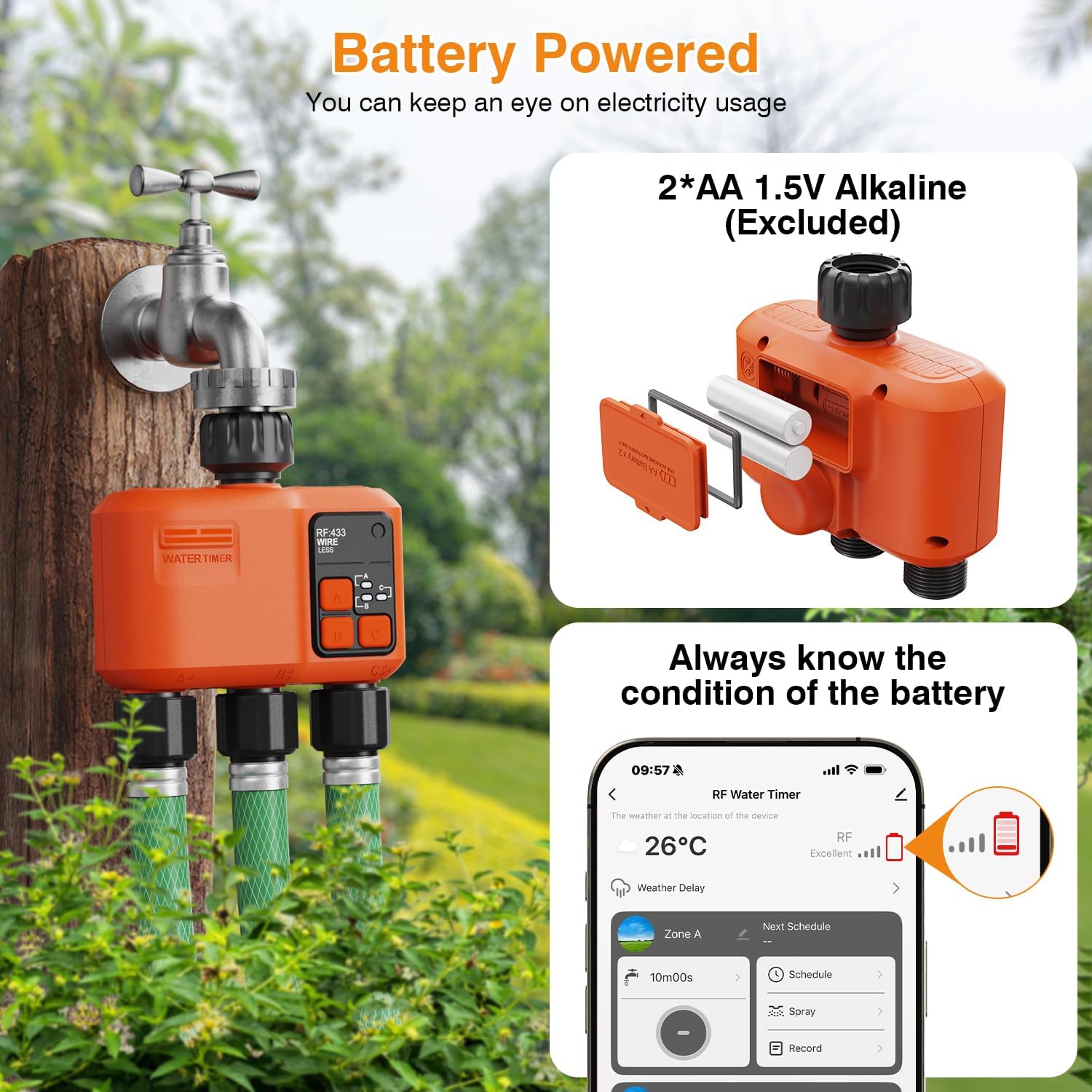
Figure 3.2: Close-up view of the water timer's battery compartment, showing the insertion of two AA 1.5V alkaline batteries. The image also indicates that the app can display the battery condition.
3.3 App Installation and Device Pairing
The Smart WiFi Sprinkler Timer is controlled via a smartphone app. Follow these steps to install the app and pair your devices:
- Download the Tuya Smart or Smart Life app from your device's app store (iOS or Android).
- Register for an account and log in.
- Plug the Sub-GHz Gateway into an indoor power outlet. Ensure the WiFi indicator light on the gateway is blinking rapidly.
- In the app, tap 'Add Device' or the '+' icon.
- Select 'Sub-GHz Gateway' or search for the device.
- Follow the on-screen prompts to connect the gateway to your 2.4GHz WiFi network.
- Once the gateway is connected, long-press any button on the water timer unit for 5 seconds until its indicator light flashes, putting it into pairing mode.
- In the app, select 'Add Device' again and choose 'Water Timer' (or similar option for 2-way/3-way timer).
- The app will discover and add the water timer. Confirm the addition.
Video 3.1: This video provides a step-by-step tutorial on how to link the WiFi Sprinkler Timer to the mobile application, covering the initial setup and pairing process.

Figure 3.3: A four-step visual guide demonstrating how to download the Tuya Smart or Smart Life app, turn on Bluetooth and connect to 2.4 GHz WiFi, add the device, and confirm successful connection.

Figure 3.4: A four-step guide illustrating how to integrate the smart timer with Amazon Alexa and Google Assistant for voice control, including selecting Alexa, linking the account, pairing, and enjoying voice commands.
3.4 Physical Installation
Once paired, install the water timer unit to your outdoor faucet:
- Ensure the faucet is turned off.
- Screw the water timer unit onto your standard outdoor faucet. Use the provided leak-proof seal ring and tape to ensure a tight, leak-free connection.
- Attach your garden hoses or sprinkler systems to the three independent outlets (A, B, C) at the bottom of the timer.
- Turn on your outdoor faucet. The timer is now ready for operation.
4. Operating Instructions
The XinFuture Smart WiFi Sprinkler Timer offers various modes for flexible watering management.
4.1 App Control
The primary method of control is through the Smart Life or Tuya Smart app. The app interface allows you to:
- Set Schedules: Program specific start times, durations, and frequencies for each of the three zones. You can set multiple schedules per zone.
- Manual Watering: Initiate immediate watering for a specified duration.
- Rain Delay: Pause scheduled watering for 1-7 days or enable smart rain detection to automatically suspend irrigation based on weather forecasts.
- View Records: Access detailed irrigation records, including start time, duration, and end time for each watering session.
- Voice Control: If integrated with Alexa or Google Assistant, use voice commands to start or stop watering for specific zones.
Video 4.1: This video demonstrates the smart features of the WiFi Sprinkler Timer, including app control for setting schedules and managing the three zones with its 984 FT range.
Video 4.2: A demonstration of the WiFi Water Timer for Garden Hose, showcasing its 3-zone functionality and the extensive 984 FT range for comprehensive garden coverage.

Figure 4.1: An illustration of voice-activated control for the sprinkler timer, showing compatibility with Amazon Alexa and Google Assistant for hands-free management of your lawn.

Figure 4.2: A visual guide to the Smart Rain Delay System, allowing customization of 1-7 day delays or intelligent detection of rainy weather to suspend irrigation, preventing over-watering.

Figure 4.3: A smartphone screen displaying irrigation records, showing clear documentation of every watering event, including duration and time.

Figure 4.4: An illustration showing how watering records and control can be shared among family members, enabling collaborative management of the smart irrigation system.
4.2 Manual Operation
For immediate watering needs, you can activate manual mode directly from the timer unit or through the app. Pressing a button on the timer will initiate watering for a default period, which can be adjusted in the app. This is useful for tasks such as:
- Pool filling
- Car washing
- Spot watering specific plants
- Testing sprinkler heads

Figure 4.5: A collage of images demonstrating various applications for the smart water timer, including pool filling, potted irrigation, lawn watering, and fruit watering.
5. Maintenance
To ensure the longevity and optimal performance of your XinFuture Smart WiFi Sprinkler Timer, follow these maintenance guidelines:
- Battery Replacement: Replace the AA batteries in the water timer unit when the app indicates low battery or when the timer's indicator lights dim. Always use fresh alkaline batteries.
- Clean Filters: Periodically check and clean the filter screen located at the inlet of the water timer to prevent debris from clogging the unit.
- Winterization: In colder climates, disconnect the water timer from the faucet before the first frost. Drain any remaining water from the unit and store it indoors in a dry, protected area to prevent freezing damage.
- Inspect for Leaks: Regularly check all connections for leaks. If leaks occur, ensure connections are tight and that the seal rings are properly seated and undamaged. Replace worn or damaged seal rings as needed.
- Software Updates: Keep the Smart Life or Tuya Smart app updated to the latest version to benefit from new features and performance improvements. The device firmware may also receive OTA updates via the app.
6. Troubleshooting
If you encounter issues with your Smart WiFi Sprinkler Timer, refer to the following common problems and solutions:
| Problem | Possible Cause | Solution |
|---|---|---|
| Timer not responding to app commands. | Weak WiFi signal to gateway, gateway disconnected, low timer batteries, timer out of RF range from gateway. | Ensure gateway is plugged in and has a stable 2.4GHz WiFi connection. Check timer batteries and replace if necessary. Move gateway closer to the timer if range is an issue (up to 984 ft). |
| Water not flowing or weak flow. | Faucet off, clogged filter, low water pressure, timer valve stuck. | Ensure outdoor faucet is fully open. Clean the filter screen at the timer's inlet. Check household water pressure. If valve is stuck, try manual activation or contact support. |
| Leaks at connections. | Loose connection, damaged seal ring, missing tape. | Tighten all connections. Inspect seal rings for damage and replace if needed. Ensure plumber's tape is used on threaded connections. |
| Scheduled watering not occurring. | Incorrect schedule settings, rain delay active, low batteries. | Verify schedule settings in the app (start time, duration, frequency, enabled status). Check if rain delay is active. Replace timer batteries. |
| App unable to find device during pairing. | Incorrect pairing mode, 5GHz WiFi network, device too far from phone/gateway. | Ensure timer is in pairing mode (flashing indicator). Confirm your phone is connected to a 2.4GHz WiFi network. Bring devices closer during pairing. Reset device if necessary. |
7. Specifications
| Feature | Detail |
|---|---|
| Model Number | HCT-638 |
| Brand | XinFuture |
| Color | Orange |
| Material | Plastic |
| Product Dimensions | 4.53"D x 1.22"W x 1.73"H |
| Item Weight | 15.8 ounces |
| Number of Settings | 6 (referring to modes/schedules) |
| Wireless Range | Up to 984 feet (300 meters) |
| WiFi Compatibility | 2.4GHz |
| Voice Assistant Compatibility | Alexa, Google Voice |
| Power Source | 2 x 1.5V AA Alkaline Batteries (Timer Unit) |
| Country of Origin | China |
8. Warranty and Support
XinFuture is committed to providing high-quality products and excellent customer service. Your Smart WiFi Sprinkler Timer comes with a guaranteed after-sales service. If you encounter any technical problems or require assistance, please do not hesitate to contact our professional engineers for support.
For support, please refer to the contact information provided on the product packaging or the official XinFuture website.
Related documentsHCT-638

Ask a question about this manual
Ask about setup, troubleshooting, compatibility, parts, safety, or missing instructions. Manuals+ will review the question and use this page’s manual context to help answer it.