
1. Introduction
This manual provides essential information for the safe and effective installation, operation, and maintenance of the DEWIN DEW2R-63 2P 63A Automatic Transfer Switch (ATS). This device is designed to automatically switch between a primary power source (e.g., utility grid) and a secondary power source (e.g., generator) in 220V AC systems, ensuring continuous power supply to your load. Please read this manual thoroughly before installation and use.
2. Safety Information
WARNING: Electrical shock hazard. Installation and servicing should only be performed by qualified personnel.
- Always disconnect all power sources before installing or servicing the ATS.
- Ensure all wiring complies with local and national electrical codes.
- Verify the voltage and current ratings of the ATS match your application requirements.
- Do not use this device in environments exceeding its specified operating conditions.
- This ATS is designed for 220V AC systems in Europe and is not suitable for 120V systems.
- Ensure proper grounding to prevent electrical hazards.
3. Product Overview and Features
The DEWIN DEW2R-63 is a high-performance automatic transfer switch designed for reliability and ease of use.
Key Features:
- High Performance: Driven by an excitation electromagnet, achieving rapid switching within milliseconds to effectively manage power outages.
- Indicator Lights: Equipped with power indicators for general supply, emergency supply, and load status, providing clear operational feedback.
- Easy Installation: Modular structure with incoming lines on the same side for convenient wiring. Compact size supports 35mm DIN rail installation, suitable for household distribution boxes.
- Arc Extinguishing System: Features an internal arc extinguishing system to quickly cool and extinguish electrical arcs, enhancing safety and device longevity.
- High Quality Construction: Flame-retardant casing ensures durability and reliable operation in various environments.

Image: DEWIN DEW2R-63 Automatic Transfer Switch highlighting features like millisecond switching, mains/generator compatibility, and 35mm rail type.

Image: Close-up view of the DEWIN DEW2R-63 ATS, illustrating its dual power supply design and core features such as electromagnetic drive, modular structure, and quick conversion capability.
Component Identification:
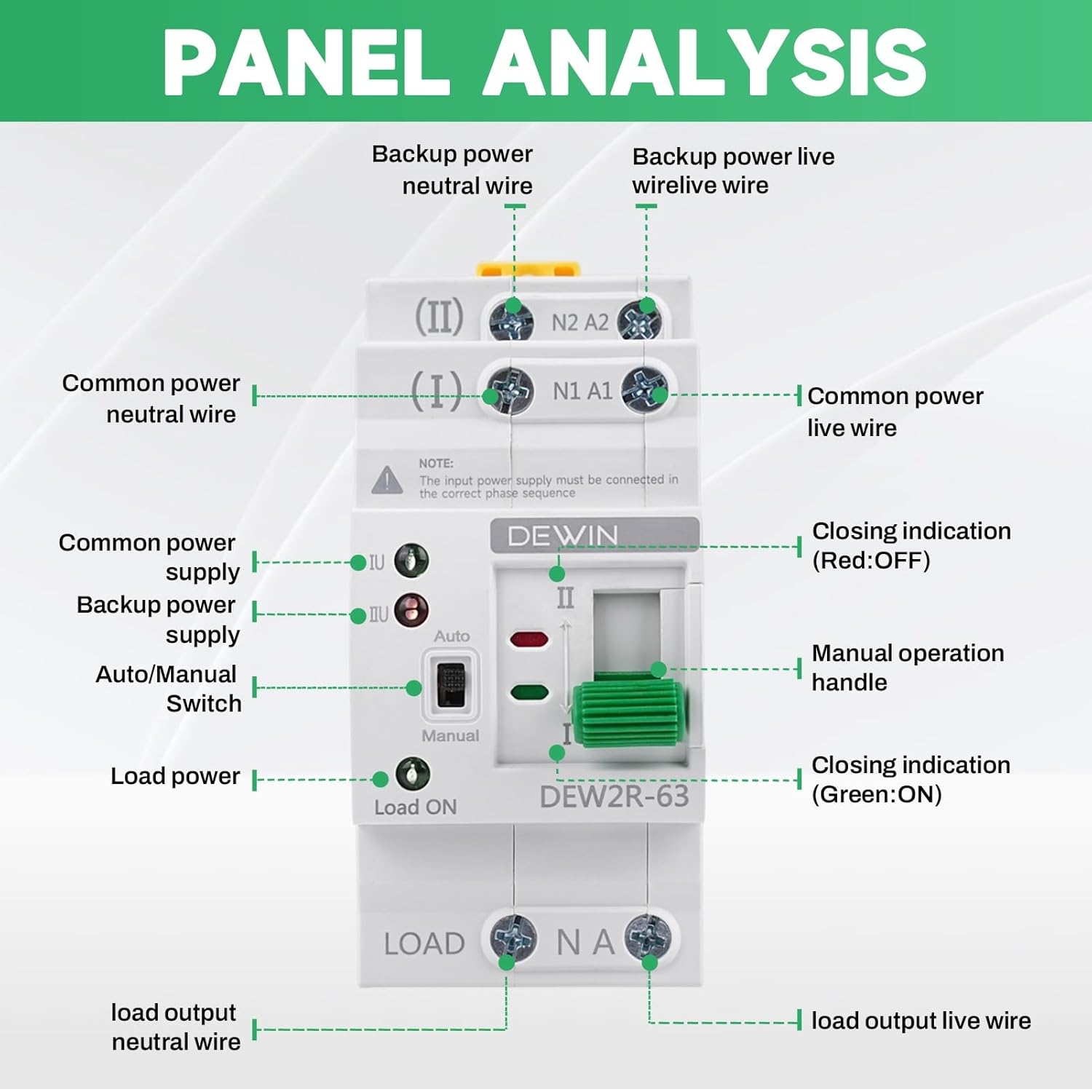
Image: Detailed panel analysis of the DEWIN DEW2R-63 ATS, showing connection points for common power (I) and backup power (II), neutral and live wires, auto/manual switch, load power, and closing indications (Red: OFF, Green: ON).
- (I) N1 A1: Common Power Input (Neutral and Live)
- (II) N2 A2: Backup Power Input (Neutral and Live)
- Load ON / NA: Load Output (Neutral and Live)
- IU / IIU: Indicators for Common Power Supply (I) and Backup Power Supply (II)
- Auto / Manual Switch: Selector for operating mode.
- Manual Operation Handle: For manual switching.
- Closing Indication (Red/Green): Indicates switch status (Red: OFF, Green: ON).
4. Technical Specifications
The following table outlines the technical specifications for the DEWIN DEW2R-63 Automatic Transfer Switch:

Image: Product information diagram showing dimensions (108mm height, 50.5mm width, 78mm depth, 45mm rail depth) and detailed technical specifications.
| Parameter | Value |
|---|---|
| Model | DEW2R-63 2P |
| Material | Polycarbonate and Copper |
| Rated Working Current (Ie) | 63 Amperes |
| Rated Working Voltage (Ue) | AC 220V |
| Rated Frequency | 50/60 Hz |
| Number of Poles | 2P |
| Rated Short Circuit Current (Iq) | 50KA |
| Rated Impulse Withstand Voltage | 8kV |
| Contactor Conversion Time | <50ms |
| Operation Conversion Time | <50ms |
| Return Conversion Time | <50ms |
| Power Outage Time | <50ms |
| Mechanical Life | 8000 times |
| Electrical Life | 1500 times |
| Category of Use | AC-31B |
| Dimensions (L x W x H) | 7.8 x 5 x 10.8 cm |
| Operating Mode | Automatic |
| Terminal Type | Spade / Crimped |
| Contact Type | Normally Open |
5. Installation
The DEWIN DEW2R-63 ATS is designed for easy installation on a 35mm DIN rail within distribution boxes.
Installation Steps:
- Preparation: Ensure all power is disconnected from the main and backup sources. Gather necessary tools (screwdriver, wire strippers, etc.).
- Mounting: Securely attach the ATS to a 35mm DIN rail inside your distribution box. The device features clips for easy mounting.
- Wiring: Connect the common power supply (utility grid) to terminals (I) N1 A1. Connect the backup power supply (generator) to terminals (II) N2 A2. Connect the load to the 'Load ON / NA' terminals. Ensure correct phase sequence and secure all connections. Refer to the wiring diagram below.
- Verification: Double-check all connections for tightness and correctness before restoring power.

Image: An installation demonstration showing the compact shape of the DEWIN DEW2R-63 ATS and its direct installation into a distribution box.
Wiring Diagram:

Image: Wiring diagram for the DEWIN DEW2R-63 ATS, illustrating connections for Common N (Neutral), Common L (Live), Spare N (Neutral), Spare L (Live), and Load Output.
6. Operation
The DEWIN DEW2R-63 ATS offers both automatic and manual operation modes.
Operating Modes:
- Automatic Mode: Set the Auto/Manual switch to 'Auto'. The ATS will automatically detect the presence of power from the common source (I) and switch to it. If the common source fails, it will automatically switch to the backup source (II) if available. When the common source returns, it will switch back.
- Manual Mode: Set the Auto/Manual switch to 'Manual'. Use the manual operation handle to physically switch between power sources (I) and (II). This mode is typically used for testing or maintenance.
Indicator Lights:
- IU (Green LED): Indicates that the common power supply (I) is active.
- IIU (Red LED): Indicates that the backup power supply (II) is active.
- Load ON (Green LED): Indicates that power is being supplied to the load.

Image: Front view of the DEWIN DEW2R-63 ATS showing the indicator lights for common power (IU), backup power (IIU), and load status (Load ON), along with the Auto/Manual switch and manual operation handle.
Product Demonstration Video:
Video: A short demonstration of the DEWIN DEW2R-63 Automatic Transfer Switch, showcasing its physical appearance and basic functionality, including the Auto/Manual switch and indicator lights.
7. Maintenance
Regular maintenance ensures the longevity and reliable operation of your ATS.
- Periodic Inspection: Annually inspect the ATS for any signs of physical damage, loose connections, or discoloration due to overheating.
- Cleaning: Keep the device free from dust and debris. Use a dry, soft cloth for cleaning. Do not use liquid cleaners.
- Connection Check: Periodically verify that all terminal connections are tight and secure.
- Functionality Test: Regularly test the automatic transfer function by simulating a power outage from the common source to ensure the switch operates correctly.
8. Troubleshooting
If you encounter issues with your DEWIN DEW2R-63 ATS, refer to the following common troubleshooting steps:
| Problem | Possible Cause | Solution |
|---|---|---|
| ATS does not switch automatically | Switch is in 'Manual' mode. No power from backup source. Faulty wiring. | Set to 'Auto' mode. Check backup power supply. Verify wiring connections. |
| No power to load | No power from either source. ATS not switched to an active source. Loose load connections. | Check both power sources. Ensure ATS is switched to an active source (check indicators). Tighten load connections. |
| Indicator lights not working | No power to the ATS. Faulty indicator. | Check power supply to the ATS. If power is present and other functions work, contact support. |
| Overheating or burning smell | Overload. Loose connections. Internal fault. | Immediately disconnect power. Reduce load. Check and tighten all connections. Do not use if internal fault is suspected; contact qualified personnel. |
9. Warranty and Support
For warranty information or technical support, please refer to the product packaging or contact your retailer. Keep your purchase receipt as proof of purchase.