
RORRY D2
RORRY 5000mAh Portable Charger Instruction Manual
Model: D2 | Brand: RORRY
1. Introduction
Thank you for choosing the RORRY 5000mAh Portable Charger. This compact and versatile power bank is designed to provide convenient charging for your Apple Watch, iPhone, and other USB-C compatible devices on the go. Its built-in cables and keychain design make it an ideal travel companion.
Key Features:
- Universal Compatibility: Designed for Apple Watch Ultra/11/10/9/8/7/6/SE, iPhone 17/16/15/14/13/12/11/Pro/Pro Max, AirPods, and Android devices.
- 5000mAh Capacity: Provides approximately 7-10 charges for an Apple Watch, 1 full charge for an iPhone 15, or 6-8 charges for AirPods.
- Simultaneous Charging: Capable of charging multiple devices concurrently.
- Portable Design: Compact, lightweight, and features a keychain for easy transport.
- Integrated Cables: Includes built-in USB-C and Lightning cables for convenience.
- Safety Features: Equipped with over-temperature, over-current, over-voltage, and short-circuit protection.
2. What's in the Box
- RORRY Portable Charger x 1
- 1M USB-C to USB-C Charging Cable x 1
- User Manual x 1
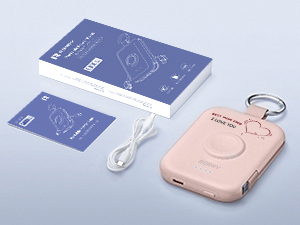
Image: RORRY Portable Charger, USB-C cable, and user manual.
3. Product Overview
Familiarize yourself with the components of your RORRY Portable Charger.
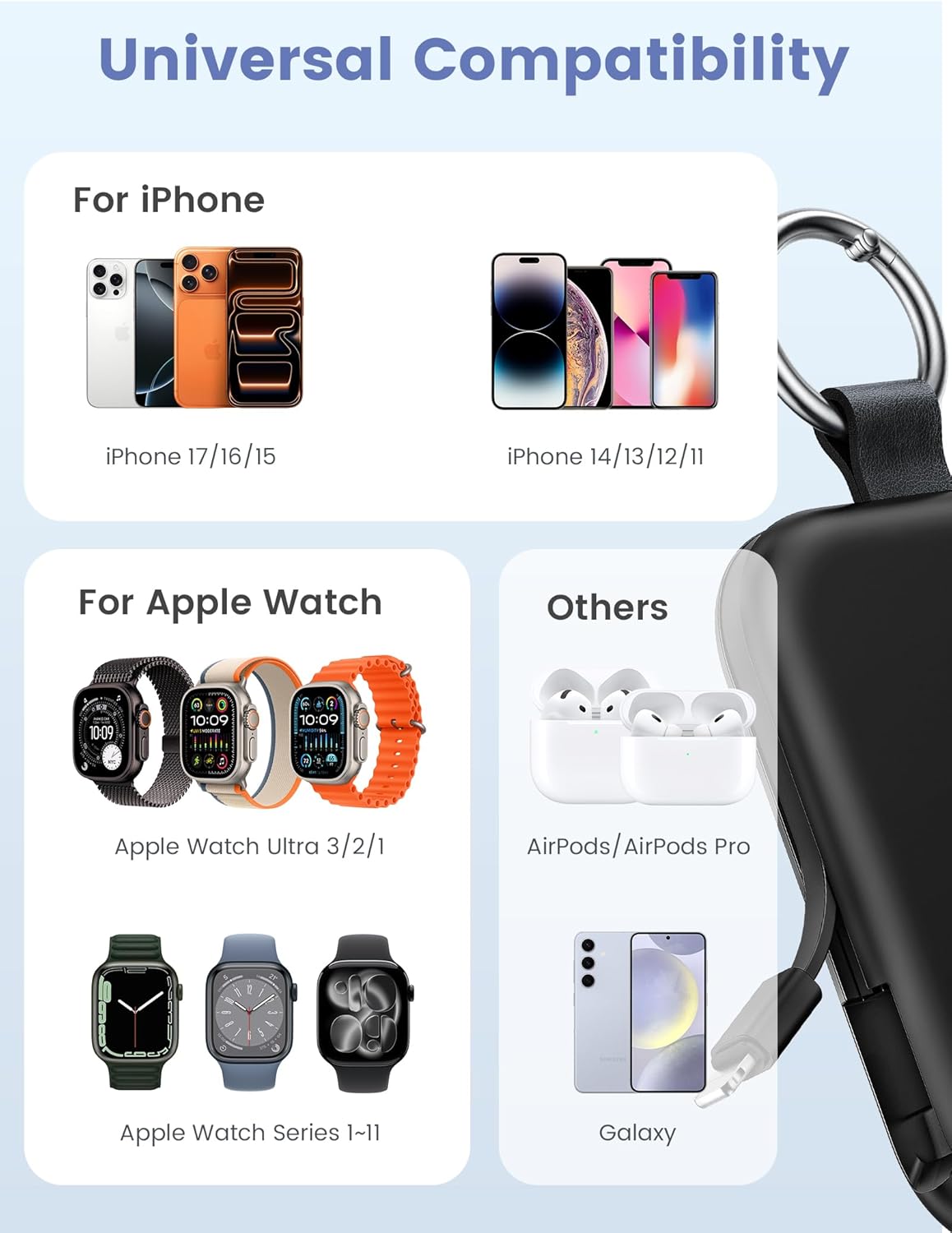
Image: Front view of the RORRY Portable Charger, highlighting the integrated Apple Watch charging pad and LED indicators.

Image: Side view of the RORRY Portable Charger, showing the retractable built-in USB-C and Lightning cables.
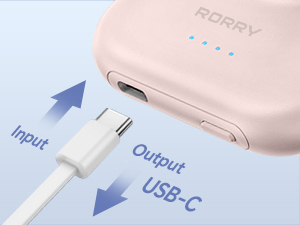
Image: Close-up of the USB-C port on the side of the charger, used for both input (recharging the power bank) and output (charging other devices).
4. Setup
Initial Charge:
- Before first use, fully charge your RORRY Portable Charger.
- Connect the provided USB-C to USB-C cable to the power bank's USB-C port.
- Connect the other end of the cable to a compatible USB power adapter (not included).
- The LED indicator lights on the power bank will illuminate to show charging progress. All four lights will be solid when fully charged.
- A full charge typically takes approximately 2.5 to 2.8 hours.
5. Operating Instructions
Charging Your Devices:
Press the power button on the side of the power bank to activate it before connecting devices. The LED indicators will show the remaining battery level.
5.1. Charging an Apple Watch:
- Place your Apple Watch onto the magnetic charging pad on the front of the power bank.
- Ensure the watch is properly aligned for optimal charging.
- The watch display will indicate that it is charging.

Image: An Apple Watch placed on the magnetic charging pad of the RORRY Portable Charger.
5.2. Charging an iPhone (Lightning Devices):
- Gently pull out the built-in Lightning cable from the side of the power bank.
- Connect the Lightning connector to your iPhone or other compatible Apple device.
- The device will begin charging automatically.
5.3. Charging USB-C Devices (e.g., iPhone 15, Android, AirPods):
- Gently pull out the built-in USB-C cable from the side of the power bank.
- Connect the USB-C connector to your compatible device.
- Alternatively, use the USB-C port on the side of the power bank with your own USB-C to USB-C cable for charging.
- The device will begin charging automatically.

Image: The RORRY Portable Charger charging an Apple Watch, iPhone, and AirPods simultaneously using its built-in cables and wireless pad.
5.4. Simultaneous Charging:
The RORRY Portable Charger supports charging multiple devices at once, such as an Apple Watch, an iPhone via Lightning cable, and another device via the USB-C port or built-in USB-C cable.
Video: Demonstrates the RORRY Portable Charger's ability to charge an Apple Watch and other devices. This video is provided by the seller, RORRY DIRECT.
6. Recharging the Power Bank
To recharge the RORRY Portable Charger:
- Connect the provided USB-C to USB-C cable to the power bank's USB-C port.
- Plug the other end into a USB power adapter (e.g., wall charger, computer USB port).
- The LED indicators will flash to show the charging status and become solid when fully charged.

Image: The RORRY Portable Charger connected to a wall adapter for recharging, while simultaneously charging an Apple Watch and two iPhones.
7. Maintenance
- Keep the power bank away from extreme temperatures, direct sunlight, and liquids.
- Clean the device with a soft, dry cloth. Do not use harsh chemicals or abrasive materials.
- Store in a cool, dry place when not in use.
- Avoid dropping or subjecting the device to strong impacts.
8. Troubleshooting
| Problem | Possible Cause | Solution |
|---|---|---|
| Device not charging | Power bank is off or depleted. | Press the power button to turn on. Recharge the power bank if necessary. |
| Slow charging | Using a low-power adapter or cable. | Ensure you are using a compatible power adapter and the provided USB-C cable for optimal charging speed. |
| Apple Watch not charging | Improper alignment on charging pad. | Adjust the Apple Watch position on the magnetic pad until charging begins. |
| Built-in cables not working | Cable not fully extended or connected. | Ensure cables are fully extended and securely connected to your device. |
9. Specifications
| Model Number | D2 |
| Battery Capacity | 5000 Milliamp Hours |
| Product Dimensions | 3.86 x 0.65 x 2.82 inches |
| Item Weight | 4.4 ounces |
| Connector Type | Built-in Cable L+C, USB-C Port |
| Special Features | Compact, Built-In Cables, All-in-one, Keychain design |
| Manufacturer | ShenZhen XingYuanSheng Electronic Technology Co,Ltd |
| Date First Available | March 3, 2025 |
10. Safety Information
- Do not disassemble, open, or shred the battery pack.
- Do not expose the power bank to heat or fire. Avoid storage in direct sunlight.
- Do not short-circuit the battery pack. Do not store battery packs haphazardly in a box or drawer where they may short-circuit each other or be short-circuited by conductive materials.
- Do not subject the power bank to mechanical shock.
- In the event of a battery leak, do not allow the liquid to come into contact with the skin or eyes. If contact has been made, wash the affected area with copious amounts of water and seek medical advice.
- Keep the power bank out of reach of children.
- Do not use any charger other than that specifically provided for use with the equipment.
- Dispose of the power bank properly according to local regulations.
11. Warranty and Support
For warranty information or customer support, please refer to the contact details provided with your purchase or visit the official RORRY website. Keep your purchase receipt as proof of purchase.
Manufacturer: ShenZhen XingYuanSheng Electronic Technology Co,Ltd
Brand Store: Visit the RORRY Store on Amazon
Related documentsD2


Ask a question about this manual
Ask about setup, troubleshooting, compatibility, parts, safety, or missing instructions. Manuals+ will review the question and use this page’s manual context to help answer it.