1. Product Overview
The Alicatong ERC112D Temperature Controller Kit is designed for precise temperature management in refrigeration systems. This high-quality controller ensures reliable performance and a long service life, serving as a direct replacement for various compatible systems. It features a clear LED display and intuitive controls for efficient operation.
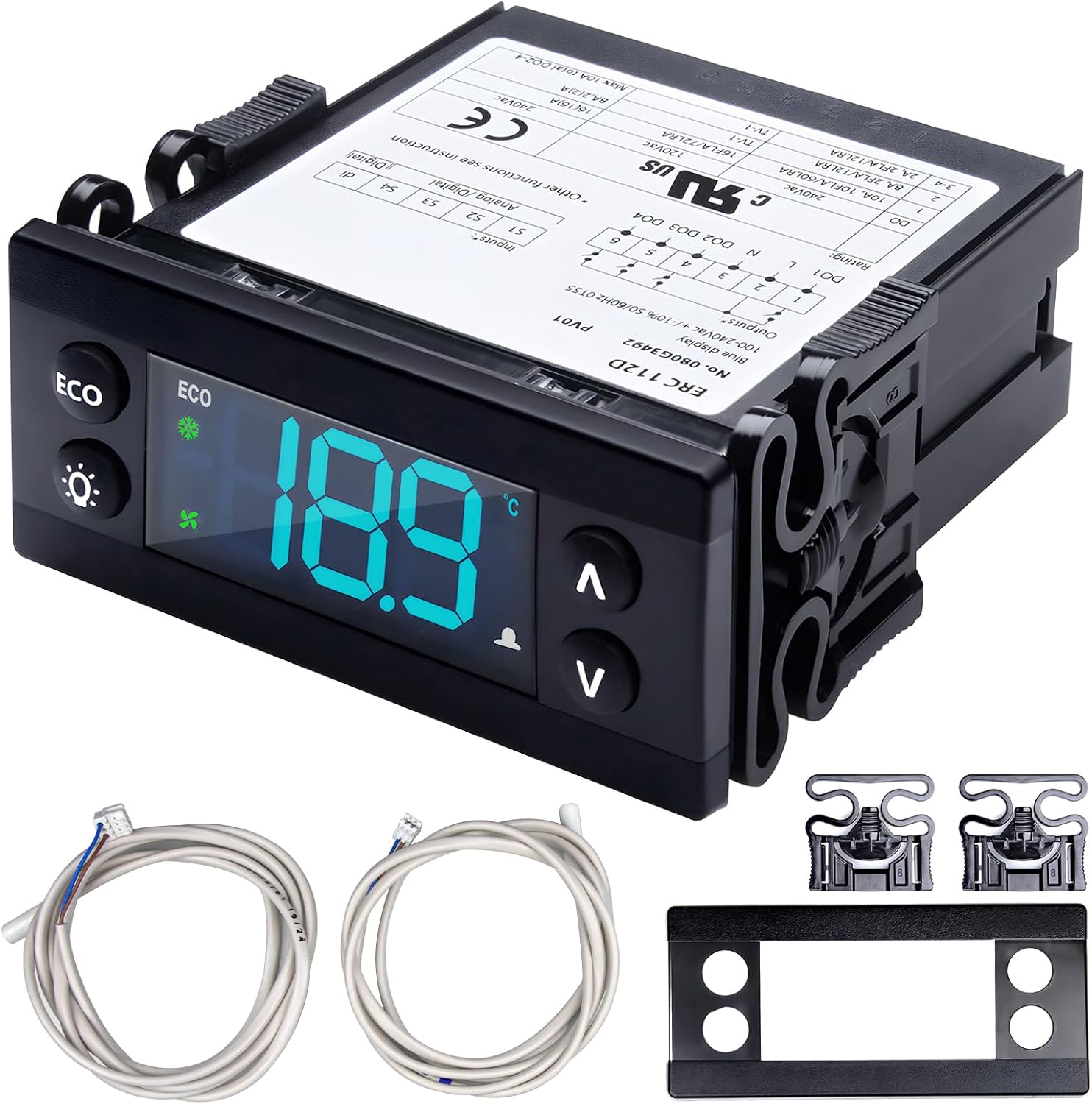
Image 1.1: The ERC112D Temperature Controller Kit, including the main unit, two NTC sensor probes, and mounting fasteners.
2. Package Contents
Upon opening the package, please verify that all the following components are present:
- 1 x ERC112D Temperature Controller with protective lid
- 2 x Fastener 080G3308 (for mounting)
- 1 x ETN NTC-Sensor 077F8761 (1500 mm, 3-pole)
- 1 x ETN NTC-Sensor 077F8790 (1500 mm, 2-pole)
- 1 x User Manual (this document)

Image 2.1: Detailed view of the two NTC sensor probes (077F8761 and 077F8790) provided with the ERC112D controller.
3. Key Features
The ERC112D Temperature Controller offers several advanced features for optimal refrigeration control:
- Temperature Stability: Maintains consistent temperatures for reliable operation.
- Energy Saving: Designed for efficient power consumption.
- Dual NTC Probe: Utilizes two NTC sensors for accurate temperature monitoring.
- Frost Improvement: Incorporates features to manage and reduce frost buildup.
- Programmable: Allows for customized settings to suit specific application requirements.

Image 3.1: Visual representation of the ERC112D's core functionalities, including temperature stability and energy efficiency.
4. Installation and Setup
Installation should be performed by qualified personnel. Ensure power is disconnected before beginning installation.
4.1 Mounting the Controller
- Identify a suitable panel cutout for the controller. Refer to the specifications for dimensions.
- Insert the ERC112D controller into the cutout.
- Secure the controller using the provided Fastener 080G3308 clips on both sides.
4.2 Wiring Connections
Refer to the wiring diagram on the controller's label for correct connections. The controller operates on 100-240V AC.
- Connect the power supply to the designated terminals.
- Connect the NTC sensor probes (077F8761 and 077F8790) to their respective sensor inputs.
- Connect the refrigeration load (e.g., compressor, fan) to the output relays as per the application requirements.

Image 4.1: Rear view of the ERC112D controller, displaying the terminal block for electrical connections and a basic wiring schematic.
5. Operation
The ERC112D controller can be configured and operated using its front panel buttons.
5.1 Manual Operation with Buttons
- ECO/Night Mode Button: Press to activate/deactivate Eco/Night mode.
- Light Button: Press to turn the display light ON/OFF.
- Up (^) Button: Used to increase values or navigate up in menus.
- Down (v) Button: Used to decrease values or navigate down in menus.
- OK Button: Confirms selections or enters programming modes.
5.2 Programming Tools
The controller can be configured in several ways:
- KoolProg and KoolKey as Gateway
- KoolKey as Copy Key
- KoolKey with Docking station
- Buttons on the front panel of the controller (detailed below)
5.3 Examples of Operation
Changing the Desired Temperature Set Point:
- The display shows the current temperature.
- Press "up/down" to access set point.
- Press "up/down" to adjust set point.
After 30 seconds, the display automatically reverts to showing the current temperature.
Changing a Parameter:
Some parameters may be hidden. Your access level determines which parameters you can view and edit.
- Press "^" and "v" together and hold for 5 seconds to access the menu.
- First parameter group is shown "tHE".
- Press "^" and "v" to find the desired group.
- Press "OK".
- First parameter is shown.
- Press "^" and "v" to find the desired parameter.
- Press "OK".
- Press "^" and "v" to find the desired setting.
- Press "OK".
After 30 seconds, the display automatically reverts to showing the current temperature. Or Press 2 x "Back".
NOTE:
Incorrect parameter settings can lead to inadequate cooling, excessive energy consumption, unnecessary alarms, and issues in temperature-sensitive food storage. Only a trained operator should make changes to parameters.
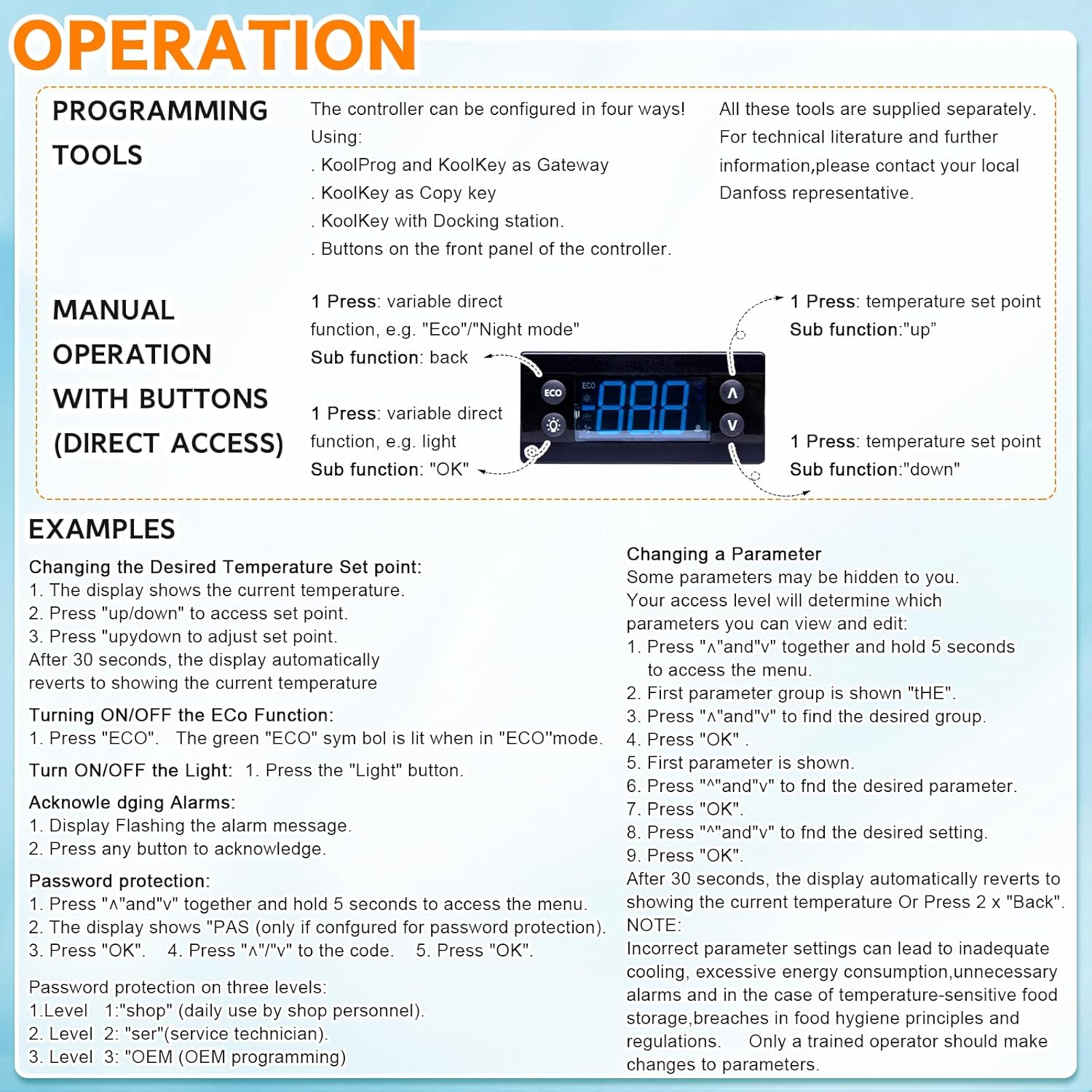
Image 5.1: Front panel controls and basic operational examples for the ERC112D temperature controller.
6. Maintenance
To ensure the longevity and optimal performance of your ERC112D Temperature Controller, follow these general maintenance guidelines:
- Regular Cleaning: Periodically wipe the controller's display and housing with a soft, dry cloth. Avoid abrasive cleaners or solvents.
- Sensor Inspection: Regularly check the NTC sensor probes for any signs of damage, corrosion, or loose connections. Ensure they are securely placed in their measuring locations.
- Connection Checks: Annually inspect all electrical connections to the controller to ensure they are tight and free from corrosion.
- Environmental Conditions: Ensure the controller is operating within its specified environmental limits (e.g., temperature, humidity) to prevent premature failure.
- Software Updates: If applicable, consult the manufacturer for any available firmware updates that may improve performance or address known issues.
Always disconnect power to the unit before performing any maintenance or inspection.
7. Troubleshooting
This section provides general guidance for common issues. For complex problems, contact technical support.
7.1 Common Issues and Solutions
- Controller Not Powering On:
- Check power supply connections and ensure the correct voltage (100-240V AC) is applied.
- Verify that the circuit breaker or fuse for the power supply is not tripped or blown.
- Incorrect Temperature Reading:
- Inspect NTC sensor probes for damage or improper placement. Ensure they are fully inserted and making good contact.
- Check sensor wiring for breaks or loose connections.
- Verify that the correct sensor type is selected in the controller's parameters (if configurable).
- Refrigeration Unit Not Cooling/Heating:
- Check the set point temperature to ensure it is correctly configured.
- Verify that the output relays are activating as expected (listen for clicks or use a multimeter).
- Inspect wiring to the refrigeration unit's compressor or heating element.
- Ensure no alarms are active that might be preventing operation.
- Display Shows Error Code:
- Refer to the controller's specific error code list (if available in a separate technical document) for diagnosis.
- Common error codes often indicate sensor faults or out-of-range conditions.
If these steps do not resolve the issue, please contact Alicatong customer support.
8. Compatibility and Applications
The ERC112D Temperature Controller is designed as a direct replacement for a wide range of commercial refrigeration units, ensuring broad applicability and ease of integration.
8.1 Compatible Models
This controller is compatible with, but not limited to, the following models:
- Beverage Air: 502-513D, 00C30-123D-01, 00C30-123D-03, 00C30-123D-04, 00C30-123D-00, 00C31-123D-01, 502-504D-01, 502-504D-05, 502-504D-08, 502-512D-01, 502-512D-03, 502-431D-01, 502-452D-01, 502-452D-12
- Danfoss: ERC112D GDM STM32-Red 080G3490/Blue 080G3492, ERC112D CFF Buzzer-Red 080G3213/Blue 080G3217, ERC112D GDM-Red 080G3203/Blue 080G3207, ERC112D CFF Buzze Blue 080G3413, ERC112D CFF Buzzer STM32-Red 080G3498, 080G3471/Blue 080G3499
- Hoshizaki: SP-5209, SP-5210, SP-5211, SP-5212
- Randell: RP CNT1701, CNT1701C, CNT1704, CNT1706, CNT1707, CNT1713, CNT1720B, CNT1720R, CNT1804, CNT1806
- Delfield: 2196111, 000-CZO-0059-S, 000-CZ0-0253-S
- Polar Temp: 0003937
8.2 Typical Applications
This temperature controller is suitable for various commercial and household refrigeration applications, including:
- Beverage coolers
- Commercial refrigerators and freezers
- Display cases
- Walk-in coolers

Image 8.1: Examples of commercial refrigeration environments where the ERC112D controller can be applied.
9. Specifications
| Feature | Specification |
|---|---|
| Model Number | ERC-112D, ERC112D |
| Brand | Alicatong |
| Use | Commercial/Household |
| Display Type | LED (Blue) |
| Control Type | Button Control |
| Supply Voltage | 100-240 Volts (AC) |
| Power Frequency | 50/60 Hz |
| Operating Temperature | Up to 55 Degrees Celsius |
| Product Dimensions | 2.5"L x 2"W x 1.2"H (6.35 x 5.08 x 3.05 cm) |
| Item Weight | 5.3 ounces (150 grams) |
| Color | Black |
| Material | Premium |
| Batteries Required | No |
| UPC | 730881655142 |
10. Warranty and Support
Alicatong is committed to providing high-quality products and excellent customer service.
10.1 After-Sales Service
If you encounter any problems during the use of your ERC112D Temperature Controller, please do not hesitate to contact us. Our customer support team is available to provide prompt assistance and satisfactory solutions.
10.2 Contact Information
For support, please visit the Alicatong store on Amazon or use the contact information provided with your purchase.
Alicatong Store: Visit Alicatong Store


