
1. Important Safety Information
Read all instructions carefully before operating the electric wheelchair. Failure to follow safety guidelines may result in injury or damage to the device.
- Always use the safety belt: Ensure the safety belt is securely fastened before operating the wheelchair.
- Observe weight limits: Do not exceed the maximum weight capacity of the wheelchair.
- Avoid steep inclines: The wheelchair has a 12° climbing angle capability. Exercise caution and avoid inclines exceeding this limit.
- Use caution in reverse: The wheelchair is equipped with a reverse warning tone. Always check your surroundings before backing up.
- Regular inspection: Periodically check all components, including brakes, wheels, and battery connections, for proper function.
- Keep clear of moving parts: Ensure hands, feet, and clothing are clear of wheels and other moving parts during operation.

Figure 1: Safety features including the seat belt, electromagnetic brake, and anti-tip wheels, demonstrating the wheelchair's 12-degree climbing capability.
2. Setup and Initial Use
2.1 Unfolding the Wheelchair
The Serianie Electric Wheelchair comes pre-assembled and can be easily unfolded for immediate use. Simply lift the chair from its folded position and allow the frame to expand. Ensure all locking mechanisms are engaged before sitting.

Figure 2: The Serianie Electric Wheelchair in its folded configuration.
2.2 Connecting the Battery and Initial Charge
The wheelchair typically arrives with a partial charge. For optimal performance, fully charge the battery before first use. Connect the battery wire if not already connected. The charging port is located on the joystick controller.
- Plug the charger into a standard wall outlet.
- Connect the charger cable to the charging port on the joystick.
- The indicator light on the charger will show charging status. A full charge typically takes 4-6 hours.

Figure 3: Dual battery system with charging and range indicators.
3. Operating Instructions
3.1 Joystick Control
The wheelchair is controlled by an intuitive 360° joystick. Gently push the joystick in the desired direction to move. Releasing the joystick will automatically engage the electromagnetic brakes, bringing the wheelchair to a stop.

Figure 4: The 360° joystick controller for precise maneuvering.
3.2 Speed Adjustment
Use the speed adjustment buttons on the joystick to select your preferred speed setting. The wheelchair offers multiple speed levels for various environments, from indoor use to outdoor travel.
3.3 Horn and Reverse Function
Press the horn button to alert others. When operating in reverse, a warning tone will sound to enhance safety. Always exercise caution and check your surroundings when moving backward.

Figure 5: Reverse warning tone feature for enhanced safety.
3.4 Folding and Transport
The wheelchair features a collapsible design for easy storage and transport. Follow the instructions in the user manual for safe folding and unfolding. Its lightweight design allows it to fit into most car trunks.

Figure 6: Demonstrating the folding process for transport.
4. Maintenance
Regular maintenance ensures the longevity and safe operation of your Serianie Electric Wheelchair.
- Cleaning: Wipe down the frame and seat with a damp cloth. Avoid using harsh chemicals or abrasive cleaners.
- Battery Care: Always charge the battery fully after each use. Store the wheelchair in a cool, dry place if not in use for extended periods, and ensure the battery is charged at least once a month.
- Wheel Inspection: Periodically check the solid and pneumatic wheels for wear and tear. Ensure tires are properly inflated if applicable.
- Brake Check: Verify that the electromagnetic brakes engage properly when the joystick is released.
5. Troubleshooting
5.1 Voice Assistant Volume / Disabling
If the voice assistant volume is too loud or you wish to disable it, follow these steps:
- Press and hold the horn button and the deceleration button for 3-5 seconds until you hear a "beep" sound, and the indicator light on top starts flashing.
- Use the deceleration button and acceleration button to adjust the lower indicator light to the left side.
- Press the power button to turn off the device, then wait 8 seconds before turning it back on. This process will disable the voice assistant.
5.2 Other Issues
For any other operational issues or concerns not covered in this manual, please refer to the Warranty and Support section for contact information.
6. Specifications
| Brand | Serianie |
| Model | AB02-15-Version3 |
| Color | Black |
| Product Dimensions (D x W x H) | 37.5"D x 17"W x 35"H |
| Material | Alloy Steel |
| Seat Width | 17 Inches |
| Seat Height | 18.5 Inches |
| Seat Depth | 16.5 Inches |
| Wheel Size | Front: 9.1 Inches, Rear: 15.7 Inches |
| Brake Style | Electromagnetic |
| Maximum Speed | 3.8 Miles per Hour |
| Motor Power | 500W |
| Battery Capacity | 12Ah |
| Range | Up to 15 Miles |
| Wheelchair Weight | 44 lbs |
| Battery Weight | 22 lbs |
| Turn Radius | 0.5 Meters |
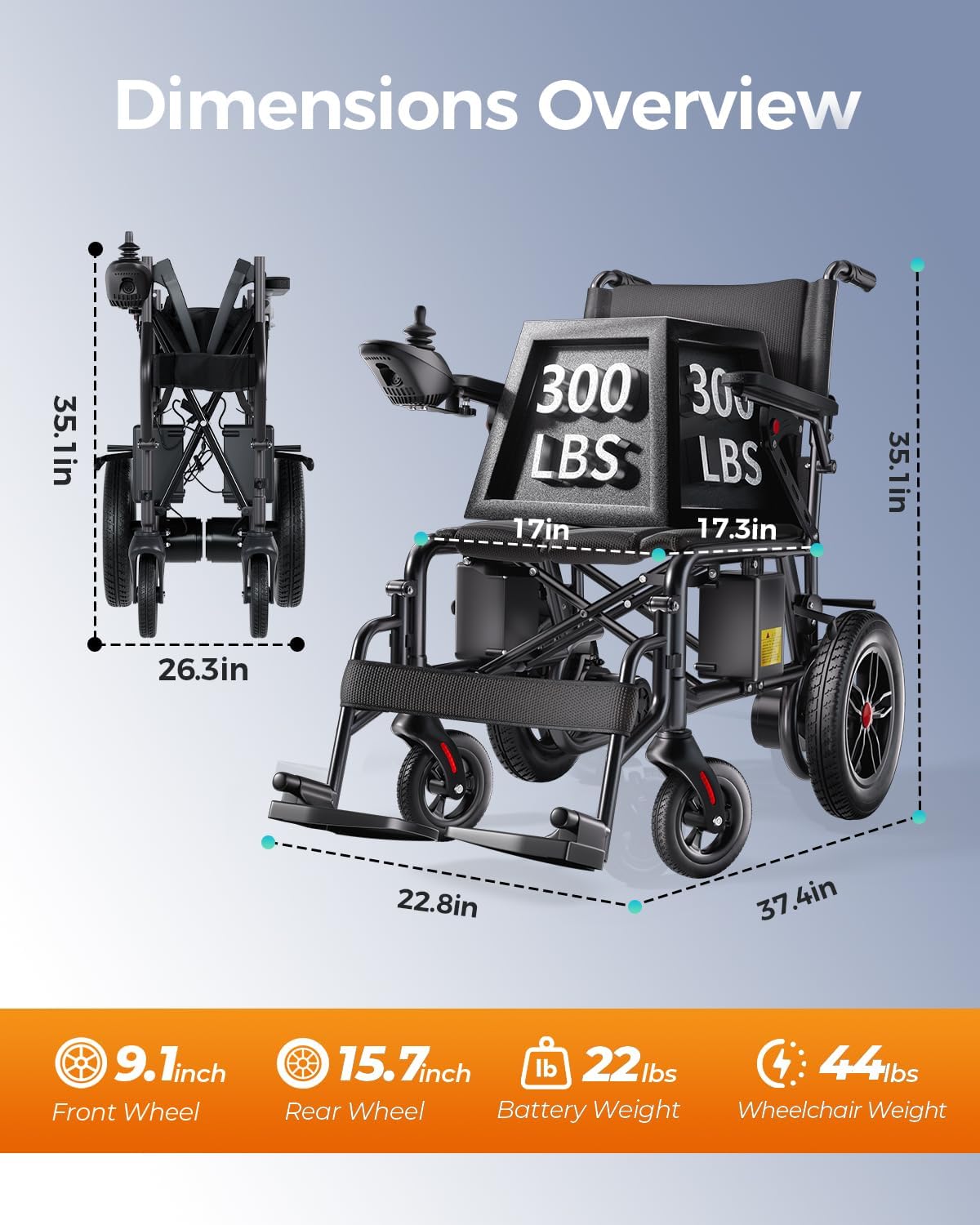
Figure 7: Dimensions overview of the Serianie Electric Wheelchair.
7. Warranty and Support
Your Serianie Electric Wheelchair comes with a 1-year warranty. For any questions, concerns, or technical assistance, please contact our dedicated after-sales support team. We are committed to ensuring your satisfaction and providing the necessary support for your product.
- After-Sales Team: Available to assist with any questions or concerns.
- Customer Support: 24/7 multilingual support is available to ensure prompt resolution of any issues.