
Motorola Edge 60
Motorola Edge 60 Smartphone User Manual
Model: Edge 60
1. Introduction
This manual provides essential information for the safe and efficient use of your Motorola Edge 60 smartphone. Please read it carefully before using your device.

Image: The Motorola Edge 60 smartphone displayed from multiple angles, highlighting its sleek design, camera module, and the vibrant Gibraltar Sea color.
Key Features:
- Moto AI with Sony LYTIA 700C sensor and 3x telephoto zoom for enhanced photography.
- Elegant and durable design with premium vegan leather finish and curved edges.
- 68W TurboPower fast charging, 15W wireless charging, and a 5200mAh battery.
- 6.67-inch pOLED 120Hz display for immersive visuals.
- MediaTek Dimensity 24M processor with up to 24GB dynamic RAM and 256GB storage for powerful performance.
2. What's in the Box
Verify that all items are present:
- Motorola Edge 60 Smartphone
- USB Cable
- Phone Case
- SIM Ejector Tool
3. Initial Setup
3.1. Insert SIM Card
- Locate the SIM tray on the side of your device.
- Insert the SIM ejector tool into the small hole next to the tray and press firmly until the tray pops out.
- Place your Nano-SIM card(s) into the tray with the gold contacts facing down. Ensure proper orientation.
- Carefully reinsert the tray into the phone.
3.2. Power On
Press and hold the Power button (located on the right side of the phone) until the Motorola logo appears on the screen.
3.3. Initial Configuration
Follow the on-screen prompts to:
- Select your language.
- Connect to a Wi-Fi network.
- Sign in with your Google account or create a new one.
- Set up screen lock (PIN, pattern, password, fingerprint, face unlock).
- Restore data from a previous device (optional).
4. Operating Your Device
4.1. Display and Navigation
The Motorola Edge 60 features a 6.67-inch pOLED display with a 120Hz refresh rate and 1220 x 2712 resolution, offering vibrant colors and smooth scrolling. Navigate using gestures or the traditional three-button navigation bar (customizable in Settings).
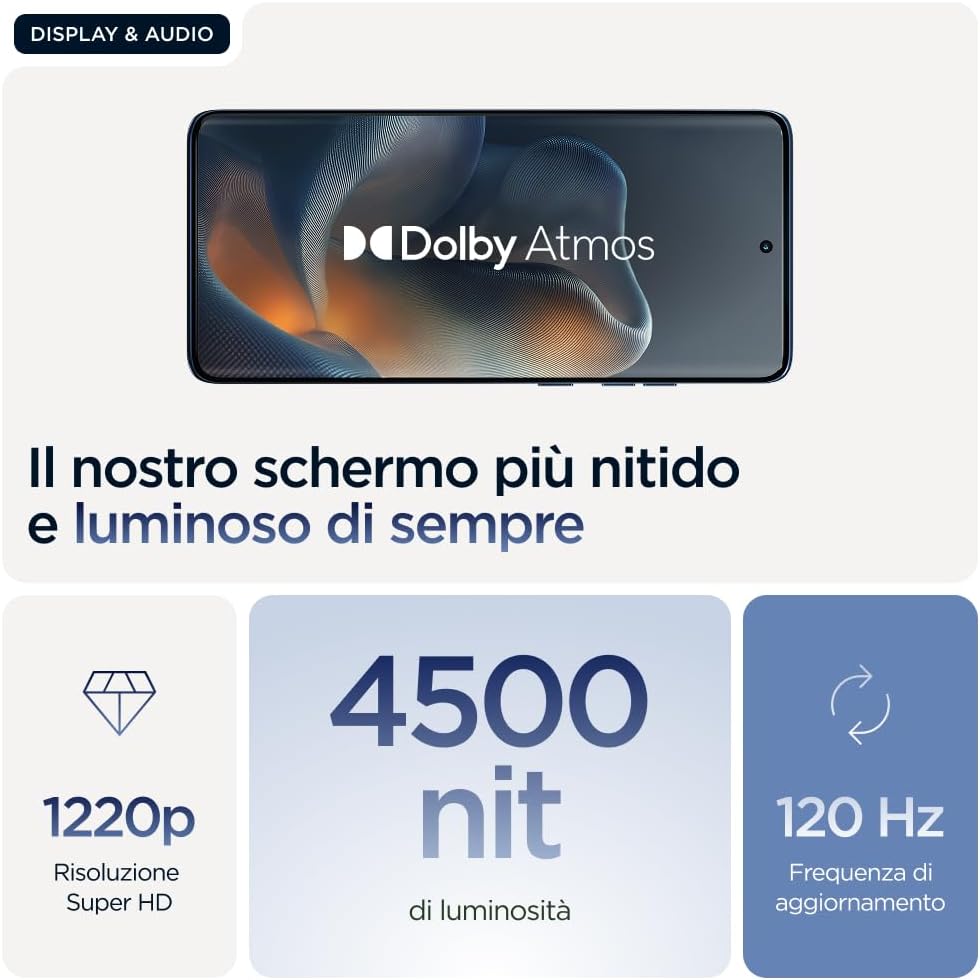
Image: The Motorola Edge 60's 6.67-inch pOLED display with Dolby Atmos support, showcasing its vibrant visual capabilities, 1220p Super HD resolution, 4500 nits brightness, and 120Hz refresh rate.
4.2. Camera Features
Your device is equipped with a versatile camera system:
- Rear Camera: 50MP main camera with f/1.8 aperture and Optical Image Stabilization (OIS), a 50MP ultrawide lens, and a 10MP 3x telephoto zoom lens.
- Front Camera: 50MP selfie camera.
- Moto AI: Enhances photos with features like Sony LYTIA 700C sensor integration for clear, bright images, perfect portraits, and powerful zoom.

Image: Detailed view of the Motorola Edge 60's triple rear camera setup, highlighting the 50MP main sensor, ultrawide, and 3x telephoto lenses.
4.3. Battery and Charging
The 5200mAh battery provides extended usage. Utilize the 68W TurboPower charger for rapid charging, or the 15W wireless charging for convenience.
- A full charge can last up to 52 hours under typical usage conditions.
- Gain a full day's power in approximately 8 minutes with 68W TurboPower charging.

Image: The Motorola Edge 60 connected to its 68W TurboPower charger, illustrating its fast charging capability and long battery life of up to 52 hours.
4.4. Performance and Storage
Powered by the MediaTek Dimensity 24M processor, the Edge 60 offers smooth performance for demanding applications and multitasking. It comes with 256GB of internal storage and up to 24GB of dynamic RAM. Storage can be expanded up to 1TB with a microSD card.

Image: Visual representation of the MediaTek Dimensity 24M chipset, highlighting the phone's powerful performance, RAM extension, and storage capabilities up to 512GB (and 1TB with microSD).
4.5. Moto AI Features
Moto AI integrates advanced artificial intelligence to simplify daily tasks and enhance user experience:
- Smart Streaming: Seamlessly share content across devices by voice command.
- Real-time Suggestions: Provides contextual suggestions based on your on-screen activity.
- Noise Filtering: Summarizes key notifications and filters out distractions.
- Memory Recall: Easily save and retrieve screenshots, photos, and notes by asking Moto AI to "Remember this."
- Transcription: Records, transcribes, and summarizes audio for meetings or notes.
- Photo Enhancement: Improves photo clarity, stability, and vibrancy for professional-looking results.

Image: An overview of Moto AI's interface, demonstrating its ability to simplify tasks with search and contextual suggestions.

Image: The Smart Streaming feature of Moto AI, illustrating seamless content sharing from the Motorola Edge 60 to a Lenovo Thinkpad laptop.
4.6. Durability and Design
The Motorola Edge 60 is designed for durability and comfort:
- IP69 Rating: Provides absolute protection against dust and water ingress.
- Corning Gorilla Glass 7i: Screen protection that is twice as resistant as previous versions.
- Temperature Resistance: Operates reliably in temperatures from -20°C to 60°C.
- Drop Protection: Designed to withstand drops from up to 1.22 meters.
- Quad-curve Design: Ergonomic design with premium vegan leather finish.

Image: Infographic detailing the Motorola Edge 60's robust build, including IP69 dust and water protection, thermal resistance from -20°C to 60°C, and drop protection up to 1.22 meters.
5. Maintenance
5.1. Cleaning Your Device
Use a soft, lint-free cloth to clean your phone. Avoid abrasive materials or harsh chemicals. For stubborn smudges, slightly dampen the cloth with water or a screen cleaner designed for electronics.
5.2. Software Updates
Regularly check for and install software updates to ensure optimal performance, security, and access to new features. Go to Settings > System > System updates to check for available updates.
5.3. Battery Care
To prolong battery life, avoid exposing your phone to extreme temperatures. It is recommended to keep the battery charge between 20% and 80% for daily use, though occasional full charges/discharges are fine.
6. Troubleshooting
6.1. Device Not Responding
If your phone is unresponsive, press and hold the Power button for approximately 10-15 seconds to force a restart.
6.2. Connectivity Issues
- Wi-Fi: Ensure Wi-Fi is enabled and you are within range of a known network. Try forgetting the network and reconnecting.
- Mobile Data: Check if mobile data is enabled in Settings. Verify your SIM card is properly inserted and your plan is active.
- Bluetooth: Ensure Bluetooth is enabled on both devices and they are in pairing mode.
6.3. Apps Crashing or Freezing
Try clearing the cache and data for the problematic app in Settings > Apps > [App Name] > Storage & cache. If the issue persists, uninstall and reinstall the app.
6.4. Factory Reset
Warning: A factory reset will erase all data from your phone. Back up important data before proceeding.
To perform a factory reset, go to Settings > System > Reset options > Erase all data (factory reset). Follow the on-screen instructions.
7. Specifications
| Feature | Detail |
|---|---|
| Brand | Motorola |
| Model Name | Edge 60 |
| Operating System | Android 15.0 |
| RAM Size | 8 GB (up to 24GB dynamic RAM) |
| CPU Speed | 2.0, 2.5 GHz |
| Internal Storage | 256 GB (expandable up to 1TB with microSD) |
| Screen Size | 6.67 Inches |
| Resolution | 1220 x 2712 |
| Refresh Rate | 120 Hz |
| Product Dimensions | 16.12 x 0.79 x 7.31 cm; 179 grams |
| Battery | 5200mAh Lithium-ion (built-in) |
| Charging | 68W TurboPower, 15W Wireless Charging |
| Ingress Protection Rating | IP69 |
| Screen Protection | Corning Gorilla Glass 7i |
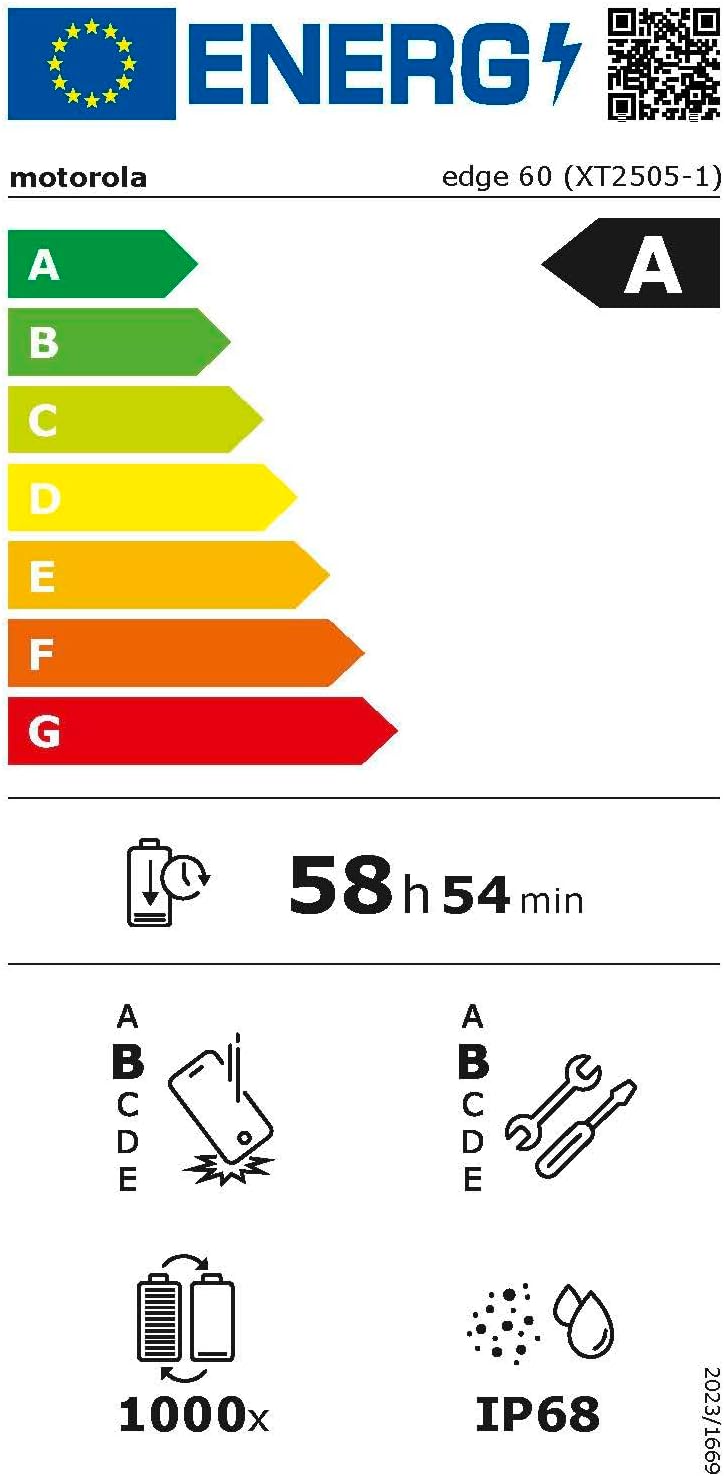
Image: The official EU energy label for the Motorola Edge 60 (XT2505-1), indicating its energy efficiency class A, battery endurance of 58 hours and 54 minutes, and durability ratings for drops and water resistance.
8. Warranty and Support
8.1. Warranty Information
Your Motorola Edge 60 is covered by a limited warranty. For specific terms and conditions, please refer to the warranty card included with your product or visit the official Motorola website. The return policy allows for refunds/replacements within 14 days of purchase.
8.2. Customer Support
For further assistance, technical support, or service inquiries, please visit the official Motorola support website or contact their customer service. You can find contact details on the Motorola website or in the documentation provided with your device.
Official Motorola Website: www.motorola.com
Related documentsEdge 60


Ask a question about this manual
Ask about setup, troubleshooting, compatibility, parts, safety, or missing instructions. Manuals+ will review the question and use this page’s manual context to help answer it.