
1. Introduction
This manual provides detailed instructions for the safe and effective use of the VIHELM HT107 Digital Socket Tester. This device is designed to quickly and accurately detect wiring faults in electrical sockets, including grounding, neutral wire, and live wire polarity, as well as perform RCD/GFCI tests. Please read this manual thoroughly before operation to ensure proper usage and safety.
2. Safety Information
WARNING: Electrical testing can be hazardous. Always exercise extreme caution when working with electricity. Failure to follow safety instructions may result in electric shock, fire, or personal injury.
- Do not use the tester if it appears damaged or is not functioning correctly.
- Ensure your hands are dry before handling the tester or any electrical outlets.
- Do not use the tester in wet environments or during adverse weather conditions.
- The tester is rated CAT II 300V. Do not exceed this voltage rating.
- Always disconnect power before attempting any repairs based on tester readings.
- Keep the device out of reach of children.
- The RCD/GFCI test function should only be performed on properly wired circuits. Ensure all connected appliances are turned off before performing an RCD/GFCI test to prevent accidental power interruption or damage to sensitive equipment.
3. Product Overview
The VIHELM HT107 Digital Socket Tester is a compact device featuring an LCD display and LED indicators for clear fault detection. It comes in different versions (HT107B, HT107D, HT107E) to accommodate various national plug standards.
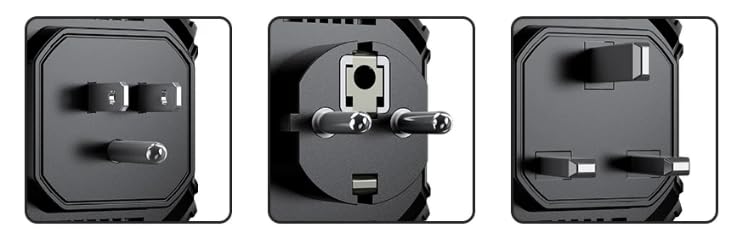
Image: The VIHELM HT107 Digital Socket Tester, showcasing its compact design and different plug configurations (US, EU, UK) for various regions.
3.1. Model Variations and Package Contents
The HT107 series includes models for different regions, each with a specific plug type. Each package typically includes one socket tester and an English user manual.
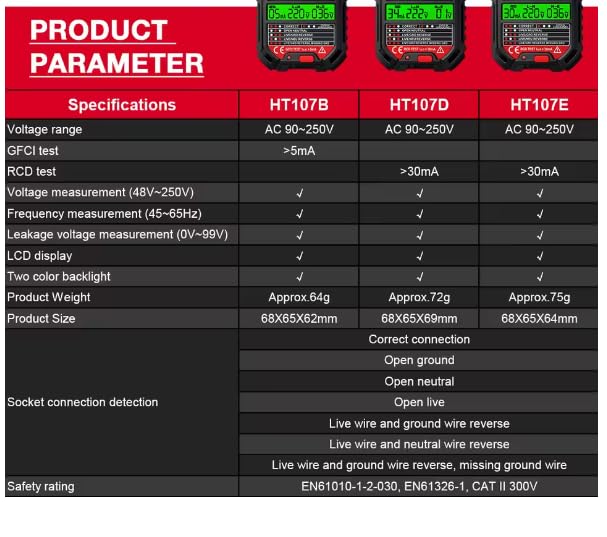
Image: HT107B Socket Tester (US Plug) and included English manual.
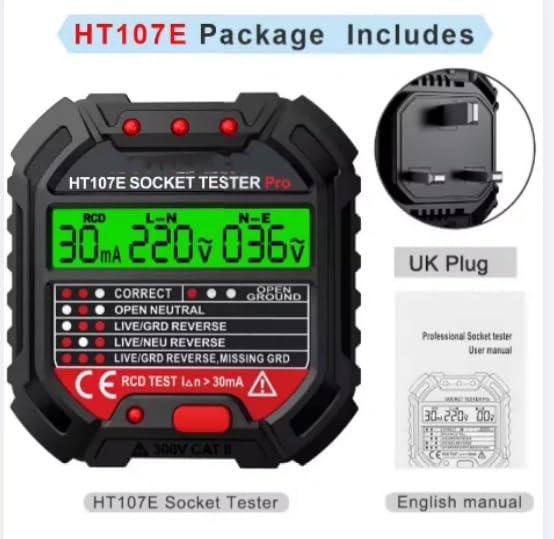
Image: HT107D Socket Tester (EU Plug) and included English manual.
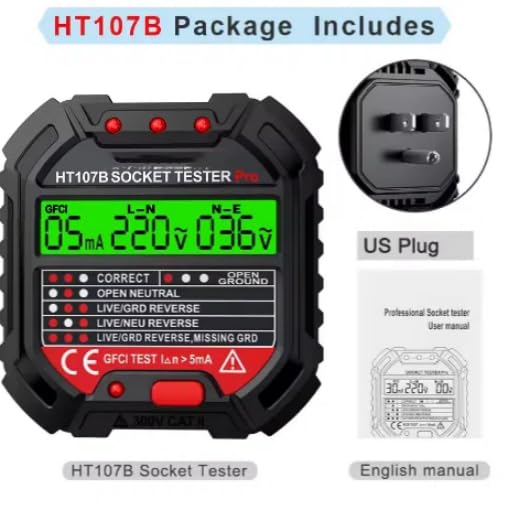
Image: HT107E Socket Tester (UK Plug) and included English manual.
4. Setup
The VIHELM HT107 Digital Socket Tester requires no complex setup. It is designed for immediate use upon insertion into a compatible electrical socket.
- Inspect the Tester: Before each use, visually inspect the tester for any signs of damage, cracks, or exposed wiring. Do not use if damaged.
- Select Correct Model: Ensure you are using the correct HT107 model (B, D, or E) that matches the electrical socket type in your region (US, EU, or UK).
- Insert into Socket: Firmly insert the tester into the electrical socket you wish to test. Ensure it is fully seated.
- Power On: The tester will automatically power on and begin its diagnostic sequence once inserted into a live socket.
5. Operating Instructions
5.1. Basic Socket Testing
Once the tester is inserted into a live socket, it will immediately display the voltage and indicate the wiring status via its LED indicators and LCD screen.
- Observe the LED indicator pattern on the tester. Refer to the 'Interpreting Results' section for detailed explanations of each pattern.
- The LCD display will show real-time voltage readings (L-N, N-E) and leakage voltage (0-99V).
5.2. RCD/GFCI Test
The RCD (Residual Current Device) or GFCI (Ground Fault Circuit Interrupter) test function verifies the proper operation of your circuit's safety mechanism. This test is crucial for ensuring protection against electric shock.
- Preparation: Before performing an RCD/GFCI test, ensure all appliances connected to the circuit being tested are turned off or unplugged. This prevents accidental power interruption to sensitive equipment.
- Insert Tester: Insert the HT107 tester into a correctly wired three-hole power socket.
- Initiate Test: Press and hold the RCD/GFCI test button (typically labeled 'RCD TEST' or 'GFCI TEST') for approximately 3 seconds.
- Observe Results: If the RCD/GFCI device trips (power is cut off to the socket), it indicates that the safety mechanism is functioning correctly. If the RCD/GFCI does not trip, it suggests a fault with the RCD/GFCI device itself, and further investigation by a qualified electrician is recommended.
- Reset Power: After the test, reset your RCD/GFCI breaker to restore power to the circuit.
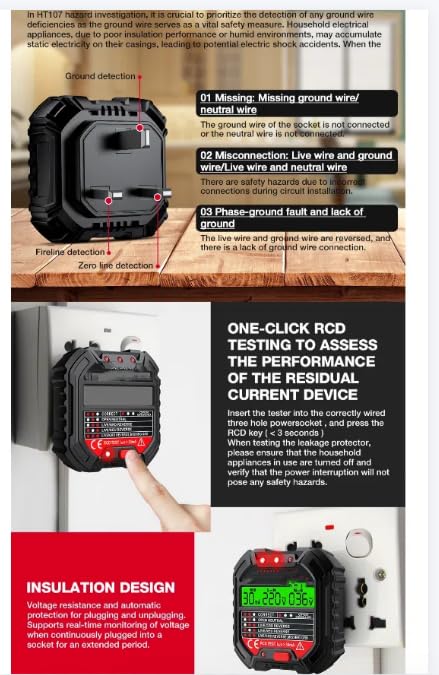
Image: The HT107 tester demonstrating RCD testing and visual indicators for normal operation versus hazardous conditions.
6. Interpreting Results
The HT107 uses a combination of LED indicators and an LCD display to communicate the wiring status of the socket. The LED patterns are crucial for quick fault identification.
6.1. LED Indicator Patterns
| Indicator Pattern | Status | Description |
|---|---|---|
| Correct | Normal | Wiring is correct. Live, Neutral, and Ground are properly connected. |
| Open Ground | Hazardous | The ground wire is missing or disconnected. This is a serious safety hazard. |
| Open Neutral | Hazardous | The neutral wire is missing or disconnected. This can lead to improper operation of appliances. |
| Live/GRD Reverse | Hazardous | The live and ground wires are reversed. This is a critical safety issue. |
| Live/NEU Reverse | Hazardous | The live and neutral wires are reversed. This can cause appliances to be energized even when switched off. |
| Live/GRD Reverse, Missing GRD | Hazardous | A combination of reversed live/ground wires and a missing ground connection. Extremely dangerous. |
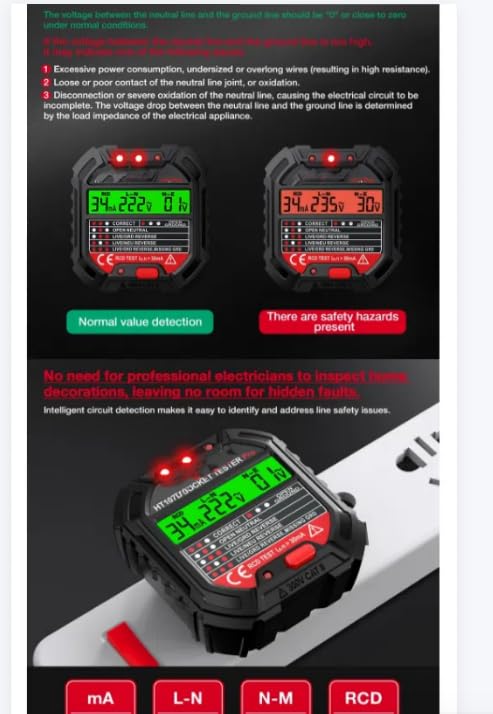
Image: Visual representation of different fault conditions detected by the HT107 tester, including lack of ground wire, reversed live/neutral, and reversed live/ground wires.
6.2. LCD Display Readings
- L-N: Voltage between Live and Neutral wires.
- N-E: Voltage between Neutral and Earth (Ground) wires. Ideally, this should be 0V or very close to 0V. Higher readings indicate potential issues.
- Leakage Voltage: Displays leakage voltage from 0-99V.
7. Specifications
The following table details the technical specifications for the VIHELM HT107 Digital Socket Tester series:
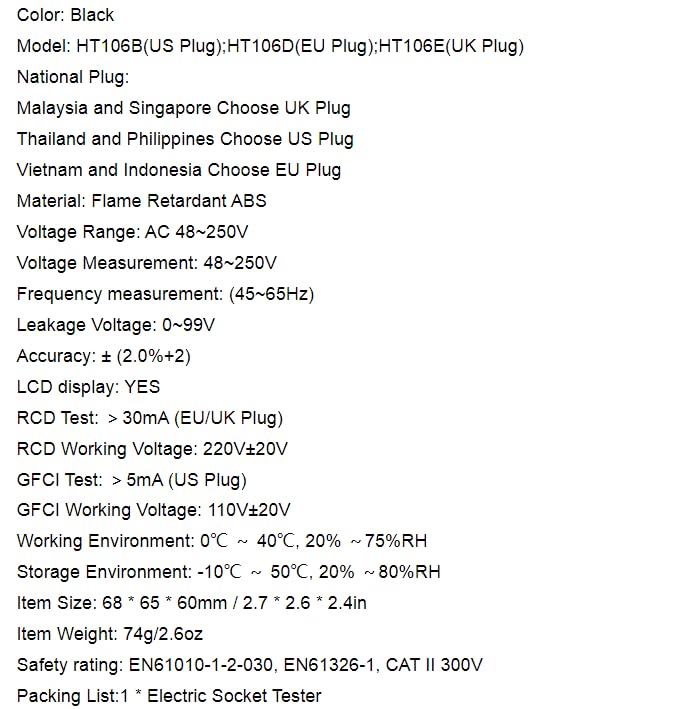
Image: Detailed product parameter table comparing specifications for HT107B, HT107D, and HT107E models.
| Parameter | Specification |
|---|---|
| Material | Flame Retardant ABS |
| Voltage Range | AC 48-250V (HT107B), AC 90-250V (HT107D, HT107E) |
| Voltage Measurement | 48V-250V |
| Frequency Measurement | 45-65Hz |
| Leakage Voltage | 0-99V |
| Accuracy | ± (2.0%+2) |
| LCD Display | Yes, Two-color backlight |
| RCD Test | > 30mA (EU/UK Plug models: HT107D, HT107E) |
| RCD Working Voltage | 220V±20V |
| GFCI Test | > 5mA (US Plug model: HT107B) |
| GFCI Working Voltage | 110V±20V |
| Working Environment | 0°C ~ 40°C, 20% ~ 75%RH |
| Storage Environment | -10°C ~ 50°C, 20% ~ 80%RH |
| Item Size (approx.) | 68 x 65 x 60mm (HT107B), 68 x 65 x 69mm (HT107D), 68 x 65 x 64mm (HT107E) |
| Item Weight (approx.) | 64g (HT107B), 72g (HT107D), 75g (HT107E) |
| Safety Rating | EN61010-1-2-030, EN61326-1, CAT II 300V |
| Packing List | 1 * Electric Socket Tester |
8. Troubleshooting
If the tester does not provide expected readings or indicates a fault, consider the following:
- No Display/No Power: Ensure the socket is live and receiving power. Check the circuit breaker.
- Incorrect Readings: Verify the tester is fully inserted into the socket. Ensure you are using the correct model for your region's plug type.
- Persistent Fault Indication: If the tester consistently indicates a wiring fault (e.g., Open Ground, Reversed Polarity), do not use the socket. Contact a qualified electrician to inspect and repair the wiring.
- RCD/GFCI Test Fails to Trip: If the RCD/GFCI test button is pressed and the circuit breaker does not trip, the RCD/GFCI device itself may be faulty. This is a serious safety concern; contact a qualified electrician immediately.
9. Maintenance
The VIHELM HT107 Digital Socket Tester requires minimal maintenance to ensure its longevity and accuracy.
- Cleaning: Wipe the tester with a dry, soft cloth. Do not use abrasive cleaners or solvents.
- Storage: Store the tester in a cool, dry place, away from direct sunlight and extreme temperatures.
- Inspection: Periodically inspect the tester for any physical damage, especially to the plug pins and casing.
- No User Serviceable Parts: Do not attempt to open or repair the tester. Doing so will void any warranty and may pose a safety risk.
10. Warranty and Support
For warranty information and customer support, please refer to the documentation provided with your purchase or contact the seller directly. Keep your purchase receipt as proof of purchase.