
CREALITY FALCON Creality Space Pi
CREALITY Space Pi Filament Dryer Instruction Manual
Brand: CREALITY FALCON | Model: Creality Space Pi
1. Introduction
The CREALITY Space Pi Filament Dryer is designed to optimize 3D printing by effectively removing moisture from various filament types. Featuring 360° hot-air circulation, fast heating, and an intuitive 3.7-inch LCD touch screen, this device ensures filaments are kept in optimal condition for high-quality prints. It includes pre-configured settings for common filament types and offers real-time monitoring of temperature and humidity.
2. Key Features
- One-Key Filament Drying Settings: Pre-configured temperature and drying time settings for up to 12 filament types, including PLA-CF, PA-CF, and ASA. Temperature is adjustable between 45℃ and 70℃.
- 360° Hot-Air Circulation: Equipped with an 80W PTC heater and built-in fan for rapid heating and uniform drying, effectively removing moisture.
- 48-Hour Timer & Real-Time Monitoring: Adjustable drying time from 0-48 hours. The built-in display monitors real-time humidity and temperature.
- Power-Off Memory Function: Automatically remembers previous settings after a power outage, eliminating the need for reconfiguration.
- Intuitive LCD Touch Screen: A 3.7-inch touch screen provides easy operation, displaying filament type, drying time, temperature, and humidity.
- Broad Compatibility: Supports 1.75mm and 2.85mm filament diameters for a wide range of filament types.
3. Setup Guide
- Unpack the Dryer: Carefully remove all components from the packaging. Retain packaging for future storage or transport.
- Verify Contents: Ensure all items listed in the "What you get in the box?" section (see Product Overview) are present. This typically includes the filament dryer box, user manual, Teflon tube, and power cord.
- Placement: Place the dryer on a stable, flat surface away from direct sunlight, heat sources, and excessive humidity. Ensure adequate ventilation around the unit.
- Power Connection: Connect the power cord to the dryer and then to a suitable power outlet (110V 50/60Hz for US models).
- Initial Power On: Press the power button to turn on the device. The LCD touch screen should illuminate.
For visual reference of package contents, please refer to the image titled "What you get in the box?" in the Product Overview section.
4. Operating Instructions
4.1 Loading Filament
- Open the lid of the filament dryer.
- Place your filament spool inside the dryer. Ensure the filament can unroll smoothly.
- If connecting directly to a 3D printer, feed the filament through the designated output hole and connect the Teflon tube.
- Close the lid securely.
4.2 Using the LCD Touch Screen
The 3.7-inch LCD touch screen provides real-time information and allows for easy control.
- Real-time Display: The screen shows current temperature (PV), set temperature (SV), real-time humidity (RH), selected material type, and remaining drying time.
- One-Key Settings: Utilize the pre-configured settings for various filament types (e.g., PLA, ABS, PETG, Nylon, TPU, PLA-CF, PA-CF, ASA). Select the appropriate filament type with a single touch.
- Manual Temperature Adjustment: If needed, manually adjust the drying temperature between 45℃ and 70℃.
- Timer Setting: Set the drying duration from 0 to 48 hours using the timer function.
- Power-Off Memory: In case of a power interruption, the dryer will resume with the last used settings once power is restored.
Refer to the images titled "One-key Set for Filaments," "Parameter Power-off Memory Function," and "LCD Touch Screen" in the Product Overview section for visual guidance.
5. Maintenance
- Cleaning: Regularly wipe the exterior of the dryer with a soft, dry cloth. Do not use abrasive cleaners or solvents. Ensure the device is unplugged before cleaning.
- Interior Cleaning: Periodically check the interior for any filament dust or debris. Use a soft brush or compressed air to gently remove any accumulation.
- Storage: When not in use for extended periods, store the dryer in a cool, dry place. It is recommended to keep the original packaging for protection.
- Teflon Tube: Inspect the Teflon tube for any kinks or damage. Replace if necessary to ensure smooth filament feeding.
6. Troubleshooting
| Problem | Possible Cause | Solution |
|---|---|---|
| Dryer does not power on. | No power supply; loose connection. | Check power cord connection; ensure outlet is functional. |
| Filament still shows signs of moisture (e.g., stringing, clogging, poor adhesion). | Insufficient drying time or incorrect temperature; extremely high initial moisture content. | Increase drying time; verify correct temperature setting for filament type; consider a longer initial drying cycle. |
| Temperature not reaching set value. | Environmental factors; internal component issue. | Ensure dryer is not in a cold environment; contact support if issue persists. |
| LCD screen is unresponsive or blank. | Power issue; software glitch. | Power cycle the device (turn off and on); contact support if issue persists. |
7. Specifications
| Attribute | Value |
|---|---|
| Product Name | Space Pi Filament Dryer |
| Model | DB-03 |
| Input Voltage | US 110V 50/60Hz; GB/UK/EUR 220V 50/60Hz |
| Rated Power | 145W |
| Temperature Control Range | 45℃-70℃ |
| Heating Duration | 0-48h |
| Filament Diameter Compatibility | 1.75mm/2.85mm |
| Item Weight | 2.54 pounds (1150 Grams) |
| Product Dimensions | 12.4 x 300 x 4.92 inches |
| Color | Space Grey |
8. Product Overview
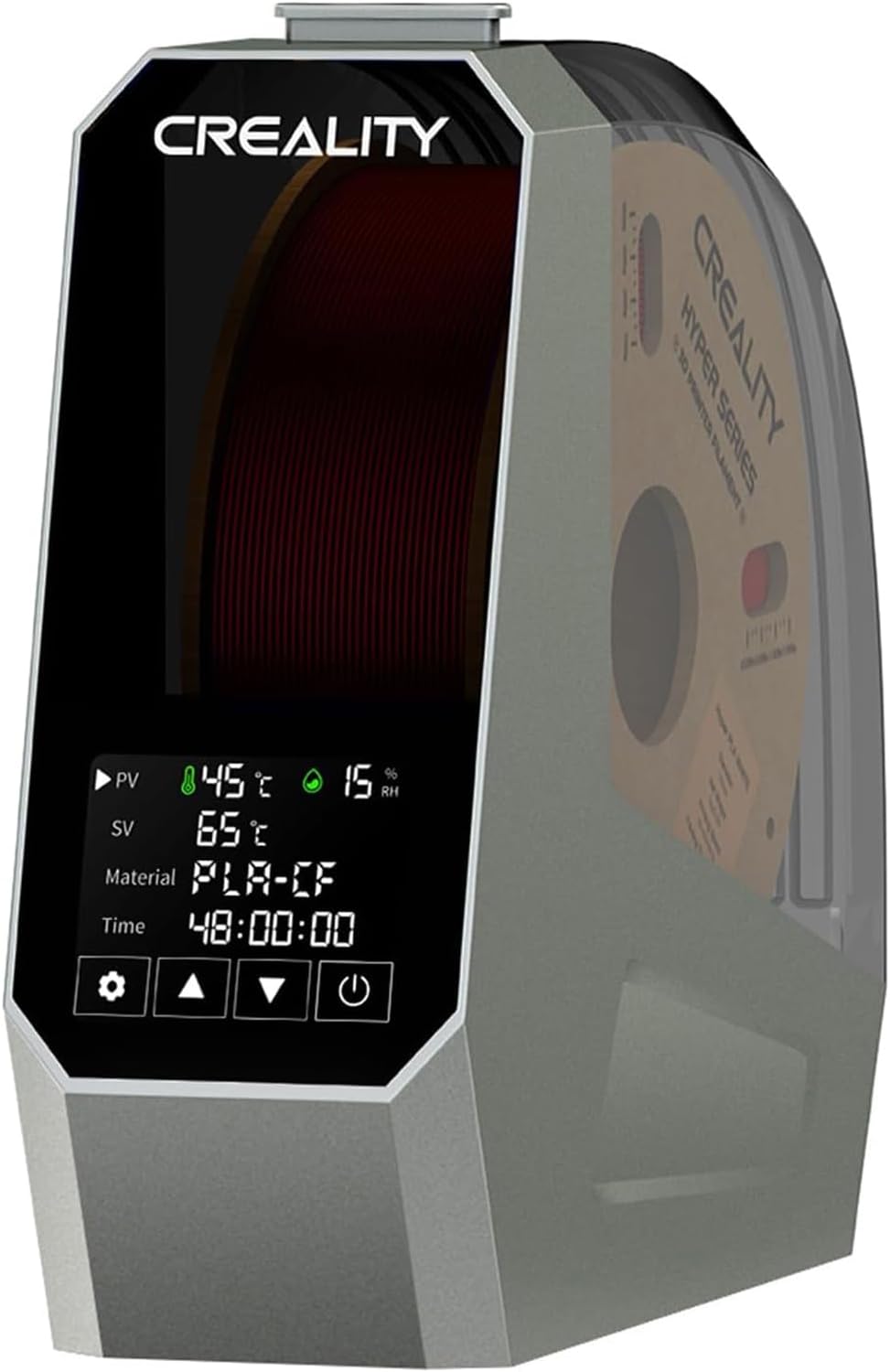
Creality Space Pi Filament Dryer, front view with filament spool inside.

Comparison of 3D prints: one with stringing/clogging from moist filament, and a smooth/clean print after using the dryer.
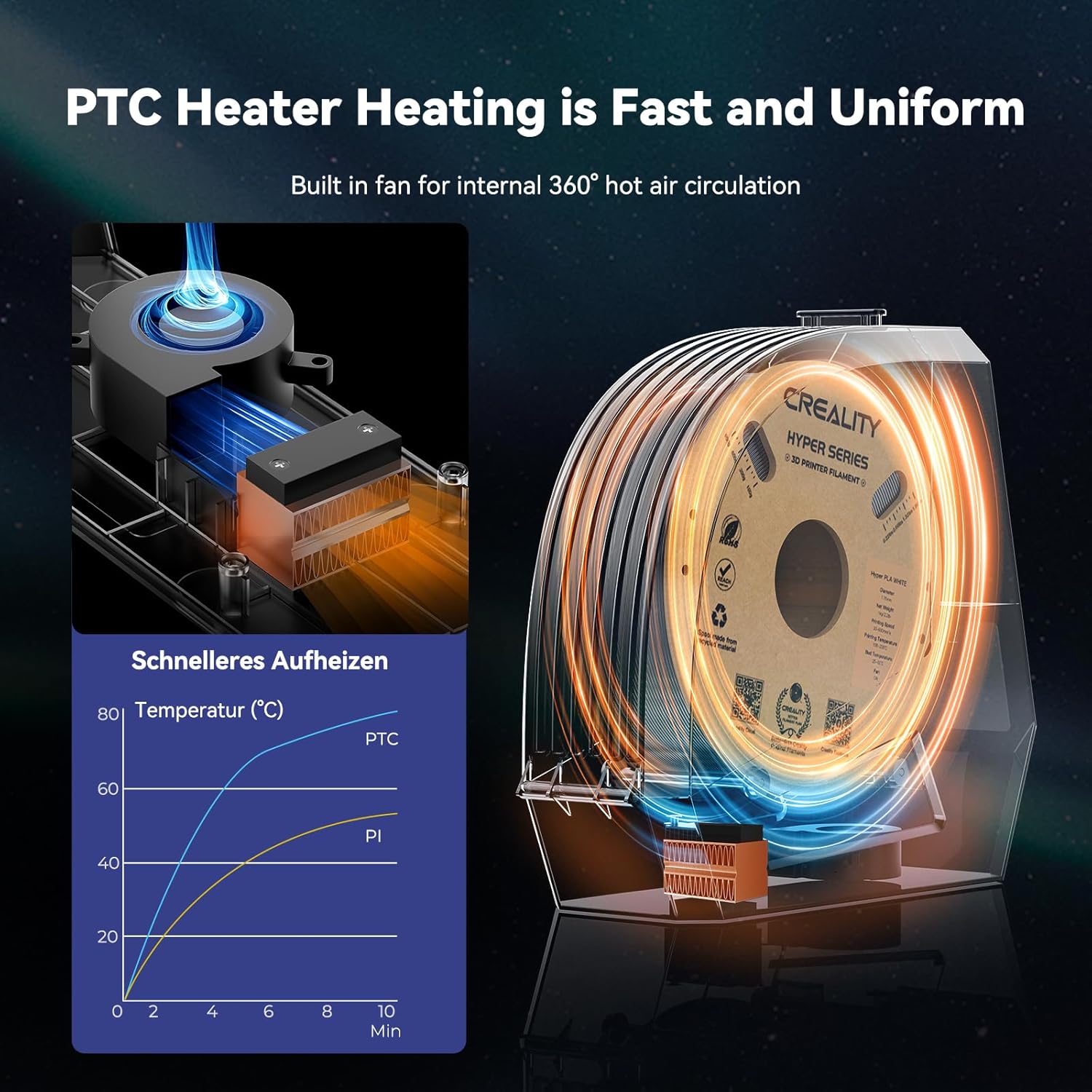
Diagram illustrating the 360° hot-air circulation and PTC heating element inside the Creality Space Pi Filament Dryer.
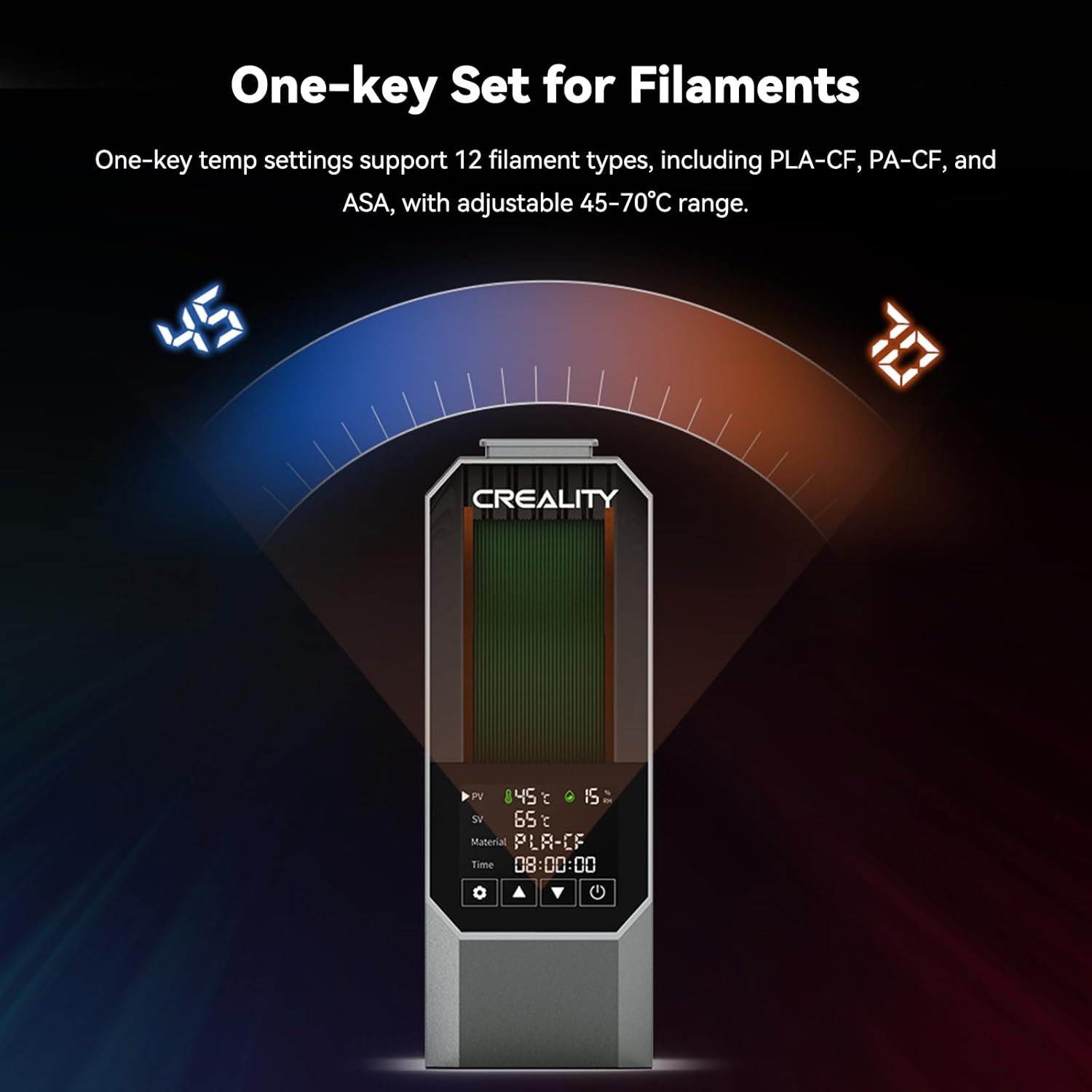
Creality Space Pi Filament Dryer display showing one-key settings for various filament types and adjustable temperature range.
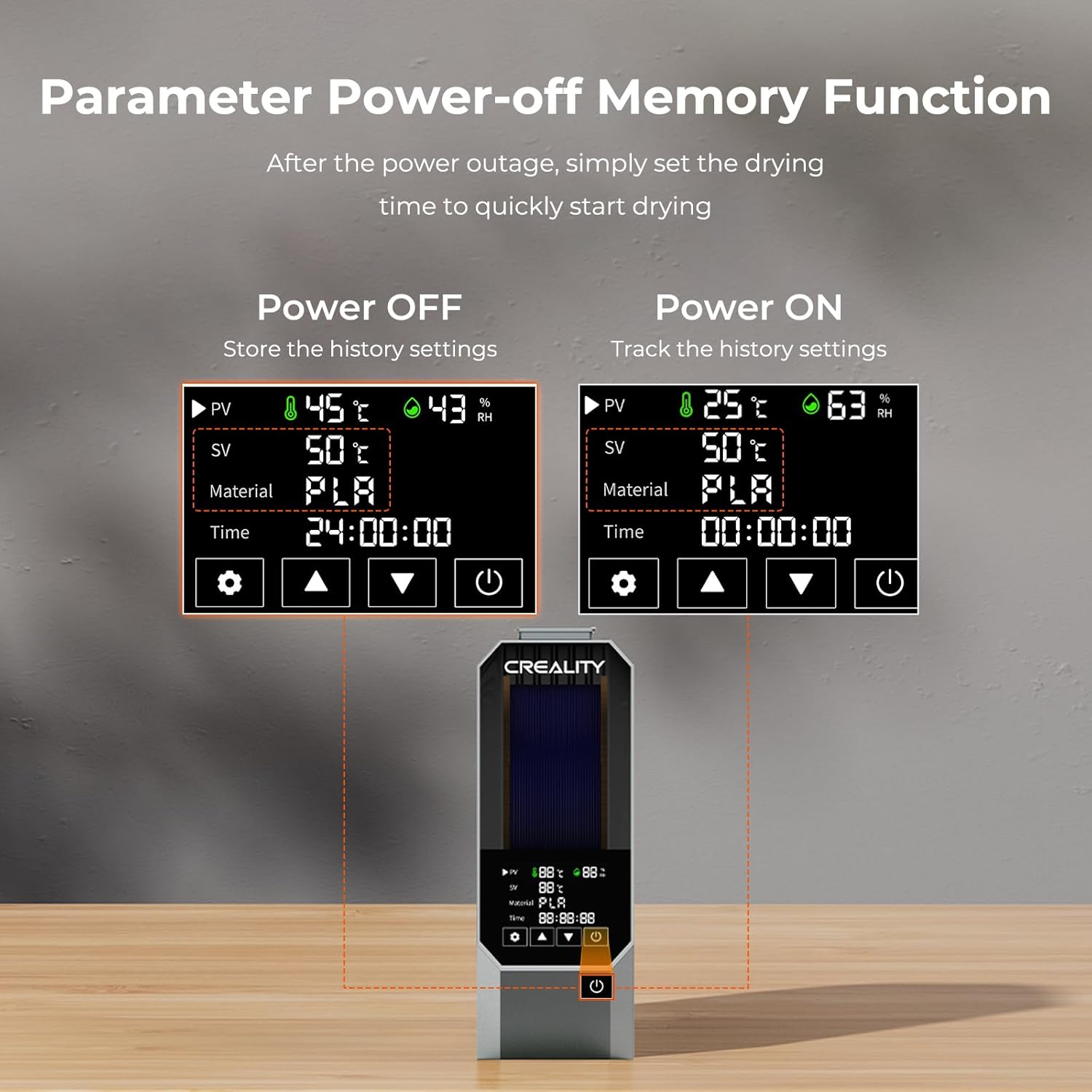
Creality Space Pi Filament Dryer display demonstrating the power-off memory function, retaining previous settings.

Close-up of the Creality Space Pi Filament Dryer's 3.7-inch LCD touch screen displaying real-time temperature, humidity, and drying countdown.

Contents of the Creality Space Pi Filament Dryer package, including the dryer box, user manual, Teflon tube, and power cord.
Ask a question about this manual
Ask about setup, troubleshooting, compatibility, parts, safety, or missing instructions. Manuals+ will review the question and use this page’s manual context to help answer it.