
Redsack SP-02
Redsack Electric Water Bottle Dispenser SP-02 User Manual
Model: SP-02
1. Introduction
Thank you for purchasing the Redsack Electric Water Bottle Dispenser, Model SP-02. This manual provides essential information for the safe and efficient use of your new water dispenser. Please read it thoroughly before operation and retain it for future reference.
Product Features:
- High-power water pumping for quick dispensing.
- Whisper-quiet submersible pump operation.
- Long-lasting 2000mAh rechargeable battery with USB-C charging.
- Food-grade silicone tubes and 304 stainless steel water outlet.
- Compatible with 3-5 gallon water jugs.
2. Important Safety Instructions
- Do not immerse the main dispenser unit in water.
- Keep out of reach of children.
- Use only with potable water.
- Ensure the charging port is dry before connecting the USB-C cable.
- Do not attempt to disassemble or repair the unit yourself. Contact customer support for assistance.
- Avoid using with liquids other than water.
3. Package Contents
Please check the package for the following items:
- Redsack Electric Water Bottle Dispenser (Main Unit)
- Food-Grade Silicone Hose
- USB-C Charging Cable
- User Manual (This document)
4. Setup Instructions
- Charge the Dispenser: Before first use, fully charge the dispenser using the provided USB-C cable. Connect the cable to the dispenser's charging port and a standard USB power adapter (not included). The indicator light will show charging status.
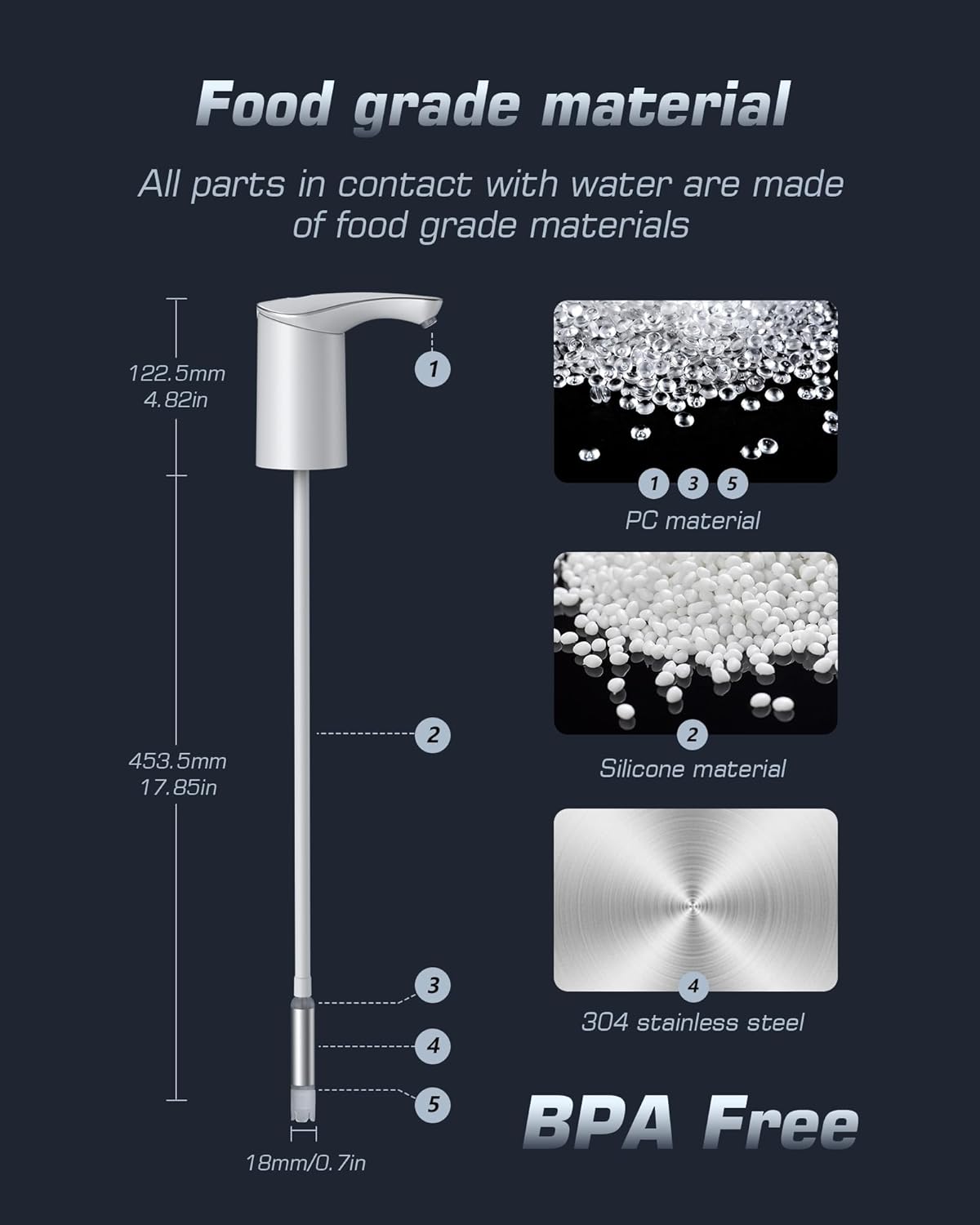
Image: The Redsack water dispenser with a USB-C cable connected for charging. This image illustrates the charging process and the 2000mAh battery capacity.
- Clean the Components: Wash the silicone hose and the stainless steel water outlet with clean water before initial use.
- Assemble the Hose: Insert one end of the silicone hose firmly into the inlet port at the bottom of the dispenser unit. Ensure a secure connection.
- Prepare the Water Jug:
- For 5-gallon jugs without a cap: Simply place the dispenser unit directly onto the jug opening.
- For 3-5 gallon jugs with a cap that has a hole (e.g., 18mm/0.7in diameter): Insert the silicone hose through the hole in the cap, then place the dispenser unit on top, ensuring the hose reaches the bottom of the jug.

Image: Diagram showing compatibility with various 3-gallon and 5-gallon water bottles, illustrating how the dispenser fits with and without bottle caps.
- Secure the Dispenser: Ensure the dispenser unit is stable and securely seated on the water jug to prevent accidental spills.
5. Operating Instructions
- Dispensing Water: Press the power button on the top of the dispenser once to start water flow. The dispenser will pump water continuously.

Image: A hand pressing the button on the Redsack water dispenser, which is actively dispensing water into a cup with ice.
- Stopping Water Flow: Press the power button again to stop the water flow.
- Automatic Shut-off: The dispenser is designed to pump water continuously for approximately 1 minute (3-4 liters) and then automatically stop. This feature helps prevent accidental overflows. If more water is needed, simply press the button again.
- Battery Indicator: The indicator light will signal low battery or charging status. Recharge when the light indicates low power.
6. Maintenance and Care
- Cleaning: Regularly clean the silicone hose and the stainless steel water outlet with warm, soapy water. Rinse thoroughly. The main dispenser unit can be wiped clean with a damp cloth. Do not submerge the main unit.
- Storage: When not in use for extended periods, ensure the dispenser is clean and dry. Store it in a cool, dry place.
- Battery Care: To prolong battery life, avoid completely draining the battery frequently. Recharge when the battery indicator is low.
7. Troubleshooting
| Problem | Possible Cause | Solution |
|---|---|---|
| No water dispensed / Weak flow |
|
|
| Dispenser stops unexpectedly |
|
|
| Charging indicator not working |
|
|
8. Specifications
| Model Number | SP-02 |
| Brand | Redsack |
| Color | White |
| Material | Plastic, Stainless Steel |
| Capacity Compatibility | 3-5 Gallon Water Jugs |
| Battery Capacity | 2000mAh |
| Charging Port | USB-C |
| Product Dimensions | 5.15"D x 2.4"W x 22.04"H |
| Item Weight | 9.9 ounces |
9. Warranty and Support
Redsack provides a hassle-free warranty for this product. If you encounter any issues or have questions regarding your Redsack Electric Water Bottle Dispenser, please contact our customer support team for timely and effective solutions.
For support, please refer to the contact information provided with your purchase or visit the official Redsack website.
Related documentsSP-02

Ask a question about this manual
Ask about setup, troubleshooting, compatibility, parts, safety, or missing instructions. Manuals+ will review the question and use this page’s manual context to help answer it.