
Introduction
This manual provides essential instructions for the proper use and care of your OLEVS L2891-G-J-white women's watch. Designed with a classic two-tone stainless steel band and an easy-to-read dial with Arabic numerals and a date display, this watch combines functionality with elegant design. Please read this manual thoroughly to ensure optimal performance and longevity of your timepiece.
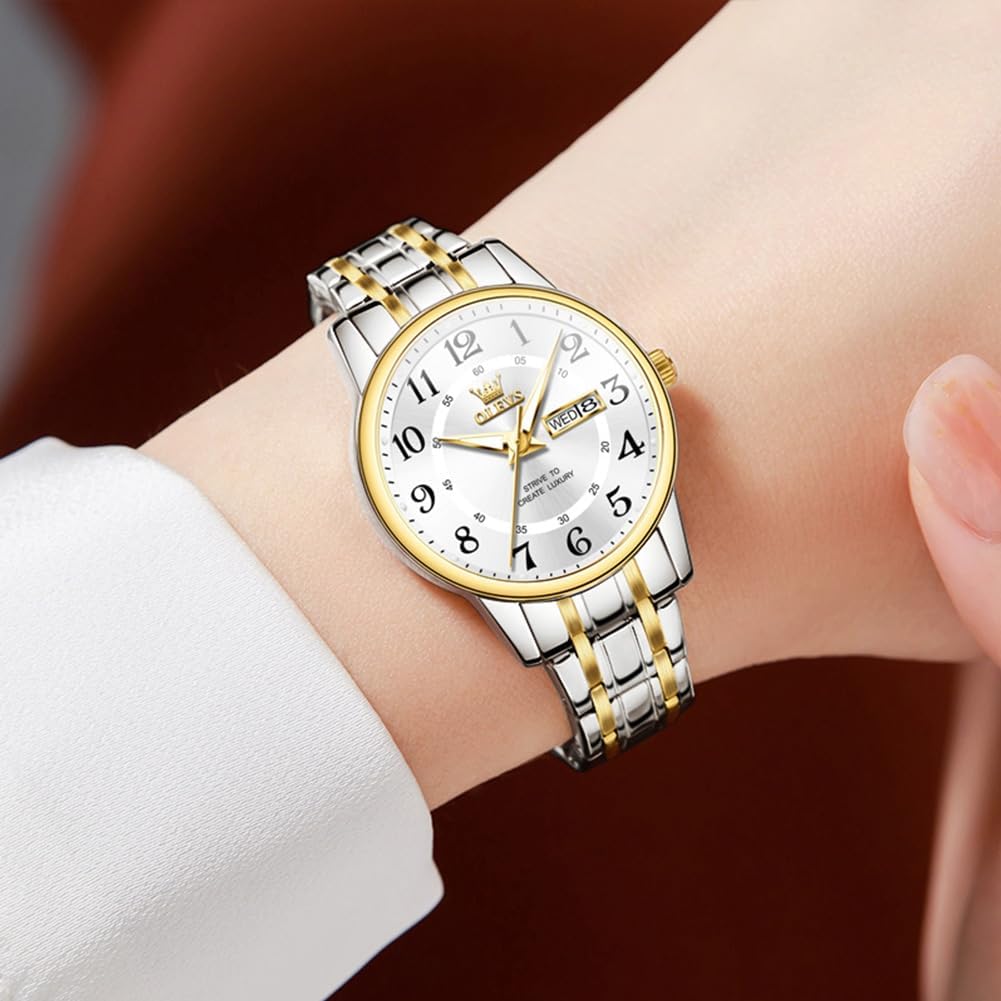
Figure 1: OLEVS L2891-G-J-white watch on a wrist.
Setup
1. Adjusting the Watch Band
Your OLEVS watch comes with a stainless steel band featuring a safety folding buckle. Adjustment tools are provided to help you achieve a comfortable fit. If the band is too short, extra links can be requested from customer support.
- Identify the pins on the inside of the watch band links.
- Use the provided adjustment tool to push out the pins from the links you wish to remove.
- Remove the desired number of links to achieve a snug but comfortable fit.
- Reinsert the pins to secure the band. Ensure all pins are fully seated.

Figure 2: Product dimensions and parameters.
2. Setting Time and Date
The watch features a high-quality quartz movement for precise timekeeping and includes a day-date window. To set the time and date:
- Pull the crown (the small knob on the side of the watch) out to the first click position to adjust the date. Turn the crown clockwise or counter-clockwise until the correct date is displayed.
- Pull the crown out to the second click position to adjust the time. Turn the crown to move the hands until the correct time is set.
- Push the crown back in completely to start the watch and seal it against water.
Important Note:
- Avoid adjusting the date between 9 PM and 5 AM, as this can interfere with the internal gear mechanism and cause damage.
- When setting the time, ensure you pass 12 o'clock to determine if it's AM or PM for the date change to occur correctly.
3. Activating the Luminous Function
For the first use of the night light function, expose the watch dial to a light source for approximately 30 seconds to activate the luminous material on the hands and hour markers. This will allow them to glow in low-light conditions.

Figure 3: Key features including luminous function and water resistance.
Operating the Watch
1. Reading Time and Date
The watch displays time using hour, minute, and second hands. The day and date are shown in a window at the 3 o'clock position. Arabic numerals provide clear readability.
2. Water Resistance
This watch is water resistant to 30 meters (100 feet). This means it can withstand splashes or brief immersion in water. It is not suitable for showering, bathing, swimming, snorkeling, or any water-related work where it would be submerged for extended periods or exposed to high-pressure water.
Video 1: Demonstration of OLEVS watch features, including water resistance and band adjustment.
Maintenance
- Cleaning: Wipe the watch regularly with a soft, dry cloth to remove dust and smudges. For the stainless steel band, a slightly damp cloth can be used, followed by immediate drying. Avoid harsh chemicals or abrasive materials.
- Avoid Extreme Conditions: Protect your watch from extreme temperatures, direct sunlight for prolonged periods, and strong magnetic fields, as these can affect its accuracy and lifespan.
- Water Resistance Care: Always ensure the crown is fully pushed in to maintain water resistance. Avoid operating the crown while the watch is wet. Do not expose the watch to hot water or steam, as this can compromise the seals.
- Battery Replacement: The watch is powered by a quartz movement, which requires a battery. When the watch stops running, it indicates the battery needs replacement. This should be done by a qualified watch technician to ensure proper sealing and function.
Troubleshooting
| Problem | Possible Cause | Solution |
|---|---|---|
| Watch not running | Depleted battery; Crown not fully pushed in. | Replace battery (professional service recommended); Push crown in completely. |
| Date/Day not changing correctly | Date set during restricted hours (9 PM - 5 AM); Incorrect time setting (AM/PM). | Reset date outside of restricted hours; Ensure time is set correctly for AM/PM. |
| Condensation under crystal | Loss of water resistance. | Immediately seek professional service to prevent further damage. |
| Band too tight/loose | Incorrect band size. | Adjust band using provided tools or contact support for extra links if needed. |
Specifications
- Model Number: L2891-G-J-white (KYS-S-L2891G-JB)
- Brand: OLEVS
- Movement: High-Quality Quartz
- Case Material: Stainless Steel
- Band Material: Stainless Steel
- Clasp Type: Safety Folding Buckle
- Case Diameter: 29 mm (1.14 inches)
- Case Thickness: 10 mm (0.39 inches)
- Band Width: 13 mm (0.51 inches)
- Band Length: 180 mm (7.08 inches)
- Water Resistance: 30 meters (100 feet) - Suitable for splashes, not for submersion.
- Weight: Approximately 3.53 ounces
- Dial Features: Arabic numerals, Day-Date window, Luminous hands/markers
Warranty
Your OLEVS watch is covered by a manufacturer's warranty against defects in materials and workmanship. The specific terms and duration of the warranty may vary. Please retain your proof of purchase for any warranty claims. For detailed warranty information, refer to the documentation included with your purchase or contact OLEVS customer support.
Support
If you encounter any issues or have questions regarding your OLEVS L2891-G-J-white watch that are not addressed in this manual, please contact the seller or OLEVS customer service for assistance. When contacting support, please have your model number (L2891-G-J-white) and purchase details readily available.
For additional information and product updates, you may visit the official OLEVS store: OLEVS Store on Amazon.
