
Introduction
Thank you for choosing the JINSERTA Pocket FM Radio Mini Wireless Bluetooth Speaker. This manual provides essential information for the safe and efficient operation of your device. Please read it thoroughly before use and retain it for future reference.
Product Overview and Features
The JINSERTA YF-1131 is a versatile audio device combining an FM radio, Bluetooth speaker, MP3 player (via TF card/USB disk), and a high-definition recorder. Its compact design and rechargeable battery make it ideal for portable use.
- 4-in-1 Functionality: FM Radio, Bluetooth Speaker, TF Card/USB MP3 Player, and Recorder.
- Excellent FM Reception: DSP chip and telescopic antenna for stable signal (87.5-108MHz).
- High-Definition Recording: Built-in microphone for clear audio capture.
- Digital Song/Station Selection: Numeric keypad for direct access.
- Sleep Timer: Customizable automatic shutdown (30-180 minutes).
- Portable Design: Compact and lightweight with a lanyard for easy carrying.
- Powerful Sound: 5W output for clear and dynamic audio.
- Rechargeable Battery: Built-in 1200mAh Li-ion battery with Type-C charging.
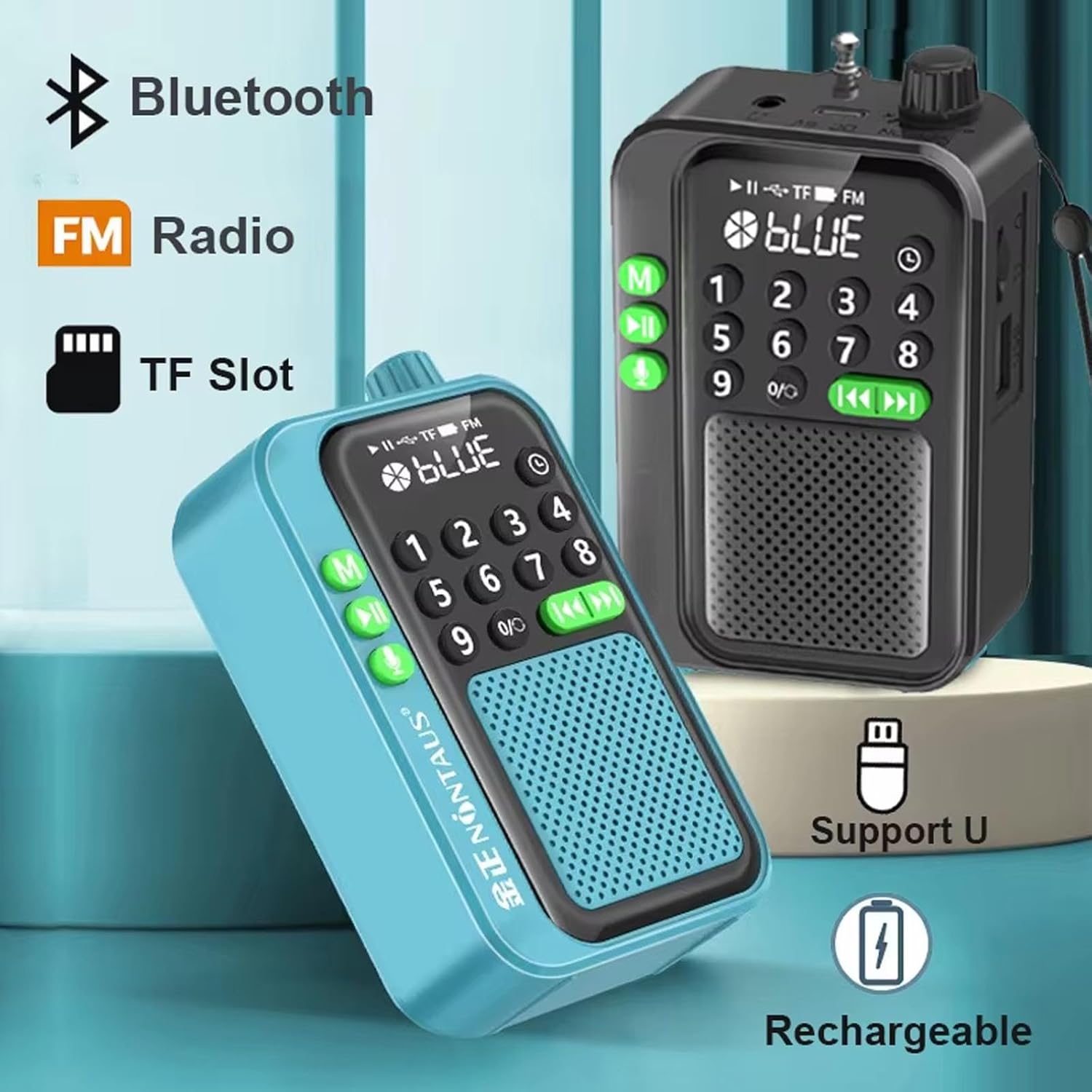
Image: Overview of the JINSERTA Pocket FM Radio highlighting its core features: Bluetooth connectivity, FM radio, TF card slot, USB support, and rechargeable battery.

Image: Internal view illustrating the 5W high-power speaker, designed to deliver dynamic and clear sound.

Image: The compact and portable design of the radio, fitting easily in the palm of a hand, with dimensions of 4.17 x 2.56 x 1.42 inches.
Package Contents
Please check the package for the following items:
- 1 x JINSERTA Pocket FM Radio Mini Wireless Bluetooth Speaker
- 1 x Type-C Charging Cable
- 1 x User Manual (this document)
Setup
1. Charging the Device
Before first use, fully charge the device. Connect the provided Type-C charging cable to the charging port on the side of the radio and plug the other end into a standard USB power adapter (not included).

Image: The removable 1200mAh Li-ion battery, indicating its capacity and ease of replacement.
2. Powering On/Off
Locate the power switch, typically on the side or top of the device. Slide it to the 'ON' position to power on the radio. Slide it to 'OFF' to power off.
Operating Instructions
The device supports multiple playback modes: Bluetooth, TF card, USB disk, and FM radio.

Image: The various connection options available: Bluetooth, USB disk playback, TF card playback, and FM radio.
1. FM Radio Mode
- Ensure the telescopic antenna is extended for optimal reception.
- Press the 'M' button (Mode button) until 'FM' is displayed on the screen.
- To auto-scan and save stations, press and hold the Play/Pause button (usually labeled with ►▮). The radio will scan and store available FM stations.
- Use the Previous (◀◀) and Next (►►) buttons to navigate through saved stations.
- For digital station selection, use the numeric keypad to directly enter the frequency (e.g., 87.5).
2. Bluetooth Speaker Mode
- Press the 'M' button until 'BLUE' or a Bluetooth icon is displayed. The device will enter pairing mode.
- On your smartphone or other Bluetooth-enabled device, search for available Bluetooth devices and select 'JINSERTA YF-1131' (or similar name) to pair.
- Once paired, you can play audio from your connected device through the speaker.
3. TF Card / USB Disk Playback
- Insert a TF card into the TF slot or a USB disk into the USB port.
- Press the 'M' button to switch to TF card or USB disk mode. The device will automatically detect and play MP3 files.
- Use the Previous (◀◀), Next (►►), and Play/Pause (►▮) buttons to control playback.
- Use the numeric keypad for digital song selection.

Image: The numeric keypad and LED display, enabling direct selection of songs or radio stations.
4. Recording Function
This feature requires a TF card or USB disk with available storage space.
- Insert a TF card or USB disk.
- Press the 'microphone' key (often labeled with a microphone icon) to start recording.
- Press the 'microphone' key again briefly to save the current recording and play it back.
- To delete a recording, navigate to the recording file and press the delete button (if available, or refer to specific button combinations in the quick start guide).

Image: Icons indicating the high-definition recording function and the option to delete recordings.
5. Sleep Timer
The sleep timer allows the device to automatically shut down after a set period.
- Press the 'Timer' button (or a button with a clock icon).
- Repeatedly press the button to cycle through available timer settings: 30, 60, 90, 120, 150, 180 minutes.
- The device will power off automatically once the selected time elapses.
6. Volume Control
Adjust the volume using the dedicated volume knob or buttons, typically located on the side or top of the device.
Maintenance
Cleaning
Wipe the device with a soft, dry cloth. Do not use abrasive cleaners, alcohol, or solvents, as these may damage the surface.
Battery Care
To prolong battery life, avoid fully discharging the battery frequently. Charge the device regularly, even if not in use for extended periods.
Storage
Store the device in a cool, dry place away from direct sunlight and extreme temperatures. If storing for a long time, ensure the battery is partially charged.
Troubleshooting
- No Power: Ensure the device is charged. Check the power switch is in the 'ON' position.
- No Sound: Check the volume level. Ensure the device is not muted. If using Bluetooth, ensure it's properly paired and connected.
- Poor FM Reception: Extend the telescopic antenna fully. Try moving to a different location. Perform an auto-scan for stations again.
- Bluetooth Pairing Issues: Ensure the device is in Bluetooth mode and discoverable. Turn off and on Bluetooth on both devices. Ensure no other devices are connected to the speaker.
- TF Card/USB Not Playing: Ensure the card/disk is inserted correctly. Check if the audio files are in a supported format (e.g., MP3). Ensure the device is in the correct playback mode.
- Recording Not Working: Ensure a TF card or USB disk is inserted and has sufficient free space.
Specifications
| Product Name | Portable Radio Bluetooth Speaker |
| Model Number | YF-1131 |
| Product Size | 106mm x 36mm x 65mm (4.17"L x 1.42"W x 2.56"H) |
| Product Weight | 130g |
| Receiving Frequency | FM 87.5-108MHz |
| Playback Modes | Bluetooth, TF card, U disk, FM radio |
| Speaker Category | Full-range speaker |
| Output Power | 5W |
| Function Support | Record & Delete, Loop Play |
| Timer Shutdown Settings | 30, 60, 90, 120, 150, 180 minutes |
| Battery Capacity | 1200mAh removable Li-ion battery |
| Charging Cable | TYPE-C fast charging cable |
| Material | Plastic |
| Display Type | LED |
Warranty Information
This product comes with a 1-Year Warranty from the date of purchase. Please retain your proof of purchase for warranty claims. The warranty covers manufacturing defects but does not cover damage caused by misuse, accidents, unauthorized modifications, or normal wear and tear.
Support
For further assistance or inquiries, please refer to the seller's contact information on your purchase platform or visit the official JINSERTA store online.
