
1. Introduction
This manual provides essential information for the safe and efficient operation of your Weiworld Through the Wall HEPA Ventilation Fan. Please read this manual thoroughly before installation and use, and retain it for future reference. This ventilation fan is designed to provide fresh air intake, stale air exhaust, and air circulation, improving indoor air quality in various spaces.
2. Safety Information
WARNING: Failure to follow these instructions may result in electric shock, fire, or serious injury.
- Always disconnect power before servicing or cleaning the unit.
- Installation must be performed by a qualified electrician in accordance with all local and national electrical codes.
- Do not operate the fan with a damaged cord or plug.
- Do not use this fan in areas where flammable or explosive gases are present.
- Keep hands and foreign objects away from the fan blades during operation.
- Ensure proper grounding to prevent electrical hazards.
- This appliance is not intended for use by persons (including children) with reduced physical, sensory or mental capabilities, or lack of experience and knowledge, unless they have been given supervision or instruction concerning use of the appliance by a person responsible for their safety.
3. Product Overview
The Weiworld Through the Wall HEPA Ventilation Fan is an advanced system designed for optimal air exchange and purification. It features an ultra-quiet EC motor, multi-stage filtration, and smart control options.
Key Features:
- Remote & WiFi Control: Manage settings via the Tuya App or the included remote control.
- Three Operating Modes: Fresh air intake, stale air exhaust, and air recirculation.
- Multi-Stage Filtration: Equipped with G4 pre-filter, HEPA filter, and activated carbon filter for comprehensive air purification.
- Quiet Operation: High-quality EC motor ensures powerful ventilation with minimal noise (as low as 20 dB).
- Energy Efficient: 9 Watt EC motor with PWM control for reduced energy consumption.
- Magnetic Panel: Easy-to-remove panel for convenient cleaning and filter replacement.

Product Components:

- Extendable Ducting: Allows for flexible installation depth.
- Active Carbon Filter: Removes odors and volatile organic compounds.
- HEPA Filter: Captures fine particles, allergens, and pollutants.
- Mounting Plate: Secures the unit to the wall.
- EC Motor: Energy-efficient and quiet motor for powerful airflow.
- G4 Filter: Primary filter for larger dust particles and lint.
- Magnetic Panel: Front cover for easy access to filters and internal components.
4. Installation (Setup)
Follow these steps for proper installation of your ventilation fan. Ensure all safety precautions are observed.
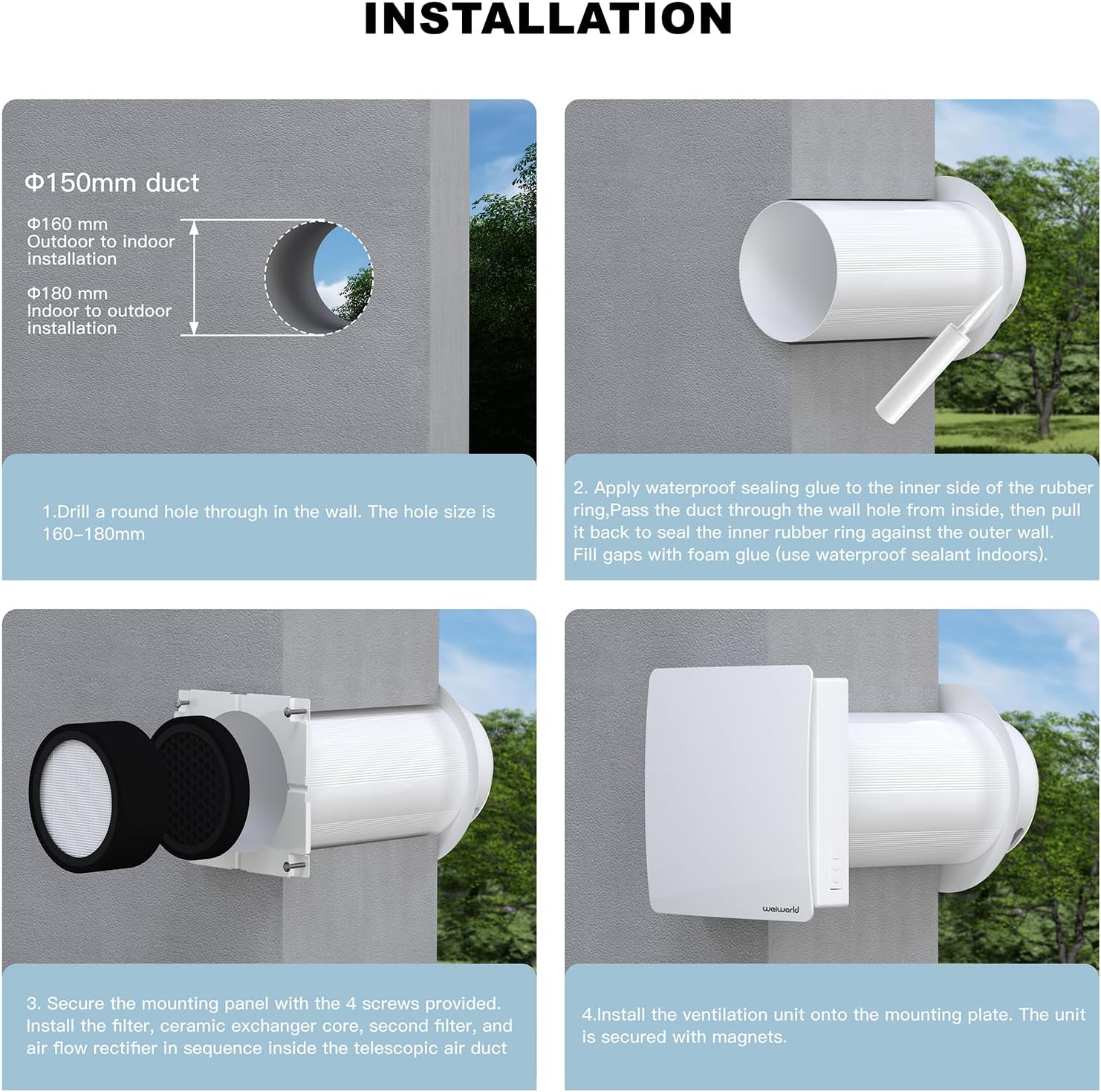
- Drill Wall Opening: Drill a round hole through the wall. The recommended hole size is 160-180mm for a Φ150mm duct.
- Apply Sealant and Insert Duct: Apply waterproof sealing glue to the inner side of the rubber ring. Pass the duct through the wall hole from the inside, then pull it back to seal the inner rubber ring against the outer wall. Fill any gaps with foam glue (use waterproof sealant indoors).
- Secure Mounting Panel and Filters: Secure the mounting panel with the 4 screws provided. Install the filter, ceramic exchanger core, second filter, and air flow rectifier in sequence inside the telescopic air duct.
- Install Ventilation Unit: Install the ventilation unit onto the mounting plate. The unit is secured with magnets.
5. Operating Instructions
Your Weiworld ventilation fan offers multiple control methods and operating modes to suit your needs.
Control Methods:

- Push Button Control: The unit features integrated buttons for basic functions.
- Remote Control: Use the provided remote control for convenient operation from a distance (within 30 ft).
- Smart App Control (WiFi): Download the Tuya App on your smartphone to control the fan anytime, anywhere. Refer to the app's instructions for pairing and advanced features.
Operating Modes:

- Intake Mode: Brings fresh outdoor air into the room, creating a healthier indoor environment.
- Exhaust Mode: Expels stale indoor air to maintain freshness and remove pollutants.
- Recirculation Mode: Alternates between air intake and exhaust every 65 seconds for balanced ventilation and continuous air exchange.
Refer to the remote control or Tuya App interface for specific button functions and mode selection.
6. Maintenance
Regular maintenance ensures optimal performance and longevity of your ventilation fan. Always disconnect power before performing any maintenance.
Filter Replacement:

The ventilation fan is equipped with a multi-stage filtration system. Filters should be inspected and replaced periodically based on usage and air quality.
- Access Filters: The magnetic front panel can be easily removed by gently pulling it off.
- Remove Old Filters: Carefully remove the G4 filter, HEPA filter, and activated carbon filter. Note their order for correct reinstallation.
- Install New Filters: Insert new filters in the correct sequence. Ensure they are seated properly.
- Reattach Panel: Align the magnetic panel and gently push it back into place until it secures.
The G4 filter can be cleaned periodically, but the HEPA and activated carbon filters are generally not washable and should be replaced when dirty.
Cleaning the Unit:
- Wipe the exterior of the unit with a soft, damp cloth. Do not use abrasive cleaners or solvents.
- Ensure no water enters the electrical components.
- The magnetic panel can be cleaned with mild soap and water.
7. Troubleshooting
If you encounter issues with your ventilation fan, refer to the table below for common problems and solutions.
| Problem | Possible Cause | Solution |
|---|---|---|
| Fan does not turn on | No power supply Power switch off Loose wiring | Check power outlet and circuit breaker Ensure power switch is ON Verify wiring connections (consult a professional if unsure) |
| Weak airflow | Clogged filters Obstruction in ducting Low fan speed setting | Clean or replace filters Check ducting for blockages Increase fan speed via remote or app |
| Unusual noise during operation | Loose components Foreign object in fan blades Motor issue | Ensure all components are securely fastened Disconnect power and inspect fan blades for obstructions If noise persists, contact customer support |
| Remote control not working | Dead batteries Out of range Interference | Replace remote control batteries Move closer to the unit Reduce potential sources of interference |
| WiFi connection issues | Incorrect WiFi password Router too far App not updated | Verify WiFi password Ensure unit is within WiFi range Update Tuya App to the latest version |
8. Specifications
Technical specifications for the Weiworld Through the Wall HEPA Ventilation Fan.

| Feature | Specification |
|---|---|
| Model Number | VT501F-WF |
| Brand | Weiworld |
| Color | White |
| Power Source | DC |
| Product Dimensions | 15.4"D x 11.4"W x 16"H (39.1cm D x 29cm W x 40.6cm H) |
| Panel Size | 242mm x 242mm |
| Room Type | Attic, Bedroom, Home Office, Kids Room, Basements, Garages |
| Special Features | App Operable, Quiet Operation, Remote Controlled, Wi-Fi Enabled |
| Noise Level | 20-33 dB |
| Wattage | 9 Watts |
| Air Flow Capacity | 350 Cubic Feet Per Minute (60 m³/h) |
| Voltage | 90V - 240V |
| Included Components | Remote Control |
| Indoor/Outdoor Usage | Indoor |
| Control Method | App, Push Button, Remote |
| Number of Power Levels | 3 |
| Area of Use | 10-20 m² |
9. Warranty Information
Weiworld products are manufactured to high-quality standards and are warranted against manufacturing defects. Please refer to the product packaging or contact customer support for specific warranty terms and conditions applicable to your region. Keep your purchase receipt as proof of purchase.
10. Customer Support
For technical assistance, troubleshooting, or warranty inquiries, please contact Weiworld customer support:
- Website: Visit the official Weiworld website for FAQs and support resources.
- Email: Refer to your product packaging for customer service email address.
- Phone: Refer to your product packaging for customer service phone number.
When contacting support, please have your product model number (VT501F-WF) and purchase date available.