
Introduction
Thank you for purchasing the JINSERTA Pocket FM Radio Mini Wireless Bluetooth Speaker. This compact and versatile device combines a high-quality FM radio, a powerful Bluetooth speaker, an MP3 player supporting TF cards and USB disks, and a high-definition recording function. Designed for portability and ease of use, it features a clear LED display, digital song/station selection, and a convenient sleep timer. Please read this manual carefully to ensure proper operation and to fully enjoy all the features of your new device.
Safety Information
- Do not expose the device to extreme temperatures, direct sunlight, or high humidity.
- Avoid dropping or subjecting the device to strong impacts.
- Do not disassemble, repair, or modify the device yourself. Refer all servicing to qualified personnel.
- Keep the device away from water and other liquids.
- Use only the specified charging cable (Type-C) and power adapter.
- Dispose of the battery according to local regulations. Do not incinerate.
Package Contents
Please check the package for the following items:
- 1 x JINSERTA Pocket FM Radio Mini Wireless Bluetooth Speaker (Blue)
- 1 x Type-C Fast Charging Cable
- 1 x User Manual
Product Overview
Familiarize yourself with the various parts and controls of your device.

Figure 1: Front and side view of the JINSERTA Pocket FM Radio, highlighting the display, keypad, and connectivity ports.
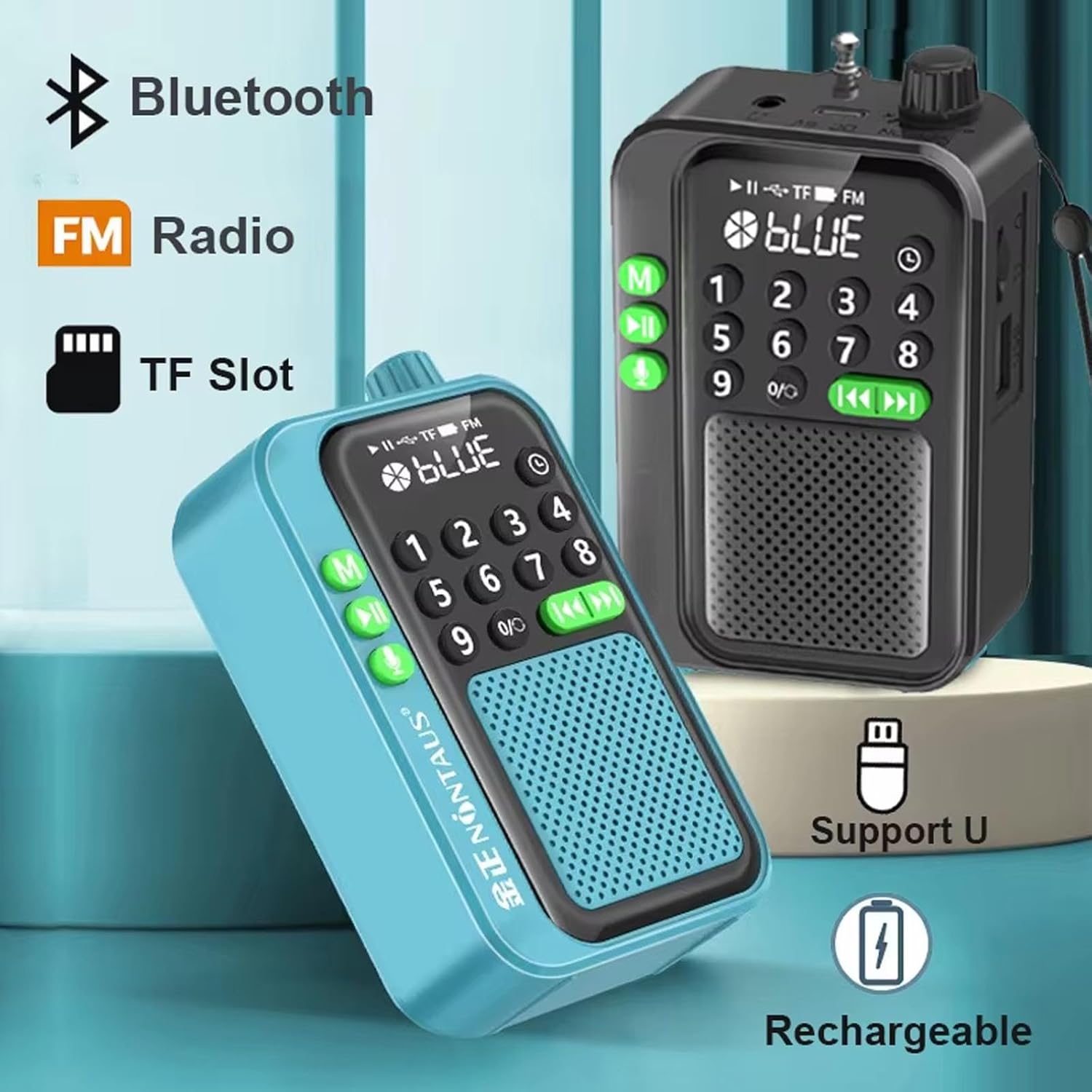
Figure 2: Overview of key features including Bluetooth, FM Radio, TF Card slot, USB support, and rechargeable battery.
The device features a clear LED display, a numeric keypad for direct input, and dedicated buttons for mode selection, playback control, and recording. On the side, you will find slots for TF card and USB disk, along with the Type-C charging port and power switch.
Setup
1. Charging the Device
Before first use, fully charge the device.
- Connect the supplied Type-C charging cable to the charging port on the side of the radio.
- Connect the other end of the cable to a USB power adapter (not included) or a computer's USB port.
- The LED display will indicate charging status. Once fully charged, the indicator will change or turn off.

Figure 3: The device features a built-in 1200 mAh removable Li-ion battery for extended use.
2. Powering On/Off
- To power on, slide the power switch located on the side of the device to the "ON" position.
- To power off, slide the power switch to the "OFF" position.
Operating Instructions
1. Mode Selection
Press the "M" button (Mode button) repeatedly to cycle through available modes: FM Radio, Bluetooth, TF Card, and USB Disk (if inserted).
2. FM Radio Operation
- Switch to FM Radio mode using the "M" button.
- For automatic station search, long press the Play/Pause button (►►). The radio will scan and save available stations.
- Use the Previous (◀◀) and Next (►►) buttons to navigate through saved stations.
- Alternatively, use the numeric keypad to directly input a station frequency (e.g., 105.3).
3. Bluetooth Mode
- Switch to Bluetooth mode using the "M" button. The display will show "BLUE" and a Bluetooth icon, indicating it's ready for pairing.
- On your mobile device, enable Bluetooth and search for "JINSERTA YF-1131" (or similar name).
- Select the device to pair. Once connected, you can play audio from your mobile device through the speaker.
4. TF Card / USB Disk Playback
- Insert a TF card or USB disk with MP3 audio files into the respective slot.
- Switch to TF Card or USB Disk mode using the "M" button. The device will automatically start playing audio files.
- Use the Play/Pause (►►), Previous (◀◀), and Next (►►) buttons to control playback.
- Use the numeric keypad to directly select a track number.

Figure 4: The device supports multiple connection options including Bluetooth, USB disk, TF card, and FM radio.
5. Recording Function
The device supports high-definition recording to an inserted TF card or USB disk.
- Ensure a TF card or USB disk with sufficient storage space is inserted.
- Press the "microphone" button (usually labeled with a microphone icon) to start recording.
- Press the "microphone" button again briefly to stop and save the current recording.
- To delete a recording, navigate to the recording file and long press the "microphone" button or a designated delete button if available.

Figure 5: The device features a built-in high-definition recording function and the ability to delete recordings.
6. Sleep Timer
The sleep timer allows the device to automatically shut down after a set period.
- Press the "clock" button (or a button labeled with a timer icon).
- Repeatedly press the button to cycle through preset shutdown times (e.g., 30, 60, 90, 120, 150, 180 minutes).
- The selected time will be displayed. The device will automatically power off after this duration.
7. Digital Song/Station Selection
Use the numeric keypad (0-9) to directly input track numbers in MP3 mode or station frequencies in FM mode.

Figure 6: The numeric keypad allows for quick and easy selection of specific songs or radio stations.

Figure 7: The 5W high-power speaker delivers clear and dynamic sound.

Figure 8: The compact size of the radio makes it highly portable and easy to carry.
Maintenance
- Cleaning: Use a soft, dry cloth to wipe the surface of the device. Do not use abrasive cleaners or solvents.
- Storage: When not in use for extended periods, store the device in a cool, dry place away from direct sunlight.
- Battery Care: To prolong battery life, avoid fully discharging the battery frequently. Charge the device regularly, even if not in use.
Troubleshooting
| Problem | Possible Cause | Solution |
|---|---|---|
| Device does not power on. | Battery is low or depleted. Power switch is off. | Charge the device fully. Ensure the power switch is in the "ON" position. |
| Poor FM radio reception. | Weak signal. Antenna not extended. | Extend the telescopic antenna fully. Try moving to a location with better signal. Perform an automatic station search. |
| Bluetooth not connecting. | Device not in pairing mode. Bluetooth is off on mobile device. Too far from mobile device. | Ensure the radio is in Bluetooth mode. Turn on Bluetooth on your mobile device. Keep devices within 10 meters (33 feet). |
| Cannot play from TF card/USB disk. | Card/disk not inserted correctly. Unsupported file format. Corrupted files. | Reinsert the TF card/USB disk. Ensure files are in MP3 format. Try another card/disk. |
| Recording not working. | No TF card/USB disk inserted. Insufficient storage space. | Insert a TF card or USB disk. Check available storage space. |
Specifications
| Product Name | Portable Radio Bluetooth Speaker |
| Model Number | YF-1131 |
| Product Dimensions | 106mm x 36mm x 65mm (4.17 x 1.42 x 2.56 inches) |
| Product Weight | 130g |
| Receiving Frequency | FM 87.5-108MHz |
| Playback Modes | Bluetooth, TF Card, U Disk, FM Radio |
| Speaker Category | Full-range speaker |
| Output Power | 5W |
| Function Support | Record & Delete, Loop Play |
| Timer Shutdown Settings | 30, 60, 90, 120, 150, 180 minutes |
| Battery Capacity | 1200mAh Li-ion (removable) |
| Charging Port | Type-C |
| Manufacturer | JINSERTA |
| Country of Origin | China |
Warranty and Support
For warranty information, technical support, or customer service inquiries, please refer to the contact information provided with your purchase or visit the official JINSERTA website. Keep your purchase receipt as proof of purchase for warranty claims.