Introduction
The DREAME L40s Ultra Robot Vacuum and Mop is an advanced cleaning device designed to automate floor maintenance. It combines powerful vacuuming with effective mopping capabilities, featuring a self-cleaning and auto-empty base station for enhanced convenience. This manual provides essential information for setting up, operating, maintaining, and troubleshooting your device to ensure optimal performance.
What's in the Box
Carefully unpack all components and ensure everything is present before setup.
- Robot Vacuum x1
- Base Station x1
- Cleaning Tool x1
- Base Station Ramp Extension x1
- Dust Bags x2 (1 pre-installed)
- Mop Pads x2
- Mop Pad Holders x2
- Quick Start Guide x1
- 200ml Cleaning Solution x1
- User Manual x1

Image: DREAME L40s Ultra Robot Vacuum and Mop with its base station and all included accessories laid out.
Product Features
Powerful 19,000Pa Suction
Equipped with the sixth-generation TurboForce high-speed motor, the L40s Ultra delivers 19,000Pa Vormax suction for effective debris pickup from various surfaces, including floor gaps and carpets. The motor is designed to minimize noise for a quiet cleaning experience.

Image: The robot vacuum demonstrating its 19,000Pa suction power, effectively capturing hair, large particles, and scraps from the floor.
Versatile Carpet Cleaning
Customize carpet care through the Dreamehome App. Options include removable mops for dry carpets, liftable mops for low-pile carpets, complete carpet avoidance, intensive carpet cleaning (vacuum twice), or a suction boost for deeper cleaning.

Image: The robot vacuum illustrating its versatile carpet cleaning modes, including mop removal for vacuum-only cleaning and mop lifting for low-pile carpets.
HyperStream Detangling DuoBrush
The innovative DuoBrush features one bristled rubber brush and one TPU rubber brush. This design efficiently picks up debris from both hard floors and carpets while preventing hair tangles, ensuring consistent powerful cleaning performance.
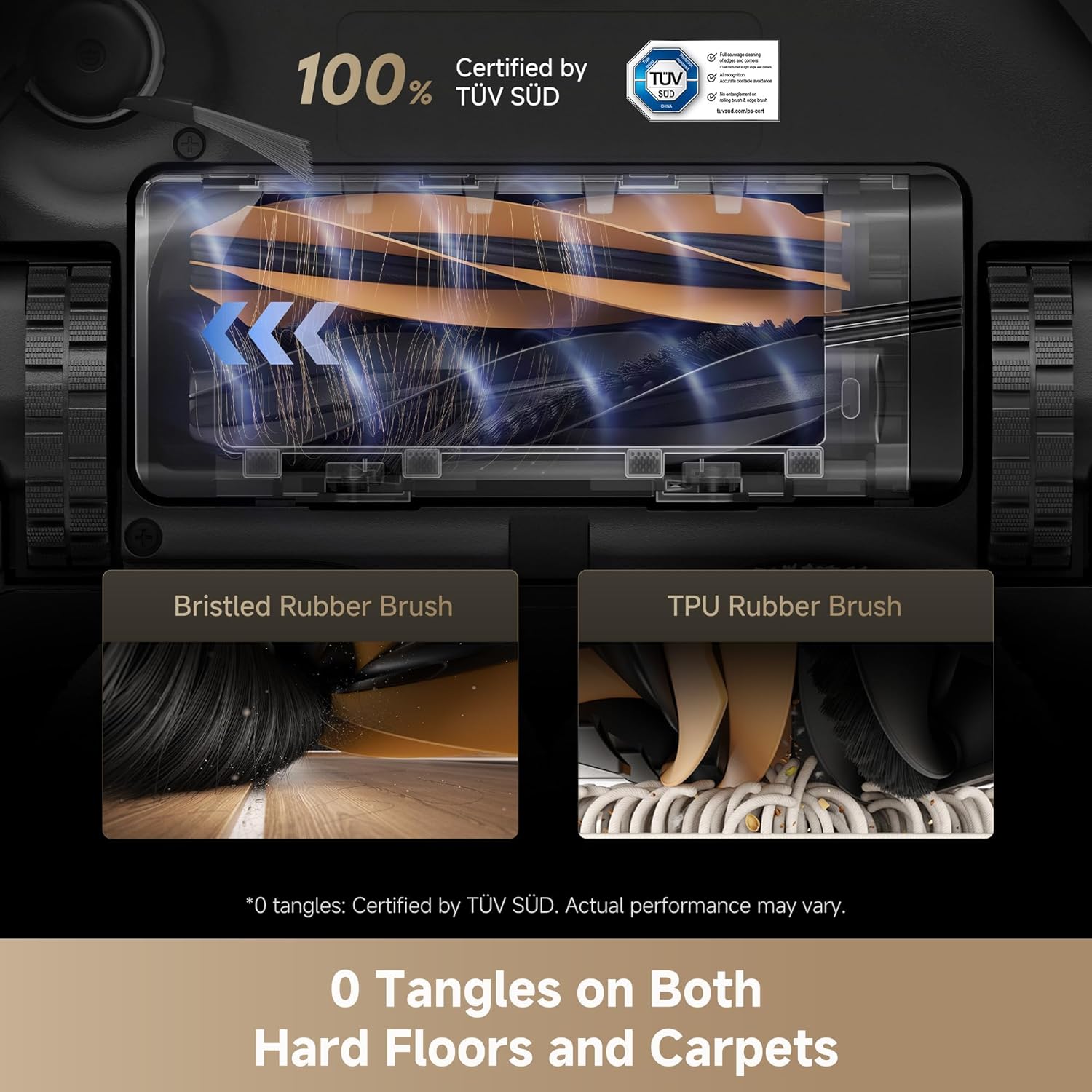
Image: A detailed view of the HyperStream Detangling DuoBrush, highlighting its two types of brushes designed for effective, tangle-free cleaning on various surfaces.
All-in-One PowerDock Convenience
The PowerDock provides up to 100 days of manual dust box emptying freedom. It also rinses mop pads with 167°F hot water, dries them, refills cleaning solution and water for mopping, and washes the board with minimal residue, offering a truly hands-free post-cleaning experience.

Image: The PowerDock showcasing its comprehensive features: hot water mop cleaning, 100-day auto-empty, hot air mop drying, and automatic solution refilling.
Extending Mops and Side Brush
The robot smartly extends its side brush to capture dust in corners and stretches its mops to wipe sticky messes along walls and under furniture, ensuring comprehensive edge-to-corner coverage.
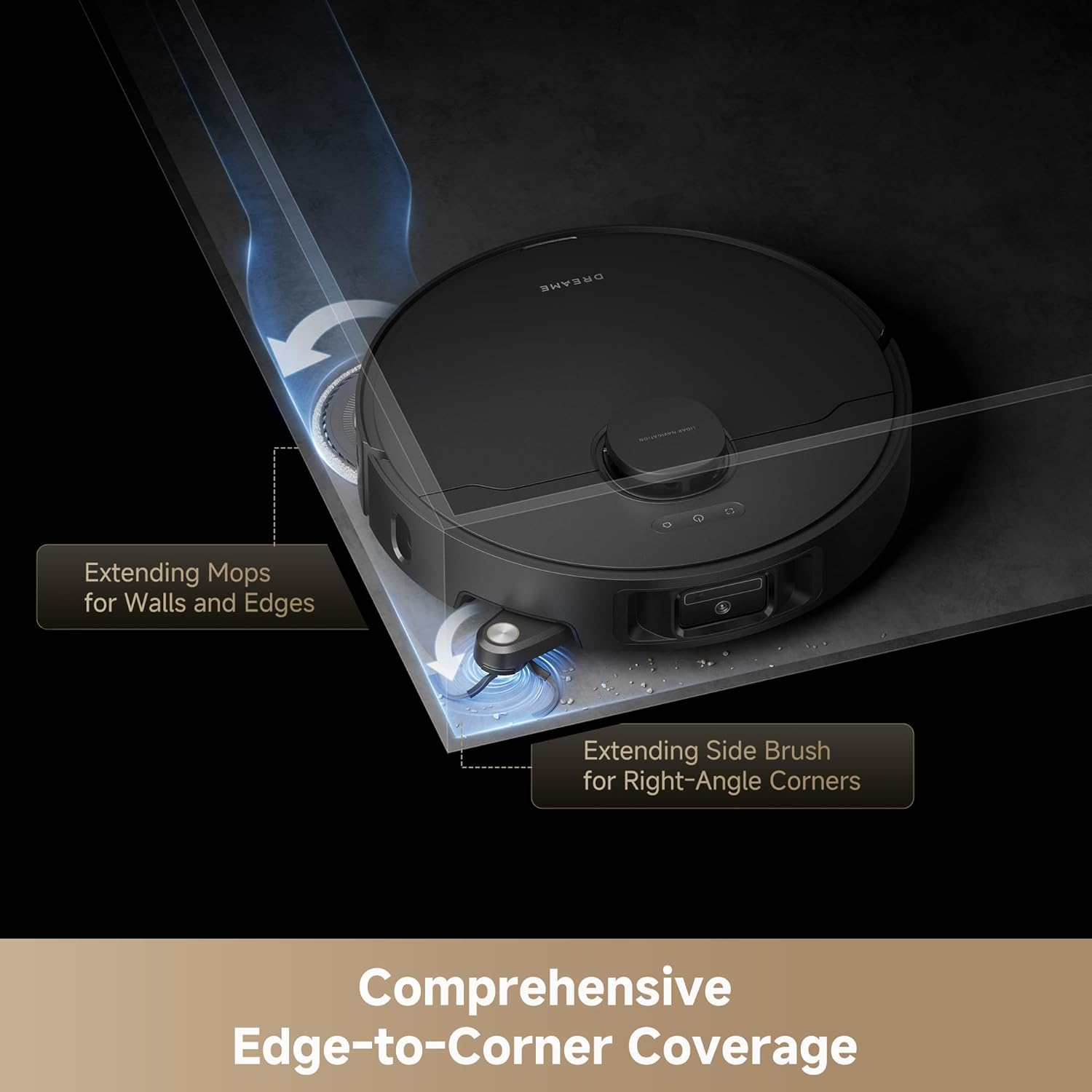
Image: The robot vacuum extending its mop pads and side brush to clean along edges and into corners for thorough coverage.
EasyLeap System for Obstacle Clearing
The advanced EasyLeap system, equipped with main and auxiliary climbing wheels, allows the robot vacuum to effortlessly cross thresholds, door tracks, and steps up to 1.57 inches high, preventing it from getting stuck or colliding during cleaning.

Image: The robot vacuum demonstrating its ability to cross a 1.57-inch threshold using its EasyLeap system.
App & Voice Control
Control your DREAME L40s Ultra via the Dreamehome App, remote control, or voice commands using compatible devices like Amazon Echo and Google Home. The app offers features such as 4-story mapping, room-by-room cleaning, initial deep cleaning, cleaning history, and scheduled cleaning.

Image: A screenshot of the Dreamehome App, illustrating its comprehensive control and mapping features for the robot vacuum.
Setup
Follow these steps to set up your DREAME L40s Ultra for first-time use.
- Unpack the Device: Remove all packaging materials from the robot vacuum and the base station.
- Position the Base Station: Place the base station against a wall in an open area with good Wi-Fi signal. Ensure there are no obstacles within 1.5 meters (5 feet) in front and 0.5 meters (1.6 feet) on either side.
- Connect Power: Plug the base station into a power outlet.
- Install Mop Pads: Attach the mop pads to the mop pad holders and then secure them to the bottom of the robot.
- Fill Water Tanks: Open the top cover of the base station. Fill the clean water tank with clean water and the provided cleaning solution.
- Power On and Charge: Place the robot vacuum onto the base station. It will automatically power on and begin charging. Ensure it is fully charged before its first cleaning task.
- Download the App: Download the Dreamehome App from your smartphone's app store and follow the in-app instructions to connect your robot.
Video: A detailed unboxing, setup, and demonstration of the DREAME L40s Ultra Robot Vacuum and Mop.
Operating Instructions
Your DREAME L40s Ultra is designed for intelligent and autonomous cleaning. Here are basic operating guidelines.
- Start/Pause Cleaning: Press the power button on the robot or use the Dreamehome App to start or pause a cleaning cycle.
- Spot Cleaning: In the app, select a specific area for targeted cleaning.
- Zone Cleaning: Define custom zones in the app for the robot to clean.
- Scheduled Cleaning: Set up recurring cleaning schedules through the Dreamehome App.
- Carpet Detection: The robot automatically detects carpets and adjusts its cleaning mode (e.g., lifting mops, increasing suction).
- Edge Cleaning: The extending side brush and mops ensure thorough cleaning along walls and in corners.
- Obstacle Avoidance: The robot uses advanced sensors to navigate around furniture, cables, and other obstacles.
Video: A demonstration of the DREAME L40s Ultra Robot Vacuum and Mop's mopping capabilities in a test environment.
Maintenance
Regular maintenance ensures the longevity and optimal performance of your DREAME L40s Ultra.
- Empty Dirty Water Tank: The base station will notify you when the dirty water tank needs to be emptied.
- Refill Clean Water Tank: The base station will notify you when the clean water tank needs refilling.
- Check Dust Bag: The auto-empty dust bag can hold debris for up to 100 days. Replace it when full.
- Clean Mop Pads: The base station automatically cleans and dries the mop pads. Periodically remove and hand wash them for thorough cleaning.
- Clean Brushes: Regularly check the HyperStream Detangling DuoBrush for any tangled hair or debris and remove it using the provided cleaning tool.
- Clean Sensors: Wipe the robot's sensors with a soft, dry cloth to ensure accurate navigation.
- Clean Base Station Washboard: The base station has a self-cleaning washboard. Ensure it is free from excessive residue.
Video: A demonstration of the DREAME L40s Ultra's base station, showing the clean and dirty water tanks and the auto-empty dust bag compartment.
Troubleshooting
If you encounter issues with your DREAME L40s Ultra, refer to the following common solutions.
| Problem | Possible Solution |
|---|---|
| Robot not charging | Ensure the base station is plugged in and the robot is correctly docked. Clean charging contacts on both the robot and base station. |
| Poor cleaning performance | Check and clean the main brush, side brush, and mop pads. Empty the dust bag and clean the filter. Ensure water tanks are filled. |
| Robot gets stuck frequently | Clear obstacles like cables, toys, or loose rugs from the cleaning path. Ensure sensors are clean. |
| App connectivity issues | Ensure your Wi-Fi is 2.4GHz (5GHz is not supported). Restart your router and the robot. Re-pair the device in the app. |
| Mop pads not cleaning properly | Ensure the clean water tank has sufficient water and cleaning solution. Check if the mop pads are heavily soiled and require manual cleaning or replacement. |
Specifications
| Feature | Detail |
|---|---|
| Brand | DREAME |
| Model Name | L40s Ultra Series |
| Item Model Number | RLL77SE |
| Suction Power | 19,000Pa Vormax Suction |
| Obstacle Crossing | Up to 1.57 inches (40mm) |
| Auto-Empty Duration | Up to 100 days |
| Mop Self-Cleaning | 167°F Hot Water |
| Brushes | HyperStream Detangling DuoBrush |
| Mapping | 4-Story Mapping |
| Control Method | App, Remote, Voice |
| Compatible Devices | Amazon Echo, Google Home, Smartphones |
| Wi-Fi Compatibility | 2.4GHz only |
| Battery Life | 220 minutes |
| Product Dimensions | 17.8"L x 16.5"W x 27.3"H |
| Item Weight | 17 pounds |
Warranty and Support
The DREAME L40s Ultra Robot Vacuum and Mop comes with a 3-year warranty. For technical support, troubleshooting assistance, or warranty claims, please refer to the contact information provided in your Quick Start Guide or visit the official DREAME website.


