
1. Introduction
This manual provides detailed instructions for the installation, operation, and maintenance of your AMprime Android 13 Car Stereo Radio. Please read this manual thoroughly before using the product to ensure proper functionality and safety.
Product Compatibility: This car stereo is designed for Honda Vezel HR-V models manufactured between 2014 and 2019.

Image 1.1: AMprime Android 13 Car Stereo Radio main unit. This image displays the 9-inch touch screen interface with various application icons and highlights its 2GB RAM + 64GB ROM configuration, specifically designed for Honda Vezel HR-V models from 2014 to 2019.
2. Package Contents
Verify that all items listed below are included in your product package:
- Car Stereo Radio Unit
- 6PIN USB Cable
- Installation Tool
- Microphone
- RCA Cable
- USB Cable
- Power Cable
- Canbus Decoder
- 4PIN USB Cable
- Camera Input & Output Cables
- User Manual
- GPS Antenna
- Mounting Accessories
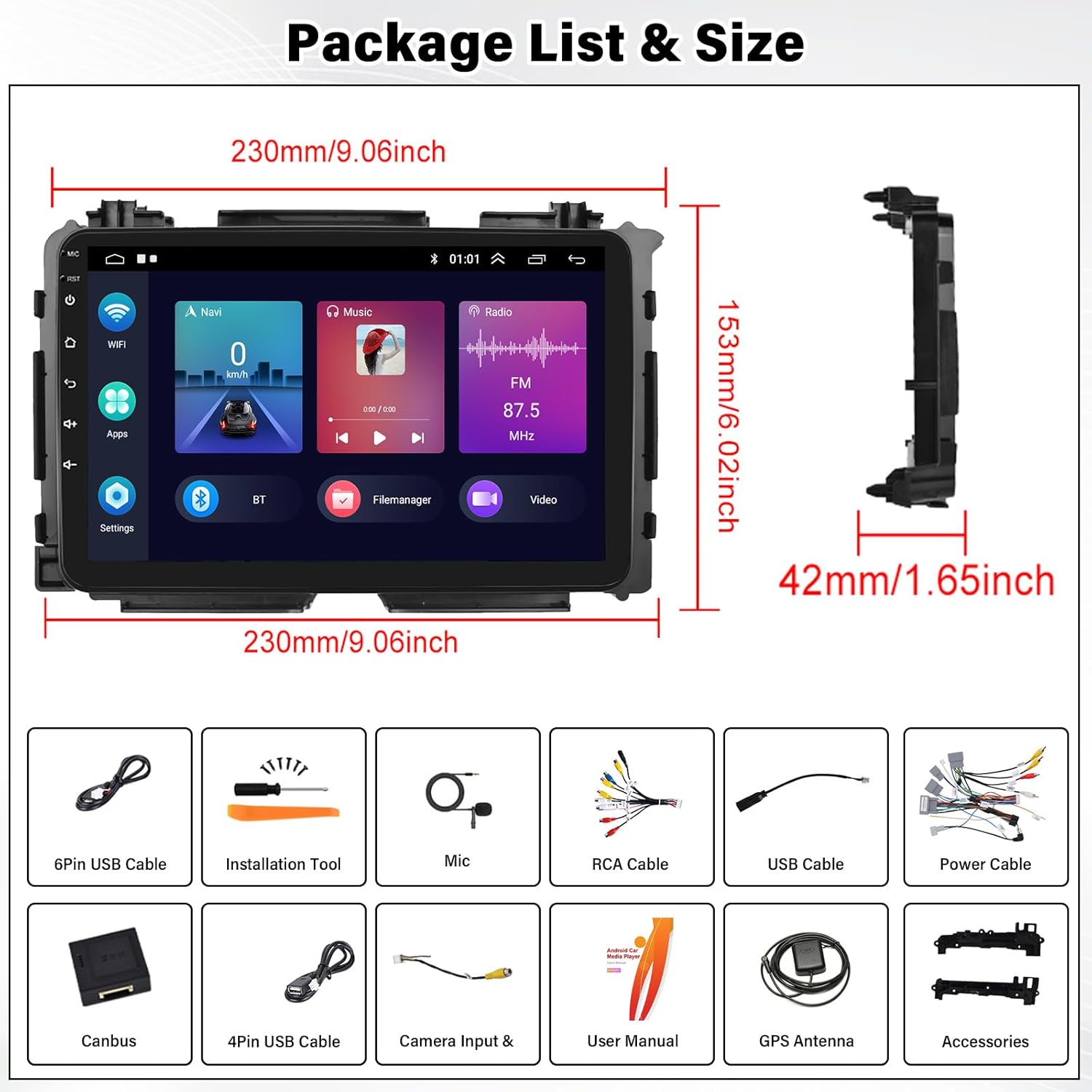
Image 2.1: Package List and Dimensions. This image illustrates all included components such as various cables, tools, and the main unit, along with its physical dimensions (230mm x 153mm x 42mm).
3. Setup and Installation
Professional installation is recommended. Ensure the vehicle's power is disconnected before beginning installation.
3.1 Pre-Installation Checks
- Verify the car stereo unit matches your vehicle's dashboard opening.
- Confirm that the wiring harness provided is compatible with your Honda Vezel HR-V (2014-2019) factory radio connector. Note: Some users have reported harness incompatibility; double-check before proceeding.
3.2 Physical Installation
- Carefully remove the existing factory radio from your vehicle's dashboard.
- Connect the provided power cable and other necessary cables (USB, RCA, GPS antenna) to the new AMprime car stereo.
- If installing the AHD backup camera, refer to the wiring diagram below for correct connection.
- Mount the new car stereo securely into the dashboard opening.
- Reconnect the vehicle's power and test the unit.

Image 3.1: Before and After Installation. This image demonstrates the visual transformation of the Honda Vezel HR-V dashboard after replacing the factory radio with the AMprime Android 13 Car Stereo.
3.3 AHD Backup Camera Wiring (Optional)
If your package includes an AHD backup camera, follow these wiring instructions:
- Connect the camera's video output to the 'Video(out)' input on the car stereo.
- Connect the camera's red power wire to the vehicle's reversing lamp (Power+).
- Connect the camera's black wire to a ground point (GND).

Image 3.2: AHD Backup Camera Wiring Diagram. This diagram illustrates the connections required for the optional AHD backup camera, showing how to link it to the car stereo and the vehicle's power system.
4. Operating Instructions
4.1 System Overview
The AMprime car stereo operates on the latest Android 13 system, powered by a 4-core CPU, with 2GB RAM and 64GB ROM. This configuration ensures smooth operation for various applications.

Image 4.1: System Specifications and Dual-USB Ports. This image highlights the core specifications of the unit, including its Android 13 operating system, 4-core CPU, 2GB RAM, and 64GB ROM, alongside the functionality of its dual-USB ports for media playback and phone connection.
4.2 Connectivity Features
4.2.1 Wireless CarPlay & Android Auto & Mirror Link
Connect your smartphone wirelessly via USB or Bluetooth to access CarPlay or Android Auto. This allows you to project your phone's interface onto the car stereo's screen for navigation, music, calls, and other applications. Mirror Link functionality is also supported for both iOS and Android devices.

Image 4.2: Wireless CarPlay, Android Auto, and Mirror Link. This image demonstrates the seamless integration of smartphone features onto the car stereo display, enabling navigation, music, and app access through wireless connections.
4.2.2 Bluetooth
The built-in Bluetooth module allows for hands-free calling and audio streaming. Pair your phone to make and receive calls safely, and play music directly from your device.
4.2.3 Built-in WiFi & GPS Navigation
Utilize the integrated WiFi module to connect to the internet. Once connected, you can download and install various applications from the app store, access online maps (e.g., Google Maps, Waze), and stream content. The GPS functionality supports both online and offline navigation.

Image 4.3: WiFi, GPS Navigation, and Split Screen. This image illustrates the capabilities of the built-in WiFi for app downloads and online content, the GPS navigation system for route guidance, and the split-screen function for multitasking.
4.3 Audio Features
4.3.1 FM/RDS Radio
Tune into your favorite FM radio stations. The RDS (Radio Data System) feature provides additional information such as station name, song title, and traffic announcements where available.
4.3.2 Hi-Fi Function & EQ
Experience high-fidelity sound reproduction. The integrated Equalizer (EQ) allows you to customize audio settings to your preference, with various preset modes (Rock, Pop, Jazz, Classical) and a custom adjustment option.

Image 4.4: FM/RDS Radio, Bluetooth, and HiFi Function. This image details the radio interface with RDS information, the Bluetooth calling and music playback screens, and the graphical equalizer for sound customization.
4.4 Display Features
4.4.1 9-Inch Touch Screen
The unit features a 9-inch touch screen with a 178° full viewing angle, providing clear and vibrant visuals for all functions.
4.4.2 Split Screen Function
Multitask efficiently by using the split-screen feature, allowing you to run two applications simultaneously on the display, such as navigation and music playback.
4.5 Vehicle Integration
4.5.1 Steering Wheel Control (SWC)
The car stereo supports integration with your vehicle's steering wheel controls. This enables convenient operation of functions like volume adjustment, track skipping, and answering calls without taking your hands off the wheel.
4.6 Ports
4.6.1 Dual-USB Ports
The unit includes dual USB ports for connecting external devices. One port can be used for playing multimedia from a USB disk, while the other can connect your phone for data transfer or charging.
5. Maintenance
To ensure the longevity and optimal performance of your AMprime car stereo, follow these maintenance guidelines:
- Screen Cleaning: Use a soft, lint-free cloth slightly dampened with a screen cleaner or water to gently wipe the touch screen. Avoid abrasive materials or harsh chemicals.
- Software Updates: Periodically check for available software updates through the system settings or the manufacturer's website. Keeping the software updated can improve performance and add new features.
- Environmental Conditions: Avoid exposing the unit to extreme temperatures, direct sunlight for prolonged periods, or excessive moisture.
6. Troubleshooting
If you encounter issues with your car stereo, refer to the following common troubleshooting steps:
- No Power: Check all power connections. Ensure the vehicle's ignition is on. Verify the fuse for the car stereo is not blown.
- No Sound: Check speaker connections. Ensure the volume is not muted or set to minimum. Verify audio settings in the system.
- Touch Screen Unresponsive: Try restarting the unit. If the issue persists, a factory reset might be necessary (refer to system settings).
- GPS Not Working: Ensure the GPS antenna is properly connected and has a clear view of the sky. Check GPS settings and ensure location services are enabled.
- Bluetooth Pairing Issues: Ensure Bluetooth is enabled on both the car stereo and your phone. Delete previous pairings and try reconnecting.
- Harness Incompatibility: If the provided harness does not match your vehicle's factory wiring, contact customer support for assistance or consult a professional installer.
For more complex issues, please contact AMprime customer support.
7. Specifications
| Feature | Specification |
|---|---|
| Item Weight | 2.2 pounds |
| Package Dimensions | 8.27 x 6.3 x 2.76 inches |
| Display Size | 9 Inches |
| Voice Command | Touchscreen |
| Manufacturer | AMprime |
| Vehicle Service Type | Car |
| Special Feature | Bluetooth |
| Connectivity Technology | Wi-Fi |
| Map Type | Worldwide |
| Memory Storage Capacity | 64 GB |
| Operating System | Android 13 |
| CPU | 4 Core |
| RAM | 2GB |
| ROM | 64GB |
8. Warranty Information
The AMprime car stereo typically comes with a 1-year warranty as specified in the product details. For extended protection, optional 2-Year and 3-Year Protection Plans may be available for purchase separately.
Please retain your proof of purchase for any warranty claims. For details regarding specific protection plans, refer to the terms and conditions provided at the time of purchase.
9. Customer Support
For technical assistance, installation queries, or any other support needs, please contact AMprime customer support:
Email: AmprimeTechSupport@yeah.net
Please provide your product model and a detailed description of your issue when contacting support to ensure a prompt and effective resolution.