1. Introduction
The GODOX XT-16 Flash Trigger Transmitter is a wireless control device designed for Godox 2.4G X System photography monolights and studio strobe lights. It operates on a 2.4GHz frequency, offering 16 channels and 16 groups for flexible control. This transmitter enables remote adjustment of flash power, modeling lamp, buzzer, AF-assist beam, and flash triggering, providing enhanced convenience and precision in studio and on-location photography setups.
2. Setup and Installation
2.1 Powering On
Ensure the XT-16 transmitter has fresh batteries installed. Turn on the power switch located on the side of the unit.
2.2 Pairing with Godox 2.4G X System Monolights
The XT-16 transmitter works directly with Godox 2.4G X system monolights such as MS300, MS300V, SK300II, SK400II, SK400IIV, DP400II, DP400III, DP600II, and DP600III. No additional receiver is required for these units.

Figure 1: Godox XT-16 trigger compatibility with various Godox 2.4G X System monolights. The image shows the XT-16 in the center, surrounded by compatible flashes like DP II, Quick II, Quicker DII, MS300, MS300-V, SK300II, SK400II, and SK400II-V, indicating direct wireless control.
2.3 Pairing with Non-2.4G X System Studio Strobes
For non-2.4G X system studio strobe lights, the Godox XTR-16 receiver is required to receive commands from the XT-16 transmitter and enable synchronization. Ensure the XTR-16 receiver is properly connected to the strobe's USB 'SYN' port.
2.4 Pairing with V850/V860 Series Flashes
When using the XT-16 with Godox V850 or V860 series flashes, the Godox XTR-16S receiver is necessary for synchronization.
2.5 Basic Setup Steps with 2.4G Strobe
- Ensure all devices (transmitter and strobe) are powered ON.
- Turn ON the 2.4G signal on the strobe.
- Set the same channel on both the XT-16 transmitter and the strobe.
- Set the POWER dial to the desired GROUP number/letter selected on the Godox 2.4G X system strobe.

Figure 2: XT-16 display and setup instructions. The image highlights the 2.4G signal indicator, channel, group, and output ratio on the XT-16's screen, alongside a step-by-step guide for connecting to a 2.4G strobe.
3. Operating Instructions
3.1 Mounting the Transmitter
Mount the XT-16 transmitter onto your camera's hot shoe. Ensure it is securely fastened.
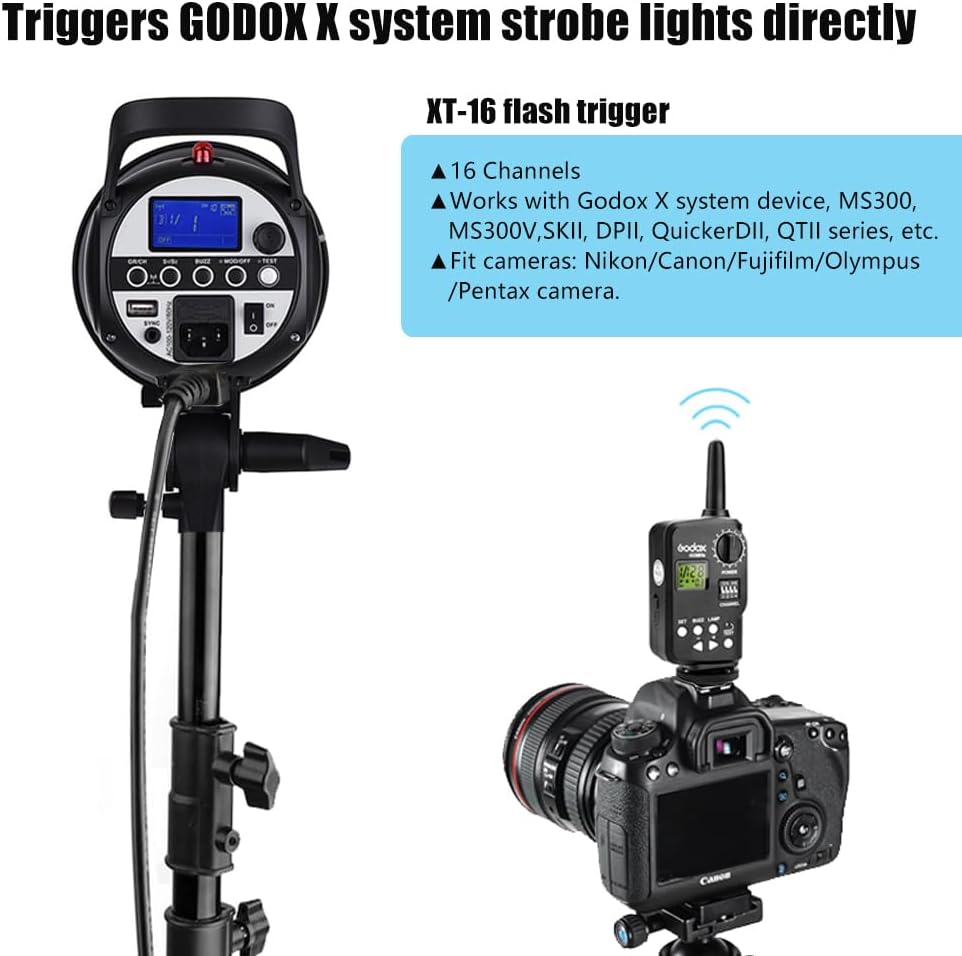
Figure 3: XT-16 mounted on a camera. This image illustrates the XT-16 trigger attached to a camera's hot shoe, demonstrating its use in wirelessly triggering a studio strobe.
3.2 Controls and Functions
- Power ON/OFF: Use the dedicated switch to turn the unit on or off.
- Channel Selection: The XT-16 offers 16 channels. Use the channel selector to match the channel with your strobe.
- Group Selection: Control up to 16 groups (0-9, A-F). Select the desired group for individual or multiple strobe control.
- Power Level Adjustment: Use the power dial to adjust the flash output level of the connected strobes.
- Modeling Lamp ON/OFF: Toggle the modeling lamp of the strobe.
- Buzzer ON/OFF: Activate or deactivate the strobe's buzzer sound.
- AF-Assist Beam ON/OFF: Control the autofocus assist beam function.
- Test Button: Press to fire a test flash and verify connection.
3.3 Wireless Performance
The XT-16 operates on a 2.4GHz frequency, providing a wireless control working distance of up to 100 meters. The fastest synchronization speed achievable is 1/250s.
4. Compatibility
The GODOX XT-16 Flash Trigger Transmitter is widely compatible with various camera brands, including Canon, Nikon, Sony, Fujifilm, Olympus, and Pentax. It synchronizes the camera shutter with Godox X system monolights.
4.1 Camera Compatibility List
Refer to the detailed compatibility list below for specific camera models and their flash sync capabilities with the XT-16. This table indicates models that support legacy hot shoe control.
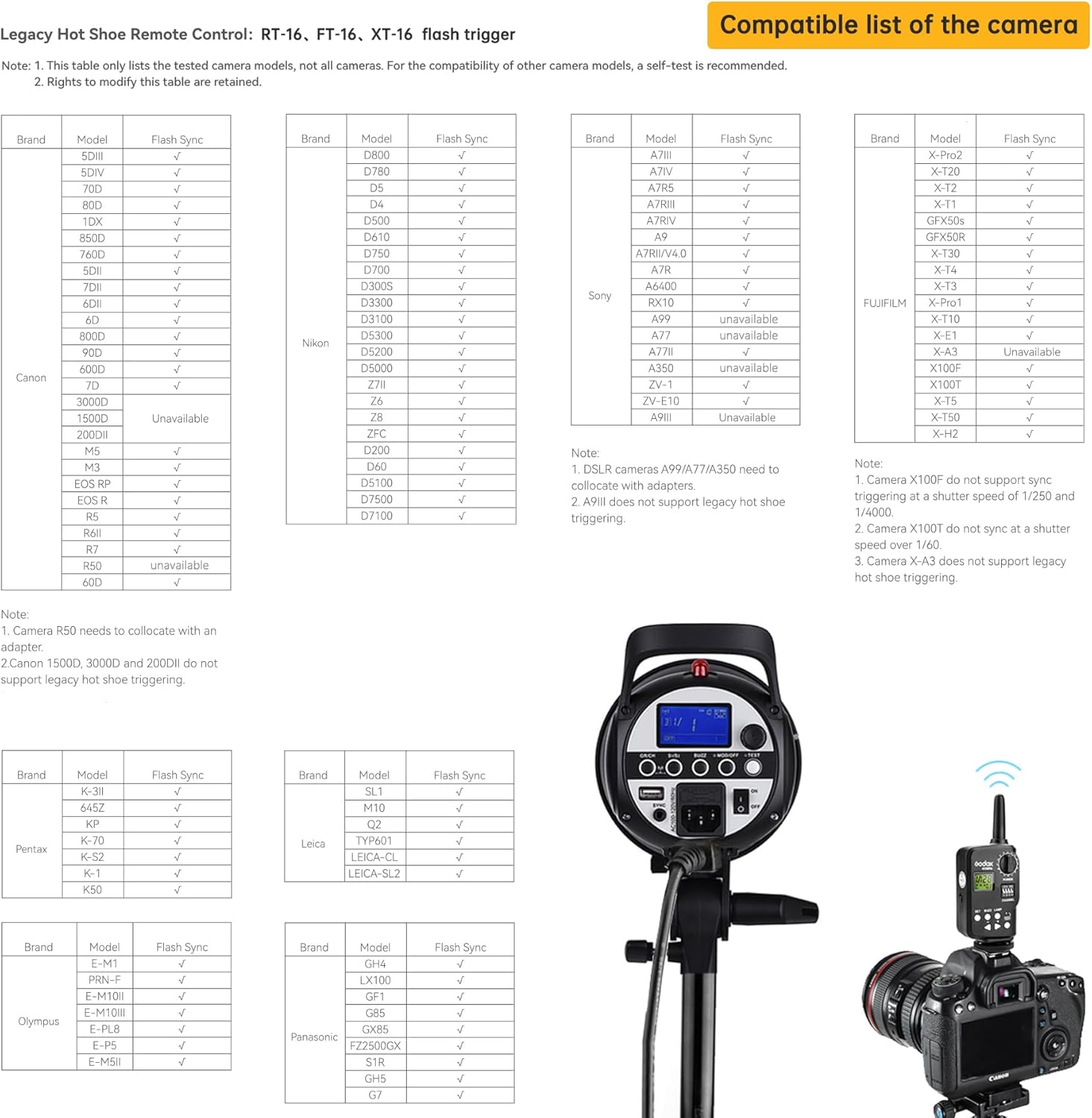
Figure 4: Camera compatibility list. This image displays a comprehensive table detailing the compatibility of various camera models from brands like Canon, Nikon, Sony, Fujifilm, Olympus, Pentax, Leica, and Panasonic with the XT-16 trigger, indicating their flash synchronization status.
Note: This table only lists tested camera models. For other camera models, a self-test is recommended. Some models may require an adapter or have specific limitations (e.g., sync speed). Always refer to your camera's manual for hot shoe compatibility.
5. Maintenance
- Keep the device dry. Do not handle with wet hands or immerse in water.
- Avoid sudden impacts. The device may malfunction if subjected to strong shocks, drops, or vibrations.
- Keep out of reach of children.
- Do not disassemble the device. Repairs should only be performed by authorized service personnel.
- Clean the device with a soft, dry cloth. Do not use solvents or harsh chemicals.
- Remove batteries if the device will not be used for an extended period to prevent leakage.
6. Troubleshooting
6.1 Flash Not Firing
- Check Power: Ensure both the XT-16 transmitter and the strobe/flash unit are powered on and have sufficient battery life.
- Verify Channel/Group: Confirm that the channel and group settings on the XT-16 match those on the receiving strobe/flash unit.
- Secure Connection: Ensure the XT-16 is properly seated in the camera's hot shoe. For external receivers (XTR-16/XTR-16S), ensure they are securely connected to the flash unit.
- Range: Check if the transmitter and receiver are within the effective operating range (up to 100 meters). Obstacles can reduce this range.
- Camera Settings: Ensure your camera's flash settings are correctly configured and not set to a mode that disables external flash.
6.2 Inconsistent Firing or Missed Flashes
- Interference: 2.4GHz signals can be affected by other wireless devices. Try changing the channel on your XT-16 and strobe.
- Battery Level: Low batteries in either the transmitter or the flash unit can lead to inconsistent performance. Replace or recharge batteries.
- Distance/Obstacles: Reduce the distance between the transmitter and receiver, or remove any large metallic objects that might be blocking the signal.
6.3 Incorrect Flash Output
- Power Settings: Double-check the power level set on the XT-16 transmitter.
- Strobe Mode: Ensure the strobe is in the correct mode (e.g., Manual) if you are controlling power manually from the XT-16.
7. Specifications
| Package Dimensions | 6.81 x 5.31 x 1.85 inches |
| Item Weight | 2.99 ounces |
| Wireless Frequency | 2.4GHz |
| Channels | 16 |
| Groups | 16 (0-9, A-F) |
| Max Sync Speed | 1/250s |
| Wireless Control Distance | Up to 100 meters |
| Manufacturer | GODOX |
8. Warranty and Support
For warranty information and technical support, please refer to the documentation included with your purchase or visit the official GODOX website. Keep your proof of purchase for any warranty claims.


